Gatsby: Preview of links shared with Whatsapp does not show with large inline styles
Description
When sharing links of the final built website, sharing links with Whatsapp should show up preview of og:image or icon specified in <meta> produced by React Helmet.
However, I noticed that even with _correct_ og:image and icons specified, link preview does not show up in Whatsapp.
This actually happened due to inlined style, where link preview on Whatsapp:
- not shown: all site css all inlined (~74KB including Bootstrap etc) before meta tags
- shown without inlined CSS
- shown with the large
<style>element placed _below_ meta tags
Steps to reproduce
- include a large CSS that will be inlined by Gatsby (Bootstrap scss imports in my case)
- publish site
- copy a page address from the page to Whatsapp. It should show link preview shortly after, but it does not show.
Expected result
Link preview should be shown in Whatsapp.
Actual result
Link preview does not show in Whatsapp. I've tested this on several people's Whatsapp (all Android, I have no access to iOS).
I have published a client's website preview on https://atw-website-preview.web.app/, all pages faced the same issue.
I also hand-edit the 404.html published to move the <style> tag below <meta> tags but above other <link type='script'> tags. Pasting the address of 404 page results in link preview becoming shown in Whatsapp. Probably Whatsapp stop processing HTML when it cannot encounter any <meta> tag its looking for in the first KBs of the page (?)
I think moving the inlined <style> is a fully feasible workaround, as opting out of inlining CSS causes performance to drop significantly. I've been digging around Gatsby SSR API and gatsby-plugin-react-helmet source code, but have not found any way to move the order of elements inside <head>.
Environment
  System:
    OS: Linux 5.6 openSUSE Tumbleweed 20200405
    CPU: (8) x64 Intel(R) Core(TM) i7-8565U CPU @ 1.80GHz
    Shell: 5.0.16 - /bin/bash
  Binaries:
    Node: 12.16.1 - /usr/bin/node
    Yarn: 1.22.4 - /usr/local/bin/yarn
    npm: 6.14.2 - /usr/local/bin/npm
  Languages:
    Python: 2.7.17 - /usr/bin/python
  npmPackages:
    gatsby: ^2.20.29 => 2.20.29
    gatsby-background-image: ^1.1.1 => 1.1.1
    gatsby-image: ^2.3.4 => 2.3.4
    gatsby-plugin-catch-links: ^2.2.3 => 2.2.3
    gatsby-plugin-manifest: ^2.3.6 => 2.3.6
    gatsby-plugin-offline: ^3.1.4 => 3.1.4
    gatsby-plugin-preact: ^3.2.3 => 3.2.3
    gatsby-plugin-prefetch-google-fonts: ^1.4.3 => 1.4.3
    gatsby-plugin-react-helmet: ^3.2.4 => 3.2.4
    gatsby-plugin-sass: ^2.2.3 => 2.2.3
    gatsby-plugin-sharp: ^2.5.6 => 2.5.6
    gatsby-remark-copy-linked-files: ^2.2.3 => 2.2.3
    gatsby-remark-images: ^3.2.5 => 3.2.5
    gatsby-remark-relative-images: ^0.3.0 => 0.3.0
    gatsby-source-filesystem: ^2.2.2 => 2.2.2
    gatsby-source-wordpress: ^3.2.2 => 3.2.2
    gatsby-transformer-remark: ^2.7.4 => 2.7.4
    gatsby-transformer-sharp: ^2.4.6 => 2.4.6
  npmGlobalPackages:
    gatsby-cli: 2.11.1
 benedictjohannes
All 4 comments
Thank you for opening this!
About your big import in general: You might want to give this a try => https://www.gatsbyjs.org/packages/gatsby-plugin-purgecss/
About your re-ordering issue:
You can use the onPreRenderHTML API: https://www.gatsbyjs.org/docs/ssr-apis/#onPreRenderHTML
When adding this to your gatsby-ssr.js you'll see the output of your pages:
exports.onPreRenderHTML = ({ getHeadComponents, replaceHeadComponents }) => {
const headComponents = getHeadComponents()
console.log(headComponents)
}
In my example (that uses react-helmet) I got this:
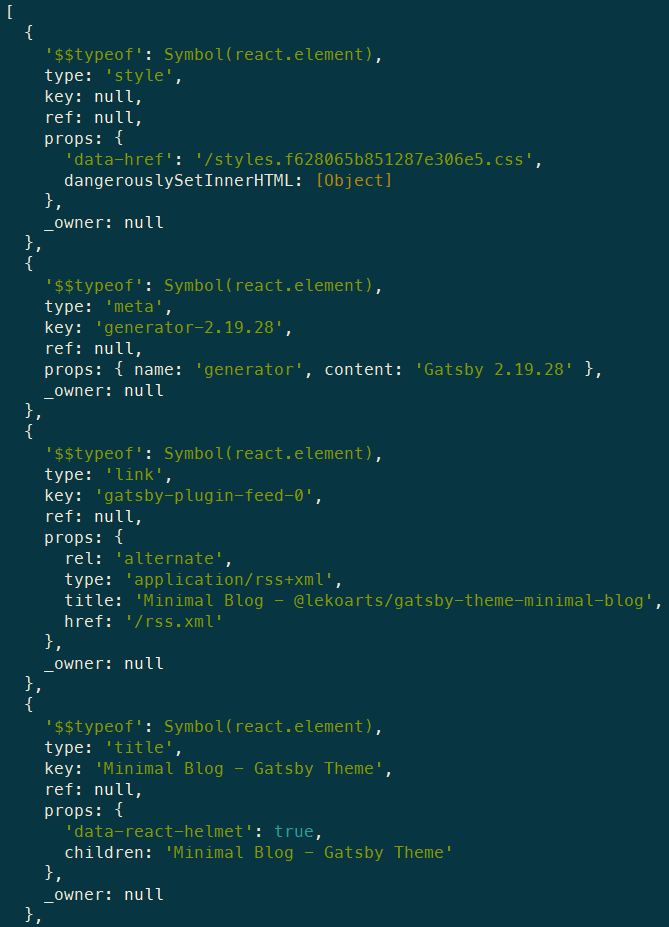
So as the documentation shows you could sort this array by values like props['data-react-helmet'] to move react-helmet to the top or re-sort the array in general.
We're marking this issue as answered and closing it for now but please feel free to comment here if you would like to continue this discussion. We also recommend heading over to our communities if you have questions that are not bug reports or feature requests. We hope we managed to help and thank you for using Gatsby!
 LekoArts
on 27 Apr 2020
LekoArts
on 27 Apr 2020
Thank you for this, I'm sorry for my ignorance.
I've tried gatsby-plugin-purgecss, however, it does not help when there are classes that are removed and added by javascript (for example, 'nav-rolled-up' classes added when users scroll down for auto-hidden navbar).
I successfully fixed the issue with adding this on gatsby-ssr
exports.onPreRenderHTML = ({ getHeadComponents, replaceHeadComponents }) => {
    const headComponents = getHeadComponents()
    const styleHeadComponents = headComponents.filter((component) => component.type === 'style')
    const nonStyleHeadComponents = headComponents.filter((component) => component.type !== 'style')
    replaceHeadComponents([nonStyleHeadComponents, styleHeadComponents])
}
In my case, I am using Material UI and for styling all I am using is inline styles. So, my size of inline styles is so large. I tried the upper code putting into my gatsby-ssr.js file. But, still my all react helmet meta tags are below all styles tags in header.
 Md-Abdul-Halim-Rafi
on 10 Jun 2020
Md-Abdul-Halim-Rafi
on 10 Jun 2020
The code I shared worked for me with single scss import from top layout component (which calls Bootstrap scss inside it).
But then, it might be related with the sequence of rendering when <style> is rendered into page. MaterialUI (CMIIW) actually put all styles made with makeStyles() into a <style> tag when the component is rendered. Using components such as <Box> with styling props like m={4} will even generate classes that are replaced with new classes when the props change. Might need to use other API, if it is due to on**preRender**HTML being too "late" to catch MUI's generated styles. Maybe digging into gatsby-plugin-material-ui might help.
benedictjohannes
on 11 Jun 2020
Related issues
 dustinhorton
·
3Comments
dustinhorton
·
3Comments
 mikestopcontinues
·
3Comments
mikestopcontinues
·
3Comments
 rossPatton
·
3Comments
rossPatton
·
3Comments
 3CordGuy
·
3Comments
3CordGuy
·
3Comments
 signalwerk
·
3Comments
signalwerk
·
3Comments
Most helpful comment
Thank you for this, I'm sorry for my ignorance.
I've tried
gatsby-plugin-purgecss, however, it does not help when there are classes that are removed and added by javascript (for example, 'nav-rolled-up' classes added when users scroll down for auto-hidden navbar).I successfully fixed the issue with adding this on gatsby-ssr