Description
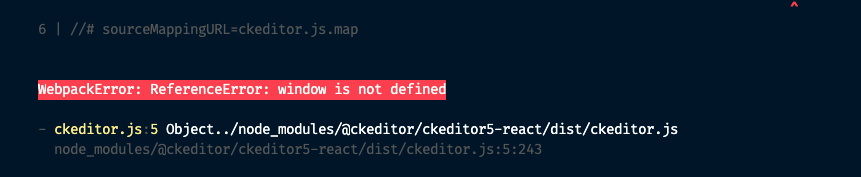
CKEditor is working fine in develop mode, but when I try to build I get the error:
WebpackError: ReferenceError: window is not defined
Steps to reproduce
Adding @ckeditor/ckeditor5-react to a component
implemented ckeditor
run build .
https://codesandbox.io/s/determined-worker-1onye?file=/src/pages/index.js
It works in codebox works, however building does not
Expected result
CKEditor should build
Actual result
WebpackError: ReferenceError: window is not defined
 salientknight
All 12 comments
Works as expected ... https://www.gatsbyjs.org/docs/debugging-html-builds/
salientknight
on 23 Apr 2020
@salientknight Hi!
which solution specifically worked for CKEditor from that link? I've tried most of them unsuccessfully, but probably not implementing them correctly. Thanks in advance!
 sebastosh
on 23 Apr 2020
sebastosh
on 23 Apr 2020
@sebastosh take a look at this and apply it to CKEditor. I've just tested it and it works in both development and production mode. If you want i can hoist the code i've used to a repo so that you can take a look at it.
 jonniebigodes
on 24 Apr 2020
jonniebigodes
on 24 Apr 2020
@jonniebigodes thanks so much for the help!
After your instructions, I'm getting: TypeError: this.props.editor.create is not a function in development and production mode, which I assume might be due to applying the editor value of the CKEditor component incorrectly after wrapping them in Loadable.
I did this:
const LoadableCKEditor = Loadable(() =>
  import("@ckeditor/ckeditor5-react")
)

const LoadableCKEditorClassic = Loadable(() =>
  import("@ckeditor/ckeditor5-build-classic")
)
and calling it in the render:
<LoadableCKEditor
                  editor={ LoadableCKEditorClassic }
                  data="Hello from CKEditor 5!"
                  onInit={ editor => {
                      // You can store the "editor" and use when it is needed.
                      console.log( 'Editor is ready to use!', editor );
                  } }
                  onChange={ ( event, editor ) => {
                      const data = editor.getData();
                      console.log( data  );
                      this.setState({data: data})
                  } }
                  onBlur={ ( event, editor ) => {
                      console.log( 'Blur.', editor );
                  } }
                  onFocus={ ( event, editor ) => {
                      console.log( 'Focus.', editor );
                  } }
              />
also I tried editor={ <LoadableCKEditorClassic /> } with same results.
sebastosh
on 25 Apr 2020
@sebastosh there you go, here is the code used and here is the code deployed. Feel free to take a look at it at your own pace
jonniebigodes
on 25 Apr 2020
@jonniebigodes thanks! I see my mistake now, was wrapping the CKeditor imports and not the component one level up. Testing it out now!
sebastosh
on 25 Apr 2020
@jonniebigodes just a quick extra thanks for this! I ended up re-working the project around your repo, as whatever I had done before was throwing errors on build. Cheers!
sebastosh
on 29 Apr 2020
Sorry for the delayed response. I solved it using react-loadable. wrap it in a component and then use react loadable to load that component.
https://medium.com/@daniellefebvre/using-ckeditor5-with-gatsby-59e4feafaa9d
salientknight
on 29 Apr 2020
As a note, you will still have to do CKE work to get file and file preview working and a custom build to add any components they don't come by default. I am looking at react Draft.js because it seems to be less work to a fully functional tool from. https://draftjs.org/
salientknight
on 29 Apr 2020
@sebastosh no need to thank, glad that i managed to help you out solving your issue and managed to get a build working. @salientknight if i were you i would go with the @loadable/component package. Last time i checked there wasn't much traffic around the react-loadable one.
Stay safe
jonniebigodes
on 29 Apr 2020
@jonniebigodes react-loadable is the one recommended by the Gatsby team.
Another solution is to use a package like react-loadable. The module that tries to use window will be dynamically loaded only on the client side (and not during SSR).
salientknight
on 29 Apr 2020
Related issues
 timbrandin
·
3Comments
timbrandin
·
3Comments
 theduke
·
3Comments
theduke
·
3Comments
 KyleAMathews
·
3Comments
KyleAMathews
·
3Comments
 kalinchernev
·
3Comments
kalinchernev
·
3Comments
 jimfilippou
·
3Comments
jimfilippou
·
3Comments