Gatsby: Is there a way to get page data inside onRouteUpdate (improving gatsby-plugin-google-analytics)
The gatsby-plugin-google-analytics plugin implements onRouteUpdate method where it defines variables and sends data to Google Analytics:
var onRouteUpdate = function onRouteUpdate(_ref, pluginOptions) {
  ...
  var sendPageView = function sendPageView() {
    var pagePath = location ? location.pathname + location.search + location.hash : undefined;
    window.ga("set", "page", pagePath);
    window.ga("send", "pageview");
  };
  ...
};
I want to improve it and add the ability to set custom variables,
ga('set', 'dimension1', author.name );
This is important because using custom variables I can configure use custom dimensions in Google Analytics, like authors.
But I need to get access to page data to retrieve author's name. How can I do that?
Once I solve this problem for myself, I'll submit a PR. Thanks!
 maxkoretskyi
All 17 comments
You'll find the code for onRouteUpdate() here. You'll find the requisite entry points here (production) and here (development).
As you may notice, it's a short path to pass in the page resources. However, there's doesn't seem like a great way to do that without introducing breaking changes.
I wonder if you could do what you want from wrapPageElement(). It receives the location and the rest of the same properties that get passed to the page itself, like pageContext, data
 Js-Brecht
on 14 Apr 2020
Js-Brecht
on 14 Apr 2020
The plugin gatsby-plugin-google-tagmanager should be able to do what you're asking for with custom events, correct?
 LekoArts
on 14 Apr 2020
LekoArts
on 14 Apr 2020
The plugin gatsby-plugin-google-tagmanager should be able to do what you're asking for with custom events, correct?
Thanks, but I need to set custom variables, not send custom events. I can send custom events with gatsby-plugin-google-analytics too.
maxkoretskyi
on 14 Apr 2020
@Js-Brecht
I wonder if you could do what you want from wrapPageElement(). It receives the location and the rest of the same properties that get passed to the page itself, like pageContext, data
Thanks for the suggestion. I've played a bit with it, it might work. However, how do I get access to all route updates from inside wrapPageElement function? I need this because the wrapper component is not re-initialized when I navigate to other post from the current one, so no way to set different author.
maxkoretskyi
on 14 Apr 2020
// gatsby-browser.js
const doStuff = ({ location, pageContext, data }) => {
    console.log("location:", location);
    console.log("pageContext:", pageContext);
    console.log("data:", data);
}

export const wrapPageElement = ({ element, location, props }) => {
    doStuff({ location, ...props});
    return element
}
This works for me.
the wrapper component is not re-initialized when I navigate to other post from the current one
It is correct that it is not re-_initialized_, but it is, ultimately, a part of the React tree. When its props change, it will receive them, and when you navigate is when it receives new props.
If you wanted, you could even use a React component, so that you could use hooks inside of it.
// gatsby-browser.js
import React, { useEffect } from 'react';

const FooComponent = ({ location, pageContext, data }) => {
    useEffect(() => {
        console.log("location:", location);
        console.log("pageContext:", pageContext);
        console.log("data:", data);
    })
    return null;
}

export const wrapPageElement = ({ element, location, props }) => (
    <React.Fragment>
        <FooComponent  location={location} {...props} />
        {element}
    </React.Fragment>
)
This works for me.
thanks for taking the time to test it! it does work for me too, the component is re-initialized and the new props come in. I made a silly mistake by clicking on the link that pointed to the deployed version and since I didn't see any logging there I assumed the component didn't re-initialize.
It is correct that it is not re-initialized, but it is, ultimately, a part of the React tree. When its props change, it will receive them, and when you navigate is when it receives new props.
I meant that if it's a functional component that re-initialization basically means executing the function again with new parameters (props).
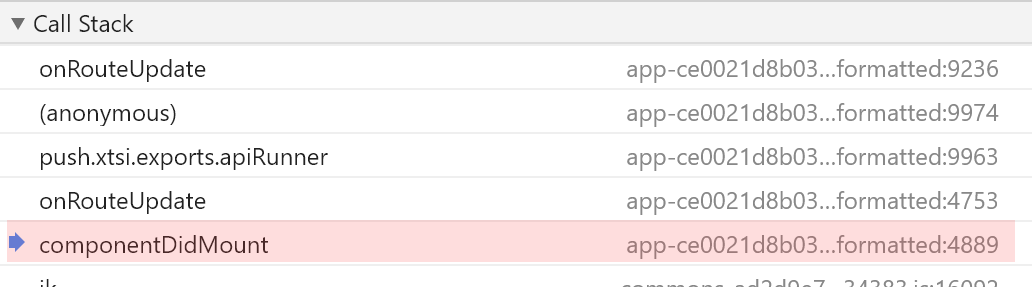
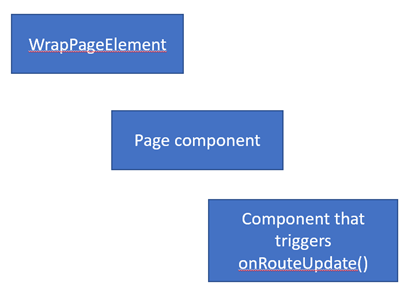
I also noticed that the wrapPageElement function\component is called before onRouteUpdate function from gatsby-browser.js file. Inspecting the callstack that shows componentDidMount lifecycle method I can conclude that gatsby-browser.js is used as React component in components tree and it's somewhere below wrapPageElement. Is my assumption correct?
maxkoretskyi
on 15 Apr 2020
I also noticed that the
wrapPageElementfunction\component is called beforeonRouteUpdatefunction fromgatsby-browser.jsfile. Inspecting the callstack that showscomponentDidMountlifecycle method I can conclude thatgatsby-browser.jsis used as React component in components tree and it's somewhere belowwrapPageElement. Is my assumption correct?
Pretty much, but with two small correction:
gatsby-browseris really just a container for various APIs that get called during page rendering; I believe you meantonRouteUpdate?onRouteUpdateis actually abovewrapPageElementin the tree.
You can see how wrapPageElement is called by following this (simplified) path:
LocationHandler -> RouteHandler -> PageRenderer -> call wrapPageElement() api.
You can see how onRouteUpdate is called by following this path:
LocationHandler -> RouteUpdates -> componentDidMount()/componentDidUpdate() -> call onRouteUpdate() api
Both of those should give a better understanding of how the React tree is built
Js-Brecht
on 15 Apr 2020
Thanks for the clarification!
gatsby-browser is really just a container for various APIs that get called during page rendering; I believe you meant onRouteUpdate?
I meant that functions inside gatsby-browser are executed as part of some React component's lifecycle methods calls or some other React component mechanism.
onRouteUpdate is actually above wrapPageElement in the tree.
oh, interesting, I put a debugger inside the functionas and the wrapPageElement function executed before onRouteUpdate in a plugin. Why is that? Also is RouteHandler or RouteUpdates executed first? I'm trying to construct a single chain from the calls you showed in your answer:
LocationHandler -> RouteHandler -> PageRenderer -> call wrapPageElement() api.
LocationHandler -> RouteUpdates -> componentDidMount()/componentDidUpdate() -> call onRouteUpdate() api
It's important for me to have code in plugin's onRouteUpdate be executed before wrapPageElement because that code sends a hit to GA and I want to set the variable before that it sends the hit.
maxkoretskyi
on 15 Apr 2020
I meant that functions inside
gatsby-browserare executed as part of some React component's lifecycle methods calls or some other React component mechanism.
Ah, I see. Some of them are, yes. Some of them run apart from the React tree.
oh, interesting, I put a debugger inside the functionas and the
wrapPageElementfunction executed beforeonRouteUpdatein a plugin. Why is that? Also isRouteHandlerorRouteUpdatesexecuted first? I'm trying to construct a single chain from the calls you showed in your answer:
If you look at the JSX->JS transpiled source of production-app, it starts to become more apparent why wrapPageElement is called first:
production-app.js->LocationHandler transpiled
      return _react.default.createElement(
        _ensureResources.default,
        {
          location: location,
        },
        ({ pageResources, location }) =>
          _react.default.createElement(
            _navigation.RouteUpdates,
            {
              location: location,
            },
            _react.default.createElement(
              _gatsbyReactRouterScroll.ScrollContext,
              {
                location: location,
                shouldUpdateScroll: _navigation.shouldUpdateScroll,
              },
              _react.default.createElement(
                _router.Router,
                {
                  basepath: __BASE_PATH__,
                  location: location,
                  id: `gatsby-focus-wrapper`,
                },
                _react.default.createElement(
                  RouteHandler,
                  (0, _extends2.default)(
                    {
                      path:
                        pageResources.page.path === `/404.html`
                          ? (0, _stripPrefix.default)(
                              location.pathname,
                              __BASE_PATH__
                            )
                          : encodeURI(
                              pageResources.page.matchPath ||
                                pageResources.page.path
                            ),
                    },
                    this.props,
                    {
                      location: location,
                      pageResources: pageResources,
                    },
                    pageResources.json
                  )
                )
              )
            )
          )
      )
So a React tree with children is constructed like this:
React.createElement(
   Foo,
   fooProps,
   React.createElement(
      FooChild,
      fooChildProps,
   )
)
Which means the inside createElement call will need to be resolved first, before the outside call can be.
It's important for me to have code in plugin's
onRouteUpdatebe executed beforewrapPageElementbecause that code sends a hit to GA and I want to set the variable before that it sends the hit.
I see 🤔.
Are you trying to do this from the plugin itself, or from your own code? The reason I ask is because onRouteUpdate in the plugin will always be called before your own code.
_I spoke too soon earlier, about breaking changes. I forgot that the props sent to those API endpoints are part of an object, so introducing new properties onto that object won't be a breaking change_
There could be a way to do this using the plugin, but it would require alterations to the core, and to the plugin itself; and it would have to be generic enough to be used in anybody's project, with their own specific data structure.
If you pass pageResources.json to RouteUpdates, much like it's done here, you should wind up with all of the same props that get delivered to each page. You could collect those props in RouteUpdates, and pass them on to apiRunner. That should cause them to be passed on to onRouteUpdate.
_(the same would need to be done in the development version, too)_
Now you would just need a way to tell onRouteUpdate in the plugin when/how to use values from those props; probably through pluginOptions. Just have to remember that pluginOptions in gatsby-browser gets serialized, so you won't be able to pass functions to it. If you wanted to get a function to it, you could maybe pass the path of a module that has a default export 🤷♂️.
I leave the details to you, if this is the route you decide to take.
Or perhaps somebody else has a better idea
Js-Brecht
on 15 Apr 2020
@Js-Brecht appreciate your help!
I tried your suggestions and it seemed like pretty minor change that should work.
However, while exploring your solution I discovered that onRouteUpdate receives lots of useful API, particularly loadPageSync that I can use to retrieve data:
export const onRouteUpdate = (_ref, pluginOptions) => {
    const pageData = _ref.loadPageSync(_ref.location.pathname).json;
    ...
};
not sure how I missed it before. Would you say it's a good way to go?
I can implement it in my gatsby-browser.js and not touch the plugin. The only thing that may go wrong is the order of calls. It seems that plugin's API is called before project files API, is it correct?
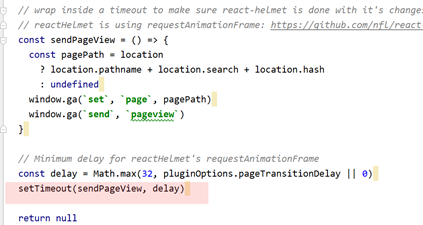
but because the hit for GA is sent after a timeout, my project's API is executed before the hit is sent:
maxkoretskyi
on 16 Apr 2020
It seems that plugin's API is called before project files API, is it correct?
Yes, I mentioned in my last post that the plugin's onRouteUpdate will always be called before your own.
Would you say it's a good way to go?
I can't think of any reason off the top of my head why that would be an issue. IIRC, that method accesses a cache that is populated when the resources are fetched in the first place, so I don't think it would be any additional overhead.
but because the hit for GA is sent after a timeout, my project's API is executed before the hit is sent:
I was under the impression that the call that gatsby-plugin-google-analytics makes needed to be altered, to send some custom values.
If all you need is to run some code before onRouteUpdate in gatsby-plugin-google-analytics runs and the call in onRouteUpdate itself doesn't need to change, then maybe it would make more sense, semantically, to use onPreRouteUpdate? That way, you wouldn't be reliant on some arbitrary timeout.
Js-Brecht
on 16 Apr 2020
I was under the impression that the call that gatsby-plugin-google-analytics makes needed to be altered, to send some custom values.
I initially intended to make the solution generic so that anyone can add custom variables to GA through the plugin. That would probably require passing a function that takes API and returns a set of variables to set on GA object. But you said a function can't be passed to a plugin b/c of serialization.
For my case, it's OK to set the variable in my project's gatsby-browser file, b/c GA is available on window.ga and I can call methods on it before the plugin sends a hit.
If all you need is to run some code before onRouteUpdate in gatsby-plugin-google-analytics runs and the call in onRouteUpdate itself doesn't need to change, then maybe it would make more sense, semantically, to use onPreRouteUpdate? That way, you wouldn't be reliant on some arbitrary timeout.
That's a great suggestion, thanks a lot! I'll use it.
not sure how I missed it (API) before.
I know why, the API is not listed in docs :)
maxkoretskyi
on 16 Apr 2020
That would probably require passing a function that takes API and returns a set of variables to set on GA object. But you said a function can't be passed to a plugin b/c of serialization.
It's possible if you make the function accessible through a module. You would pass only the path to the module through the plugin options, and then just require() that module from the plugin side. Its easiest when the module exposes the desired function as the default export.
Js-Brecht
on 16 Apr 2020
Thanks for the suggestion, I think I'll give it a try next week. I'll let you know how it goes.
and then just require() that module from the plugin side
Do you think it's OK to require module from local files in gatsby project or should it be a module from node_modules?
maxkoretskyi
on 18 Apr 2020
Sure it’s no problem. Just make sure to use relative paths, and resolve them to absolute, that way it is portable.
You could use this to pass the path to the plugin:
{
  resolve: “foo-plugin”,
  options: {
     fooApi: require.resolve(‘./src/utils/someModule’)
  }
}
And in your plugin, something like this:
export const onRouteUpdate = ({ location }, pluginOptions) => {
  const fooApiFn = require(pluginOptions.fooApi).default
}
Hiya!
This issue has gone quiet. Spooky quiet. 👻
We get a lot of issues, so we currently close issues after 30 days of inactivity. It’s been at least 20 days since the last update here.
If we missed this issue or if you want to keep it open, please reply here. You can also add the label "not stale" to keep this issue open!
As a friendly reminder: the best way to see this issue, or any other, fixed is to open a Pull Request. Check out gatsby.dev/contribute for more information about opening PRs, triaging issues, and contributing!
Thanks for being a part of the Gatsby community! 💪💜
![github-actions[bot] picture](https://avatars2.githubusercontent.com/in/15368?v=4&s=40) github-actions[bot]
on 9 May 2020
github-actions[bot]
on 9 May 2020
Hey again!
It’s been 30 days since anything happened on this issue, so our friendly neighborhood robot (that’s me!) is going to close it.
Please keep in mind that I’m only a robot, so if I’ve closed this issue in error, I’m HUMAN_EMOTION_SORRY. Please feel free to reopen this issue or create a new one if you need anything else.
As a friendly reminder: the best way to see this issue, or any other, fixed is to open a Pull Request. Check out gatsby.dev/contribute for more information about opening PRs, triaging issues, and contributing!
Thanks again for being part of the Gatsby community! 💪💜
github-actions[bot]
on 19 May 2020
Related issues
 hobochild
·
3Comments
hobochild
·
3Comments
 ferMartz
·
3Comments
ferMartz
·
3Comments
 ghost
·
3Comments
ghost
·
3Comments
 benstr
·
3Comments
benstr
·
3Comments
 signalwerk
·
3Comments
signalwerk
·
3Comments