gatsby-image: Querying for multiple images listed in a JSON file returns childImageSharp as null
Relevant information
Hi. Right off the bat, let me say I'm new to react and gatsbyjs. It's quite possible my issue is easily solved, but in case it's not, I thought it'd be worthwhile to add it here.
The issue is this: Despite countless tries, I can't get graphql to return anything other than null for images listed in a json file. I've been reading most of the relevant issues on this board to try and solve this problem, but no luck.
I've setup a repo specifically to showcase the error here.
To sum up, using this json file:
[
      {
         "name":"Python",
         "image":"./green-parrot.jpg",
         "type": [
              "Nice"
          ]

      },
      {
         "name":"Pascal",
         "image":"./blue-parrot.jpg",
          "type": [
              "Naughty"
          ]

      },
      {
         "name":"Ruby",
         "image":"./red-parrot.jpg",
         "type": [
              "Nice", "Sweet"
          ]
      }
]
and a query like this:
query NiceBirds {
  allBirdsJson(filter: {type: {eq: "Nice"}}) {
    edges {
      node {
        name
        image {
            childImageSharp {
                fluid {
                    ...GatsbyImageSharpFluid
                }
            }
        }
      }
    }
  }
}
only null is returned for the image. First issue was auto misidentifying the image as a String, but I've tried to solve that using the Schema Customization API.
System:
    OS: Linux 5.3 Pop!_OS 19.10
    CPU: (4) x64 Intel(R) Core(TM) i7-6500U CPU @ 2.50GHz
    Shell: 5.0.3 - /bin/bash
  Binaries:
    Node: 10.15.2 - /usr/bin/node
    npm: 6.13.6 - /usr/bin/npm
  Languages:
    Python: 2.7.17 - /usr/bin/python
  Browsers:
    Firefox: 72.0.1
  npmPackages:
    gatsby: ^2.18.15 => 2.18.15
    gatsby-image: ^2.2.39 => 2.2.39
    gatsby-plugin-postcss: ^2.1.18 => 2.1.18
    gatsby-plugin-react-helmet: ^3.1.18 => 3.1.18
    gatsby-plugin-sharp: ^2.3.13 => 2.3.13
    gatsby-plugin-typography: ^2.3.20 => 2.3.20
    gatsby-source-filesystem: ^2.1.43 => 2.1.43
    gatsby-transformer-json: ^2.2.22 => 2.2.22
    gatsby-transformer-sharp: ^2.3.12 => 2.3.12
  npmGlobalPackages:
    gatsby-cli: 2.8.27
File contents (if changed)
gatsby-config.js
module.exports = {
    plugins: [
        {
            resolve: `gatsby-source-filesystem`,
            options: {
                name: `images`,
                path: `${__dirname}/static/img/`,
            },
        },
        {
            resolve: `gatsby-source-filesystem`,
            options: {
                name: `json`,
                path: `${__dirname}/src/data/`,
            },
        },
        `gatsby-plugin-sharp`,
        `gatsby-transformer-sharp`,
        `gatsby-transformer-json`,
        `gatsby-image`,
        `gatsby-plugin-react-helmet`,
        `gatsby-plugin-postcss`,
    ],
}
package.json
`package.json`: {
  "name": "for the birds",
  "private": true,
  "description": "problems with querying multiple images from json with graphQL",
  "version": "0.1.0",
  "license": "MIT",
  "scripts": {
    "build": "gatsby build",
    "develop": "gatsby develop",
    "format": "prettier --write \"**/*.{js,jsx,json,md}\"",
    "start": "npm run develop",
    "serve": "gatsby serve",
    "clean": "gatsby clean"
  },
  "dependencies": {
    "gatsby": "^2.18.15",
    "gatsby-image": "^2.2.39",
    "gatsby-plugin-postcss": "^2.1.18",
    "gatsby-plugin-react-helmet": "^3.1.18",
    "gatsby-plugin-sharp": "^2.3.13",
    "gatsby-plugin-typography": "^2.3.20",
    "gatsby-source-filesystem": "^2.1.43",
    "gatsby-transformer-sharp": "^2.3.12",
    "lost": "^8.3.1",
    "react": "^16.12.0",
    "react-dom": "^16.12.0",
    "react-helmet": "^5.2.1",
    "react-typography": "^0.16.19",
    "typography": "^0.16.19"
  },
  "devDependencies": {
    "autoprefixer": "^9.7.3",
    "cssnano": "^4.1.10",
    "gatsby-transformer-json": "^2.2.22",
    "postcss-assets": "^5.0.0",
    "postcss-load-config": "^2.1.0",
    "postcss-loader": "^3.0.0",
    "postcss-plugin": "^1.0.0",
    "precss": "^4.0.0",
    "prettier": "^1.19.1"
  }
}
gatsby-node.js
// New Schema Customization API - Available in Gatsby 2.2.0
// see:  https://www.gatsbyjs.org/blog/2019-03-18-releasing-new-schema-customization/
exports.sourceNodes = ({ actions }) => {
  const { createTypes } = actions
  const typeDefs = `
    type BirdsJson implements Node {
        image: File!
}
  `
  createTypes(typeDefs)
}
gatsby-browser.js: N/A
gatsby-ssr.js: N/A
 cbdp
cbdp
All 9 comments
@cbdp see if #12916 helps you, if not, i can take a look at it a bit later, during the weekend and come back with a response, do you mind waiting a bit?
 jonniebigodes
on 24 Jan 2020
jonniebigodes
on 24 Jan 2020
@jonniebigodes Thank you for your quick reply, I've read almost all your replies to problems of this nature, including #12916. I have to say, they've helped me a lot, but I'm stilling getting the null issue. Yours is a help I'd appreciate, since your posts are always incredibly thorough. I don't mind waiting if it means an end to the headache this is causing me. I know you always say no thank you is necessary, but please accept my gratitude nonetheless.
cbdp
on 24 Jan 2020
@cbdp i accept it, but seriously there's no need to thank. I'm more than glad to help out as much as i can to the best of my knowledge, I can take a look at it during the weekend and come back with a response.
I saw that @sidharthachatterjee assigned himself to this and you'll be in good hands aswell. @sidharthachatterjee if you're ok with it i can provide further context.
jonniebigodes
on 24 Jan 2020
@jonniebigodes I cut the example out of a larger (non-avian) project, so I have plenty of busywork to do during the weekend, but I'll be at a (non-tech) conference from monday to thursday next week. So please, take as long as you need.
@sidharthachatterjee Thank you for assigning yourself to see my issue resolved. This is my first go around on github actually participating in the endless threads and issues that pop up when googling and I must say, you all seem an extremely helpful and welcoming bunch :)
cbdp
on 24 Jan 2020
@cbdp sorry for the late response and i hope you had a excellent conference. As probably @sidharthachatterjee is busy continuing to build awesome stuff and further improving Gatsby and to avoid the issue being without answer for more time and if you both don't mind, i've taken a look at your issue and i have a solution for you.
Going to detail the steps i took to triage this:
- Cloned you repo.
- Tried installing the dependencies and node started complaining, as a tip for you for future reference, avoid using spaces in the package.json
nameelement. It might work for you, but for someone else that might pick up on code he might run into issues. And probably some CI (Continuous integration ) environmnent or deploy platfor that you might use, for instance Netlify might have issues with it. With this in mind i changed the name tofor-the-birds, also one other thing regardingpackage.jsonand this one is more of a personal one, but i tend to push the Gatsby plugins up the tree, so to speak, add them to dependencies, there could be some caveats for this, but for rule of thumb, it's best to leave them there. With this leaving in thedevDependenciesfor items that will aid during the development cycle, for example, packages likeprettierfor code formatting.eslintfor code checks and sanity checks.
Moving on.
- Ran
yarn develop( i have yarn installed, if you don't adjust accordingly) and the issue manifested itself, i'm presented with the following message:
There was an error in your GraphQL query:

Cannot return null for non-nullable field File.id.

The field "File.id." was explicitly defined as non-nullable via the schema customization API (by yourself or a plugin/theme). This means that this field is not optional and you have to define a value. If this is not your desired behavior and you defined the schema yourself, go to "createTypes" in gatsby-node.js. If you're using a plugin/theme, you can learn more here on how to fix field types:
https://www.gatsbyjs.org/docs/schema-customization/#fixing-field-types
- Checked
gatsby-config.jsand how you've configuredgatsby-source-filesystem, more specifically for the images you want to use (i'll circle back to this shortly) . With that in mind, i checked the json file you supplied. In the json file you have:
[
      {
         "name":"Python",
         "image":"./green-parrot.jpg",
         "type": [
              "Nice"
          ]

      },
      {
         "name":"Pascal",
         "image":"./blue-parrot.jpg",
          "type": [
              "Naughty"
          ]

      },
      {
         "name":"Ruby",
         "image":"./red-parrot.jpg",
         "type": [
              "Nice", "Sweet"
          ]
      }
]
But looking at the file/folder structure you have static/img/a-bird-image.jpg. As you can see they are both a bit diferent and this is a part of the problem. As in the json element you're pointing to the same folder, telling Gatsby that red-parrot.jpg is a "sibling", or in other words, they are in the same folder. But when Gatsby is going through the process, among other things, it will copy the content of the static folder as is to the public folder. It will create the public\img folder and copy over the images there, but also it will grab the images and transform them with gatsby-plugin-sharp and gatsby-transformer-sharp, making them reponsive so that they can be used by gatsby-image.
To make your code work as is, you'll need to change the json file to the following:
[
      {
         "name":"Python",
         "image":"../../static/img/green-parrot.jpg",
         "type": [
              "Nice"
          ]

      },
      {
         "name":"Pascal",
         "image":"../../static/img/blue-parrot.jpg",
          "type": [
              "Naughty"
          ]

      },
      {
         "name":"Ruby",
         "image":"../../static/img/red-parrot.jpg",
         "type": [
              "Nice", "Sweet"
          ]
      }
]
Basically instructing Gatsby to look up the images a bit above the folder tree, where the images are "physically" present.
- Ran
yarn developthe build went through, opened uphttp://locahost:8000/SingleParrotand i'm presented with:

As you can see on the right side is the page with the image being displayed, on the left side is the query that is used in the component, with the small caveat, that the Gatsby graphql explorer does not allow usage of fragments, that's why you're seeing the src and srcSet fields.
Now and if you'll allow me i'm going to add in some considerations regarding this issue, these are basically some pointers as you're a newcomer to React / Gatsby.
If you're able move the images to another place, somewhere more closer to the json file, for instance to
src\assets\and adjust the json accordingly. Reason being is that Gatsby tends to treat thestaticfolder as a special folder, you can read more about it here and here.Also in your
src\pages\index.js, you don't need to use<a href="/SingleParrot">attempt to just query one via file</a>for internal site navigation. Gatsby as already a built in system that takes care of it. You can read more about it here, with that in mind your page can be updated to the following:
import React from "react"
import { Link } from 'gatsby' // <-- the import/component that will take care of the navigation
import Layout from "../components/Layout.js"
import NiceBirds from "../components/NiceBirds.js"

export default () => (
  <Layout>
    <h1>Just the nice birds</h1>
    <NiceBirds />
    <h4>childImageSharp query for images return null</h4>
    <Link to="/SingleParrot/">attempt to just query one via file</Link>
  </Layout>
)
- The component
src\components\Perch.js, needs some addressing, based on your code, you can leave out theconstructor(props)out, if you're not binding any events or setting a component state in there. Also you have another issue with it, you need to update the information/props that are being injected into Gatsby image component, as the information you're using is not accurate.
With this, changing your component to:
import React, { Component } from "react"
import Image from "gatsby-image"

class Perch extends Component {
  render() {
    return (
        <>
        <div>
        <p>{this.props.name}</p>
        <Image fluid={this.props.image.childImageSharp.fluid} />
        </div>
        </>
    )
  }
}

export default Perch
Will yeld the following:


And soon as you get your "React legs" (pardon the bad pun), you can further optimize this into a fully functional component. But that's something for you to look up in the future.
Sorry for the long comment, but i think it was required, just like you said in your issue description, you're a newcomer to the React / Gatsby ecosystem and it would be best to go over it in more detail.
Feel free to provide feedback so that we can close this issue, or continue to work on it until we find a suitable solution. @sidharthachatterjee feel free to correct me if i made a mistake somewhere or did not present the information correctly.
jonniebigodes
on 1 Feb 2020
Hi @jonniebigodes,
Conference was fine, but I caught a flu on the final day and was bedridden until today. Hope you are well. Thank for you for asking and thank you again for looking at my issue.
First, let's get the non graphQL stuff out of the way. Here, I found your pointers very useful and have committed almost all of your proposed changes.
non graphql
Changed name to avoid spaces in package.json
Reorganized package.json by moving all non-development dependencies to dependencies instead of devDependencies. This seems good practice, I'm only sorry I didn't do so to begin with. I did this using
npm install <module_name> --save-prodto move from devDependencies to dependencies and the following for the reverse
npm install <module_name> --save-dev- You're right, I should be using
<Link to="">, but I set up the repo just for the graphQL stuff. On the site I'm looking to deploy, I'm using<Link to="">for all internal links, but I was afraid using it for the bird-graphql issue repo would cloud the issue. It had the opposite effect and for this I apologise.
graphql
- Changed my json image path from
      {
         "name":"Ruby",
         "image":"./red-parrot.jpg",
         "type": [
              "Nice", "Sweet"
          ]
      }
to
      {
         "name":"Ruby",
         "image":"../../static/img/red-parrot.jpg",
         "type": [
              "Nice", "Sweet"
          ]
      }
- I actually did this last as a hail mary, but for the purpose of demonstrating it works best as the penultimate step: Moved all images to src/assets. Updated gatsby-config.json from
        {
            resolve: `gatsby-source-filesystem`,
            options: {
                name: `images`,
                path: `${__dirname}/static/img/`,
            },
        }
to
        {
            resolve: `gatsby-source-filesystem`,
            options: {
                name: `images`,
                path: `${__dirname}/src/assets/`,
            },
        }
Then went into the json and adjusted the image paths from
      {
         "name":"Ruby",
         "image":"../../static/img/red-parrot.jpg",
         "type": [
              "Nice", "Sweet"
          ]
      }
to
      {
         "name":"Ruby",
         "image":"assets/red-parrot.jpg",
         "type": [
              "Nice", "Sweet"
          ]
      }
- Updated my Perch.js to reflect yours. Was happy not to need
props, however, with or without it, this sadly let me down the same error path I've been struggling with for awhile. Screenshots below.

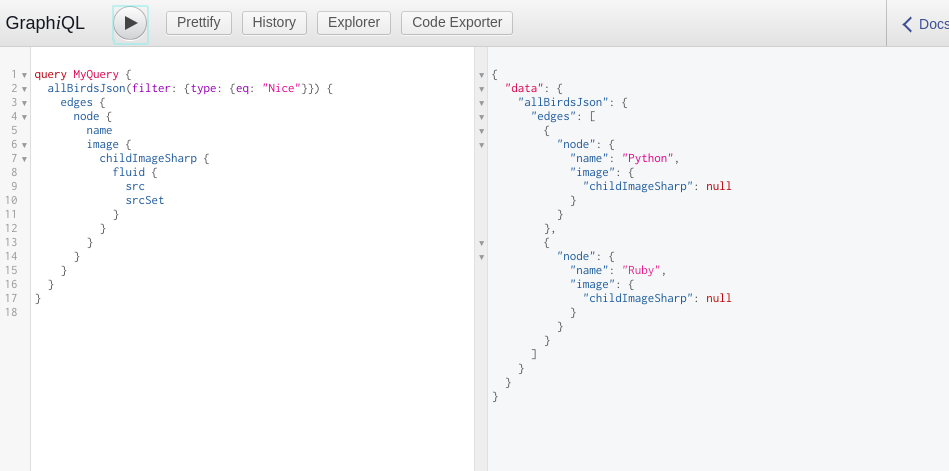
I don't think I made a mess of implementing your solution, but I added it as a new branch to the bird repo just in case: See here
Any and all ideas are appreciated :)
cbdp
on 5 Feb 2020
Please hold up on responding. I suddenly got it working and will document the process.
Okay, so, as noted in above, I did step 5 before step 6. Therefore I did not spend the time to write in the proper paths, because the solution had already "failed" when I was putting the images in my static folder. This was probably due to me not running gatsby clean earlier
Goofing around a bit in the graphQL explorer, I decided to change the path again from simply assets/bird.jpg to "image":"../../src/assets/bird.jpg"
I've attempted multiple and/or all paths before while trying to work this issue out, but it would seem it was solvable by not storing my images in the static folder like a squirrel, so:
- Move all images to src/assets
- Adjust the json files accordingly
- Adjust gatsby-config accordingly
- Run
gatsby clean
Sidenote: I also no longer need to do
    type BirdsJson implements Node {
        image: File!
in my gatsby-node file for this to work, which is a bonus
Thank you to @jonniebigodes. I consider this issue closed, but will keep it open while I implement this solution on my other site and for jonnie to take a victory lap ;)
cbdp
on 5 Feb 2020
@cbdp glad that you're feeling better and also that you've managed to solve the issue. I'm ok with leaving it open while you check your other site. Feel free to provide feedback when you've confirmed that everything is in order, so that we can close this issue. You know the deal...no need to thank 😁! Just glad that i was able to help you solve your issue and you got it to work.
jonniebigodes
on 6 Feb 2020
@jonniebigodes I'm happy you're happy. If anyone comes across this on google, the TL;DR is don't use the static folder for images you want to be fluid. Somewhere down the line, I must have followed a tutorial that urged me to do this - but I can't for the life of me remember which one.
Anyway, good luck to you all and thanks again :)
cbdp
on 6 Feb 2020
Related issues
 dustinhorton
·
3Comments
dustinhorton
·
3Comments
 totsteps
·
3Comments
totsteps
·
3Comments
 ferMartz
·
3Comments
ferMartz
·
3Comments
 mikestopcontinues
·
3Comments
mikestopcontinues
·
3Comments
 signalwerk
·
3Comments
signalwerk
·
3Comments