Gatsby: Sorting an array of objects does not update img src
Description
This only occurs in a production build.
When providing an array of objects that include an image source url to a component, you would expect the properties to display per object.
Shuffling the array randomizes everything, but React seems to re-render everything other than the img tag.
Various sort methods to randomize the array have been tried with the same result.
Code example: https://github.com/corymcdaniel/react-sorted-images
Live example: https://sorted-images-bug.netlify.com/
Refresh the page a few times and you'll see that the text changes but the image does not.
I've tried this in a CRA project and it doesn't reproduce the issue, so I'm assuming this has to do with the default Gatsby build. I've tried adding keys to the img tag, putting a hash and key on the img src, shuffling before or after mapping, all with the same result.
Steps to reproduce
- Create an array of objects that include a url to an image.
- Shuffle array
- Map items to a component that displays the image and any text properties
Expected result
A random list that displays an image and accompanying text
Actual result
Images do not update to their associated text. If you view page-source, it looks correct, but the re-render does not update the img src
Environment
  System:
    OS: macOS 10.15.2
    CPU: (8) x64 Intel(R) Core(TM) i7-4770HQ CPU @ 2.20GHz
    Shell: 5.7.1 - /bin/zsh
  Binaries:
    Node: 10.16.0 - ~/.nvm/versions/node/v10.16.0/bin/node
    Yarn: 1.17.3 - ~/.nvm/versions/node/v10.16.0/bin/yarn
    npm: 6.13.4 - ~/.nvm/versions/node/v10.16.0/bin/npm
  Languages:
    Python: 2.7.16 - /usr/bin/python
  Browsers:
    Chrome: 79.0.3945.117
    Firefox: 72.0.1
    Safari: 13.0.4
  npmPackages:
    gatsby: ^2.18.12 => 2.18.12
    gatsby-image: ^2.2.34 => 2.2.34
    gatsby-plugin-manifest: ^2.2.31 => 2.2.31
    gatsby-plugin-offline: ^3.0.27 => 3.0.27
    gatsby-plugin-react-helmet: ^3.1.16 => 3.1.16
    gatsby-plugin-sharp: ^2.3.5 => 2.3.5
    gatsby-source-filesystem: ^2.1.40 => 2.1.40
    gatsby-transformer-sharp: ^2.3.7 => 2.3.7
  npmGlobalPackages:
    gatsby-cli: 2.7.46
I've been pulling my hair out on this one.
 corymcdaniel
All 13 comments
@corymcdaniel if you don't mind waiting a bit i'll take a look and come back with possibly a detailed solution and explanation.
 jonniebigodes
on 23 Jan 2020
jonniebigodes
on 23 Jan 2020
@jonniebigodes having a second eye on this would be awesome, thank you
corymcdaniel
on 23 Jan 2020
@corymcdaniel i think i have a solution for you, i'm going to make some tests to confirm and come back to you. I need to check with smaller pictures as the ones you're providing in the repo are extremely large. Do you mind waiting a bit further?
jonniebigodes
on 23 Jan 2020
@jonniebigodes That's fine, although I am curious why the filesize would make a difference.
corymcdaniel
on 23 Jan 2020
@corymcdaniel i've checked it and it seems to be working correctly. Below are the steps i took to triage and solve your issue and after that i'll try to add some context on what is happening.
- Cloned the repo you supplied in the description.
- Installed the packages.
- Ran
yarn build && yarn serveto generate the production build and i saw the issue.
Based on that i made some changes to the code
- Starting with the page code:
import React from "react"
import Layout from "../components/layout"
import ImageList from "../components/ImageList"

const imageList = [
  {
    // original image src: 'https://images.pexels.com/photos/3584443/pexels-photo-3584443.jpeg',
    src:'https://q-cf.bstatic.com/images/hotel/max1024x768/136/136968640.jpg',
    imgId: '3584443',
    text: 'bridge'
  },
  {
    // original src: 'https://images.pexels.com/photos/3590401/pexels-photo-3590401.jpeg',
    src:'https://www.cookingforkeeps.com/wp-content/uploads/2019/09/Creamy-Tomato-Pasta-Recipe-1.jpg',
    imgId: '3590401',
    text: 'pasta'
  },
  {
    //src: 'https://images.pexels.com/photos/3585073/pexels-photo-3585073.jpeg',
    src:'https://image.shutterstock.com/image-photo/collage-portraits-ethnically-diverse-mixed-260nw-725291137.jpg',
    imgId: '3585073',
    text: 'people'
  },
];

const sortedList = [...imageList].sort(() => Math.random() - 0.5);

const IndexPage = () => (
  <Layout>
    <h1>Random Images</h1>
    <ul>
      <li>443: bridge</li>
      <li>401: pasta</li>
      <li>073: people</li>
    </ul>
    <div>
      <ImageList items={sortedList}/>
    </div>
  </Layout>
)

export default IndexPage
I chose another set of images, just for testing purposes, i've checked with the originals and it works. it will take a while to see the effect as the images you've provided are quite big.
- Changed
src\components\imageList.jsto the following:
import React from "react"
import PropTypes from "prop-types"
import SimpleImage from './simple-image'
import { ul } from "./ImageList.module.css"

const ImageList = ({ items }) => {
  console.log(`ImageList:${JSON.stringify(items, null, 2)}`)
  return (
    <ul className={ul}>
      {items.map((item, i) => (
        <li key={i}>
          <h3>{item.text}</h3>
          <SimpleImage imageInformation={item}/>
          <div>{item.imgId}</div>
          <div>{item.src}</div>
        </li>
      ))}
    </ul>
  )
}

ImageList.propTypes = {
  items: PropTypes.array.isRequired,
}

export default ImageList
Nothing much different from what you have, i left in the log just for confirmation.
And replaced the <img> element with a component which will be introduced shortly.
- Created a new component in
src\components\simple-image.jswith the following content inside:
import React, { useRef, useEffect } from "react"
import PropTypes from "prop-types"
import { img } from "./ImageList.module.css"

// simple component to display a random image
const SimpleImage = ({ imageInformation }) => {
    // instantiates a new ref for the image
  const randomImage = useRef(null)
  /**
   * sets the hook to set the image src after the timeout is executed.
   * it replaces the src with the one passed in via props
   */
  useEffect(() => {
    setTimeout(() => {
      randomImage.current.src = imageInformation.src
    }, 1000)
  })
  return (
    <img
      alt={imageInformation.text}
      className={img}
      src="placeholder.png"
      style={{ height: "100px", width: "100px" }}
      ref={randomImage}
    />
  )
}
export default SimpleImage

SimpleImage.propTypes = {
  imageInformation: PropTypes.shape({
    src: PropTypes.string.isRequired,
    text: PropTypes.string.isRequired,
    imgId: PropTypes.string.isRequired,
  }).isRequired,
}
Copied over the default gatsby icon that is used by starters to the
staticfolder and renamed itplaceholder.pngfor demonstrational purposes. Hence the "hard coded" src, just to allow something to be displayed when the component is rendered, a placeholder.Ran
yarn build && yarn serveto generate a production build and emulate the reproduction as if it was on a live server.Opened up
http://localhost:9000and i'm presented with:
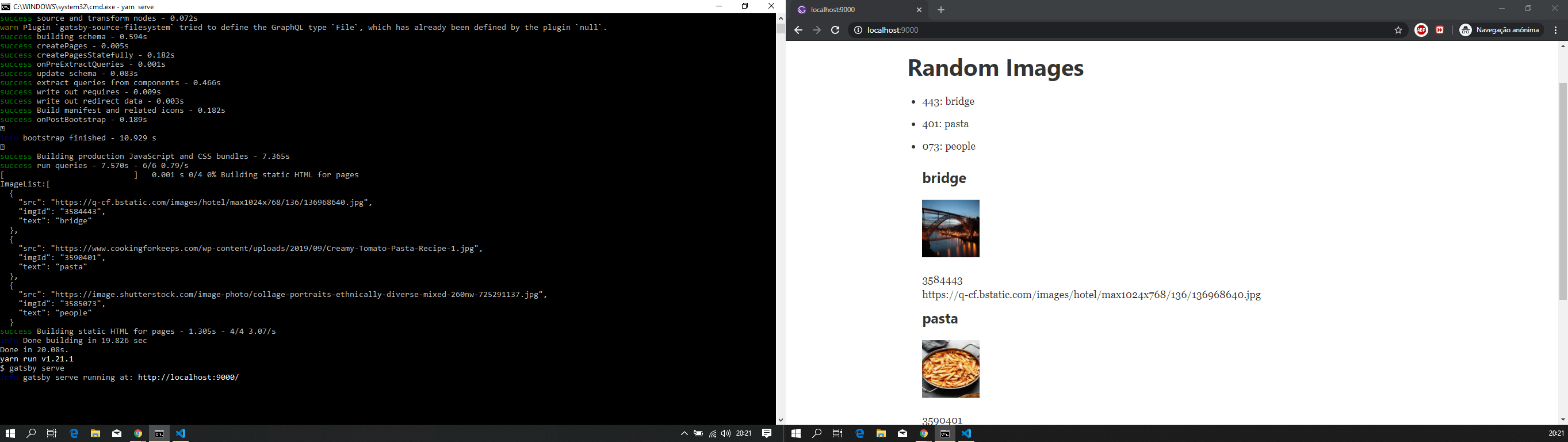
Refreshed it and i'm presented with:
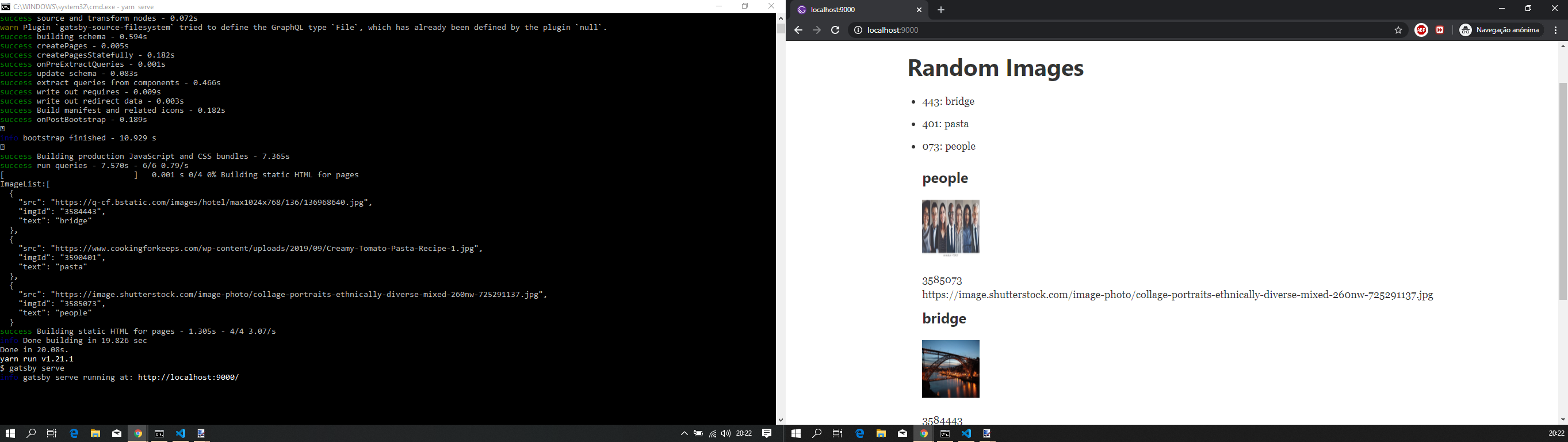
I changed it to your images and same process works also, with the caveat of you seeing the placeholder first have a couple of moments without any image and then your image starts popping.
And this is based of my knowledge of Gatsby and a past issue that popped in that was quite similar to your own.
Gatsby in the development mode is quite permissive and let's you get away with some things that you normally shouldn't. This intended behaviour leans towards you, the developer have a good experience and avoiding introducing issues right from the start and allow you to continue your work. Now when you switch to a production build mode it's when Gatsby becomes a bit more at the lack of a better word restrictive and enforcing some good practices.
The behaviour you're seeing i'm still trying to pinpoint if it's actually a React issue or a Gatsby build process related, or probably a combination of both, as when you trigger a production build it will set in stone the component tree/pages and the React element props and will not updated them even if the whole tree is unmounted with a refresh or navigate way it will persist them no matter. Probably someone more knowledgeable of Gatsby might actually add some more context on the issue, but the way i was able to solve/circunvent issues like this was through this approach.
Feel free to provide feedback so that we can close this issue or continue to work on it until we find a suitable solution.
jonniebigodes
on 23 Jan 2020
@jonniebigodes Thank you so much for the in-depth response. I'll use your solution for now, but I think this is a deeper issue that needs to be investigated at some point.
Just as a side-note, I wanted to make sure it was Gatsby related before posting this which is why I tested the issue against create-react-app. Since CRA didn't experience the same problem, I am pretty sure it has something to do with how Gatsby's webpack builds, specifically for SSR.
Personally I'd prefer to keep this issue open because
- Demonstrably a problem with vanilla Gatsby vs create react app
- This function is not doing anything unique, just shuffling an object array for display
- Using a timeout feels like a code smell/antipattern (no offense)
I could very much see this also just being a symptom of using functional components and not utilizing available hooks to trigger a re-render in React. I'll continue to look into this as well.
Thanks
corymcdaniel
on 23 Jan 2020
@corymcdaniel fine by me to leave it open, no offense taken whatsoever, i personally don't like it, but the workaround works and i'm more inclined to the hydration aspect than the ssr, i might be wrong about this, but it's a "gut feeling" i have.
And no need to thank, i was glad that i could at least provide you with some sort of solution.
jonniebigodes
on 24 Jan 2020
Hiya!
This issue has gone quiet. Spooky quiet. 👻
We get a lot of issues, so we currently close issues after 30 days of inactivity. It’s been at least 20 days since the last update here.
If we missed this issue or if you want to keep it open, please reply here. You can also add the label "not stale" to keep this issue open!
As a friendly reminder: the best way to see this issue, or any other, fixed is to open a Pull Request. Check out gatsby.dev/contribute for more information about opening PRs, triaging issues, and contributing!
Thanks for being a part of the Gatsby community! 💪💜
![github-actions[bot] picture](https://avatars2.githubusercontent.com/in/15368?v=4&s=40) github-actions[bot]
on 13 Feb 2020
github-actions[bot]
on 13 Feb 2020
Hey again!
It’s been 30 days since anything happened on this issue, so our friendly neighborhood robot (that’s me!) is going to close it.
Please keep in mind that I’m only a robot, so if I’ve closed this issue in error, I’m HUMAN_EMOTION_SORRY. Please feel free to reopen this issue or create a new one if you need anything else.
As a friendly reminder: the best way to see this issue, or any other, fixed is to open a Pull Request. Check out gatsby.dev/contribute for more information about opening PRs, triaging issues, and contributing!
Thanks again for being part of the Gatsby community! 💪💜
github-actions[bot]
on 23 Feb 2020
@corymcdaniel this issue kept bugging me for a bit and in the meantime i put it on the "back burner" and yesterday i decided to revisit it with a fresh pair of eyes. With that in mind it hit me we could do better than this and avoid the "clunkyness" of using the effect and the timeout.
Below are the steps i took to address this:
- Re cloned your repo and installed the dependencies
Installed
@loadable/babel-plugin,@loadable/componentand@loadable/webpack-plugin. These additions with the code changes i did will "offload" part of the app to the client side, ensuring the conjunction of generating random numbers and setting the images will function better. You can read more about it here, checked the Gatsby documentation that mentions this approach and component and it's a bit off, as the example could be improved for better understandability.After the installation went through i changed
gatsby-node.jsto the following:
const loadablePlugin=require('@loadable/webpack-plugin');


exports.onCreateWebpackConfig =({ actions })=>{
    actions.setWebpackConfig({
        plugins: [new loadablePlugin()]
    })
}
What is happening here is nothing more than injecting the @loadable/webpack-plugin into the already existing webpack configuration for Gatsby.
- Grabbed a couple of images i usually use for issues that will involve working with images into the
staticfolder more even to expand the set a bit.
- Created a new component called
LoadableImageList.jswith the following:
import React from "react"
import ImageList from "../components/ImageList"
const imageList = [
  {
    src: "https://images.pexels.com/photos/3584443/pexels-photo-3584443.jpeg",
    imgId: "3584443",
    text: "bridge",
  },
  {
    src: "https://images.pexels.com/photos/3590401/pexels-photo-3590401.jpeg",
    imgId: "3590401",
    text: "pasta",
  },
  {
    src: "https://images.pexels.com/photos/3585073/pexels-photo-3585073.jpeg",
    imgId: "3585073",
    text: "people",
  },
  {
    src: "first-image.jpg",
    imgId: "3585001",
    text: "lemurs",
  },
  {
    src: "second-image.png",
    imgId: "3585002",
    text: "chuck",
  },
  {
    src: "third-image.jpg",
    imgId: "3585003",
    text: "touch",
  },
  {
    src: "fourth-image.jpg",
    imgId: "3585004",
    text: "tree",
  },
]

const ImagesList = () => {
  const sortedList = [...imageList].sort(() => Math.random() - 0.5)
  console.log(`sortedList:${JSON.stringify(sortedList, null, 2)}`)  // this console.log() is intentional to test if the randomness happens.
  return (
    <>
      <ImageList items={sortedList} />
    </>
  )
}
export default ImagesList
This is nothing more than your previous implementation of the code used in pages\index.js
- Updated
pages\index.jsto the following:
import React from "react"
import Loadable from "@loadable/component"
import Layout from '../components/layout'
const LoadableImageList = Loadable(() =>
  import("../components/LoadableImageList")
)

const IndexPage = () => (
  <Layout>
    <h1>Random Images</h1>
    <ul>
      <li>443: bridge</li>
      <li>401: pasta</li>
      <li>073: people</li>
      <li>001: lemurs</li>
      <li>002: chuck</li>
      <li>003: touch</li>
      <li>004: tree</li>
    </ul>
    <div>
      <LoadableImageList />
    </div>
  </Layout>
)

export default IndexPage
- Issued a production build with
yarn build && yarn serveand opened uphttp://localhost:9000and i'm presented with the following:

- Refreshed the page once more and i'm presented with:

It's still not ideal, but it removes the need of the code/logic that i originally posted.
I don't know how far along you moved since this, but if you want to test it out, just let me know if this worked for you. Sounds good?
jonniebigodes
on 23 Feb 2020
@jonniebigodes Sorry for the late response. I hadn't had a chance to revisit researching a better solution, but this works well for me. Thanks for all of your help!
corymcdaniel
on 2 Mar 2020
@corymcdaniel no need to be sorry and no thanks are required, just wanted to present a cleaner solution for your issue and with that not only help you but someone else that comes across this issue.
jonniebigodes
on 2 Mar 2020
I encountered a similar scenario to this - where my image src selected by Math.random() would only be evaluated once per production build.
The loadable-components solution given above worked well - but I wanted to include a link here to the relevant section of the gatsbyjs.org documentation for future reference.
Using Client-Side Only Packages
It's probably also possible to use React.lazy and Suspense as detailed in the next section of that page.
 alecdwm
on 6 Apr 2020
alecdwm
on 6 Apr 2020
Related issues
 signalwerk
·
3Comments
signalwerk
·
3Comments
 ferMartz
·
3Comments
ferMartz
·
3Comments
 totsteps
·
3Comments
totsteps
·
3Comments
 dustinhorton
·
3Comments
dustinhorton
·
3Comments
dustinhorton
·
3Comments
dustinhorton
·
3Comments