Gatsby: How can I make two or more page type creations in 'gatsby-node'?
I have two different content categories, both written in mdx files, that need different routes and templates when being created programmatically. It seems that I can only have one createPages and one createNode in the gatsby-node file, so I am unsure as to how to go about making pages for two or more different content categories that require different routes and frontmatter, content, etc...
Here is some example code, using regex to filter for each query:
const path = require(`path`)

exports.createPages = async ({ graphql, actions }) => {
  const { createPage } = actions
  const result = await graphql(`
    query {
      articles: allMdx(filter: { fileAbsolutePath: { regex: "/content/words/" } }) {
        edges {
          node {
            id
            fields {
              slug
            }
          }
        }
      }
    }
  `).then(res => res.data )

  result.articles.edges.forEach(({ node }) => {
    createPage({
      path: node.fields.slug,
      component: path.resolve(`./src/templates/article.js`),
      context: {
        slug: node.fields.slug,
        id: node.id
      },
    })
  })
}

exports.createPages = async ({ graphql, actions }) => {
  const { createPage } = actions
  const result = await graphql(`
    query {
      articles: allMdx(filter: { fileAbsolutePath: { regex: "/content/words/" } }) {
        edges {
          node {
            id
            fields {
              slug
            }
          }
        }
      }
    }
  `).then(res => res.data )

  result.articles.edges.forEach(({ node }) => {
    createPage({
      path: node.fields.slug,
      component: path.resolve(`./src/templates/article.js`),
      context: {
        slug: node.fields.slug,
        id: node.id
      },
    })
  })
}
...but this does not work, as I can only have one createPages in the gatsby-node file. This is the same for node creation, of which I would need two different ones, but I am unsure how to go about this issue either:
const { createFilePath } = require(`gatsby-source-filesystem`)

exports.onCreateNode = ({ node, actions, getNode }) => {
  const { createNodeField } = actions
  if (node.internal.type === `Mdx`) {
    const value = createFilePath({ node, getNode })
    createNodeField({
      name: `slug`,
      node,
      value: `/words${value}`,
    })
  }
}

exports.onCreateNode = ({ node, actions, getNode }) => {
  const { createNodeField } = actions
  if (node.internal.type === `Mdx`) {
    const value = createFilePath({ node, getNode })
    createNodeField({
      name: `slug`,
      node,
      value: `/music${value}`,
    })
  }
}
So basically I do not know how to go about programmatically creating pages for two or more categories of content that each require different graphql queries and templates. I am assuming that I need to combine them under one function, I just don't know how to go about doing that.
Thank you in advance for any assistance that you may be able to give me :-)
 rchrdnsh
All 13 comments
Hey @rchrdnsh,
You can achieve what you're looking for by grouping your API code into one function for each node API.
For ex:
const path = require(`path`)

exports.createPages = async ({ graphql, actions }) => {
  const { createPage } = actions
  const words = await graphql(`
    query {
      articles: allMdx(filter: { fileAbsolutePath: { regex: "/content/words/" } }) {
        edges {
          node {
            id
            fields {
              slug
            }
          }
        }
      }
    }
  `).then(res => res.data )

  words.articles.edges.forEach(({ node }) => {
        createPage({
            path: node.fields.slug,
            component: path.resolve(`./src/templates/article.js`),
            context: {
                slug: node.fields.slug,
                id: node.id,
            },
        })
  })

  const otherContent = await graphql(`
        query {
            articles: allMdx(
                filter: { fileAbsolutePath: { regex: "/content/some-other-content/" } }
            ) {
                edges {
                    node {
                        id
                        fields {
                            slug
                        }
                    }
                }
            }
        }
  `).then(res => res.data)

  otherContent.articles.edges.forEach(({ node }) => {
        createPage({
            path: node.fields.slug,
            component: path.resolve(`./src/templates/other-template.js`),
            context: {
                slug: node.fields.slug,
                id: node.id,
            },
        })
  })
}
There are ways to make the code more concise, but for now, try building the query for each in Graphiql, and then console.log() the responses to figure out how to write your logic.
and for onCreateNode you can do something like this:
const { createFilePath } = require(`gatsby-source-filesystem`)

exports.onCreateNode = ({ node, actions, getNode }) => {
    const { createNodeField } = actions
    const value = createFilePath({ node, getNode })
    if (node.internal.type === `Mdx`) {
        createNodeField({
            name: `slug`,
            node,
            value: `/words${value}`,
        })
    } else if (node.internal.type === `SomethingElse`) {
        createNodeField({
            name: `slug`,
            node,
            value: `/music${value}`,
        })
    }
}
What you query and how you create your pages and node fields will be different depending on the requirements of your project, but the code above should give you a general idea of where to start. console.log and graphiql will be your best friends in figuring out how to write your logic. Let me know if you need any more help!
 TylerBarnes
on 17 Dec 2019
TylerBarnes
on 17 Dec 2019
Hi @TylerBarnes,
ok, so, the issue here as far as i can tell with your answer is that for my situation, creating nodes with an if statement when the condition is the same won't work...for example:
const { createFilePath } = require(`gatsby-source-filesystem`)

exports.onCreateNode = ({ node, actions, getNode }) => {
    const { createNodeField } = actions
    const value = createFilePath({ node, getNode })
        // the conditions are the same...
    if (node.internal.type === `Mdx`) {
        createNodeField({
            name: `slug`,
            node,
            value: `/words${value}`,
        })
        // right here, same condition...anything else i can use that's relevant?
    } else if (node.internal.type === `Mdx`) {
        createNodeField({
            name: `slug`,
            node,
            value: `/music${value}`,
        })
    }
}
I'm using node.internal.type ===Mdx`` because both content collections use mdx. Of course this does not work, but I don't know what else I can use to separate these collections and I can't find any documentation for such an issue.
I dunno about the first part working or not, because this is what's breaking, so...
rchrdnsh
on 17 Dec 2019
@rchrdnsh what are you trying to differentiate them by? The node you get access to in onCreateNode will have all data attached to that node available on the node object. It depends on what you're trying to do but for example if your nodes had a property called category you could do if (node.category === 'words') {} else if (node.category === 'music') {}. You could try console logging what kind of data your nodes have. I like to use dumper.js for inspecting in Node, maybe there are better ways but I like the simplicity of it. https://www.npmjs.com/package/dumper
So if I was approaching this problem and I had no idea what kind of data the nodes contained I would do this:
const { dd } = require(`dumper.js`)

exports.onCreateNode = ({ node }) => {
    if (node.internal.type === `Mdx`) {
        dd(node)
    }
}
That would log the node object to the terminal window and then exit the Gatsby process.
What are you trying to achieve and what kind of data do you have?
TylerBarnes
on 17 Dec 2019
I just stumbled upon a real-world example that I wrote fairly recently. I think it might be helpful for you here!
In the first if statement I'm adding a slug based on the file path of the node, this is added to all markdown nodes.
The second if statement only runs if the node is a markdown node an the node's frontmatter contains a githubSlug property.
If it has a slug, I can use that to make a fetch request to the Github GraphQL API and attach the returned data to a new node field repository which is an object containing all the data about the Github repo.
The use-case for this code was that it was for a resume and I wanted to be able to write a bit about each of my Github repos, but then also fetch some of the data about the repo which I referenced by slug. So when I later queried these nodes, I would have my writeup about the project but also the star count, forkCount, description, url, etc.
exports.onCreateNode = async ({ node, getNode, actions }) => {
  const { createNodeField } = actions
  if (node.internal.type === `MarkdownRemark`) {
    const slug = createFilePath({ node, getNode, basePath: `pages` })
    createNodeField({
      node,
      name: `slug`,
      value: slug,
    })
  }

  if (node.internal.type === `MarkdownRemark` && node.frontmatter.githubSlug) {

    // get repository fields from GitHub
    const githubResponse = await axios({
      url: `https://api.github.com/graphql`,
      method: "post",
      headers: {
        Authorization: `Bearer ${process.env.GITHUB_TOKEN}`,
      },
      data: {
        query: `
          query {
            viewer {
              repository(name: "${node.frontmatter.githubSlug}") {
                name
                url
                forkCount
                description
                stargazers {
                  totalCount
                }
              }
            }
          }
        `,
      },
    })

    const { repository } = githubResponse.data.data.viewer

    createNodeField({
      node,
      name: `repository`,
      value: repository
    })
  }
}
Hopefully that's helpful! I'm happy to explain anything that isn't clear for you :)
TylerBarnes
on 17 Dec 2019
hmmmm, so, I have different content 'collections' organized like so:
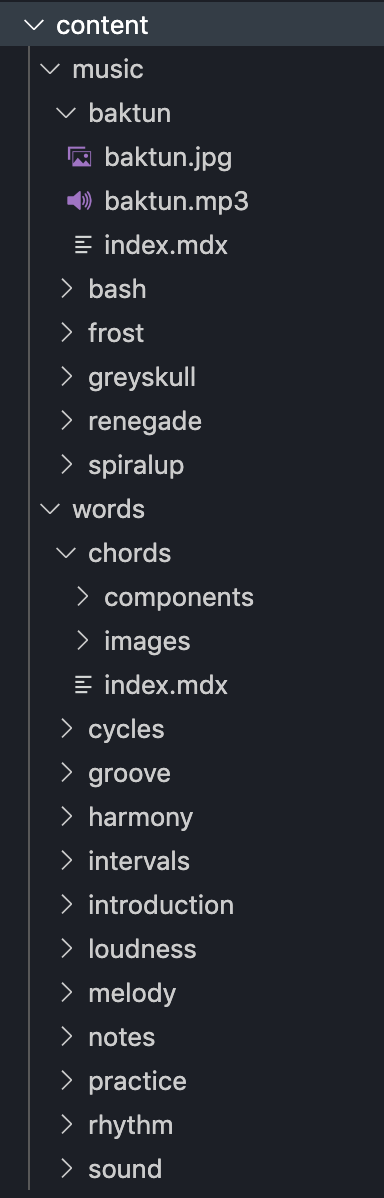
where one 'collection' is in a folder called 'music, and another 'collection' is in a folder called 'words', which are the names of each collection...
The content is different for each collection, as is evidenced by the frontmatter for each collection:
Here is an example of the frontmatter (aka, serializable content) for a music entry:
---
name: b'ak'tun
artist: RYKR
genre: Dubstep
bpm: 140 bpm
artwork: baktun.jpg
alt: b'ak'tun artwork.
audio: baktun.mp3
description: This is a heavy one, so be careful where you stand.
release: 2019-01-01
---
and here is an example of the frontmatter for an entry from the 'words' (think posts, articles, etc...) entry:
---
title: Chords
subtitle: Don't get it twisted.
image: images/chords.jpg
alt: So many chords, so little time.
category: theory
---
...and after that their respective frontmatter blocks they both contain different types of rich content, from the most basic (words) to all sorts of different react components containing images, image carousels, interactive step sequencers, audio clips, etc, etc, etc, etc... but nothing that can be serialized.
So, I need different a template for each type of content, but they both happen to be written using the new technology known as mdx. I also need each category to have a different url path, as the music entries need to be under www.url.com/music/track-name and the articles need to be using www.url.com/words/post-name, hence me trying to do what I'm trying to do in the createNode...thingy? Don't even know what it is...is it a function, I guess? The syntax in all the 'gatsby-something' files is foreign to me, so that makes it even harder to follow for my relatively 'designer who is very new to js' mind...I get the syntax in the regular react files, but the special files look odd to me.
Anyway, I know exactly what they are, as I wrote them, and I'm simply trying to create two different sets of pages using the same createNode...function call, I'm gonna say?
I don't follow what dumper is and what it is for, but I will look into it to try and wrap my head around it.
I hope that makes it a bit more clear as to what I am trying to achieve here :-)
rchrdnsh
on 17 Dec 2019
No need to wrap your head around dumper.js, it's essentially just a fancier console.log. The point is you'll need to learn to inspect the available data so you can understand what to do with that data. So any time there's something where you don't know what kind of data is avialable, you can console.log(data), run gatsby develop, and look at what's printed out in the terminal so you can write JS logic based on that data.
So, to solve your problem, you can get a list of markdown files in each directory and create pages from each one after the other. Since you're querying for the slug and using it in your page path, you'll need to add a slug to each of your markdown files.
---
title: Chords
subtitle: Don't get it twisted.
image: images/chords.jpg
alt: So many chords, so little time.
category: theory
slug: so-many-chords <-- here
---
const path = require(`path`)

exports.createPages = async ({ graphql, actions }) => {
  const { createPage } = actions
  const words = await graphql(`
    query {
      articles: allMdx(filter: { fileAbsolutePath: { regex: "/content/words/" } }) {
        edges {
          node {
            id
            frontmatter {
              slug # <-- this is the slug you added above
            }
          }
        }
      }
    }
  `).then(res => res.data )

  words.articles.edges.forEach(({ node }) => {
    createPage({
      path: `words/${node.fields.slug}`, // and you're using the slug to create your page path here
      component: path.resolve(`./src/templates/words-template.js`), // add the path to a custom template here
      context: {
        slug: node.fields.slug,
        id: node.id,
      },
    })
  })

  // repeat the same logic for your music pages
  const music = await graphql(`
    query {
      articles: allMdx(filter: { fileAbsolutePath: { regex: "/content/music/" } }) {
        edges {
          node {
            id
            frontmatter {
              slug
            }
          }
        }
      }
    }
  `).then(res => res.data )

  music.articles.edges.forEach(({ node }) => {
    createPage({
      path: `music/${node.fields.slug}`,
      component: path.resolve(`./src/templates/music-template.js`),
      context: {
        slug: node.fields.slug,
        id: node.id,
      },
    })
  })
}
To recap, the way to solve this on your own would be:
- Use Graphiql to determine which data you can query for by running
gatsby developand visiting http://localhost:8000/___graphql in your browser. Create a GraphQL query and copy it into your code - Use
console.logto inspect data in your gatsby-node.js file to know how to write your logic
Let me know if that doesn't get you unstuck. Happy to answer more questions!
TylerBarnes
on 17 Dec 2019
hmmmm, ok, but how do i do this without adding a slug to each pages frontmatter? I am trying to avoid adding unnecessary information to the frontmatter, as this will be strange and confusing to any non-coder content creators in the future (a slug is the meaty part of a bullet, or a good punch to the face, to most people), so I would much rather avoid doing this kind of thing if it's possible to avoid. Plus, if it can be done programmatically, shouldn't it?
So if I could do something like this in the gatsby-node.js file, I would imagine this would be ideal:
const { createFilePath } = require(`gatsby-source-filesystem`)

exports.onCreateNode = ({ node, actions, getNode }) =>
  const { createNodeField } = actions
  const value = createFilePath({ node, getNode })
    // ideally something like this...
    if (node.internal.type === `Mdx` && node.parent.folder === `words` ) {
    createNodeField({
      name: `slug`,
      node,
      value: `/words${value}`,
    })
  // this set of two conditions would help avoid adding unnecessary frontmatter fields...
  } else if (node.internal.type === `Mdx` && node.parent.folder === `music` ) {
    createNodeField({
      name: `slug`,
      node,
      value: `/music${value}`,
    })
  }
}
So what I'm getting from you here is that to do what I want to do, I would need to hop into GraphiQL and try to figure out what stuff I can conditionally check for to make this kind of filtering work?
Can I see something like node.internal.type and node.parent.folder(if it exists) and other things like this in graphiQL to help filter my slug generation?
rchrdnsh
on 17 Dec 2019
@rchrdnsh have you console logged the contents of your nodes? Like I mentioned if you use dd(node) from dumper.js you get a pretty printed console log of the contents of your node, otherwise you can use console.log to check for that info.
TylerBarnes
on 17 Dec 2019
hmmmm, so here's where I'm at now. I added a category to the frontmatter and used that to filter the node creation after looking into the possible options in graphiQL. Not ideal, but better than adding anymore completely unnecessary fields to the frontmatter that would be hard to understand for a non developer. Anyway, here is what the code looks like:
const { createFilePath } = require(`gatsby-source-filesystem`)

exports.onCreateNode = ({ node, actions, getNode }) => {

  const { createNodeField } = actions

  const value = createFilePath({ node, getNode })

  if (node.internal.type === `Mdx` && node.frontmatter.category === `words`) {
    createNodeField({
      name: `slug`,
      node,
      value: `/words${value}`
    })
  } else if (node.internal.type === `Mdx` && node.frontmatter.category === `music`) {
    createNodeField({
      name: `slug`,
      node,
      value: `/music${value}`
    })
  }

}

const path = require(`path`)

exports.createPages = async ({ graphql, actions }) => {

  const { createPage } = actions

  const words = await graphql(`
    query {
      articles: allMdx(filter: { fileAbsolutePath: { regex: "/content/words/" } }) {
        edges {
          node {
            id
            fields {
              slug
            }
          }
        }
      }
    }
  `).then(res => res.data )

  words.articles.edges.forEach(({ node }) => {
    createPage({
      path: node.fields.slug,
      component: path.resolve(`./src/templates/article.js`),
      context: {
        slug: node.fields.slug,
        id: node.id
      },
    })
  })

  const music = await graphql(`
    query {
      tracks: allMdx(filter: { fileAbsolutePath: { regex: "/content/music/" } }) {
        edges {
          node {
            id
            fields {
              slug
            }
          }
        }
      }
    }
  `).then(res => res.data)

  music.tracks.edges.forEach(({ node }) => {
    createPage({
      path: node.fields.slug,
      component: path.resolve(`./src/templates/track.js`),
      context: {
        slug: node.fields.slug,
        id: node.id
      }
    })
  })

}
...and it WORKS!!! but....
getting this many many many times in the terminal:
 ERROR #11321  PLUGIN

"gatsby-node.js" threw an error while running the onCreateNode lifecycle:

Cannot read property 'replace' of undefined

  TypeError: Cannot read property 'replace' of undefined

  - path.js:54 slash
    [RYKR]/[gatsby-core-utils]/dist/path.js:54:15

  - create-file-path.js:41 module.exports
    [RYKR]/[gatsby-source-filesystem]/create-file-path.js:41:61

  - gatsby-node.js:400 Object.exports.onCreateNode
    /Users/rchrdnsh/Documents/Code/Gatsby/RYKR/gatsby-node.js:400:16

  - api-runner-node.js:236 runAPI
    [RYKR]/[gatsby]/dist/utils/api-runner-node.js:236:37

  - api-runner-node.js:352 resolve
    [RYKR]/[gatsby]/dist/utils/api-runner-node.js:352:15

  - debuggability.js:411 Promise._execute
    [RYKR]/[bluebird]/js/release/debuggability.js:411:9

  - promise.js:518 Promise._resolveFromExecutor
    [RYKR]/[bluebird]/js/release/promise.js:518:18

  - promise.js:103 new Promise
    [RYKR]/[bluebird]/js/release/promise.js:103:10

  - api-runner-node.js:351 Promise.mapSeries.plugin
    [RYKR]/[gatsby]/dist/utils/api-runner-node.js:351:12

  - util.js:16 tryCatcher
    [RYKR]/[bluebird]/js/release/util.js:16:23

  - reduce.js:166 Object.gotValue
    [RYKR]/[bluebird]/js/release/reduce.js:166:18

  - reduce.js:155 Object.gotAccum
    [RYKR]/[bluebird]/js/release/reduce.js:155:25

  - util.js:16 Object.tryCatcher
    [RYKR]/[bluebird]/js/release/util.js:16:23

  - promise.js:547 Promise._settlePromiseFromHandler
    [RYKR]/[bluebird]/js/release/promise.js:547:31

  - promise.js:604 Promise._settlePromise
    [RYKR]/[bluebird]/js/release/promise.js:604:18

  - promise.js:649 Promise._settlePromise0
    [RYKR]/[bluebird]/js/release/promise.js:649:10
...maybe as many times as there are nodes that are trying to be created? But it's working in develop mode and all the pages are rendering and the slugs are correct, etc...I dunno...pretty happy at this point, just want to figure out what that error is so as to avoid any issues in the future.
rchrdnsh
on 18 Dec 2019
Turns out i had to duplicate and move the:
const value = createFilePath({ node, getNode })
...inside the if and else if of the createNode function, like so:
const { createFilePath } = require(`gatsby-source-filesystem`)

exports.onCreateNode = ({ node, actions, getNode }) => {

  const { createNodeField } = actions

  if (node.internal.type === `Mdx` && node.frontmatter.category === `words`) {
    const value = createFilePath({ node, getNode })
    createNodeField({
      name: `slug`,
      node,
      value: `/words${value}`
    })
  } else if (node.internal.type === `Mdx` && node.frontmatter.category === `music`) {
    const value = createFilePath({ node, getNode })
    createNodeField({
      name: `slug`,
      node,
      value: `/music${value}`
    })
  }

}
...to get rid of the error, which is rather odd, no?
Anyway, looks like everything is basically working now, so...thank you @TylerBarnes XD
rchrdnsh
on 18 Dec 2019
@rchrdnsh I think the reason that was throwing an error is that createFilePath is meant to be used on file nodes but when it's outside your conditional it's being run on every node in your site.
Glad you got it working though!
TylerBarnes
on 18 Dec 2019
yay, thank you! now, i need to figure out how to get Audio() to work in gatsby build...
rchrdnsh
on 18 Dec 2019
I am unable to create multiple nodes in my case :
exports.onCreateNode = async ({ actions }) => {
  const { createNode } = actions

  // Fetch all blogs
  const homepageContents = await axios.get(
    `api`
  )

  // Create Four Featured Blogs nodes
  homepageContents.data.items.featuredBlogs.map((featuredBlog, i) => {
    // Create your node object
    const featuredBlogNode = {
      // Required fields
      id: `${i}`,
      parent: `__SOURCE_1__`,
      internal: {
        type: `FeaturedBlog`, // name of the graphQL query --> allRandomUser {}
        // contentDigest will be added just after
        // but it is required
      },
      children: [],

      // Other fields that you want to query with graphQl
      key: featuredBlog.key,
      slug: featuredBlog.slug,
      title: featuredBlog.title,
      authorName: featuredBlog.authorName,
      authorProfile: featuredBlog.authorProfile,
      authorPhotoURL: featuredBlog.authorPhotoURL,
      category: featuredBlog.category,
      tags: featuredBlog.tags,
      featured: featuredBlog.forEach,
      coverPhoto: featuredBlog.coverPhoto,
      readTime: featuredBlog.readTime,
      // etc...
    }

    // Get content digest of node. (Required field)
    const contentDigest = crypto
      .createHash(`md5`)
      .update(JSON.stringify(featuredBlogNode))
      .digest(`hex`)
    // add it to userNode
    featuredBlogNode.internal.contentDigest = contentDigest

    // Create node with the gatsby createNode() API
    createNode(featuredBlogNode)
  })

  // Create five top blogs
  homepageContents.data.items.top.map((topBlog, i) => {
    // Create your node object
    const topBlogNode = {
      // Required fields
      id: `${i}`,
      parent: `__SOURCE__`,
      internal: {
        type: `TopBlog`, // name of the graphQL query --> allRandomUser {}
        // contentDigest will be added just after
        // but it is required
      },
      children: [],

      // Other fields that you want to query with graphQl
      key: topBlog.key,
      slug: topBlog.slug,
      title: topBlog.title,
      authorName: topBlog.authorName,
      authorProfile: topBlog.authorProfile,
      authorPhotoURL: topBlog.authorPhotoURL,
      category: topBlog.category,
      tags: topBlog.tags,
      featured: topBlog.forEach,
      coverPhoto: topBlog.coverPhoto,
      readTime: topBlog.readTime,
      // etc...
    }

    // Get content digest of node. (Required field)
    const contentDigest = crypto
      .createHash(`md5`)
      .update(JSON.stringify(topBlogNode))
      .digest(`hex`)
    // add it to userNode
    topBlogNode.internal.contentDigest = contentDigest

    createNode(topBlogNode)
  })

  return
}
my homepageContent will look like :
{
 items: {
  featuredBlogs: [...],
  top: [...]
 }
}
 Md-Abdul-Halim-Rafi
on 13 May 2020
Md-Abdul-Halim-Rafi
on 13 May 2020
Related issues
 timbrandin
·
3Comments
timbrandin
·
3Comments
 kalinchernev
·
3Comments
kalinchernev
·
3Comments
 dustinhorton
·
3Comments
dustinhorton
·
3Comments
 jimfilippou
·
3Comments
jimfilippou
·
3Comments
 rossPatton
·
3Comments
rossPatton
·
3Comments
Most helpful comment
Hey @rchrdnsh,
You can achieve what you're looking for by grouping your API code into one function for each node API.
For ex:
There are ways to make the code more concise, but for now, try building the query for each in Graphiql, and then console.log() the responses to figure out how to write your logic.
and for onCreateNode you can do something like this:
What you query and how you create your pages and node fields will be different depending on the requirements of your project, but the code above should give you a general idea of where to start. console.log and graphiql will be your best friends in figuring out how to write your logic. Let me know if you need any more help!