Gatsby: [gatsby-source-wordpress] Cannot query custom-post-type
Description
In gatsby v1 I was able to query custom-post-types from wordpress with gatsby-source-wordpress. The format in graphql was `wordpressWp[custom-post type name]. When I try to query the same source on a modern version of gatsby and gatsby-source-wordpress, the custom-post type is not available in the graphql layer.
Expected result
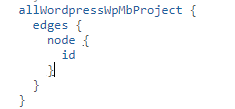
When using gatsby v2.18.4 and gatsby-source-wordpress v3.1.50, I was expecting to be able to query the endpoint "salehin.ipage.com/igortest/moon2word_test5/" and see the same custom post types available as when I was using gatsby v1.9.279 and gatsby-source-wordpress v2.0.93. Data format should look like so:
Actual result
The custom post types are not in the data layer. Only the acf data nodes are available, but that is one layer deeper than I would need to have access to wordpress slugs and guid's and such. Here is the explorer from GraphiQL:

Environment
System:
OS: Windows 10 10.0.17763
CPU: (8) x64 Intel(R) Core(TM) i7-4770K CPU @ 3.50GHz
Binaries:
Node: 10.14.0 - C:\Program Files\nodejs\node.EXE
Yarn: 1.17.3 - C:\Program Files (x86)\Yarn\bin\yarn.CMD
npm: 6.4.1 - C:\Program Files\nodejs\npm.CMD
Languages:
Python: 2.7.17 - /c/Python27/python
Browsers:
Edge: 44.17763.1.0
npmPackages:
gatsby: ^2.18.4 => 2.18.5
gatsby-image: ^2.2.34 => 2.2.34
gatsby-plugin-manifest: ^2.2.30 => 2.2.30
gatsby-plugin-offline: ^3.0.24 => 3.0.25
gatsby-plugin-react-helmet: ^3.1.16 => 3.1.16
gatsby-plugin-sharp: ^2.3.4 => 2.3.4
gatsby-source-filesystem: ^2.1.39 => 2.1.39
gatsby-source-wordpress: ^3.1.50 => 3.1.50
gatsby-transformer-sharp: ^2.3.6 => 2.3.6
 orshick
All 7 comments
Hi @orshick , my first hunch is that the other post types aren't registered with REST API support. Can you share a reproduction so I can dig into it a bit more?
Thanks!
 TylerBarnes
on 2 Dec 2019
TylerBarnes
on 2 Dec 2019
Thanks for the reply Tyler. Before I make a reproduction, I'd like to
clarify what you mean by that: a wordpress instance with a custom post
type, gatsby v1 and v2 repos, of both?
For what it's worth, I tried using both CPT-UI and the pods plugin to
create the custom posts and I had the rest api enabled with both, to no
avail on another wordpress site. On the wordpress instance I mentioned
earlier though, the rest api was never enabled for the post type, yet it
worked in the gatsby v1 repo. The results in the original post are from
that wordpress instance.
On Mon., Dec. 2, 2019, 10:25 a.m. Tyler Barnes, notifications@github.com
wrote:
Hi @orshick https://github.com/orshick , my first hunch is that the
other post types aren't registered with REST API support. Can you share a
reproduction so I can dig into it a bit more?
Thanks!—
You are receiving this because you were mentioned.
Reply to this email directly, view it on GitHub
https://github.com/gatsbyjs/gatsby/issues/19891?email_source=notifications&email_token=AA3XDSP7DHPAOBMTJXSTHQ3QWUSIJA5CNFSM4JTIWG2KYY3PNVWWK3TUL52HS4DFVREXG43VMVBW63LNMVXHJKTDN5WW2ZLOORPWSZGOEFT3GXI#issuecomment-560444253,
or unsubscribe
https://github.com/notifications/unsubscribe-auth/AA3XDSMORXNLDOG42E3GYV3QWUSIJANCNFSM4JTIWG2A
.
orshick
on 3 Dec 2019
@orshick I mean on the WordPress side. It's hard to say what the cause could be off hand, but I can most likely figure it out pretty quick if I can have a look at a reproduction :)
TylerBarnes
on 3 Dec 2019
@TylerBarnes I made a reproduction and emailed you the url + credentials. Hope this is indeed a quick thing to figure out that I missed somehow :)
orshick
on 4 Dec 2019
@orshick thanks for sharing that with me!
The issue is in your gatsby-config.js.
gatsby-source-wordpress uses the REST API discovery endpoint at yoursite.com/wp-json, it loops through every endpoint there and fetches data from all of them. The includedRoutes option modifies that so that only routes that match one of the included routes will be fetched. In your config you have this:
includedRoutes: [
          "**/categories",
          "**/posts",
          "**/pages",
          "**/media",
          "**/tags",
          "**/taxonomies",
          "**/users",
        ],
You'll either need to remove that option entirely or add your CPT endpoints as includedRoutes.
If a CPT still doesn't show up after that, double check that show_in_rest => true is added where you register the CPT.
That should solve the issue. Let me know if it still isn't working and I can take another look!
TylerBarnes
on 4 Dec 2019
Thanks a lot @TylerBarnes, that did indeed do the trick. Guess it's my mistake to have assumed that the allowed paths in the docs for this plugin had mostly good for drop-in defaults. Not sure if I'm the only one who would have made this mistake though. Do you think the docs should point out that if you have custom post types, they would constitute a separate path that needs to be included? If so, I could try to work on a pull request to add that.
orshick
on 5 Dec 2019
@orshick if it's not clear in the docs currently, I think that's a great idea
TylerBarnes
on 5 Dec 2019
Related issues
 dlindahl
·
81Comments
dlindahl
·
81Comments
 omrllm
·
83Comments
omrllm
·
83Comments
 ehowey
·
97Comments
ehowey
·
97Comments
 blainekasten
·
130Comments
blainekasten
·
130Comments
 freiksenet
·
131Comments
freiksenet
·
131Comments