Gatsby: 'gatsby-remark-images` inside `gatsby-plugin-mdx` breaking styled-components...
Hi @johno, @ChristopherBiscardi @LekoArts XD
Not sure who to ping here, but this has been driving me nuts for a while, and i think I may have made a little progress in figuring out what is going wrong, at least...
Description
gatsby-remark-images inside gatsby-plugin-mdx seems to be completely breaking styled-component functionality if trying to render images inside a styled-component container <div> in .mdx files.
Steps to reproduce
In this example, I am trying to create a horizontal scrolling container using styled-components. @LekoArts created a minimal working example where he pulls in images from picsum, and it works just fine:

...and the styles are applied properly to the container and it's children:
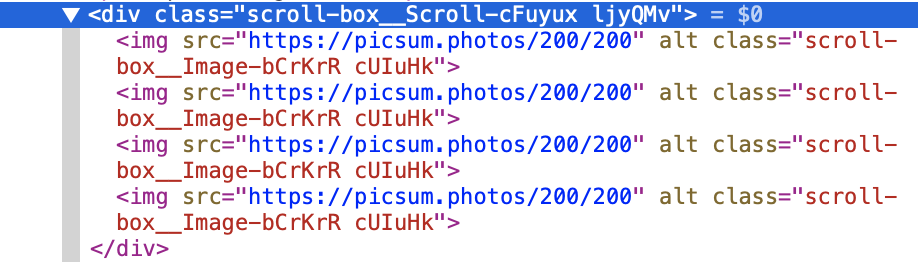
The issue with this approach of course is that it is not using local images, but instead images from the web, so I hooked that up using the the example in the Gatsby mdx docs, like so, first installing the appropriate packages:
npm install gatsby-plugin-sharp gatsby-remark-images
...then implementing them in the gatsby-config.js file, as per the docs:
module.exports = {
  plugins: [
    `gatsby-plugin-sharp`,
    `gatsby-remark-images`,
    {
      resolve: `gatsby-plugin-mdx`,
      options: {
        gatsbyRemarkPlugins: [
          {
            resolve: `gatsby-remark-images`,
            options: {
              maxWidth: 1035,
              sizeByPixelDensity: true,
            },
          },
        ],
      },
    },
    {
      resolve: `gatsby-source-filesystem`,
      options: {
        path: `${__dirname}/src/pages`,
      },
    },
  ],
}
...taking out sizeByPixelDensity, as the CLI yells at me that this will be deprecated. I then run gatsby develop again, and the styled component rendering is broken, like so:

...where the <Scroll> container for both the web and local images are broke, as the styled-component styles are not being applied to the <Scroll> container, and instead, this happens:
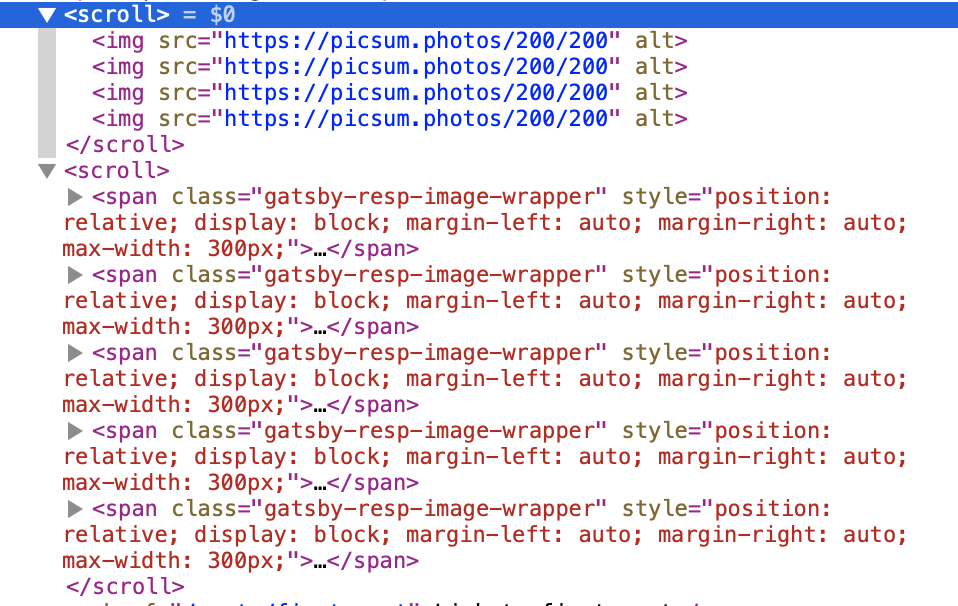
....where <scroll> is what is being created and I get the following error in the console:
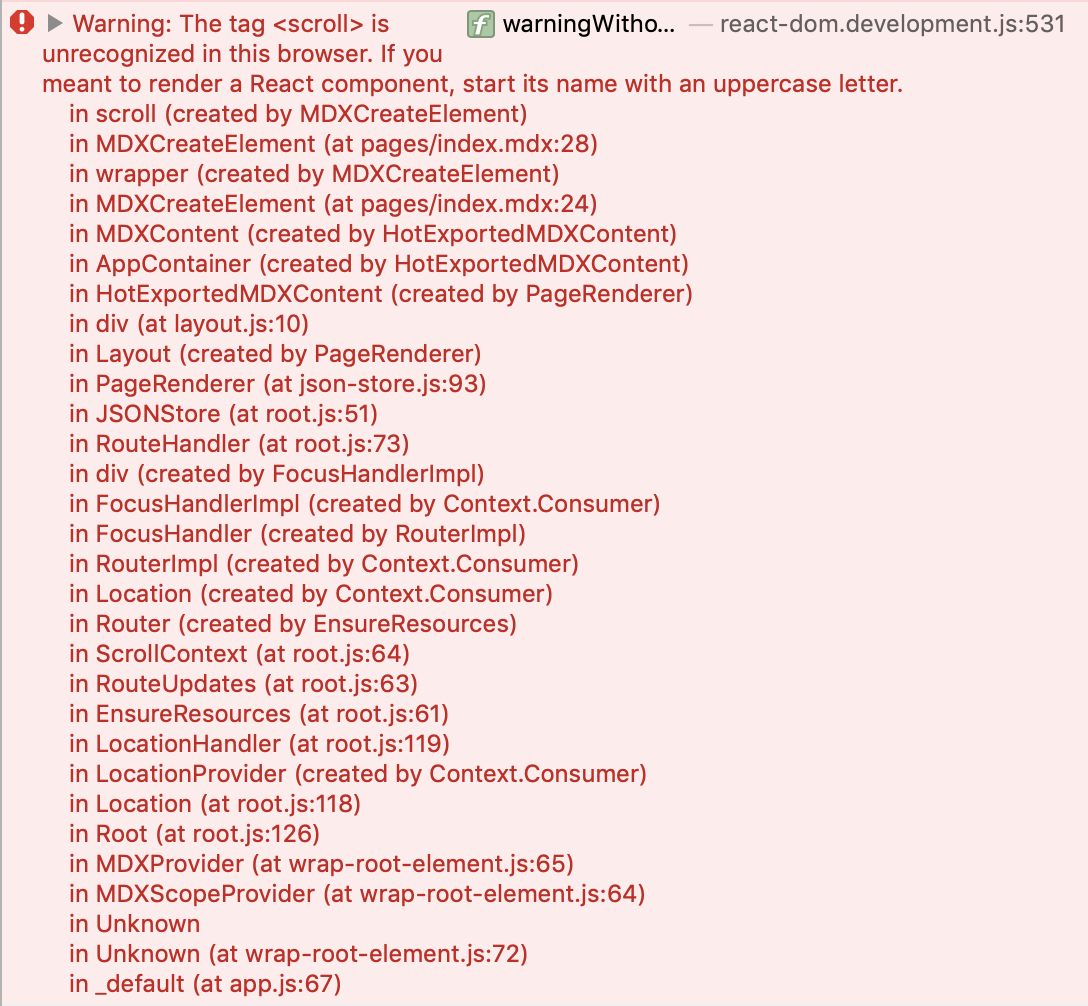
...because the <scroll> html element does not exist.
Here is a repo to try it out for yourself:
https://github.com/rchrdnsh/mdx-issue
Expected result
The styled-component styled should be applied to the div in question and the horizontal scrolling <div> should work properly with the appropriate styles applied.
Actual result
The styled-component styles are NOT applied to the <div> and instead, a new, as yet developed html element named <scroll> is being made.
Environment
System:
    OS: macOS Mojave 10.14.6
    CPU: (12) x64 Intel(R) Core(TM) i9-8950HK CPU @ 2.90GHz
    Shell: 3.2.57 - /bin/bash
  Binaries:
    Node: 10.12.0 - /usr/local/bin/node
    Yarn: 1.10.1 - /usr/local/bin/yarn
    npm: 6.13.1 - /usr/local/bin/npm
  Languages:
    Python: 2.7.10 - /usr/bin/python
  Browsers:
    Chrome: 78.0.3904.108
    Firefox: 70.0.1
    Safari: 13.0.2
  npmPackages:
    gatsby: ^2.13.50 => 2.18.1
    gatsby-image: ^2.2.8 => 2.2.33
    gatsby-plugin-layout: ^1.1.15 => 1.1.15
    gatsby-plugin-manifest: ^2.2.4 => 2.2.29
    gatsby-plugin-mdx: ^1.0.0 => 1.0.57
    gatsby-plugin-offline: ^2.2.4 => 2.2.10
    gatsby-plugin-react-helmet: ^3.1.3 => 3.1.15
    gatsby-plugin-sharp: ^2.3.3 => 2.3.3
    gatsby-plugin-styled-components: 3.1.13 => 3.1.13
    gatsby-remark-images: ^3.1.33 => 3.1.33
    gatsby-source-filesystem: ^2.1.8 => 2.1.38
    gatsby-transformer-sharp: ^2.2.5 => 2.3.5
  npmGlobalPackages:
    gatsby-cli: 2.8.13
 rchrdnsh
All 13 comments
update:
I tried this with emotion as well and the same issue persists. I also forgot to test in all browsers, but have done so and the result is the same across the latest versions of Safari, Chrome, Firefox and Opera.
rchrdnsh
on 25 Nov 2019
@rchrdnsh (I think your title has a typo, images needs an a. Just pointing out to help Googleability :))
I also think I have a simpler reproduction repo, where just installing mdx + gatsby-remark-images and trying to render an image shows the blur-up fallback not being removed:
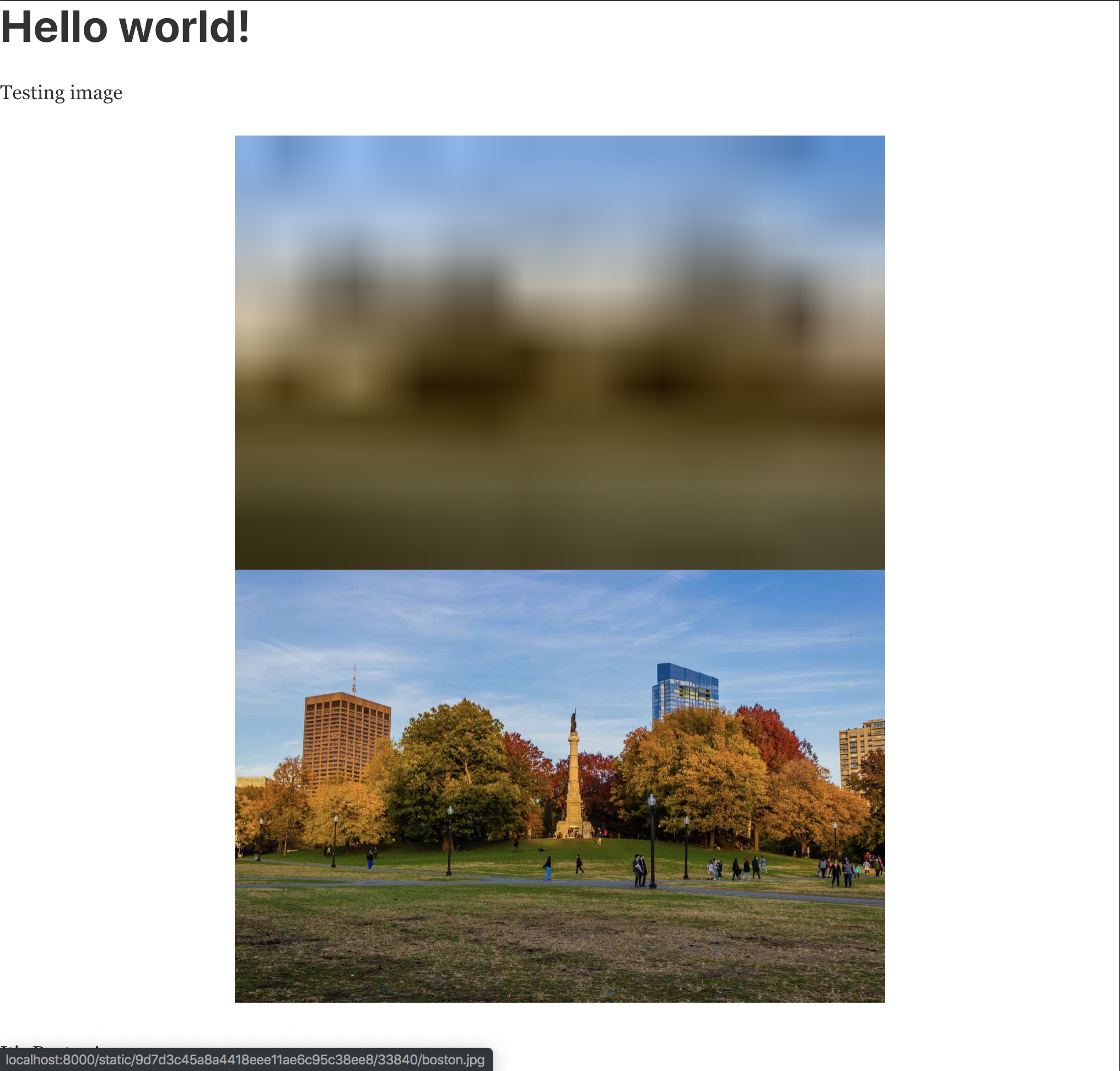
Here's the repo: https://github.com/samselikoff/gatsby-image-in-mdx-bug
 samselikoff
on 26 Nov 2019
samselikoff
on 26 Nov 2019
Thank you for comment @samselikoff XD
I am aware of your issue as well, which is a separate, but possibly tangentially related issue, with gatsby-remark-images inside of gatsby-plugin-mdx. There is another thread with a workaround, but no fix yet.
Here's one thread on the issue:
https://github.com/gatsbyjs/gatsby/issues/17055
...and another:
https://github.com/gatsbyjs/gatsby/issues/15486
...and another, more general issue about plugins in general:
https://github.com/gatsbyjs/gatsby/issues/16242
This current issue that I am running into is a little bit different, as components that are being styled using styled-components/emotion are being broken by 'gatsby-remark-images` somehow...
I hope that these issue links are helpful to you :-)
rchrdnsh
on 26 Nov 2019
if you don't want to sift through those long issues, I believe this is the approach that gets rid of the doubled image, although it's still a hack, in my opinion:
{
  resolve: `gatsby-plugin-mdx`,
  options: {
    extensions: ['.mdx', '.md'],
    defaultLayouts: {
      default: path.join(__dirname, './src/templates/markdown-page.js'),
    },
    gatsbyRemarkPlugins: [
      {
        resolve: `gatsby-remark-images`,
        options: {
          maxWidth: 860,
          backgroundColor: 'none',
        },
      },
    ],
  },
},
{
  resolve: `gatsby-remark-images`,
  options: {
    maxWidth: 860,
    backgroundColor: 'none',
  },
},
...where you declare the plugin inside and outside of the mdx declaration. I tried that with my issue and my issue still persisted, so....
rchrdnsh
on 26 Nov 2019
You’re right! Sorry for the noise & thanks for sharing those :)
samselikoff
on 2 Dec 2019
Hiya!
This issue has gone quiet. Spooky quiet. 👻
We get a lot of issues, so we currently close issues after 30 days of inactivity. It’s been at least 20 days since the last update here.
If we missed this issue or if you want to keep it open, please reply here. You can also add the label "not stale" to keep this issue open!
As a friendly reminder: the best way to see this issue, or any other, fixed is to open a Pull Request. Check out gatsby.dev/contribute for more information about opening PRs, triaging issues, and contributing!
Thanks for being a part of the Gatsby community! 💪💜
![github-actions[bot] picture](https://avatars2.githubusercontent.com/in/15368?v=4&s=40) github-actions[bot]
on 22 Dec 2019
github-actions[bot]
on 22 Dec 2019
not stale, just no movement yet...this issue currently makes mdx unusable for me, tho any movement on this would be great to see.
rchrdnsh
on 22 Dec 2019
I'm having the same exact issue. Looking into this.
 arshad
on 6 Jan 2020
arshad
on 6 Jan 2020
OK looks like cheerio (more specifically the parser) is converting tags to lowercase here:
As a temp fix, I'm parsing lowerCaseTags to the parser options:
- const $ = cheerio.load(node.value)
+ const $ = cheerio.load(node.value, {
+   xml: { lowerCaseTags: false }
+ });
Then using the following:
- node.type = `html`;
- node.value = $(`body`).html(); // fix for cheerio v1

+ if (node.type !== `jsx`) {
+     node.type = `html`;
+ }
+ node.value = $.html(); // fix for cheerio v1
hmmmmmm...sooooo, does gatsby-remark-images work in mdx files now? Do I need to do anything for this to work? I would love it if basic images worked in mdx files :-) What do I need to do to get this goodness?
rchrdnsh
on 15 Jan 2020
Hiya!
This issue has gone quiet. Spooky quiet. 👻
We get a lot of issues, so we currently close issues after 30 days of inactivity. It’s been at least 20 days since the last update here.
If we missed this issue or if you want to keep it open, please reply here. You can also add the label "not stale" to keep this issue open!
As a friendly reminder: the best way to see this issue, or any other, fixed is to open a Pull Request. Check out gatsby.dev/contribute for more information about opening PRs, triaging issues, and contributing!
Thanks for being a part of the Gatsby community! 💪💜
github-actions[bot]
on 5 Feb 2020
Not stale. Bug still happening.
arshad
on 6 Feb 2020
Hey @rchrdnsh! I'll be looking into this issue this week. AFAICT right now you can achieve something similarly by using JSX interleaving and then apply styling to images from your Scroll component.
This will ensure that gatsby-remark-images (due to cheerio) doesn't take over your image component styling.
<Scroll>


</Scroll>
 johno
on 6 May 2020
johno
on 6 May 2020
Related issues
 theduke
·
3Comments
theduke
·
3Comments
 hobochild
·
3Comments
hobochild
·
3Comments
 timbrandin
·
3Comments
timbrandin
·
3Comments
 ferMartz
·
3Comments
ferMartz
·
3Comments
 KyleAMathews
·
3Comments
KyleAMathews
·
3Comments