Gatsby: [gatsby-image] Webp format not used unless toFormat is specified.
Description
Under the documentation describing how to use fragments with webp, the following appears:
If you want to automatically use WebP images when the browser supports the file format, use the withWebp fragments. If the browser doesn’t support WebP, gatsby-image will fall back to the default image format.
While this is correct, WebP images don't appear to render using the component from the gatsby-image package without also setting toFormat: WEBP with fixed or fluid queries. This documentation should be updated to mention this, or if this is a bug it should be fixed.
Steps to reproduce
- Query a data source using
fixedorfluidand a supported webp fragment. Do not usetoFormat. - Using the gatsby-image package, try to render an image from the data, using the
fixedorfluidprops.
Expected result
Using the component from the gatsby-image package with a supported webp fragment renders a picture tag whose source paths reference the webp image path.
Actual result
The original format of the image renders.
 smurrayatwork
All 8 comments
@smurrayatwork @pranshuchittora I'd like to take a look at this
 FailedSitcom
on 1 Oct 2019
FailedSitcom
on 1 Oct 2019
Having this same issue. When using the toFormat workaround, the png fallback seems to break for non-Webp browsers.
 graysonhicks
on 1 Oct 2019
graysonhicks
on 1 Oct 2019
@smurrayatwork & @graysonhicks using the following code (slightly modifying the Gatsby Starter):
const Image = () => {
  const data = useStaticQuery(graphql`
    query {
      placeholderImage: file(relativePath: { eq: "gatsby-astronaut.png" }) {
        childImageSharp {
          fluid(maxWidth: 300) {
            ...GatsbyImageSharpFluid_withWebp
          }
        }
      }
    }
  `)

  return <Img fluid={data.placeholderImage.childImageSharp.fluid} />
}
I'm finding that Firefox and Chrome are correctly rendering a webp image and Safari is correctly falling back to a PNG. May I enquire if your query differs greatly from mine, as well as what your image source is? Thank you!
FailedSitcom
on 1 Oct 2019
I just reverted our switch to Webp back to regular Fluid and Fixed fragments for the time being. Only difference I see is we had noBase64, but I did not have a change to test with the regular Webp fragment. I will both again tomorrow +/- toFormat and double check.
graysonhicks
on 1 Oct 2019
I believe this was working as intended originally, as I am unable to replicate. What I can confirm is that toFormat: WEBP will remove fallback images for Safari.
graysonhicks
on 4 Oct 2019
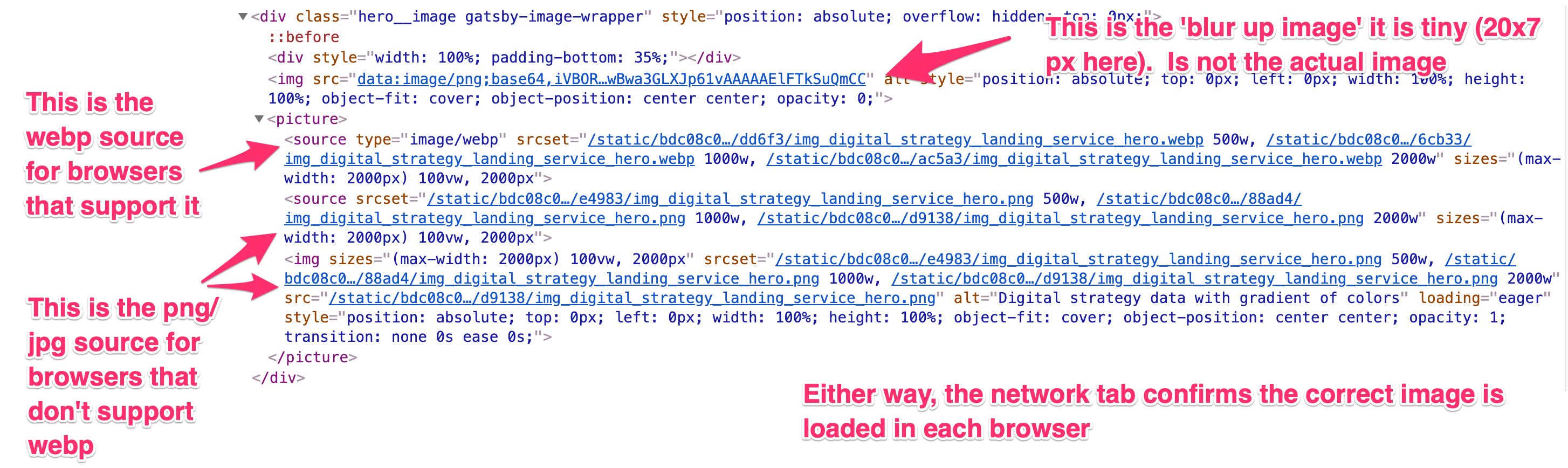
This is a screenshot of using the withWebp fragment on the image. If the screenshot and my notes are correct, we can close this issue. (@smurrayatwork and I encountering this issue on same project together)
graysonhicks
on 4 Oct 2019
@FailedSitcom If that looks okay to you, I can close. Now we are left with this issue... #10203 😬
graysonhicks
on 4 Oct 2019
@graysonhicks that sounds good to me, will try and take a look at your other issue over the weekend. 🙂
FailedSitcom
on 4 Oct 2019
Related issues
 kuworking
·
115Comments
kuworking
·
115Comments
 KyleAMathews
·
97Comments
KyleAMathews
·
97Comments
 blainekasten
·
130Comments
blainekasten
·
130Comments
 jonathan-chin
·
69Comments
jonathan-chin
·
69Comments
 freiksenet
·
131Comments
freiksenet
·
131Comments