Gatsby: [gatsby-remark-image] [gatsby-plugin-mdx] TracedSVG not being overwritten by loaded image
Summary
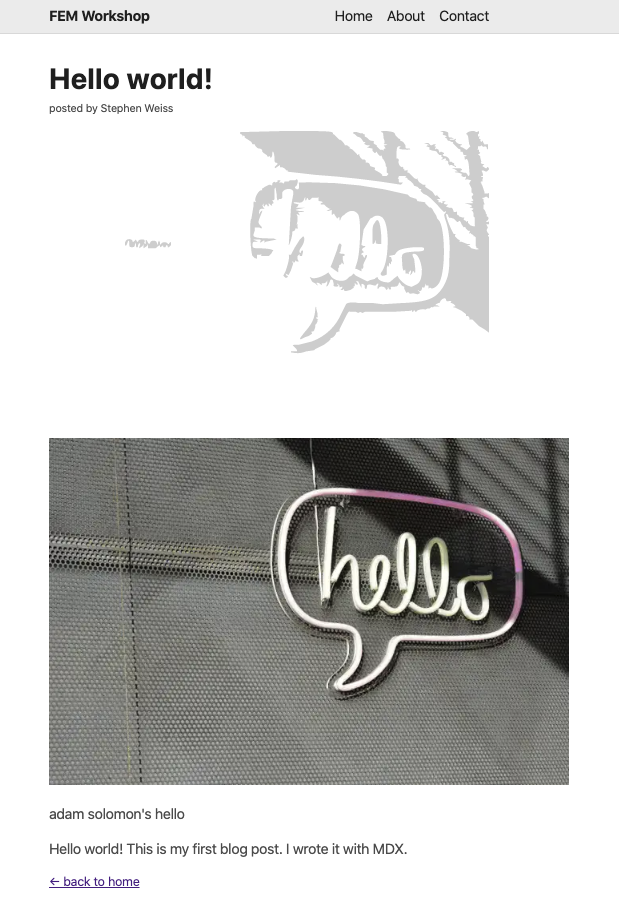
A blog post with an image in it is rendering _both_ the tracedSVG _and_ the image on load.
Relevant information
I'm trying to understand gatsby-remark-images and have been playing around with the different settings.
My gatsby-config looks like this for the gatsby-plugin-mdx (which is what I'm using to compile my markdown into HTML):
{
  resolve: 'gatsby-plugin-mdx',
  options: {
    extensions: ['.mdx', '.md'],
    defaultLayouts: {
      default: require.resolve('./src/components/layout.js'),
    },
    gatsbyRemarkPlugins: [
      {
        resolve: 'gatsby-remark-images',
        options: {
          markdownCaptions: true,
          linkImagesToOriginal: false,
          showCaptions: ['title', 'alt'],
          withWebp: true,
          tracedSVG:  {
            color: `lightgray`,
            optTolerance: 0.4,
            turdSize: 100,
            turnPolicy: 'TURNPOLICY_MAJORITY',
          },
        },
      },
    ],
  },
},
In a post where I have an image in the body of the text, instead of placing the image over the background image (and thereby replacing it), it's actually just putting it next in the DOM -- resulting in a doubling effect.
My post.js file:
import React from 'react';
import { graphql } from 'gatsby';
import { MDXRenderer } from 'gatsby-plugin-mdx';
import { css } from '@emotion/core';
import Layout from '../components/layout';
import ReadLink from '../components/read-link';
export const query = graphql`
query($slug: String!) {
mdx(frontmatter: { slug: { eq: $slug } }) {
frontmatter {
title
author
}
body
}
}
`;
const PostTemplate = (query) => {
const { data: { mdx: post }, pageContext } = query;
const { frontmatter, body } = post;
return (
<Layout>
<h1>{frontmatter.title}</h1>
<p
css={css`
font-size: 0.75rem;
`}
>
{`posted by ${frontmatter.author}`}
</p>
<MDXRenderer>{body}</MDXRenderer>
<ReadLink to="/">← back to home</ReadLink>
</Layout>
);
};
export default PostTemplate;
I would be really surprised if this is a result of
This configuration was adapted from the docs: The configuration came from: https://www.gatsbyjs.org/packages/gatsby-remark-images/?=
I also explored: https://using-gatsby-image.gatsbyjs.org/traced-svg/
I don't know if this is a bug or I'm just configuring it wrong. Until suggested otherwise, I'll assume user-error.
Also, I don't believe this is a duplicate of #17007 or #17017 as in both of those cases, the image overlaps - but the blur doesn't disappear. In my case, the tracedSVG is simply in a different place (also tracedSVG vs blur effect...).
Environment (if relevant)
System:
OS: macOS 10.15
CPU: (8) x64 Intel(R) Core(TM) i5-8259U CPU @ 2.30GHz
Shell: 5.7.1 - /usr/local/bin/zsh
Binaries:
Node: 10.12.0 - ~/.nvm/versions/node/v10.12.0/bin/node
Yarn: 1.17.0 - /usr/local/bin/yarn
npm: 6.9.0 - ~/.nvm/versions/node/v10.12.0/bin/npm
Languages:
Python: 2.7.16 - /usr/local/bin/python
Browsers:
Safari: 13.0
npmPackages:
gatsby: ^2.13.50 => 2.13.50
gatsby-background-image: ^0.8.3 => 0.8.3
gatsby-image: ^2.2.8 => 2.2.8
gatsby-plugin-emotion: ^4.1.2 => 4.1.2
gatsby-plugin-mdx: ^1.0.22 => 1.0.22
gatsby-plugin-react-helmet: ^3.1.3 => 3.1.3
gatsby-plugin-sharp: ^2.2.10 => 2.2.10
gatsby-remark-images: ^3.1.8 => 3.1.8
gatsby-source-filesystem: ^2.1.9 => 2.1.9
gatsby-transformer-remark: ^2.6.14 => 2.6.14
gatsby-transformer-sharp: ^2.2.5 => 2.2.5
npmGlobalPackages:
gatsby-cli: 2.7.8
 stephencweiss
All 4 comments
Resolved the _duplicate_ image:
{
      resolve: 'gatsby-plugin-mdx',
      options: {
        extensions: ['.mdx', '.md'],
        plugins: [`gatsby-remark-images`], // <-- this is the missing / important row
        defaultLayouts: {
          default: require.resolve('./src/components/layout.js'),
        },
        gatsbyRemarkPlugins: [
          {
            resolve: 'gatsby-remark-images',
            options: {
              // markdownCaptions: true,
              linkImagesToOriginal: false,
              // showCaptions: ['title', 'alt'],
              withWebp: true,
              // maxWidth: 960,
              // quality: 80,
              tracedSVG: {
                color: `lightgray`,
                optTolerance: 0.4,
                turdSize: 100,
                turnPolicy: 'TURNPOLICY_MAJORITY',
              },
            },
          },
        ],
      },
    },
https://media.giphy.com/media/IdCgZ8VskRa3YEO0C6/giphy.gif
The tracedSVG is definitely there now, but even on hover it doesn't show up.
Looking at the using-gatsby-images source code it seems like there's not much additional configuration they're doing... though they are using a specific fluid type within the GraphQL query (which I'm not sure is configurable from the gatsby-config).
stephencweiss
on 24 Aug 2019
Looking even more at the source code - it seems that the GridItemImage is a styled component with an hover effect which makes the image transparent (leaving only the background visible).
If I wanted to do this in an .mdx file, would I import the JSX component instead of using the standard markdown image styling (i.e. )?
const GridItemImage = styled(Img)`
  &:hover {
    div + img {
      opacity: 1 !important;
      transition: none !important;
    }
    img + picture > img {
      opacity: 0 !important;
    }
    span: {
      opacity: 1 !important;
    }
  }
`
^^ comes from using-gatsby-images image-gallery source
stephencweiss
on 24 Aug 2019
I've noticed a similar issue when I tried using gatsby-remark-images with gatsby-plugin-mdx. I'm using the default blur-up effect and it seems like the problem is there are CSS rules that are not being added. Take a look at this issue for work-arounds and suggestions until they fix the bug: https://github.com/gatsbyjs/gatsby/issues/15486
 ChangoMan
on 4 Sep 2019
ChangoMan
on 4 Sep 2019
Sorry that you've run into issues! This sounds like a duplicate of https://github.com/gatsbyjs/gatsby/issues/15486, you can also track https://github.com/gatsbyjs/gatsby/issues/16242 to see when it's fixed. Thanks for using Gatsby and sorry for the inconveniences.
 LekoArts
on 5 Sep 2019
LekoArts
on 5 Sep 2019
Related issues
 andykais
·
3Comments
andykais
·
3Comments
 mikestopcontinues
·
3Comments
mikestopcontinues
·
3Comments
 jimfilippou
·
3Comments
jimfilippou
·
3Comments
 theduke
·
3Comments
theduke
·
3Comments
 timbrandin
·
3Comments
timbrandin
·
3Comments
Most helpful comment
Resolved the _duplicate_ image:
https://media.giphy.com/media/IdCgZ8VskRa3YEO0C6/giphy.gif
The tracedSVG is definitely there now, but even on hover it doesn't show up.
Looking at the using-gatsby-images source code it seems like there's not much additional configuration they're doing... though they are using a specific
fluidtype within the GraphQL query (which I'm not sure is configurable from thegatsby-config).