Gatsby: [gatsby-plugin-manifest] icon & theme problem
Description
I'm getting issues with gatsby-plugin-manifest icon.
I have an App that uses a Gatsbyjs theme. The theme defines it owns icon but when I try to override the image, I am getting issues.
- Theme: https://github.com/maxpou/gatsby-starter-morning-dew
- Repo (the one that uses the theme above): https://github.com/maxpou/gatsby-groot
Following #14494.
Steps to reproduce
git clone https://github.com/maxpou/gatsby-groot- delete unused file
content/images/baymax.png yarn && yarn start
Expected result
Image named baymax.png is unused. I should be able to delete this picture to build the Gatsby app without problems.
Actual result
If this image is missing, I can't build my app.
Failed to validate error { ValidationError: child "error" fails because ["error" must be an object]
    at Object.exports.process (/Users/maxencepoutord/sites/lab/gatsby-plugin-manifest-issue-icon/node_modules/@hapi/joi/lib/errors.js:202:19)
    at internals.Object._validateWithOptions
(/Users/maxencepoutord/sites/lab/gatsby-plugin-manifest-issue-icon/node_modules/@hapi/joi/lib/types/any/index.js:764:31)
    at module.exports.internals.Any.root.validate
(/Users/maxencepoutord/sites/lab/gatsby-plugin-manifest-issue-icon/node_modules/@hapi/joi/lib/index.js:145:23)
    at constructError
(/Users/maxencepoutord/sites/lab/gatsby-plugin-manifest-issue-icon/node_modules/gatsby-cli/lib/structured-errors/construct-error.js:28:29)
    at Object.error (/Users/maxencepoutord/sites/lab/gatsby-plugin-manifest-issue-icon/node_modules/gatsby-cli/lib/reporter/index.js:100:29)
    at Object.panicOnBuild (/Users/maxencepoutord/sites/lab/gatsby-plugin-manifest-issue-icon/node_modules/gatsby-cli/lib/reporter/index.js:66:24)
    at Promise.catch.err (/Users/maxencepoutord/sites/lab/gatsby-plugin-manifest-issue-icon/node_modules/gatsby/dist/utils/api-runner-node.js:359:16)
    at tryCatcher (/Users/maxencepoutord/sites/lab/gatsby-plugin-manifest-issue-icon/node_modules/bluebird/js/release/util.js:16:23)
    at Promise._settlePromiseFromHandler
(/Users/maxencepoutord/sites/lab/gatsby-plugin-manifest-issue-icon/node_modules/bluebird/js/release/promise.js:512:31)
    at Promise._settlePromise (/Users/maxencepoutord/sites/lab/gatsby-plugin-manifest-issue-icon/node_modules/bluebird/js/release/promise.js:569:18)
    at Promise._settlePromise0 (/Users/maxencepoutord/sites/lab/gatsby-plugin-manifest-issue-icon/node_modules/bluebird/js/release/promise.js:614:10)
    at Promise._settlePromises (/Users/maxencepoutord/sites/lab/gatsby-plugin-manifest-issue-icon/node_modules/bluebird/js/release/promise.js:690:18)
    at _drainQueueStep (/Users/maxencepoutord/sites/lab/gatsby-plugin-manifest-issue-icon/node_modules/bluebird/js/release/async.js:138:12)
    at _drainQueue (/Users/maxencepoutord/sites/lab/gatsby-plugin-manifest-issue-icon/node_modules/bluebird/js/release/async.js:131:9)
    at Async._drainQueues (/Users/maxencepoutord/sites/lab/gatsby-plugin-manifest-issue-icon/node_modules/bluebird/js/release/async.js:147:5)
    at Immediate.Async.drainQueues [as _onImmediate]
(/Users/maxencepoutord/sites/lab/gatsby-plugin-manifest-issue-icon/node_modules/bluebird/js/release/async.js:17:14)
  isJoi: true,
  name: 'ValidationError',
  details:
   [ { message: '"error" must be an object',
       path: [Array],
       type: 'object.base',
       context: [Object] } ],
  _object:
   { error:
      'icon (content/images/baymax.png) does not exist as defined in gatsby-config.js. Make sure the file exists relative to the root of the site.',
     context:
      { sourceMessage: 'Plugin gatsby-plugin-manifest returned an error undefined' },
⠋ onPostBootstrap
⠋ Build manifest and related icons
Environment
  System:
    OS: macOS 10.14.5
    CPU: (4) x64 Intel(R) Core(TM) i7-7660U CPU @ 2.50GHz
    Shell: 5.6.2 - /usr/local/bin/zsh
  Binaries:
    Node: 10.15.3 - /usr/local/bin/node
    Yarn: 1.15.2 - /usr/local/bin/yarn
    npm: 6.4.1 - /usr/local/bin/npm
  Languages:
    Python: 2.7.10 - /usr/bin/python
  Browsers:
    Chrome: 75.0.3770.100
    Firefox: 67.0.4
    Safari: 12.1.1
  npmPackages:
    gatsby: ^2.13.4 => 2.13.6
    gatsby-plugin-manifest: ^2.2.1 => 2.2.1
    gatsby-starter-morning-dew: ^2.1.3 => 2.1.3
  npmGlobalPackages:
    gatsby-cli: 2.4.12
Thank you :)
 maxpou
All 11 comments
Findings:
I was able to reproduce. To clarify, if baymax.png is left in tact groot.png is the file eventually used by the plugin. Seems that the plugin is effectively being run one for each icon, it's just overriding the baymax icon output.
It seems to me that this is actually expected. If anything it's a bug in the theme.
Problem:
Some plugins can be configured multiple times in a gatsby-config.js file(gatsby-source-filesystem). Some, don't need to be (like gatsby-plugin-manifest). Gatsby doesn't know the difference and simply merges your site's config with the theme config...meaning that gatsby-plugin-manifest gets configured and run twice.
Solution:
Gatsby theme allow you to override settings in the theme if the theme is configured to allow this. I've never created a theme so I'm not sure how this works exactly (theme api docs may help), but this will keep the manifest config from existing twice.
Thoughts:
fun fact: until recently this would have just broken the manifest plugin cause it was not designed to run multiple times per build. I recently fixed that error when we implemented internationalization. so the fact that this works at all is nice.
Leaving the other image is a work around but the fact that gatsby-plugin-manifest is configured at all in the theme seems a little pointless. The default config will never work, a developer will always need to customize this config, thus there is little benefit to having it in the theme. I think the best solution would be to fix the theme to correctly override the config instead of concatenating an additional config.
 moonmeister
on 10 Jul 2019
moonmeister
on 10 Jul 2019
hey @moonmeister
Thank you for your answer!
I don't know if you saw it but this repo is a starter AND a theme. That's the only reason why gatsby-plugin-manifest is also defined in the repo gatsby-starter-morning-dew.
When I tried to pass options in gatsby-config.js, I ended up with weird errors.
module.exports = options => {
  const { manifest = true } = options
  // ...
}
$ yarn build

ERROR #85901  GRAPHQL
There was an error in your GraphQL query:
Cannot query field "allMdx" on type "Query".
File: gatsby-node.js:16:34
@maxpou Yeah, not sure on that, like I said, not very familiar with themes. Maybe someone from @gatsbyjs/core can help.
moonmeister
on 11 Jul 2019
I'm getting the same error with the Gatsby repo.
# after git clone gatsby repo + install deps
cd themes/gatsby-starter-theme
In gatsby-config.js - convert export object to export function
// themes/gatsby-starter-theme/gatsby-config.js
module.exports = () => {
  return {
    plugins: [
      {
        resolve: `gatsby-theme-notes`,
        options: {
          mdx: true,
          basePath: `/notes`,
        },
      },
      // with gatsby-plugin-theme-ui, the last theme in the config
      // will override the theme-ui context from other themes
      { resolve: `gatsby-theme-blog` },
    ],
    siteMetadata: {
      title: `Shadowed Site Title`,
    },
  }
}
Now let's build it:
# or gatsby build
./node_modules/.bin/gatsby build

# ...
success createPages - 0.002 s
success createPagesStatefully - 0.030 s
success onPreExtractQueries - 0.002 s
success update schema - 0.020 s

 ERROR #85907  GRAPHQL

There was an error in your GraphQL query:

- Unknown field 'siteMetadata' on type 'Site'. Source: document `BioQuery` file: `GraphQL request`

File: node_modules/gatsby-theme-notes/src/use-site-metadata.js
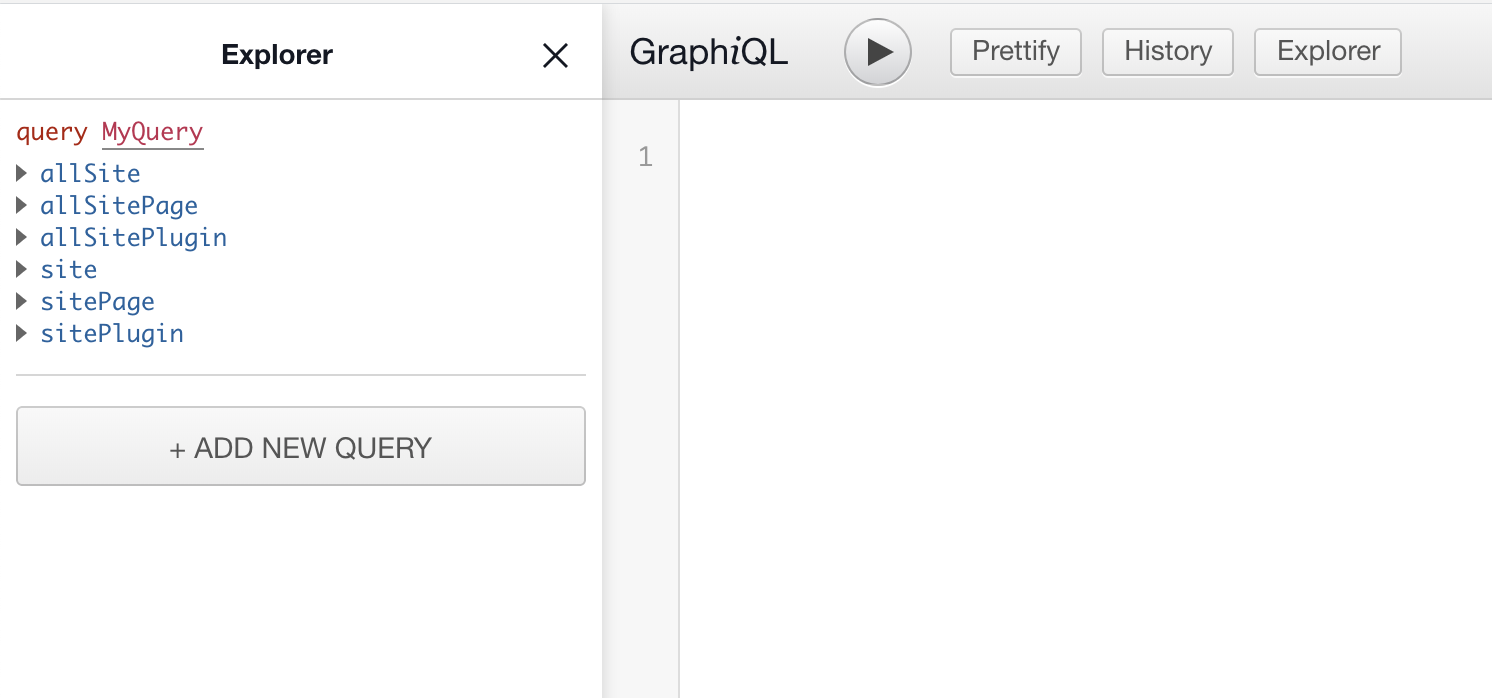
If you do a gatsby develop, and go to GraphQL page (http://localhost:8000/___graphql), you will see, some requests are missing: mdx()/allMdx() and also (same for file()/allFiles()).
maxpou
on 12 Jul 2019
@maxpou Not sure if this is the issue but your missing a closing bracket } at the end of your arrow function.
moonmeister
on 13 Jul 2019
Ooops, I forgot to take this bracket when I copy/pasted my code.
I updated my code on the comment bellow.
maxpou
on 13 Jul 2019
@maxpou Okay, So i just tried using your theme on a new site. Then modified the theme to use the function to dynamically set the icon and it sees to work. I had to do a lot of things manually to "fix" the build cause there were things the theme expected but were never included in your install documentation. Once I had it building I modified the gatsby-config to use the arrow function and pass the icon path and it worked in development. Build seemed to be broken cause of other issues with the theme.
I'd recommend deciding if you want a theme or starter. If you do want both, then you need to create the theme. then in a different repository create a starter that uses the theme. That may fix a lot of your issues. Otherwise, start a site from scratch and try that, no starter. I got one warning in the "update Schema" stage during an actual build andit was:
The GraphQL query in the non-page component "/home/ajmoon/code/trash-fire/theme-test/gatsby-starter-morning-dew/src/templates/blog-post-share-image.js" will not be
Exported queries are only executed for Page components. It's possible you're
trying to create pages in your gatsby-node.js and that's failing for some
reason.

If the failing component(s) is a regular component and not intended to be a page
component, you generally want to use a <StaticQuery> (https://gatsbyjs.org/docs/static-query)
instead of exporting a page query.

If you're more experienced with GraphQL, you can also export GraphQL
fragments from components and compose the fragments in the Page component
query and pass data down into the child component — http://graphql.org/learn/queries/#fragments
I'd recommend deciding if you want a theme or starter.
according to Gatsby Team, it's possible to mix them. That's why I don't plan to spread my code.
About the warning, it's for a page that's only available on "dev mode" (to generate stuff for social medias).
Thanks for your help :)
maxpou
on 15 Jul 2019
Hi @maxpou @moonmeister
I'm struggling with this also.
As far as I understand, gatsby-plugin-manifest is not intended to be included in a theme? Ideally there should be an option to have its icon path be relative to the root of the theme instead of the site.
Currently, adding a theme which defines icon path in its gatsby-plugin-manifest will error on gatsby develop because the icon is defined relative to the theme, but gatsby looks relative to the site, where the icon doesn't exist. Is there a fix for this?
 davidde
on 19 Aug 2019
davidde
on 19 Aug 2019
I have been dealing with this issue from day one of using Gatsby. No matter what starter or theme I use, the same thing always happens to me.
Any solution?
 eliooses-zondax
on 11 Dec 2020
eliooses-zondax
on 11 Dec 2020
Get the theme author to remove gatsby-plugin-manifest from the theme based on the earlier findings.
If you're not using a theme this shouldn't be an issue.
moonmeister
on 11 Dec 2020
Related issues
 andykais
·
3Comments
andykais
·
3Comments
 hobochild
·
3Comments
hobochild
·
3Comments
 signalwerk
·
3Comments
signalwerk
·
3Comments
 dustinhorton
·
3Comments
dustinhorton
·
3Comments
 ghost
·
3Comments
ghost
·
3Comments
Most helpful comment
Hi @maxpou @moonmeister
I'm struggling with this also.
As far as I understand,
gatsby-plugin-manifestis not intended to be included in a theme? Ideally there should be an option to have itsiconpath be relative to the root of the theme instead of the site.Currently, adding a theme which defines
iconpath in itsgatsby-plugin-manifestwill error ongatsby developbecause the icon is defined relative to the theme, but gatsby looks relative to the site, where the icon doesn't exist. Is there a fix for this?