Gatsby: `construct-error.js` - child "error" fails because ["error" must be an object]
Description
Introducing a query error on MarkdownRemarkFrontmatter seems to throw error with construct-error.js due to some error in validating an error type using the joi library. The error message thrown is:
child "error" fails because ["error" must be an object]
Original Build Error Log
This behavior will be removed in the next major release of gatsby-plugin-feed.
For more info, check out: https://gatsby.app/adding-rss-feed
success onPreBootstrap - 0.044 s
success source and transform nodes - 0.236 s
success building schema - 0.581 s
child "error" fails because ["error" must be an object]
Failed to validate error { ValidationError: child "error" fails because ["error" must be an object]
at Object.exports.process (/Users/ccrutchley/git/Etc/UnicornUtter/blog-dev/node_modules/gatsby/node_modules/gatsby-cli/node_modules/@hapi/joi/lib/errors.js:203:19)
at internals.Object._validateWithOptions (/Users/ccrutchley/git/Etc/UnicornUtter/blog-dev/node_modules/gatsby/node_modules/gatsby-cli/node_modules/@hapi/joi/lib/types/any/index.js:764:31)
at module.exports.internals.Any.root.validate (/Users/ccrutchley/git/Etc/UnicornUtter/blog-dev/node_modules/gatsby/node_modules/gatsby-cli/node_modules/@hapi/joi/lib/index.js:145:23)
at constructError (/Users/ccrutchley/git/Etc/UnicornUtter/blog-dev/node_modules/gatsby/node_modules/gatsby-cli/lib/structured-errors/construct-error.js:28:29)
at Object.error (/Users/ccrutchley/git/Etc/UnicornUtter/blog-dev/node_modules/gatsby/node_modules/gatsby-cli/lib/reporter/index.js:100:29)
at Object.panicOnBuild (/Users/ccrutchley/git/Etc/UnicornUtter/blog-dev/node_modules/gatsby/node_modules/gatsby-cli/lib/reporter/index.js:66:24)
at Promise.catch.err (/Users/ccrutchley/git/Etc/UnicornUtter/blog-dev/node_modules/gatsby/dist/utils/api-runner-node.js:359:16)
at tryCatcher (/Users/ccrutchley/git/Etc/UnicornUtter/blog-dev/node_modules/bluebird/js/release/util.js:16:23)
at Promise._settlePromiseFromHandler (/Users/ccrutchley/git/Etc/UnicornUtter/blog-dev/node_modules/bluebird/js/release/promise.js:512:31)
at Promise._settlePromise (/Users/ccrutchley/git/Etc/UnicornUtter/blog-dev/node_modules/bluebird/js/release/promise.js:569:18)
at Promise._settlePromise0 (/Users/ccrutchley/git/Etc/UnicornUtter/blog-dev/node_modules/bluebird/js/release/promise.js:614:10)
at Promise._settlePromises (/Users/ccrutchley/git/Etc/UnicornUtter/blog-dev/node_modules/bluebird/js/release/promise.js:690:18)
at _drainQueueStep (/Users/ccrutchley/git/Etc/UnicornUtter/blog-dev/node_modules/bluebird/js/release/async.js:138:12)
at _drainQueue (/Users/ccrutchley/git/Etc/UnicornUtter/blog-dev/node_modules/bluebird/js/release/async.js:131:9)
at Async._drainQueues (/Users/ccrutchley/git/Etc/UnicornUtter/blog-dev/node_modules/bluebird/js/release/async.js:147:5)
at Immediate.Async.drainQueues (/Users/ccrutchley/git/Etc/UnicornUtter/blog-dev/node_modules/bluebird/js/release/async.js:17:14)
isJoi: true,
name: 'ValidationError',
details:
[ { message: '"error" must be an object',
path: [Array],
type: 'object.base',
context: [Object] } ],
_object:
{ error: [ [Object] ],
context: { sourceMessage: 'gatsby-node.js returned an error undefined' },
text: 'gatsby-node.js returned an error undefined',
level: 'ERROR',
stack: [],
docsUrl: 'https://gatsby.dev/issue-how-to' },
annotate: [Function] }
⠋ createPages
npm ERR! code ELIFECYCLE
npm ERR! errno 1
npm ERR! [email protected] develop: gatsby develop
npm ERR! Exit status 1
npm ERR!
npm ERR! Failed at the [email protected] develop script.
npm ERR! This is probably not a problem with npm. There is likely additional logging output above.
Adding a console.error to the contruct-error.js file before doing the joi validation yeilds me a much better error message:
GraphQLError: Cannot query field "attached" on type "MarkdownRemarkFrontmatter".
The "Better" error
{ error:
[ { GraphQLError: Cannot query field "attached" on type "MarkdownRemarkFrontmatter".
at Object.Field (/Users/ccrutchley/git/Etc/UnicornUtter/blog-dev/node_modules/graphql/validation/rules/FieldsOnCorrectType.js:53:31)
at Object.enter (/Users/ccrutchley/git/Etc/UnicornUtter/blog-dev/node_modules/graphql/language/visitor.js:324:29)
at Object.enter (/Users/ccrutchley/git/Etc/UnicornUtter/blog-dev/node_modules/graphql/language/visitor.js:375:25)
at visit (/Users/ccrutchley/git/Etc/UnicornUtter/blog-dev/node_modules/graphql/language/visitor.js:242:26)
at validate (/Users/ccrutchley/git/Etc/UnicornUtter/blog-dev/node_modules/graphql/validation/validate.js:54:22)
at graphqlImpl (/Users/ccrutchley/git/Etc/UnicornUtter/blog-dev/node_modules/graphql/graphql.js:99:50)
at /Users/ccrutchley/git/Etc/UnicornUtter/blog-dev/node_modules/graphql/graphql.js:28:59
at new Promise (
at graphql (/Users/ccrutchley/git/Etc/UnicornUtter/blog-dev/node_modules/graphql/graphql.js:26:10)
at graphqlRunner (/Users/ccrutchley/git/Etc/UnicornUtter/blog-dev/node_modules/gatsby/dist/bootstrap/index.js:353:12)
at Object.exports.createPages (/Users/ccrutchley/git/Etc/UnicornUtter/blog-dev/gatsby-node.js:10:10)
at runAPI (/Users/ccrutchley/git/Etc/UnicornUtter/blog-dev/node_modules/gatsby/dist/utils/api-runner-node.js:230:37)
at resolve (/Users/ccrutchley/git/Etc/UnicornUtter/blog-dev/node_modules/gatsby/dist/utils/api-runner-node.js:352:15)
at Promise._execute (/Users/ccrutchley/git/Etc/UnicornUtter/blog-dev/node_modules/bluebird/js/release/debuggability.js:313:9)
at Promise._resolveFromExecutor (/Users/ccrutchley/git/Etc/UnicornUtter/blog-dev/node_modules/bluebird/js/release/promise.js:483:18)
at new Promise (/Users/ccrutchley/git/Etc/UnicornUtter/blog-dev/node_modules/bluebird/js/release/promise.js:79:10)
message: 'Cannot query field "attached" on type "MarkdownRemarkFrontmatter".',
locations: [Array] } ],
context: { sourceMessage: 'gatsby-node.js returned an error undefined' },
text: 'gatsby-node.js returned an error undefined',
level: 'ERROR',
stack: [],
docsUrl: 'https://gatsby.dev/issue-how-to' }
Steps to reproduce
It's like 4AM, and I'm like falling asleep. Sincere apologies for not leaving a reproducible repo as a result :/ . If this is unable to be duplicated, whenever I wake up I can give it my best crack at one.
Environment
Run gatsby info --clipboard in your project directory and paste the output here.
My system info
✘ 💅 ~/git/Etc/UnicornUtter/blog-dev master ●✚
↳ npx gatsby info --clipboard
System:
OS: macOS High Sierra 10.13.6
CPU: (4) x64 Intel(R) Core(TM) i5-7360U CPU @ 2.30GHz
Shell: 5.3 - /bin/zsh
Binaries:
Node: 8.16.0 - ~/.nvm/versions/node/v8.16.0/bin/node
Yarn: 1.17.0 - /usr/local/bin/yarn
npm: 6.9.0 - ~/.nvm/versions/node/v8.16.0/bin/npm
Languages:
Python: 2.7.16 - /usr/local/bin/python
Browsers:
Chrome: 75.0.3770.100
Safari: 12.1.1
npmPackages:
gatsby: ^2.11.3 => 2.11.3
gatsby-image: ^2.2.3 => 2.2.3
gatsby-plugin-feed: ^2.3.1 => 2.3.1
gatsby-plugin-google-analytics: ^2.1.1 => 2.1.1
gatsby-plugin-lunr: ^1.5.1 => 1.5.1
gatsby-plugin-manifest: ^2.2.0 => 2.2.0
gatsby-plugin-offline: ^2.2.0 => 2.2.0
gatsby-plugin-prefetch-google-fonts: ^1.4.2 => 1.4.2
gatsby-plugin-react-helmet: ^3.1.0 => 3.1.0
gatsby-plugin-react-svg: ^2.1.1 => 2.1.1
gatsby-plugin-sass: ^2.1.0 => 2.1.0
gatsby-plugin-sharp: ^2.2.1 => 2.2.1
gatsby-plugin-transition-link: ^1.12.4 => 1.12.4
gatsby-remark-autolink-headers: ^2.1.0 => 2.1.0
gatsby-remark-copy-linked-files: ^2.1.0 => 2.1.0
gatsby-remark-images: ^3.1.2 => 3.1.2
gatsby-remark-prismjs: ^3.3.0 => 3.3.0
gatsby-remark-responsive-iframe: ^2.2.1 => 2.2.1
gatsby-source-filesystem: ^2.1.1 => 2.1.1
gatsby-transformer-json: ^2.2.0 => 2.2.0
gatsby-transformer-remark: ^2.5.0 => 2.5.0
gatsby-transformer-sharp: ^2.2.0 => 2.2.0
 crutchcorn
All 27 comments
Can you try updating Gatsby? Recently we added https://github.com/gatsbyjs/gatsby/pull/15227 that touches this part (handling graphql errors from queries in gatsby-node).
And I couldn't really reproduce with latest version - I'm getting:
success building schema - 0.225 s

 ERROR #85901  GRAPHQL

There was an error in your GraphQL query:

Cannot query field "attached" on type "MarkdownRemarkFrontmatter".

File: gatsby-node.js:8:10
In case updating Gatsby doesn't work, then reproduction case would be great
 pieh
on 1 Jul 2019
pieh
on 1 Jul 2019
I ran into a similar issue - but different:
When adding console.error to construct-error.js I get a message:
Support for the experimental syntax \'optionalChaining\' isn\'t currently enabled
Which is odd since I thought it was enabled (it is when using gatsby develop)
// .babelrc
{
  "plugins": ["@babel/plugin-proposal-optional-chaining"],
  "presets": ["babel-preset-gatsby"]
}
 guybowden
on 2 Jul 2019
guybowden
on 2 Jul 2019
@pieh I am having the very same error. Running the latest gatsby 2.13.3:
Failed to validate error { ValidationError: child "error" fails because ["error" must be an
object]
    at Object.exports.process
(/Users/tomi/Github/apps/toryjs/node_modules/@hapi/joi/lib/errors.js:202:19)
    at internals.Object._validateWithOptions
(/Users/tomi/Github/apps/toryjs/node_modules/@hapi/joi/lib/types/any/index.js:764:31)
    at module.exports.internals.Any.root.validate
(/Users/tomi/Github/apps/toryjs/node_modules/@hapi/joi/lib/index.js:145:23)
    at constructError (/Users/tomi/Github/apps/toryjs/node_modules/gatsby-cli/lib/structured-erro
rs/construct-error.js:28:29)
    at Object.error
(/Users/tomi/Github/apps/toryjs/node_modules/gatsby-cli/lib/reporter/index.js:100:29)
    at Object.panic
(/Users/tomi/Github/apps/toryjs/node_modules/gatsby-cli/lib/reporter/index.js:58:24)
    at reportFailure
(/Users/tomi/Github/apps/toryjs/node_modules/gatsby/dist/commands/build.js:47:10)
    at buildProductionBundle.catch.err
(/Users/tomi/Github/apps/toryjs/node_modules/gatsby/dist/commands/build.js:102:5)
  isJoi: true,
  name: 'ValidationError',
  details:
   [ { message: '"error" must be an object',
       path: [Array],
       type: 'object.base',
       context: [Object] } ],
  _object:
⠹ Building production JavaScript and CSS bundles
error Command failed with exit code 1.
 tomitrescak
on 4 Jul 2019
tomitrescak
on 4 Jul 2019
I need to say that the "start" command works well, it is the build that fails ;(
I'll provide repo sooon ...
tomitrescak
on 4 Jul 2019
same error, any workaround??
 x5engine
on 7 Jul 2019
x5engine
on 7 Jul 2019
SAME ERROR
Failed to validate error { ValidationError: child "error" fails because ["error" must be an
 object]
    at Object.exports.process
(/Users/admin/Documents/app-center/node_modules/@hapi/joi/lib/errors.js:202:19)
    at internals.Object._validateWithOptions
(/Users/admin/Documents/app-center/node_modules/@hapi/joi/lib/types/any/index.js:764:31)
    at module.exports.internals.Any.root.validate
(/Users/admin/Documents/app-center/node_modules/@hapi/joi/lib/index.js:145:23)
    at constructError (/Users/admin/Documents/app-center/node_modules/gatsby/node_modules/g
atsby-cli/lib/structured-errors/construct-error.js:28:29)
    at Object.error (/Users/admin/Documents/app-center/node_modules/gatsby/node_modules/gat
sby-cli/lib/reporter/index.js:100:29)
    at Object.panicOnBuild (/Users/admin/Documents/app-center/node_modules/gatsby/node_modu
les/gatsby-cli/lib/reporter/index.js:66:24)
    at Promise.catch.err (/Users/admin/Documents/app-center/node_modules/gatsby/dist/utils/
api-runner-node.js:359:16)
    at tryCatcher
(/Users/admin/Documents/app-center/node_modules/bluebird/js/release/util.js:16:23)
    at Promise._settlePromiseFromHandler
(/Users/admin/Documents/app-center/node_modules/bluebird/js/release/promise.js:517:31)
    at Promise._settlePromise
(/Users/admin/Documents/app-center/node_modules/bluebird/js/release/promise.js:574:18)
    at Promise._settlePromise0
(/Users/admin/Documents/app-center/node_modules/bluebird/js/release/promise.js:619:10)
    at Promise._settlePromises
(/Users/admin/Documents/app-center/node_modules/bluebird/js/release/promise.js:695:18)
    at _drainQueueStep
(/Users/admin/Documents/app-center/node_modules/bluebird/js/release/async.js:138:12)
    at _drainQueue
(/Users/admin/Documents/app-center/node_modules/bluebird/js/release/async.js:131:9)
    at Async._drainQueues
(/Users/admin/Documents/app-center/node_modules/bluebird/js/release/async.js:147:5)
⠴ source and transform nodes
error Command failed with exit code 1.
info Visit https://yarnpkg.com/en/docs/cli/run for documentation about this command.
Here is a reproduction repo:
git clone [email protected]:openintents/app-center.git
yarn install
then
yarn develop
then you will see this error
@pieh
thanks guys
x5engine
on 7 Jul 2019
found a workaround for my code while you fix this bug thanks
x5engine
on 7 Jul 2019
@x5engine - what is your work around?
 desirino
on 7 Jul 2019
desirino
on 7 Jul 2019
A workaround for this is mentioned in the original issue:
Adding a console.error to the contruct-error.js file before doing the joi validation yeilds
Editing the file /node_modules/gatsby/node_modules/gatsby-cli/lib/structured-errors/construct-error.js and adding a console log of the error before line 28
crutchcorn
on 7 Jul 2019
I began to see the "Failed to validate error" yesterday after updating gatsby-cli to 2.7.8.
In case it helps, in my tests it seems to be triggered by queries originating from gatsby-node.js.
$ gatsby develop
success open and validate gatsby-configs - 0.049 s
success load plugins - 0.843 s
success onPreInit - 0.003 s
success initialize cache - 0.021 s
success copy gatsby files - 0.188 s
success onPreBootstrap - 0.011 s
success source and transform nodes - 0.304 s
success building schema - 0.227 s

 ERROR #85909  GRAPHQL

Field "image" must not have a selection since type "String" has no subfields

File: gatsby-node.js:11:10

Failed to validate error { ValidationError: child "error" fails because ["error" must be an object]
    at Object.exports.process (C:\Users\r\AppData\Roaming\npm\node_modules\gatsby-cli\node_modules\@hapi\joi\lib\errors.js:202:19)
    at internals.Object._validateWithOptions (C:\Users\r\AppData\Roaming\npm\node_modules\gatsby-cli\node_modules\@hapi\joi\lib\types\any\index.js:764:31)
    at module.exports.internals.Any.root.validate (C:\Users\r\AppData\Roaming\npm\node_modules\gatsby-cli\node_modules\@hapi\joi\lib\index.js:145:23)
    at constructError (C:\Users\r\AppData\Roaming\npm\node_modules\gatsby-cli\lib\structured-errors\construct-error.js:28:29)
    at Object.error (C:\Users\r\AppData\Roaming\npm\node_modules\gatsby-cli\lib\reporter\index.js:100:29)
    at Object.panic (C:\Users\r\AppData\Roaming\npm\node_modules\gatsby-cli\lib\reporter\index.js:58:24)
    at process.on.error (C:\Users\r\AppData\Roaming\npm\node_modules\gatsby-cli\lib\index.js:96:10)
    at process.emit (events.js:203:15)
    at processEmit (C:\Users\r\AppData\Roaming\npm\node_modules\gatsby-cli\node_modules\signal-exit\index.js:155:32)
    at processEmit [as emit] (D:\lib\dev\github\my-default-starter\node_modules\signal-exit\index.js:155:32)
    at emitPromiseRejectionWarnings (internal/process/promises.js:119:20)
    at process._tickCallback (internal/process/next_tick.js:69:34)
  isJoi: true,
  name: 'ValidationError',
  details:
   [ { message: '"error" must be an object',
       path: [Array],
       type: 'object.base',
       context: [Object] } ],
  _object:
   { error: [ [GraphQLError] ],
     context: { sourceMessage: 'UNHANDLED REJECTION undefined' },
     text: 'UNHANDLED REJECTION undefined',
     level: 'ERROR',
     stack: [],
     docsUrl: 'https://gatsby.dev/issue-how-to' },
  annotate: [Function] }
⠋ createPages
Here is the output of console.log(structuredError):
{ error:
   [ { GraphQLError: Field "image" must not have a selection since type "String" has no subfields.
         at Object.Field (D:\lib\dev\github\my-default-starter\node_modules\graphql\validation\rules\ScalarLeafs.js:42:33)
         at Object.enter (D:\lib\dev\github\my-default-starter\node_modules\graphql\language\visitor.js:324:29)
         at Object.enter (D:\lib\dev\github\my-default-starter\node_modules\graphql\language\visitor.js:375:25)
         at visit (D:\lib\dev\github\my-default-starter\node_modules\graphql\language\visitor.js:242:26)
         at validate (D:\lib\dev\github\my-default-starter\node_modules\graphql\validation\validate.js:54:22)
         at graphqlImpl (D:\lib\dev\github\my-default-starter\node_modules\graphql\graphql.js:99:50)
         at D:\lib\dev\github\my-default-starter\node_modules\graphql\graphql.js:28:59
         at new Promise (<anonymous>)
         at graphql (D:\lib\dev\github\my-default-starter\node_modules\graphql\graphql.js:26:10)
         at D:\lib\dev\github\my-default-starter\node_modules\gatsby\dist\bootstrap\graphql-runner.js:15:10
         at Promise (D:\lib\dev\github\my-default-starter\gatsby-node.js:12:5)
         at new Promise (<anonymous>)
         at Object.exports.createPages (D:\lib\dev\github\my-default-starter\gatsby-node.js:11:10)
         at runAPI (D:\lib\dev\github\my-default-starter\node_modules\gatsby\dist\utils\api-runner-node.js:230:37)
         at resolve (D:\lib\dev\github\my-default-starter\node_modules\gatsby\dist\utils\api-runner-node.js:352:15)
         at Promise._execute (D:\lib\dev\github\my-default-starter\node_modules\bluebird\js\release\debuggability.js:313:9)
       message:
        'Field "image" must not have a selection since type "String" has no subfields.',
       locations: [Array] } ],
  context: { sourceMessage: 'UNHANDLED REJECTION undefined' },
  text: 'UNHANDLED REJECTION undefined',
  level: 'ERROR',
  stack: [],
  docsUrl: 'https://gatsby.dev/issue-how-to' }
The same query error, but originating from a template file:
$ gatsby develop
success open and validate gatsby-configs - 0.054 s
success load plugins - 0.896 s
success onPreInit - 0.003 s
success initialize cache - 0.024 s
success copy gatsby files - 0.227 s
success onPreBootstrap - 0.010 s
success source and transform nodes - 0.300 s
success building schema - 0.226 s
success createPages - 0.030 s
success createPagesStatefully - 0.048 s
success onPreExtractQueries - 0.006 s
success update schema - 0.030 s
warn Using the global `graphql` tag is deprecated, and will not be supported in v3.
Import it instead like:  import { graphql } from 'gatsby' in file:
D:/lib/dev/github/my-default-starter/src/templates/page.js

 ERROR #85909  GRAPHQL

Field "image" must not have a selection since type "String" has no subfields

File: src\templates\page.js:30:15

success extract queries from components - 6.566 s
success write out requires - 0.011 s
success write out redirect data - 0.003 s
success Build manifest and related icons - 0.134 s
success onPostBootstrap - 0.153 s
...
 laradevitt
on 8 Jul 2019
laradevitt
on 8 Jul 2019
Hi,
Any updates on this? All our builds are failing.
 rtm619
on 9 Jul 2019
rtm619
on 9 Jul 2019
Sorry to hear you're running into an issue. To help us best begin debugging the underlying cause, it is incredibly helpful if you're able to create a minimal reproduction. This is a simplified example of the issue that makes it clear and obvious what the issue is and how we can begin to debug it.
If you're up for it, we'd very much appreciate if you could provide a minimal reproduction and we'll be able to take another look.
Thanks for using Gatsby! 💜
 wardpeet
on 9 Jul 2019
wardpeet
on 9 Jul 2019
@wardpeet I thought @x5engine had done that.
Repro: https://github.com/laradevitt/gatsby-demo-1
To trigger error, run gatsby develop.
This commit sets up the conditions for a GraphQL error:
https://github.com/laradevitt/gatsby-demo-1/commit/518bd3104a6c8388b7cd7a96b1b63c5a7900220a
This commit sets up the conditions for the ValidationError:
https://github.com/laradevitt/gatsby-demo-1/commit/c54005107844d4184fad30874f543a7a9470a741
Hope that helps!
laradevitt
on 9 Jul 2019
oh I missed that 🙈 thanks for creating another one!
wardpeet
on 9 Jul 2019
Just wanted to note again (in case it's important) that ValidationError is triggered when I add a reference to the faulty field in gatsby-node.js. When it is in src/templates/page.js I see only the GraphQL error.
laradevitt
on 9 Jul 2019
If you need another concrete example on recreating this error:
https://github.com/davidkartuzinski/openapprentice
I have simple instructions in the comments on top of the ./src/layout.js on two different components that, if restored, create this error.
I am developing on MacOS and gatsby develop produces a nice beautiful Gatsby site. However, when pushed to netlify, with these two components I get the same error.
PS. This is new (within past 7 days or so) I regularly spin up Gatsby sites (2-3 per week) and now (nearly) all my builds are failing - unless using just the Gatsby default starter.
See below:
Failed to validate error { ValidationError: child "error" fails because ["error" must be an object]
11:03:58 PM:     at Object.exports.process (/opt/build/repo/node_modules/@hapi/joi/lib/errors.js:202:19)
11:03:58 PM:     at internals.Object._validateWithOptions (/opt/build/repo/node_modules/@hapi/joi/lib/types/any/index.js:764:31)
11:03:58 PM:     at module.exports.internals.Any.root.validate (/opt/build/repo/node_modules/@hapi/joi/lib/index.js:145:23)
11:03:58 PM:     at constructError (/opt/build/repo/node_modules/gatsby/node_modules/gatsby-cli/lib/structured-errors/construct-error.js:28:29)
11:03:58 PM:     at Object.error (/opt/build/repo/node_modules/gatsby/node_modules/gatsby-cli/lib/reporter/index.js:100:29)
11:03:58 PM:     at Object.panic (/opt/build/repo/node_modules/gatsby/node_modules/gatsby-cli/lib/reporter/index.js:58:24)
11:03:58 PM:     at reportFailure (/opt/build/repo/node_modules/gatsby/dist/commands/build.js:47:10)
11:03:58 PM:     at buildProductionBundle.catch.err (/opt/build/repo/node_modules/gatsby/dist/commands/build.js:102:5)
11:03:58 PM:   isJoi: true,
11:03:58 PM:   name: 'ValidationError',
11:03:58 PM:   details:
11:03:58 PM:    [ { message: '"error" must be an object',
11:03:58 PM:        path: [Array],
11:03:58 PM:        type: 'object.base',
11:03:58 PM:        context: [Object] } ],
11:03:58 PM:   _object:
11:03:58 PM:    { error:
11:03:58 PM:       [ './src/components/header.js\nModule not found: Error: Can\'t resolve \'./comingSoon\' in \'/opt/build/repo/src/components\'\nresolve \'./comingSoon\' in \'/opt/build/repo/src/components\'\n  using description file: /opt/build/repo/package.json (relative path: ./src/components)\n    Field \'browser\' doesn\'t contain a valid alias configuration\n    using description file: /opt/build/repo/package.json (relative path: ./src/components/comingSoon)\n      no extension\n        Field \'browser\' doesn\'t contain a valid alias configuration\n        /opt/build/repo/src/components/comingSoon doesn\'t exist\n      .mjs\n        Field \'browser\' doesn\'t contain a valid alias configuration\n        /opt/build/repo/src/components/comingSoon.mjs doesn\'t exist\n      .js\n        Field \'browser\' doesn\'t contain a valid alias configuration\n        /opt/build/repo/src/components/comingSoon.js doesn\'t exist\n      .jsx\n        Field \'browser\' doesn\'t contain a valid alias configuration\n        /opt/build/repo/src/components/comingSoon.jsx doesn\'t exist\n      .wasm\n        Field \'browser\' doesn\'t contain a valid alias configuration\n        /opt/build/repo/src/components/comingSoon.wasm doesn\'t exist\n      .json\n        Field \'browser\' doesn\'t contain a valid alias configuration\n        /opt/build/repo/src/components/comingSoon.json doesn\'t exist\n      as directory\n        /opt/build/repo/src/components/comingSoon doesn\'t exist\n[/opt/build/repo/src/components/comingSoon]\n[/opt/build/repo/src/components/comingSoon.mjs]\n[/opt/build/repo/src/components/comingSoon.js]\n[/opt/build/repo/src/components/comingSoon.jsx]\n[/opt/build/repo/src/components/comingSoon.wasm]\n[/opt/build/repo/src/components/comingSoon.json]\n @ ./src/components/header.js 3:0-38 6:65-75\n @ ./src/components/layout.js\n @ ./src/pages/404.js\n @ ./.cache/async-requires.js\n @ ./.cache/production-app.js',
11:03:58 PM:         './src/components/header.js\nModule not found: Error: Can\'t resolve \'./logo\' in \'/opt/build/repo/src/components\'\nresolve \'./logo\' in \'/opt/build/repo/src/components\'\n  using description file: /opt/build/repo/package.json (relative path: ./src/components)\n    Field \'browser\' doesn\'t contain a valid alias configuration\n    using description file: /opt/build/repo/package.json (relative path: ./src/components/logo)\n      no extension\n        Field \'browser\' doesn\'t contain a valid alias configuration\n        /opt/build/repo/src/components/logo doesn\'t exist\n      .mjs\n        Field \'browser\' doesn\'t contain a valid alias configuration\n        /opt/build/repo/src/components/logo.mjs doesn\'t exist\n      .js\n        Field \'browser\' doesn\'t contain a valid alias configuration\n        /opt/build/repo/src/components/logo.js doesn\'t exist\n      .jsx\n        Field \'browser\' doesn\'t contain a valid alias configuration\n        /opt/build/repo/src/components/logo.jsx doesn\'t exist\n      .wasm\n        Field \'browser\' doesn\'t contain a valid alias configuration\n        /opt/build/repo/src/components/logo.wasm doesn\'t exist\n      .json\n        Field \'browser\' doesn\'t contain a valid alias configuration\n        /opt/build/repo/src/components/logo.json doesn\'t exist\n      as directory\n        /opt/build/repo/src/components/logo doesn\'t exist\n[/opt/build/repo/src/components/logo]\n[/opt/build/repo/src/components/logo.mjs]\n[/opt/build/repo/src/components/logo.js]\n[/opt/build/repo/src/components/logo.jsx]\n[/opt/build/repo/src/components/logo.wasm]\n[/opt/build/repo/src/components/logo.json]\n @ ./src/components/header.js 2:0-26 6:104-108\n @ ./src/components/layout.js\n @ ./src/pages/404.js\n @ ./.cache/async-requires.js\n @ ./.cache/production-app.js' ],
11:03:58 PM:      context:
11:03:58 PM:       { sourceMessage: 'Generating JavaScript bundles failed undefined' },
11:03:58 PM:      text: 'Generating JavaScript bundles failed undefined',
11:03:58 PM:      level: 'ERROR',
11:03:58 PM:      stack: [],
11:03:58 PM:      docsUrl: 'https://gatsby.dev/issue-how-to' },
11:03:59 PM: failed during stage 'building site': Build script returned non-zero exit code: 1
11:03:58 PM:   annotate: [Function] }
@pieh - FYI -
I installed no additional plugins.
I first tested the Gatsby Default Starter and this deployed without any problems to Netlify. The bug occurs somewhere in the components that have been commented out it seems.
 davidkartuzinski
on 9 Jul 2019
davidkartuzinski
on 9 Jul 2019
For anyone else that comes in looking for a solution, for mine it was import capitalization typos. Look at the files in the error and check the imports. They didn't break locally with develop or build, but failed on deploy in Netlify.
I found it from this https://stackoverflow.com/questions/56926593/gatsby-failed-deployment-to-netlify-failed-to-validate-error-validationerror
 dandenney
on 12 Jul 2019
dandenney
on 12 Jul 2019
@dandenney do you still have this issue on the latest gatsby? We shipped a few fixes.
wardpeet
on 12 Jul 2019
@wardpeet I'm not sure about 2.13.18, last night I was troubleshooting it and had it up through 2.13.15, but the most important part is that it was my code. I had an incorrect A and X in 2 filenames imports.
dandenney
on 12 Jul 2019
Just ran into this error, in my case it was due to 2 StaticQuery components being rendered in the same file. As a solution I just refactored the 2 separate queries into a single Query.
Basic example to illustrate what I done
Before (error only appeared on gatsby build, gatsby develop was fine):
import React, { Fragment } from 'react'
import { graphql, StaticQuery } from 'gatsby'

const ComponentA = () => (
  <StaticQuery
    query={graphql`
      query {
        allFile(filter:{relativePath:{glob:"content/pages/*.md"}}) {
          nodes {
            relativePath
          }
        }
      }
    `}
    render={({ allFile }) => (
      <div>
        {allFile.nodes.map(node => (
          <span>{node.relativePath}</span>
        ))}
      </div>
    )}
  />
)

const ComponentB = () => (
  <StaticQuery
    query={graphql`
      query {
        allFile(filter:{relativePath:{glob:"content/meta-data/*.md"}}) {
          nodes {
            relativePath
          }
        }
      }
    `}
    render={({ allFile }) => (
      <div>
        {allFile.nodes.map(node => (
          <span>{node.relativePath}</span>
        ))}
      </div>
    )}
  />
)

export default () => (
  <Fragment>
    <ComponentA />
    <ComponentB />
  </Fragment>
)
Solution:
import React, { Fragment } from 'react'
import PropTypes from 'prop-types'
import { graphql, StaticQuery } from 'gatsby'

const Query = ({ render }) => (
  <StaticQuery
    query={graphql`
      query {
        pages: allFile(filter:{relativePath:{glob:"content/pages/*.md"}}) {
          nodes {
            relativePath
          }
        }

        metaData: allFile(filter:{relativePath:{glob:"content/meta-data/*.md"}}) {
          nodes {
            relativePath
          }
        }
      }
    `}
    render={render}
  />
)

Query.propTypes = { render: PropTypes.func.isRequired }

const ComponentA = () => (
  <Query
    render={({ pages }) => (
      <div>
        {pages.nodes.map(node => (
          <span>{node.relativePath}</span>
        ))}
      </div>
    )}
  />
)

const ComponentB = () => (
  <Query
    render={({ metaData }) => (
      <div>
        {metaData.nodes.map(node => (
          <span>{node.relativePath}</span>
        ))}
      </div>
    )}
  />
)

export default () => (
  <Fragment>
    <ComponentA />
    <ComponentB />
  </Fragment>
)
 lewnelson
on 16 Jul 2019
lewnelson
on 16 Jul 2019
This has now been fixed. Simply ensure you are using the latest Gatsby version!
davidkartuzinski
on 16 Jul 2019
yes use the latest gatsby version and also remove .cache and public folder then run your app again
x5engine
on 18 Jul 2019
I was getting this error but it was because I had a query with empty parentheses allMdx() {... Not sure if that will help anyone.
 itwasmattgregg
on 26 Jul 2019
itwasmattgregg
on 26 Jul 2019
Got this error after deleting the gatsby icon from images folder. Omg it took a long time to fix. finally found the issue by logging the error in node_modules\gatsbynode_modules\gatsby-cli\lib\reporterindex.js above line 100.
I mean Ok Ok jeez fine, I wont delete your icon logo, haha.
edit: Gatasby-plugin-manifest complained cause the icon was still referenced in the gatsby config file.
 TrippJD
on 28 Jul 2019
TrippJD
on 28 Jul 2019
that's an issue that should be fixed in the gatsby-plugin-manifest. @TrippJD mind sharing the error you got without changing the reporter?
wardpeet
on 30 Jul 2019
For anyone else that comes in looking for a solution, for mine it was import capitalization typos. Look at the files in the error and check the imports. They didn't break locally with
developorbuild, but failed on deploy in Netlify.
Thank you @dandenney
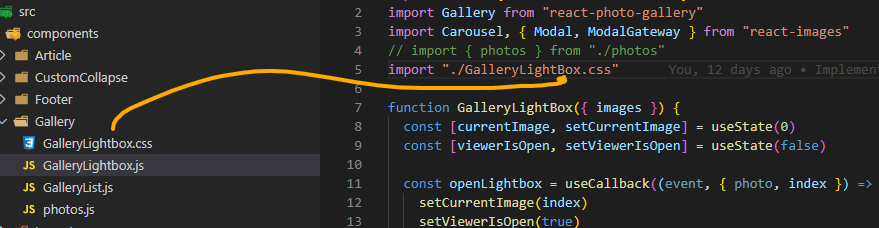
"Lightbox" vs "LightBox" for me! 😅
 birksy89
on 30 Dec 2019
birksy89
on 30 Dec 2019
Related issues
 benstr
·
3Comments
benstr
·
3Comments
 jimfilippou
·
3Comments
jimfilippou
·
3Comments
 Oppenheimer1
·
3Comments
Oppenheimer1
·
3Comments
 brandonmp
·
3Comments
brandonmp
·
3Comments
 ferMartz
·
3Comments
ferMartz
·
3Comments