Gatsby: spread operator with Set not working?
I am testing a very simple code
  let hol = new Set(['me','you','others'])
  console.log(hol)
  let hol2 = [...hol]
  console.log(hol2[1]) // should give 'you'
and this works as intended in for example in https://codepen.io/kuworking/pen/mZEWgV
But I'm trying this in a gatsbyjs webpage of mine, and I am not getting this, instead hol2 is not an array but a set within an array (seen in Chrome console)
[Set(3)]
0: Set(3)
size: (...)
__proto__: Set
[[Entries]]: Array(3)
0: "me"
1: "you"
2: "others"
length: 3
length: 1
__proto__: Array(0)
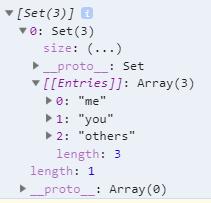
Why is this happening?
  gatsby 2.3.31
  System:
    OS: Windows 10
    CPU: (4) x64 Intel(R) Core(TM) i5-6600K CPU @ 3.50GHz
  Binaries:
    Yarn: 1.15.2 - C:\Program Files (x86)\Yarn\bin\yarn.CMD
    npm: 6.4.1 - C:\Program Files\nodejs\npm.CMD
 kuworking
All 6 comments
Hey @kuworking, in order to diagnose your issue, it would be super helpful to have a copy of your project's source code. If you haven't already, upload your project to a GitHub repo and post a link to it below. If you need help, check out this article on posting a reproducible test case.
Once you post your example, it would also be helpful to post the file/line number where your issue is occurring.
 superhawk610
on 18 Jun 2019
superhawk610
on 18 Jun 2019
@superhawk610 I've reproduced it here: https://github.com/circlingthesun/gatsby-set-bug
 circlingthesun
on 26 Jun 2019
circlingthesun
on 26 Jun 2019
It looks like the issue is caused by the default babel config having "loose" set to false on "@babel/preset-env".
circlingthesun
on 27 Jun 2019
You can work around this by adding the following to your gatsby-node.js:
exports.onCreateBabelConfig = ({ actions, stage }) => {
  actions.setBabelPlugin({
    name: `@babel/plugin-transform-spread`,
    options: {
      loose: false,
    },
  });
};
You can work around this by adding the following to your
gatsby-node.js:exports.onCreateBabelConfig = ({ actions, stage }) => { actions.setBabelPlugin({ name: `@babel/plugin-transform-spread`, options: { loose: false, }, }); };
It does work for me, thanks! :)
*I assume this won't be necessary once this issue is automatically closed and gatsby is updated
kuworking
on 4 Jul 2019
Fixed in [email protected]
 wardpeet
on 12 Jul 2019
wardpeet
on 12 Jul 2019
Related issues
 brandonmp
·
3Comments
brandonmp
·
3Comments
 signalwerk
·
3Comments
signalwerk
·
3Comments
 totsteps
·
3Comments
totsteps
·
3Comments
 dustinhorton
·
3Comments
dustinhorton
·
3Comments
 mikestopcontinues
·
3Comments
mikestopcontinues
·
3Comments