Summary
I'm new to JAMStack implementation and I've reached google search fatigue levels (not to mention information overload). So apologies for the noob question. Has someone implemented serverless setup where the system periodically builds the gatsby site and purge CDN cache automatically? I'm looking at either a CRON like system or a trigger via API (e.g. when source database gets X number of records updated, script triggers request for the server to build. I'm leaning towards _Amazon Web Services_ because of security requirements but happy with other suggestions.
Thank you in advance.
 younggrandpa
All 8 comments
Several hosts implement build hooks if youre looking for something like that. Basically tells the platform that content has changed and triggers a rebuild and push to CDN. Netlify has this, Im sure others are on this train as well.
 grantglidewell
on 12 Jun 2019
grantglidewell
on 12 Jun 2019
I automatically build my website with AWS code pipeline (I believe the first pipeline is free). I have a branch in my github repo called aws-deployment, whenever new development code is pushed to this branch it deploys to AWS (to S3). I will happily share my build config below.
In the root directory of my codebase, I have a file called buildspec.yml(note: indentation needs to be exact in yml files.) Replace all the waterproofjack.com bits with the name of your S3 bucket which should match the name of your website.
version: 0.2

phases:
  pre_build:
    commands:
      - npm install --production
      - npm run build
  build:
    commands:
      - aws s3 sync public/static s3://waterproofjack.com/static --metadata-directive REPLACE --cache-control max-age=2419200,public --delete
      - aws s3 sync public s3://waterproofjack.com --metadata-directive REPLACE --cache-control max-age=604800,public --exclude "/static/*" --delete
      - aws s3 cp s3://waterproofjack.com/index.html s3://waterproofjack.com/index.html --metadata-directive REPLACE --cache-control max-age=0,no-cache,no-store,must-revalidate --content-type text/html
  post_build:
    commands:
      - echo Build completed on `date`
      - echo Transferred to s3 production environment
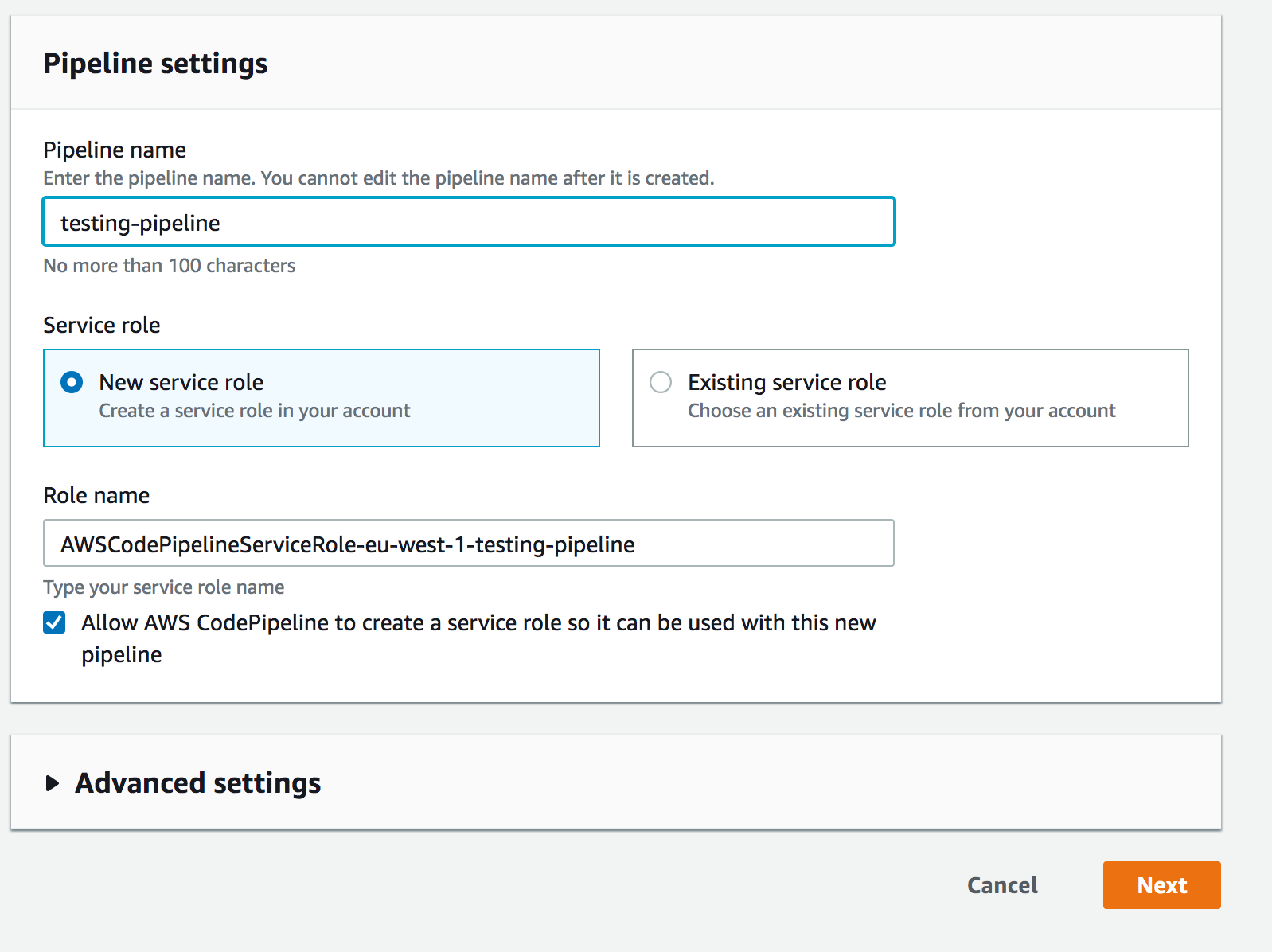
Name your pipeline. NEXT
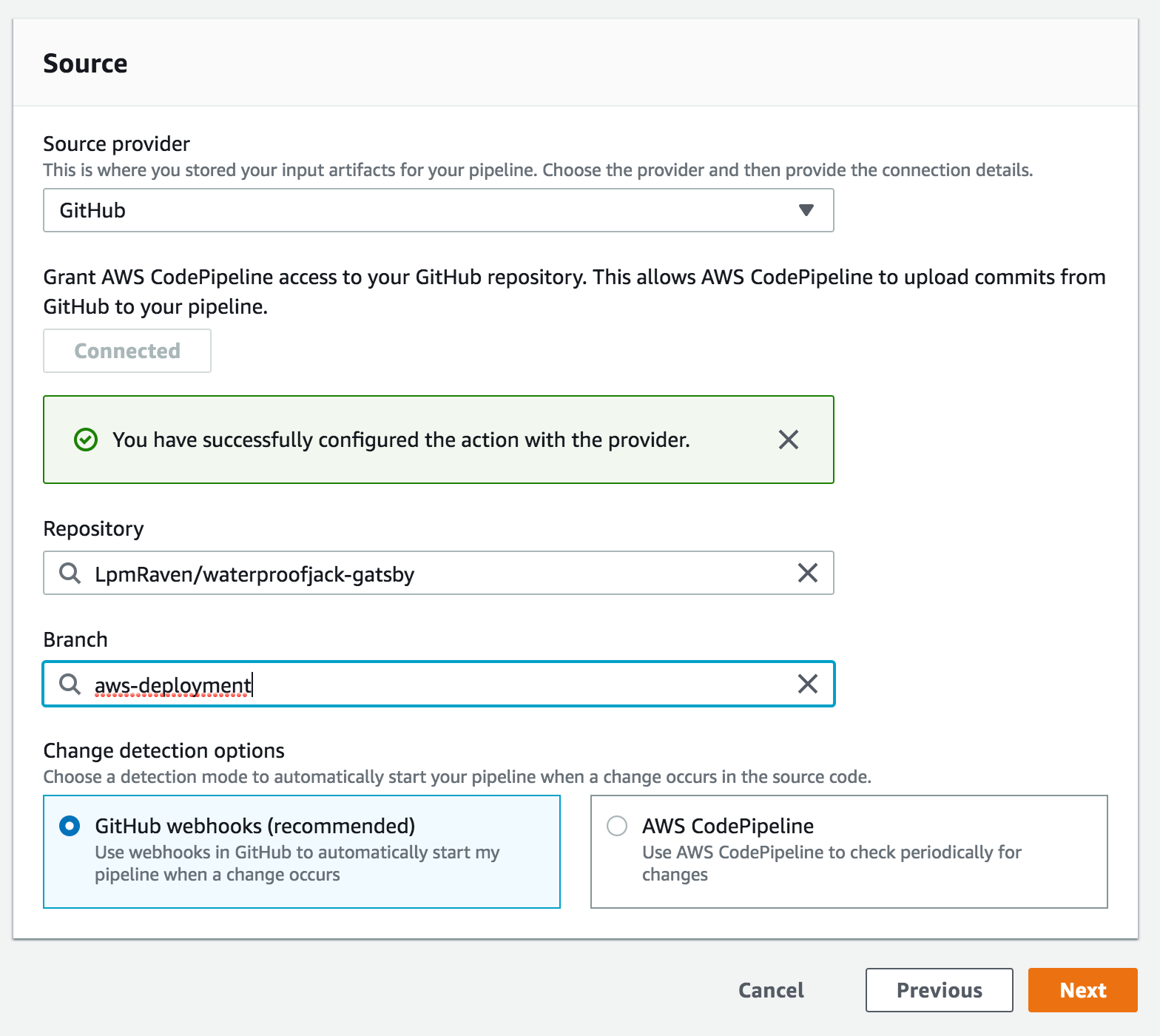
Select Github, connect, select your repo and the branch you wish to deploy from (I don't use master because in my professional career it has been problematic at times). NEXT
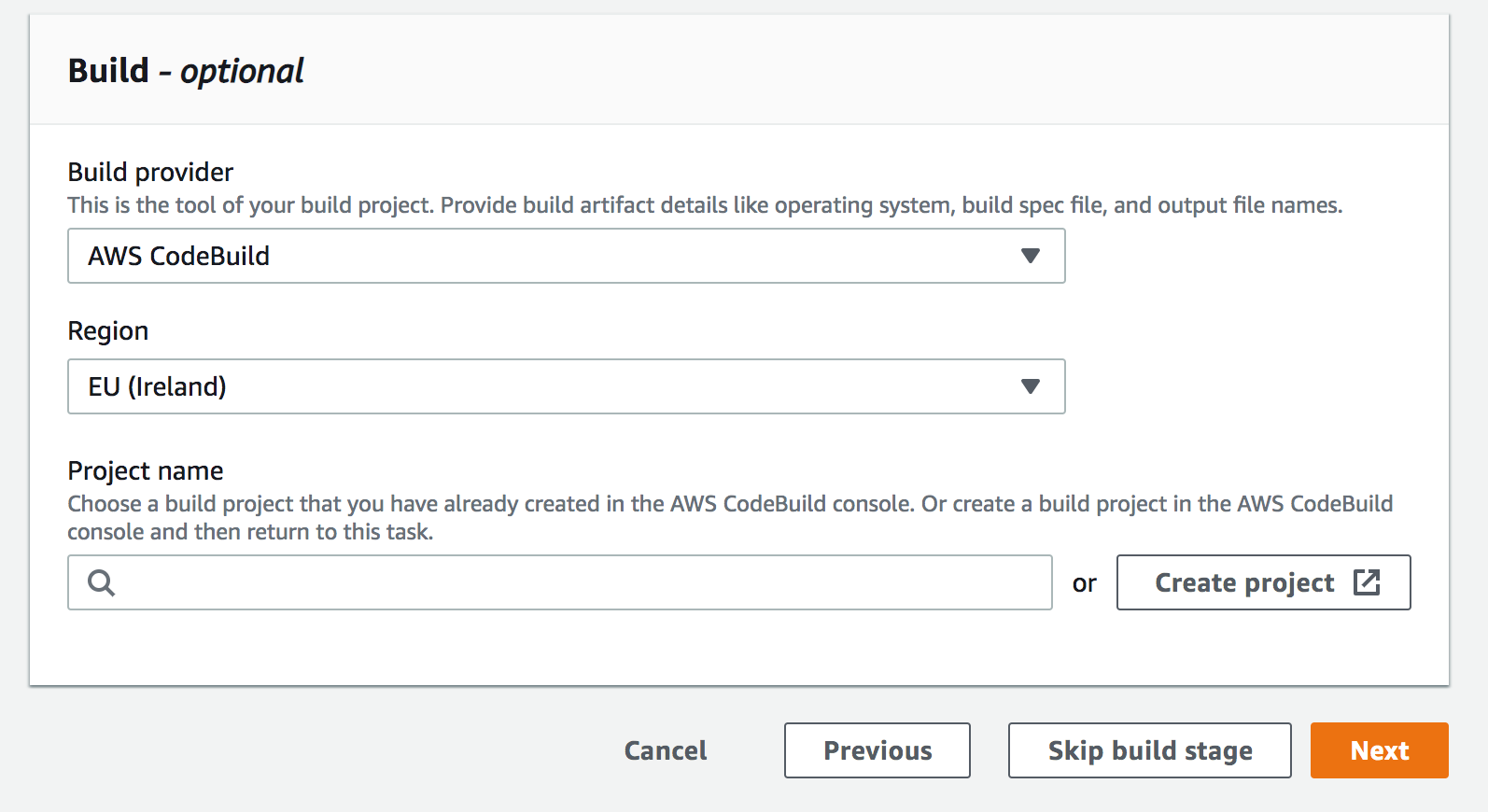
Select create project, this will make a new AWS codebuild. NEXT
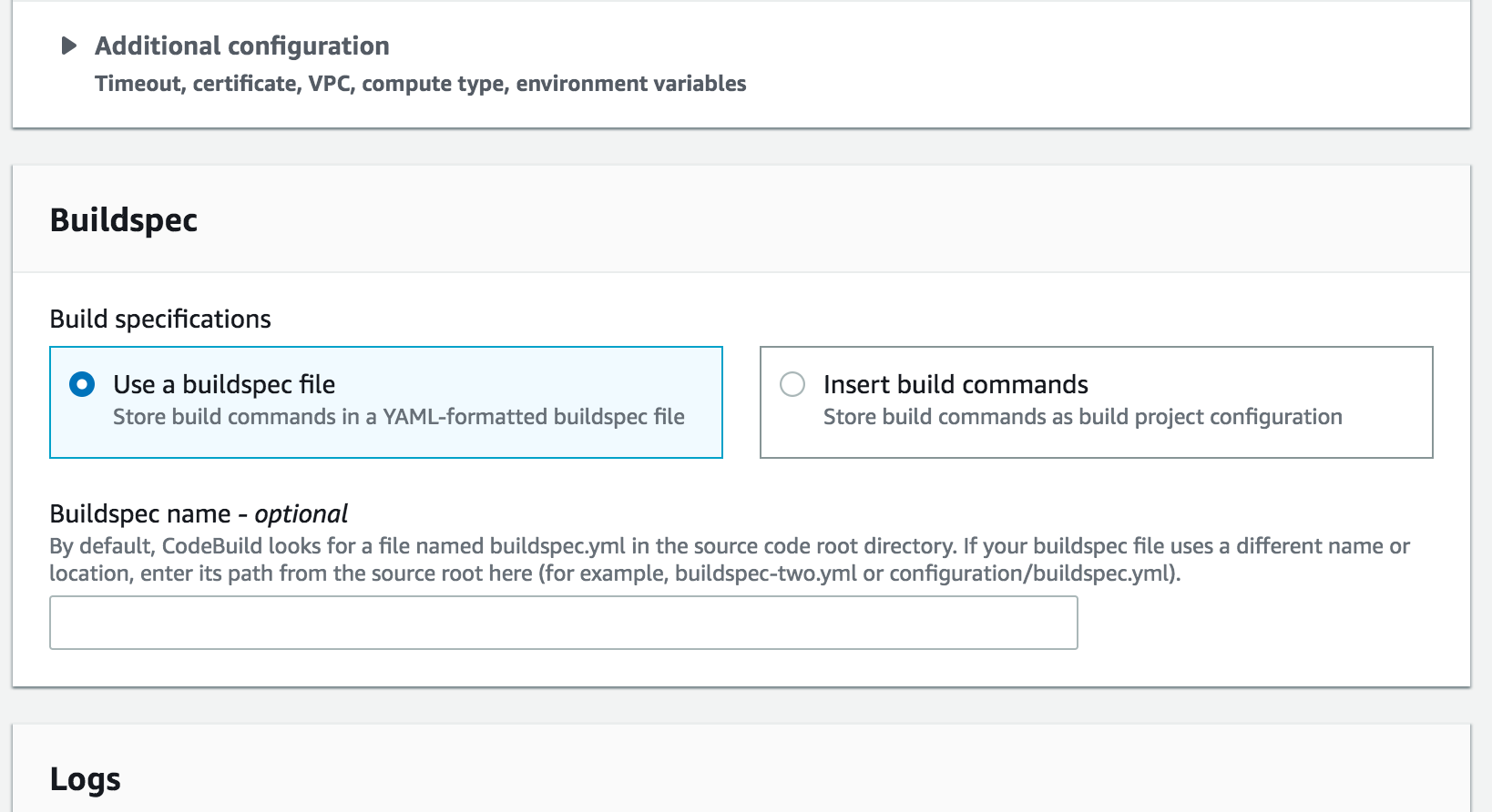
There is some config for the AWS codebuild step but it's all quite straight forward like, 'what kind of build server you want' (mine is Ubuntu). The important bit is to select 'use a buildspec file'. That will get the buildspec file I gave you above from the root directory. NEXT
Skip the deploy stage as the build stage has actually deployed it to S3 already. DONE
Hope that helps, let me know if you have any questions about it.
 LpmRaven
on 14 Jun 2019
LpmRaven
on 14 Jun 2019
@LpmRaven Cheers mate. So I'm guessing, if I only need content changes (e.g. 20 articles from different authors batched every midnight) my CMS will trigger the hook in Github or? Doable yeah? Thanks again.
Keep in mind that GitHub is never actually accessing your servers. It's up to your third-party integration to interact with deployment events. Multiple systems can listen for deployment events, and it's up to each of those systems to decide whether they're responsible for pushing the code out to your servers, building native code, etc. Source: Github Deployments
younggrandpa
on 17 Jun 2019
If I understand you correctly, you are trying to trigger the deployment once a day. Github webhooks will only trigger a deployment when 'code changes' are pushed to the aws-deployment branch. Your articles are not stored in GitHub and therefore it will not trigger a deployment.
In addition to the steps I gave above, in order to periodically trigger the pipeline, you will need to set up an AWS cloudwatch event rule to trigger the pipeline once a day. Follow the steps in this AWS documentation. Create a CloudWatch Events Rule That Schedules Your Pipeline to Start
LpmRaven
on 18 Jun 2019
@LpmRaven. Hi Liam. Thanks again.
If I understand you correctly, you are trying to trigger the deployment once a day. Github webhooks will only trigger a deployment when 'code changes' are pushed to the aws-deployment branch. Your articles are not stored in GitHub and therefore it will not trigger a deployment.
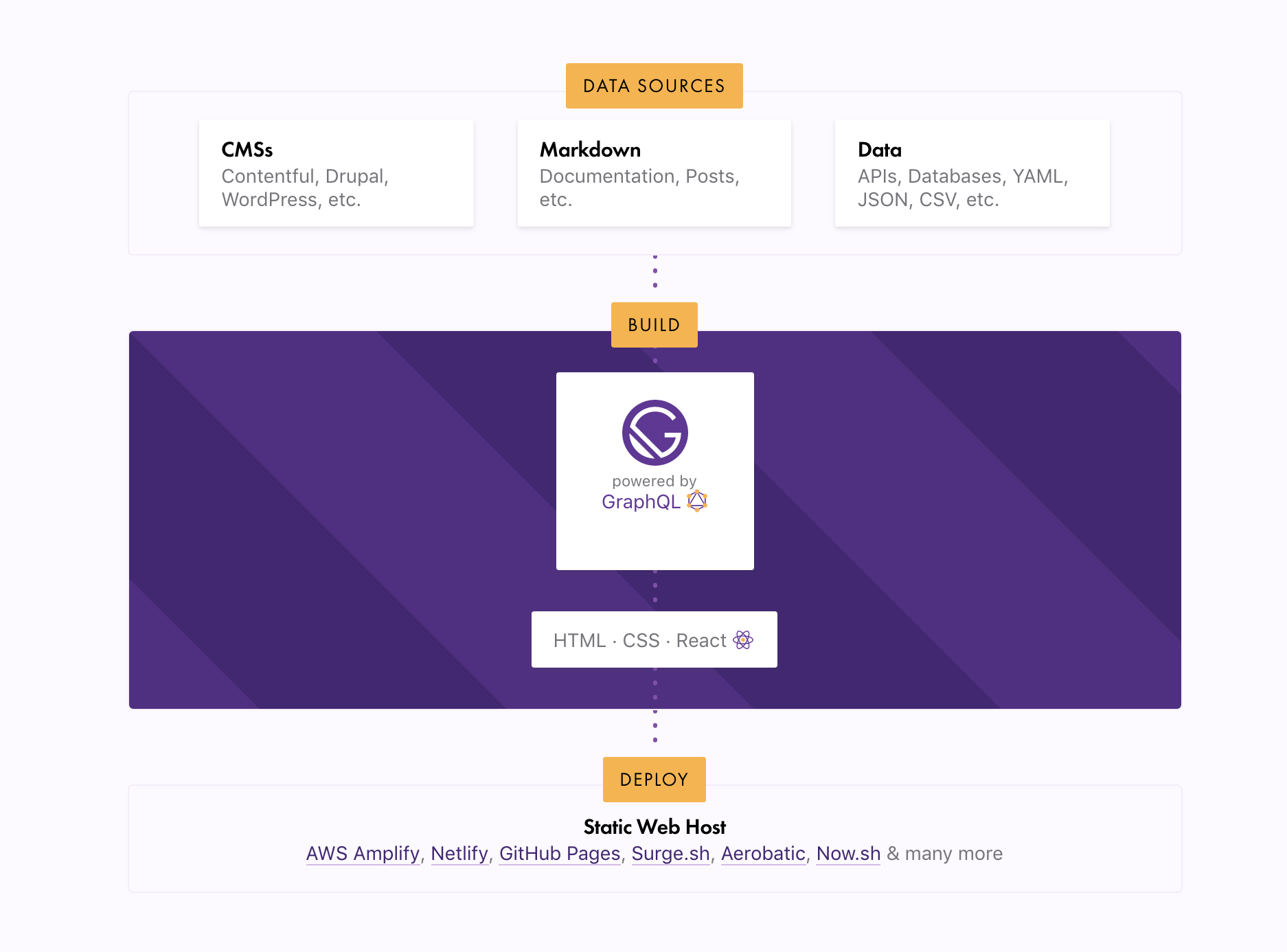
That's right. Following the flow below, the articles will come from a CMS/database so posts/articles. We want their respective pages static - thus batching them every midnight. If the pipeline (vis-a-vis with cloudwatch) will allow us to trigger the build on that basis alone that would be ideal. I found webhooks to in AWS Amplify but I prefer Code Pipeline. I'll try both and go from there. Cheers mate.
younggrandpa
on 18 Jun 2019
Hiya!
This issue has gone quiet. Spooky quiet. 👻
We get a lot of issues, so we currently close issues after 30 days of inactivity. It’s been at least 20 days since the last update here.
If we missed this issue or if you want to keep it open, please reply here. You can also add the label "not stale" to keep this issue open!
As a friendly reminder: the best way to see this issue, or any other, fixed is to open a Pull Request. Check out gatsby.dev/contributefor more information about opening PRs, triaging issues, and contributing!
Thanks for being a part of the Gatsby community! 💪💜
![gatsbot[bot] picture](https://avatars2.githubusercontent.com/in/12849?v=4&s=40) gatsbot[bot]
on 9 Jul 2019
gatsbot[bot]
on 9 Jul 2019
Hey again!
It’s been 30 days since anything happened on this issue, so our friendly neighborhood robot (that’s me!) is going to close it.
Please keep in mind that I’m only a robot, so if I’ve closed this issue in error, I’m HUMAN_EMOTION_SORRY. Please feel free to reopen this issue or create a new one if you need anything else.
As a friendly reminder: the best way to see this issue, or any other, fixed is to open a Pull Request. Check out gatsby.dev/contribute for more information about opening PRs, triaging issues, and contributing!
Thanks again for being part of the Gatsby community!
gatsbot[bot]
on 20 Jul 2019
Chiming in to make sure the updating the CDN cache has been spoken for. Here are two ways to ensure CloudFront serves the new S3 content.
Adding this command to invalidate the cache in your buildspec.yml would be a way to incorporate it into your deployments. Note the following: That's not my buildspec.yml (I'm presuming it works as expected), you'd have to update your CodeBuild role with access to CloudFront, maybe don't cache index.js anyways, and if you invalidate everything you want to cache with that command (i.e. with a top-level wildcard) you can do it 1000 times before being charged 0.5 cents per invalidation request per month.
 trycrmr
on 26 Jul 2019
trycrmr
on 26 Jul 2019
Related issues
 dustinhorton
·
3Comments
dustinhorton
·
3Comments
 jimfilippou
·
3Comments
jimfilippou
·
3Comments
 totsteps
·
3Comments
totsteps
·
3Comments
 brandonmp
·
3Comments
brandonmp
·
3Comments
 timbrandin
·
3Comments
timbrandin
·
3Comments
Most helpful comment
I automatically build my website with AWS code pipeline (I believe the first pipeline is free). I have a branch in my github repo called aws-deployment, whenever new development code is pushed to this branch it deploys to AWS (to S3). I will happily share my build config below.
In the root directory of my codebase, I have a file called
buildspec.yml(note: indentation needs to be exact in yml files.) Replace all thewaterproofjack.combits with the name of your S3 bucket which should match the name of your website.Name your pipeline. NEXT

Select Github, connect, select your repo and the branch you wish to deploy from (I don't use master because in my professional career it has been problematic at times). NEXT

Select create project, this will make a new AWS codebuild. NEXT

There is some config for the AWS codebuild step but it's all quite straight forward like, 'what kind of build server you want' (mine is Ubuntu). The important bit is to select 'use a buildspec file'. That will get the buildspec file I gave you above from the root directory. NEXT

Skip the deploy stage as the build stage has actually deployed it to S3 already. DONE
Hope that helps, let me know if you have any questions about it.