Gatsby: Style in production not same as development using Rebass
Description
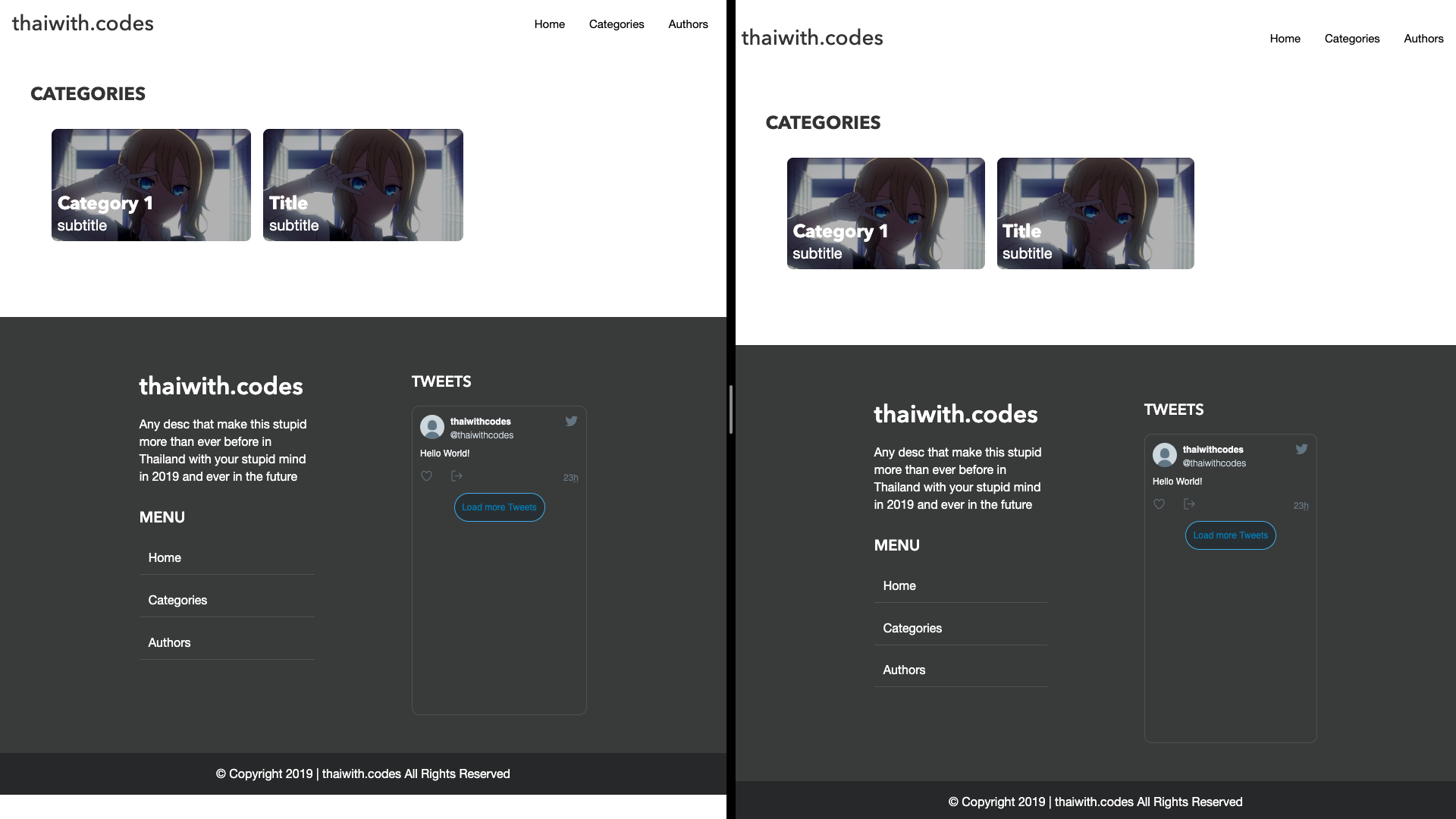
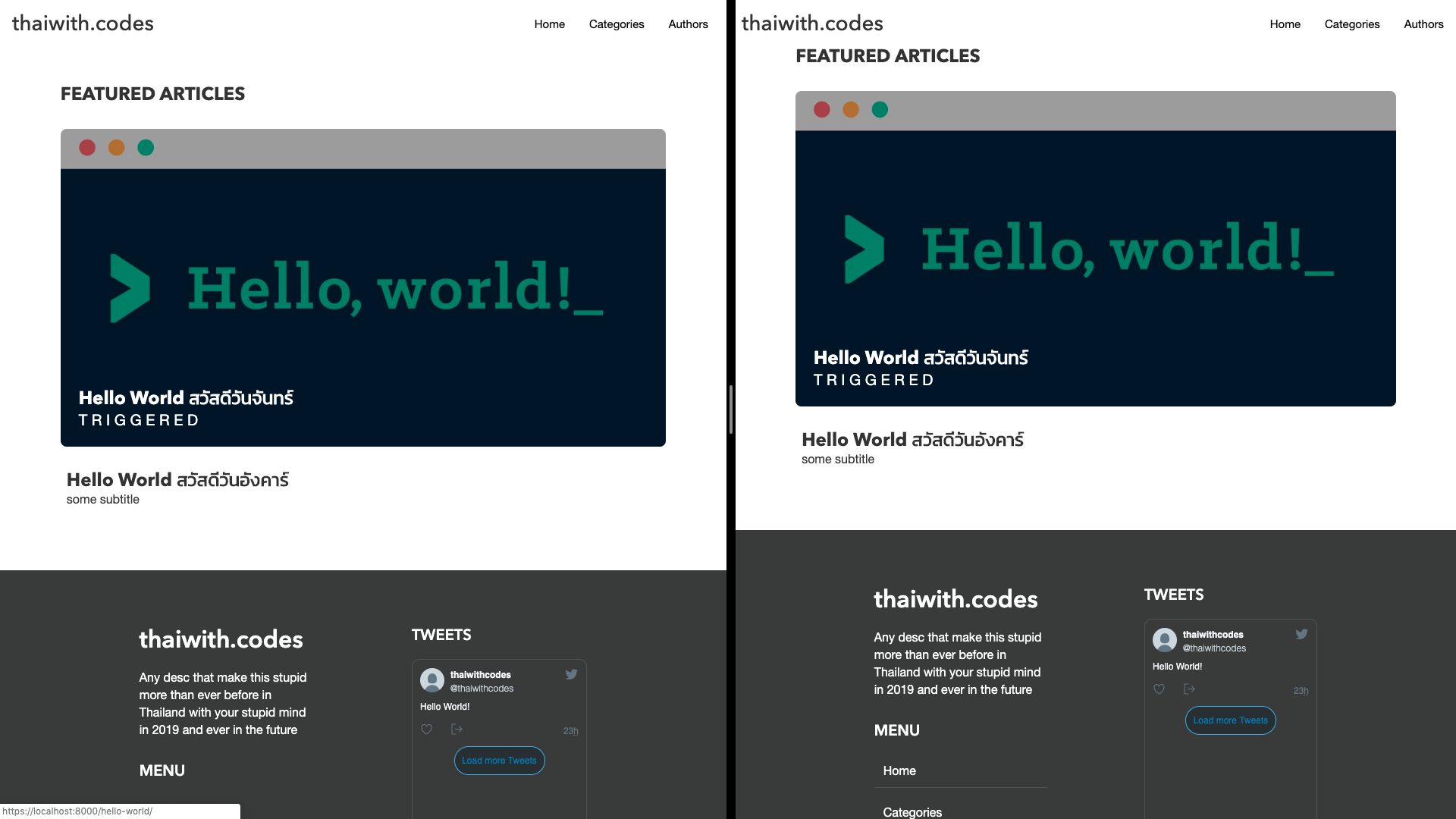
I'm using Rebass for UI with styled-component I'm facing style in development and production not the same as screen short I attach below in the left is a development which has correct style but on the right gatsby seem put class that has margin-top on the wrong element that's make navbar has margin-top
Categories Page
Home Page
Steps to reproduce
I'm using Netlify to deploy for this site just normal build and this happens nothing special in build command.
Expected result
Navbar not have margin in categories page and on home page "Featured Articles" Should have margin-top
Actual result
As screenshots above
Environment
System:
OS: macOS 10.14.4
CPU: (12) x64 Intel(R) Core(TM) i7-8850H CPU @ 2.60GHz
Shell: 3.0.2 - /usr/local/bin/fish
Binaries:
Node: 10.13.0 - ~/.nvm/versions/node/v10.13.0/bin/node
Yarn: 1.15.2 - /usr/local/bin/yarn
npm: 6.4.1 - ~/.nvm/versions/node/v10.13.0/bin/npm
Languages:
Python: 3.7.2 - /Users/wiput/.pyenv/versions/3.7.2/bin/python
Browsers:
Chrome: 74.0.3729.131
Firefox: 64.0.2
Safari: 12.1
npmPackages:
gatsby: ^2.3.16 => 2.4.2
gatsby-image: ^2.0.37 => 2.0.41
gatsby-plugin-feed: ^2.1.0 => 2.2.0
gatsby-plugin-google-analytics: ^2.0.18 => 2.0.19
gatsby-plugin-google-fonts: ^0.0.4 => 0.0.4
gatsby-plugin-manifest: ^2.0.28 => 2.1.1
gatsby-plugin-netlify: ^2.0.16 => 2.0.16
gatsby-plugin-netlify-cache: ^1.1.0 => 1.1.0
gatsby-plugin-offline: ^2.0.25 => 2.1.0
gatsby-plugin-react-helmet: ^3.0.12 => 3.0.12
gatsby-plugin-sharp: ^2.0.36 => 2.0.36
gatsby-plugin-styled-components: ^3.0.7 => 3.0.7
gatsby-plugin-tslint: ^0.0.2 => 0.0.2
gatsby-plugin-typescript: ^2.0.12 => 2.0.13
gatsby-plugin-typography: ^2.2.12 => 2.2.13
gatsby-remark-copy-linked-files: ^2.0.11 => 2.0.12
gatsby-remark-images: ^3.0.11 => 3.0.11
gatsby-remark-prismjs: ^3.2.8 => 3.2.9
gatsby-remark-responsive-iframe: ^2.1.1 => 2.1.1
gatsby-remark-smartypants: ^2.0.9 => 2.0.9
gatsby-source-filesystem: ^2.0.29 => 2.0.33
gatsby-transformer-remark: ^2.3.8 => 2.3.12
gatsby-transformer-sharp: ^2.1.17 => 2.1.19
 wiput1999
All 16 comments
Solved it's seem like issue from Rebass.js
wiput1999
on 10 May 2019
@wiput1999 what was the solution? I'm having a similar issue.
 iammatthias
on 10 May 2019
iammatthias
on 10 May 2019
@iammatthias Which UI Library are you using?
wiput1999
on 10 May 2019
I'm using Rebass.js. Experience a similar render issue.
Expected

Result

iammatthias
on 10 May 2019
@iammatthias Same here... We will wait for someone know about this to answer 😄
wiput1999
on 10 May 2019
I just created an issue on Rebass hope we will get an answer.
https://github.com/rebassjs/rebass/issues/587
 rayriffy
on 10 May 2019
rayriffy
on 10 May 2019
This can occur when global styles are used and/or when styles are expected to load in a specific order. Since develop mode uses hot reloading and does not do server-side-rendering, insertion order is sometimes different than in production.
Which is not to say that's for sure what is causing this, but it is worth looking into if you're trying to isolate the cause.
 coreyward
on 10 May 2019
coreyward
on 10 May 2019
@coreyward Interesting. I recently split my CSS reset out into it's own global style file, in addition to my main globals.js. I'll take a closer look at my CSS tonight.
iammatthias
on 10 May 2019
@coreyward Any method to solve this problem?
wiput1999
on 10 May 2019
@wiput1999 I've never used Rebass, alas. When I'm using Emotion I've found that the default webpack import (e.g. import "some.css") will cause it to be appended to the <head> after the Emotion <style> tags when navigating, so I instead use the Global component provided by Emotion:
import { Global } from "@emotion/core"
import baseStyles from "whatever"

export default () =>
  <>
    <Global styles={baseStyles} />
    <p>Hello, world</p>
  </>
Figured out what the issue was for me:
This snippet:
import Layout from './src/components/general/Layout'

export const wrapPageElement = ({ element, props }) => {
  return <Layout {...props}>{element}</Layout>
}
Got removed from gatsby-browser and gatsby-ssr. Added it back in, and all is well.
iammatthias
on 10 May 2019
For mine it make UI more glitchy. So, I gave up wrapping element inside gatsby-browser and gatsby-ssr then everything rendered as I expected!
So, it's not Rebass fault then.
PS. For preventing confusion I make this site together with @wiput1999
rayriffy
on 11 May 2019
Here's all the preview I tried
rayriffy
on 11 May 2019
When adding the Layout direct to each page, it's possible to end up duplicating your content: https://github.com/gatsbyjs/gatsby/issues/7466
iammatthias
on 11 May 2019
Hiya!
This issue has gone quiet. Spooky quiet. 👻
We get a lot of issues, so we currently close issues after 30 days of inactivity. It’s been at least 20 days since the last update here.
If we missed this issue or if you want to keep it open, please reply here. You can also add the label "not stale" to keep this issue open!
As a friendly reminder: the best way to see this issue, or any other, fixed is to open a Pull Request. Check out gatsby.dev/contributefor more information about opening PRs, triaging issues, and contributing!
Thanks for being a part of the Gatsby community! 💪💜
![gatsbot[bot] picture](https://avatars2.githubusercontent.com/in/12849?v=4&s=40) gatsbot[bot]
on 1 Jun 2019
gatsbot[bot]
on 1 Jun 2019
It seems stable right now, Thank you, everyone, for help.
wiput1999
on 1 Jun 2019
Related issues
 brandonmp
·
3Comments
brandonmp
·
3Comments
 kalinchernev
·
3Comments
kalinchernev
·
3Comments
 andykais
·
3Comments
andykais
·
3Comments
 mikestopcontinues
·
3Comments
mikestopcontinues
·
3Comments
 benstr
·
3Comments
benstr
·
3Comments