Gatsby: [gatsby-plugin-sharp] Sharp 0.22 needed for node 12
Description
Newest version of node 12 has some api changes that require a newer version of sharp.
See: https://github.com/lovell/sharp/issues/1668
Steps to reproduce
Try installing gatsby-plugin-sharp with node 12
Expected result
Build should succeed.
Actual result
Build fails.
Environment
$ ./node_modules/.bin/gatsby info --clipboard

  System:
    OS: Windows 10
    CPU: (4) x64 Intel(R) Core(TM) i5-6300U CPU @ 2.40GHz
  Binaries:
    npm: 6.9.0 - C:\Program Files\nodejs\npm.CMD
  Browsers:
    Edge: 44.17763.1.0
  npmPackages:
    gatsby: ^2.0.63 => 2.0.63
    gatsby-cli: ^2.4.6 => 2.4.6
    gatsby-image: ^2.0.22 => 2.0.22
    gatsby-plugin-less: ^2.0.8 => 2.0.8
    gatsby-plugin-react-helmet: ^3.0.4 => 3.0.4
    gatsby-plugin-s3: ^0.2.5 => 0.2.5
    gatsby-plugin-sharp: ^2.0.15 => 2.0.35
    gatsby-plugin-sitemap: ^2.0.3 => 2.0.3
    gatsby-plugin-styled-components: ^3.0.4 => 3.0.4
    gatsby-source-filesystem: ^2.0.11 => 2.0.11
    gatsby-transformer-sharp: ^2.1.9 => 2.1.9

error The system cannot find the path specified.
 marknsikora
All 7 comments
@marknsikora It looks like latest release of Sharp, released a few hours ago fixes this issue. So, Sharp v. 0.22.1 is compatible with Node 12.
 eclectic-coding
on 26 Apr 2019
eclectic-coding
on 26 Apr 2019
We do need to bump sharp ( https://github.com/gatsbyjs/gatsby/blob/1443d4c6fccaf5f9700a1d020f283537f3a857d2/packages/gatsby-plugin-sharp/package.json#L23 ) in our packages as we won't install 0.22.1 automatically.
 pieh
on 26 Apr 2019
pieh
on 26 Apr 2019
@pieh I could bump the package.json but would not know how to test if there are any compatibility issues with the new version of Sharp.
Let me know what you need.
eclectic-coding
on 26 Apr 2019
@polishedwp Changelog for sharp looks like it was just a version bump of the underlying library, no mention of any backwards compatibility issues
marknsikora
on 26 Apr 2019
There seems to be issue if some packages will use sharp 0.22 version and other ones will use 0.21, so this is not easy thing to fix - see comments in https://github.com/gatsbyjs/gatsby/pull/13646. In the meantime, you potentially could workaround this by using yarn instead of npm and make use of yarn resolutions to force sharp to install 0.22.1:
In your package.json
"resolutions": {
  "sharp": "0.22.1",
}
@pieh Thanks a lot! This worked. It is usable at least as a temporary workaround.
 alexdevero
on 27 Apr 2019
alexdevero
on 27 Apr 2019
To confirm, today I testing Node v.12 on Ubuntu 18.10 (Mac/Parallels).
If I use the recommendation of the resolutions field in the package.json file I can install the default starter (with modified package.json). I think after this issue is resolved and merged, it will fix the Node v.12 issues.
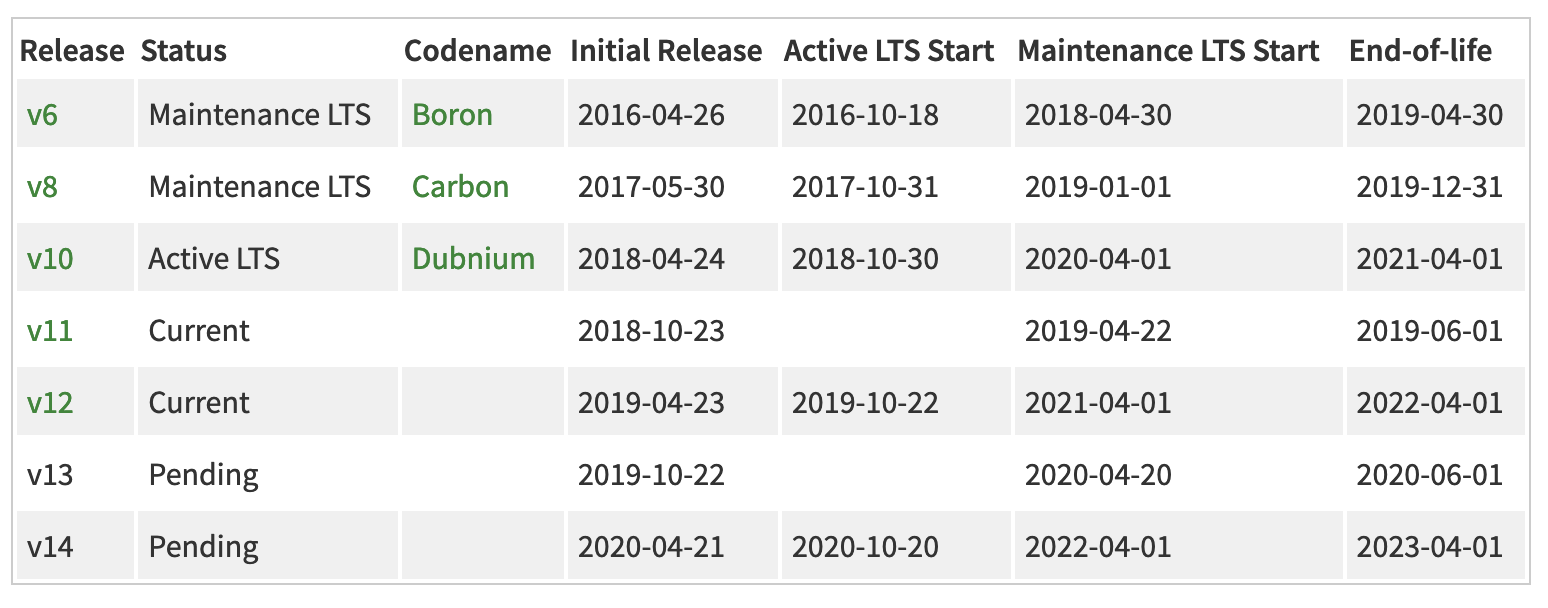
Node v.12 moves to LTS status in October, so there is some time to resolve.
eclectic-coding
on 28 Apr 2019
Related issues
 brandonmp
·
3Comments
brandonmp
·
3Comments
 rossPatton
·
3Comments
rossPatton
·
3Comments
 theduke
·
3Comments
theduke
·
3Comments
 dustinhorton
·
3Comments
dustinhorton
·
3Comments
 hobochild
·
3Comments
hobochild
·
3Comments
Most helpful comment
There seems to be issue if some packages will use sharp 0.22 version and other ones will use 0.21, so this is not easy thing to fix - see comments in https://github.com/gatsbyjs/gatsby/pull/13646. In the meantime, you potentially could workaround this by using
yarninstead ofnpmand make use ofyarn resolutionsto forcesharpto install 0.22.1:In your package.json