Gatsby: [docs] Breadcrumbs for all docs pages
Summary
I am thinking it would be beneficial to have a component at the top of each docs page to show the hierarchy of where the current page is in the docs.
Basic example
For instance, the Working With Images in Gatsby page could have a breadcrumbs of
Docs / Guides / Images, Files, and Video / Working With Images in Gatsby
And then you can click any point in the chain to walk up the hierarchy.
Acceptance criteria
Acceptance criteria by @marcysutton (added by @prestonso)
- As a user with a larger viewport, I should encounter a link “home” to get a clear path to the homepage.
- As a user, I should encounter links in the breadcrumb list for all pages in the docs hierarchy except the current one, which is in plain text.
- As a user, I should see breadcrumbs displaying my current location in the site’s hierarchical structure, not my browser session history.
- As a user with a smaller viewport, I should see only the last item in the breadcrumb trail (the link that is the parent of the current page in view)
- As a sighted or low-vision user, I should see links and text with adequate color contrast.
- As a screen reader user, I should hear the widget announced as a nav landmark with a unique label to identify it from other landmarks.
- This can be done with
<nav aria-label=”breadcrumb”>
- This can be done with
- As a screen reader user, inside the widget I should find useful links and current item text announced without repetitive separator characters.
- Separators like
>can be marked as presentational with<span role=”presentation”>or similar.
- Separators like
 lannonbr
All 20 comments
Great intuition here! We've talked about it this week, actually. I think it could fit nicely into #6896. I saw an example from @calcsam from Django where they use a "you are here" section in the sidebar, something to consider! https://docs.djangoproject.com/en/2.2/howto/outputting-csv/
 marcysutton
on 19 Apr 2019
marcysutton
on 19 Apr 2019
Yeah I think these two issues could go hand in hand where mine is for the hierarchy of the global docs while Shannon's will dig into the local hierarchy of an individual page
lannonbr
on 19 Apr 2019
This would be great, particularly on mobile where the sidebar is collapsed it's currently sometimes quite hard to get a feel for where you are in the site structure.
 andrewfairlie
on 19 Apr 2019
andrewfairlie
on 19 Apr 2019
Yeah, @fk and I talked about breadcrumb trails maybe a year ago, too and I'd love to pair w/ @lannonbr and @marcysutton on this!
I think breadcrumbs are the logical choice for this need, though the Django method could work (I haven't seen people use that very often so not sure!). Here is a design guide about breadcrumbs that I like. https://www.nngroup.com/articles/breadcrumbs/
A few key principles:
- Start the trail with "home" unless "home" exists in the site navigation. Do you guys think Gatsby's logo is clear enough "home" link? I think so, not sure without some usability testing
- All items in the breadcrumb list ought to be links except the name of the current page. Luckily, the Gatsby doc guide categories are actually pages, so those will be part of the breadcrumb trail!
- Breadcrumbs should display the current location in the site’s hierarchical structure, not the session history.
- Mobile design could show just the last item in the breadcrumb trail (the link that is the parent of the current page in view). OR, this just occurred to me, we could put the Django idea at the bottom of the page on mobile. I think the top is possibly better b/c it's more visible. Not sure. @andrewfairlie do you remember why you wanted to get a feel for where you were on mobile?
There are some fun, fairly minor design choices to make here too. For example, how do we show that the items in the breadcrumb are links? Do we make the name of the current page look a little different than the rest of the items to show that it is the current page?
 shannonbux
on 19 Apr 2019
shannonbux
on 19 Apr 2019
So after a session with @shannonbux and @marcysutton tonight, we got some ideas for this feature and made some mockups for what we think would possibly work when displayed on the sites:
We are thinking that in a large layout, we can display a breadcrumbs component above the top heading and see a hierarchy of where someone is on the site and then have the current page be bolded. As described earlier by Shannon, the nodes up the docs tree are also pages so each section would be a link as well to climb up the tree
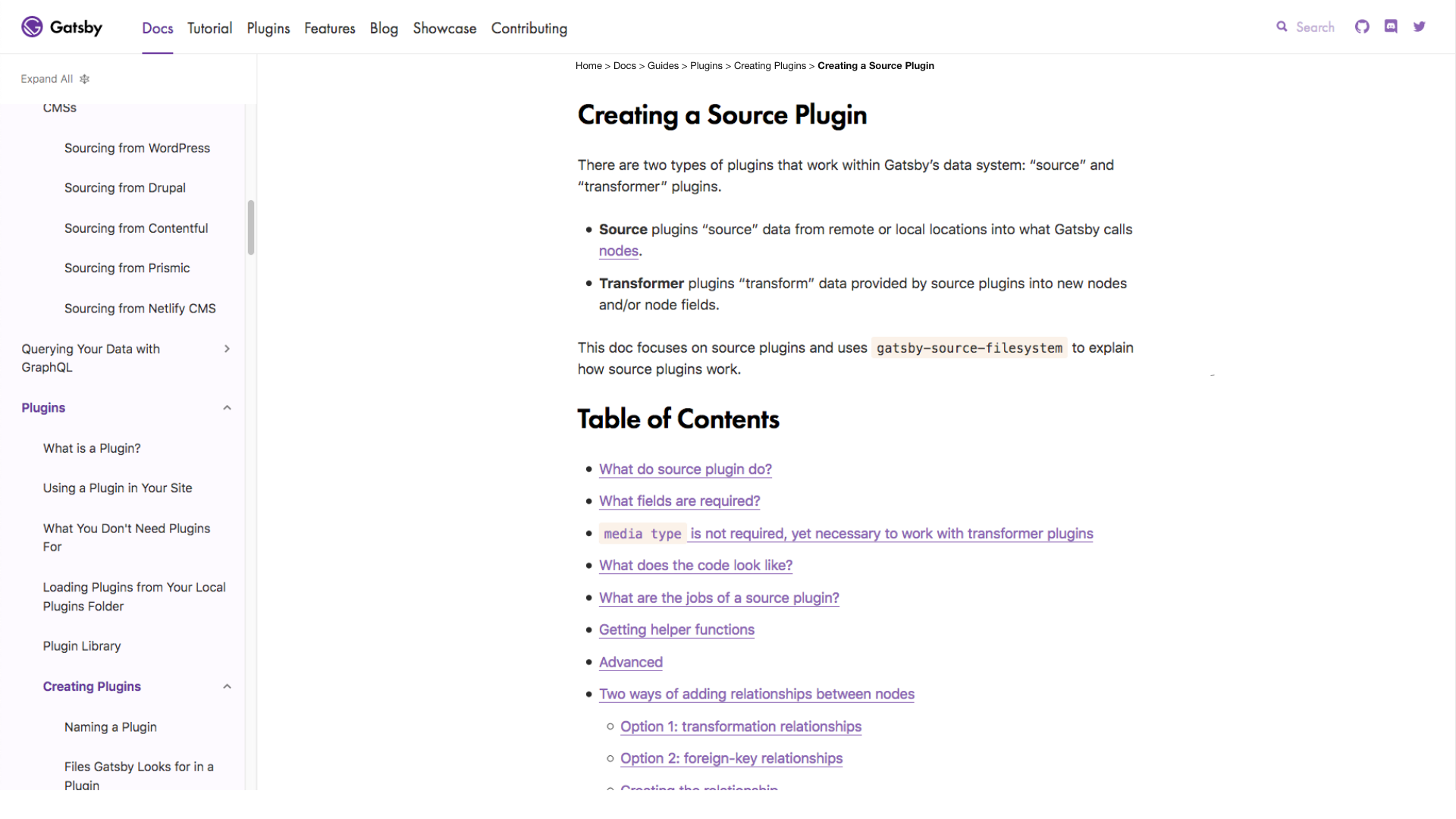
In certain circumstances though, the list of pages can get quite long so we could then truncate the top levels and leave just a few displayed possibly like below:

Finally, in a mobile layout, we could possibly display just a link to click that would walk up one layer like this:
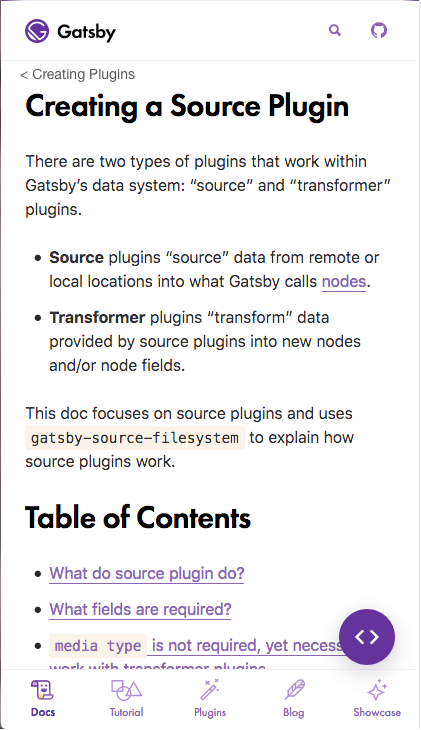
@fk Do you have any guidance on these ideas?
lannonbr
on 24 Apr 2019
Do you have any guidance on these ideas?
💯 to everything here (too 😃) — great work!
As Shannon wrote, the only thing I'm torn about is if we really need "Home":
Start the trail with "home" unless "home" exists in the site navigation. Do you guys think Gatsby's logo is clear enough "home" link? I think so, not sure without some usability testing
 fk
on 24 Apr 2019
fk
on 24 Apr 2019
just a side note: when i jump to a doc then in the doc hierarchy is bolded.
but i miss here that the bolded selected doc is also moved to be visible area. i always need to scroll down to find the bolded text
 muescha
on 24 Apr 2019
muescha
on 24 Apr 2019
@muescha I agree with your comment but I do think it is a separate topic so I moved it to another issue
lannonbr
on 24 Apr 2019
Hey @lannonbr, how's it going with this initiative?
marcysutton
on 12 May 2019
@marcysutton I actually have been on vacation this past week but will likely get to work on it when I get back
lannonbr
on 12 May 2019
@lannonbr cool, enjoy your vacation! 🌴 🍹
marcysutton
on 14 May 2019
Some notes and user stories/acceptance criteria from internal MDX component scoping:
Breadcrumbs provide another way for users to discern their location in the docs. By creating a reusable component for breadcrumbs, a hierarchy of links would be automatically added to every page and provide immense value to users. The component could handle its own responsive styling to be self-contained.
Acceptance Criteria
- As a user with a larger viewport, I should encounter a link “home” to get a clear path to the homepage.
- As a user, I should encounter links in the breadcrumb list for all pages in the docs hierarchy except the current one, which is in plain text.
- As a user, I should see breadcrumbs displaying my current location in the site’s hierarchical structure, not my browser session history.
- As a user with a smaller viewport, I should see only the last item in the breadcrumb trail (the link that is the parent of the current page in view)
- As a sighted or low-vision user, I should see links and text with adequate color contrast.
- As a screen reader user, I should hear the widget announced as a nav landmark with a unique label to identify it from other landmarks.
- This can be done with
<nav aria-label=”breadcrumb”>
- This can be done with
- As a screen reader user, inside the widget I should find useful links and current item text announced without repetitive separator characters.
- Separators like
>can be marked as presentational with<span role=”presentation”>or similar.
- Separators like
marcysutton
on 24 May 2019
Hey @lannonbr, are you back from vacation now? Any update on the breadcrumb component?
marcysutton
on 7 Jun 2019
Yeah, so I have not sat down to start coding it out, but basically what I will want to do is walk down the docs tree structure and get the links and titles.
The sidebar already does this so I may either use some code from there to make a similar experience but for the breadcrumbs.
lannonbr
on 7 Jun 2019
I've been working on some updates to the /features page and was thinking this would be really helpful for what we're adding. Any update on this @lannonbr? I feel like this'll help a lot!
 gillkyle
on 22 Jun 2019
gillkyle
on 22 Jun 2019
So I actually am going to unassign myself off this issue as I haven't had enough time to work on this issue, but I do still think it will be useful when someone implements this.
lannonbr
on 23 Jun 2019
I would love to pair with someone to work on this...
 mikeattara
on 24 Jun 2019
mikeattara
on 24 Jun 2019
Hey @mikeattara I'd love to pair with you on this if you want! Shoot me an email and we can set something up 🙂
gillkyle
on 24 Jun 2019
@gillkyle I've sent you an email. Thanks and look forward to working with you.
mikeattara
on 24 Jun 2019
This was just merged in #15165 🎉. Closing
lannonbr
on 11 Jul 2019
Related issues
 dustinhorton
·
3Comments
dustinhorton
·
3Comments
 timbrandin
·
3Comments
timbrandin
·
3Comments
 jimfilippou
·
3Comments
jimfilippou
·
3Comments
 totsteps
·
3Comments
totsteps
·
3Comments
 kalinchernev
·
3Comments
kalinchernev
·
3Comments
Most helpful comment
Yeah, so I have not sat down to start coding it out, but basically what I will want to do is walk down the docs tree structure and get the links and titles.
The sidebar already does this so I may either use some code from there to make a similar experience but for the breadcrumbs.