Gatsby: Gatsby does not recognize Contentful 404 page
Description
According to the docs, creating a page whose path matches the regex /404* should be recognized as the 404 page. However, the development 404 page says no custom 404 page was detected even though a page with such a path exists.
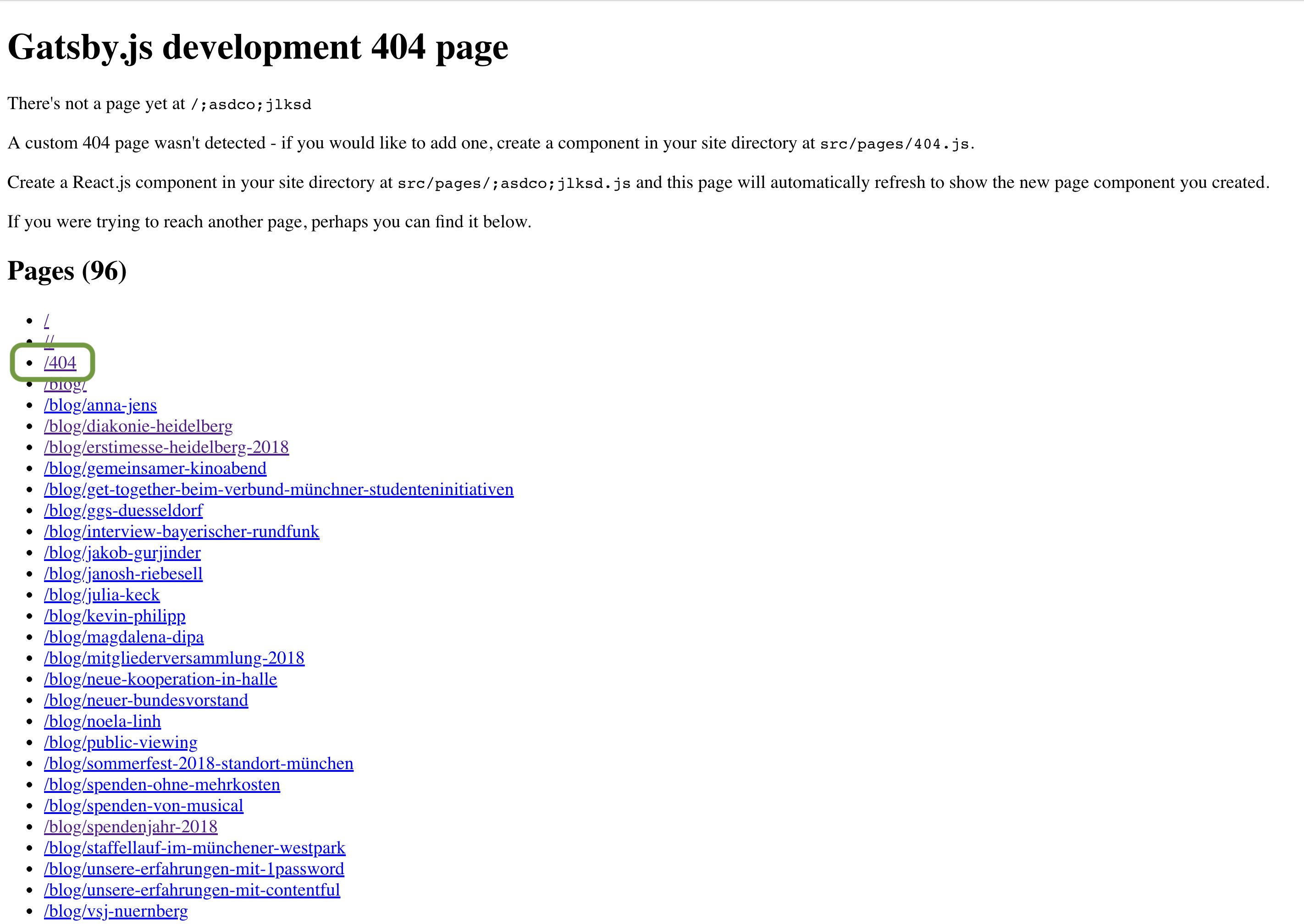
Steps to reproduce
Create a page in Contentful with slug /404.
Expected result
Show button to preview custom 404 page.
 janosh
All 13 comments
Do you still have the src/pages/404.js file?
 floriangaechter
on 2 Apr 2019
floriangaechter
on 2 Apr 2019
Sorry, strike that – I just saw in your error message that you deleted it…
I had to delete the cache folder for Gatsby to recognize the 404 page coming from Contentful when I just tried it out.
floriangaechter
on 2 Apr 2019
@floriangaechter I don't have a src/pages/404.js file? I deleted that file since it essentially just reproduces src/template/page.js. With src/pages/404.js everything works as expected, without it, Gatsby doesn't seem to pick up on the Contentful page even though it matches the path prescribed by the docs.
janosh
on 2 Apr 2019
Did you try deleting the .cache folder? I had issues with the 404 page coming from Contentful, but once I deleted the .cache folder it worked…
floriangaechter
on 3 Apr 2019
@floriangaechter I did attempt gatsby clean && gatsby develop multiple times without success. Do you have a link to the repo with the Contentful 404 page? Maybe I can find the problem by comparing with your code.
janosh
on 3 Apr 2019
Ok, I just tried to recreate your issue and noticed that Gatsby actually creates a 404 page from the Contentful source. If you have a look in your public directory you'll see that Gatsby created a 404/index.html file but the actual 404 page is expected to be at /404.html (which doesn't exist if you deleted the src/pages/404.js file).
I guess you'd have to figure out a way to make Gatsby create the /404.html file instead of the /404/index.html file. Or you stick with the static 404 page and pull in the content via page query.
floriangaechter
on 3 Apr 2019
@gatsbyjs/core Is there a way to change the path of pages (not the URL, but the location in the public folder)? I couldn't find anything in the node APIs nor in the docs for creating and modifying pages.
Or would you consider adding full support for custom 404 pages at public/404/index.html?
janosh
on 3 Apr 2019
This is most likely a bug if we don't support it, let me try to reproduce
 pieh
on 3 Apr 2019
pieh
on 3 Apr 2019
I definitely can reproduce. This might not be straight forward to fix, but in meantime if you can force path for 404 page to be /404.html (not /404) - it works
const path = require(`path`)
exports.createPages = ({ actions }) => {
  actions.createPage({
    path: `/404.html`,
    component: path.join(process.cwd(), "src/templates/test.js"),
  })
}
@pieh Thanks a lot for looking into this! Setting the path to /404.html is certainly a good workaround in the meantime. Out of curiosity, why do you think the fix will be difficult?
janosh
on 3 Apr 2019
I was thinking we will have to change hardcoded /404.html in bunch of places, but after some digging I figured that we can adjust check in https://github.com/gatsbyjs/gatsby/blob/master/packages/gatsby/src/internal-plugins/prod-404/gatsby-node.js
to not match /404/ exactly, but rather to use some regexp matching for it.
We still want to actually create 404.html file - because as mentioned in the linked file - many static hosting providers do handle /404.html file as 404 page (so it works not only in client navigation - but also for server rewrites)
pieh
on 3 Apr 2019
I think the check in that file didn't match both your case, and my reproduction is because I used /404 (no trailing slash), so it wasn't picked up by check
pieh
on 3 Apr 2019
Took a while, but I just opened PR ( #15615 ) to add more friendly support for recognising 404 pages.
pieh
on 11 Jul 2019
Related issues
 hobochild
·
3Comments
hobochild
·
3Comments
 benstr
·
3Comments
benstr
·
3Comments
 dustinhorton
·
3Comments
dustinhorton
·
3Comments
dustinhorton
·
3Comments
dustinhorton
·
3Comments
 signalwerk
·
3Comments
signalwerk
·
3Comments
Most helpful comment
Took a while, but I just opened PR ( #15615 ) to add more friendly support for recognising 404 pages.