Gatsby: [gatsby-source-wordpress] Cannot query field "localFile" on type "wordpress__wp_media"
We are trying to query acf/featured_image images from wordpress and following the image processing example, we are getting this error:
Cannot query field "localFile" on type "wordpress__wp_media"
This is the config entry:
{
  resolve: 'gatsby-source-wordpress',
  options: {
     baseUrl: config.baseWPUrl,
     protocol: 'https',
     hostingWPCOM: false,
     useACF: true
  }
}
And here is an example query that is failing:
{
  allWordpressWpWork(sort: {fields: [date], order: DESC}) {
    edges {
      node {
        slug
        date
        acf {
          project_image {
            localFile {
              childImageSharp {
                fluid(maxWidth: 500) {
                  ...GatsbyImageSharpFluid_withWebp
                }
              }
            }
            source_url
          }
        }
      }
    }
  }
}
We are currently using the source_url to display images hosted on wordpress:
<img src={`${config.baseWPUrl}/${work.node.acf.project_image.source_url}`}/>
But this is not ideal as some of the images are unnecessarily large (would benefit a lot from the imageSharp plugin).
We are aware of other issues opened on this matter, but none are actually solved (most are closed due to inactivity). The solution we have is working, but the site speed is impacted by this.
 bogdancss
All 15 comments
I believe this issue got resolved with https://github.com/gatsbyjs/gatsby/pull/12837
I might be wrong here
cc @freiksenet @stefanprobst
 wardpeet
on 26 Mar 2019
wardpeet
on 26 Mar 2019
@wardpeet I've updated all plugins and tested with the same results (this has been a problem for since we started building the website - since Gatsby v1)
bogdancss
on 26 Mar 2019
ok thanks for letting us know. I'm no wordpress expert. Mind creating a reproduction repo that we can use to get this fixed?
wardpeet
on 27 Mar 2019
@wardpeet it might be something to do with my wordpress setup (as in, the plugins needed to expose media files to the API). It would be very useful to know which plugins to use for this
bogdancss
on 27 Mar 2019
@b0gd4n Can you provide the link to the Wordpress site you're using so I can look at the rest api?
 iamtimsmith
on 3 Apr 2019
iamtimsmith
on 3 Apr 2019
@iamtimsmith Hey - here's our wordpress json json. The acf API is currently set to v2 - as soon as I set this to v3, there's no ACF coming through to GraphQL at all.
I tried removing every wp query from the app, just to let the GraphiQL interface to start, and querying localFile from the base featured_image (not from acf) returns the same error:

bogdancss
on 3 Apr 2019
@b0gd4n Have you tried deleting the .cache and public folders in your gatsby project? I find that I get weird errors sometimes when something gets stuck.
iamtimsmith
on 3 Apr 2019
@iamtimsmith yep - tried that, tried running a fresh installation, on a new machine - same result
bogdancss
on 3 Apr 2019
@b0gd4n When I look at the rest endpoint for posts, the acf item is showing false. Have you double checked to make sure that you have the acf plugin enabled and you have the rules set up correctly to show the acf fields on posts?
iamtimsmith
on 3 Apr 2019
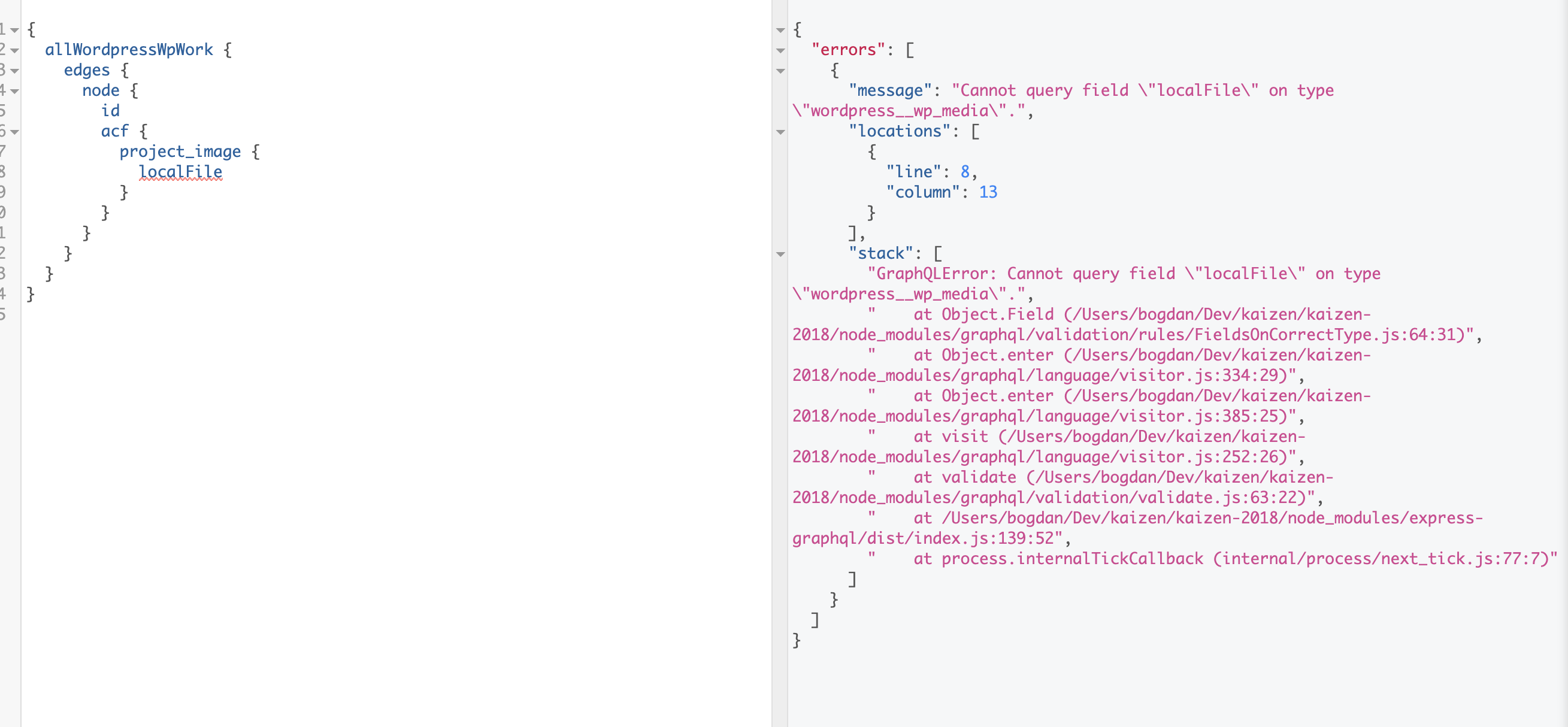
@iamtimsmith posts don't have any acf, but here we do. Again, I don't think the issue I'm having here has anything to do with ACF, but the fact that wordpress__wp_media (such as featured_image) doesn't have localFile.
Here's trying to call localFile on a image from acf:
bogdancss
on 3 Apr 2019
@b0gd4n I just tested it in a project of mine with the featured media and it's working just fine. Here's a screenshot of my code for what I'm getting.
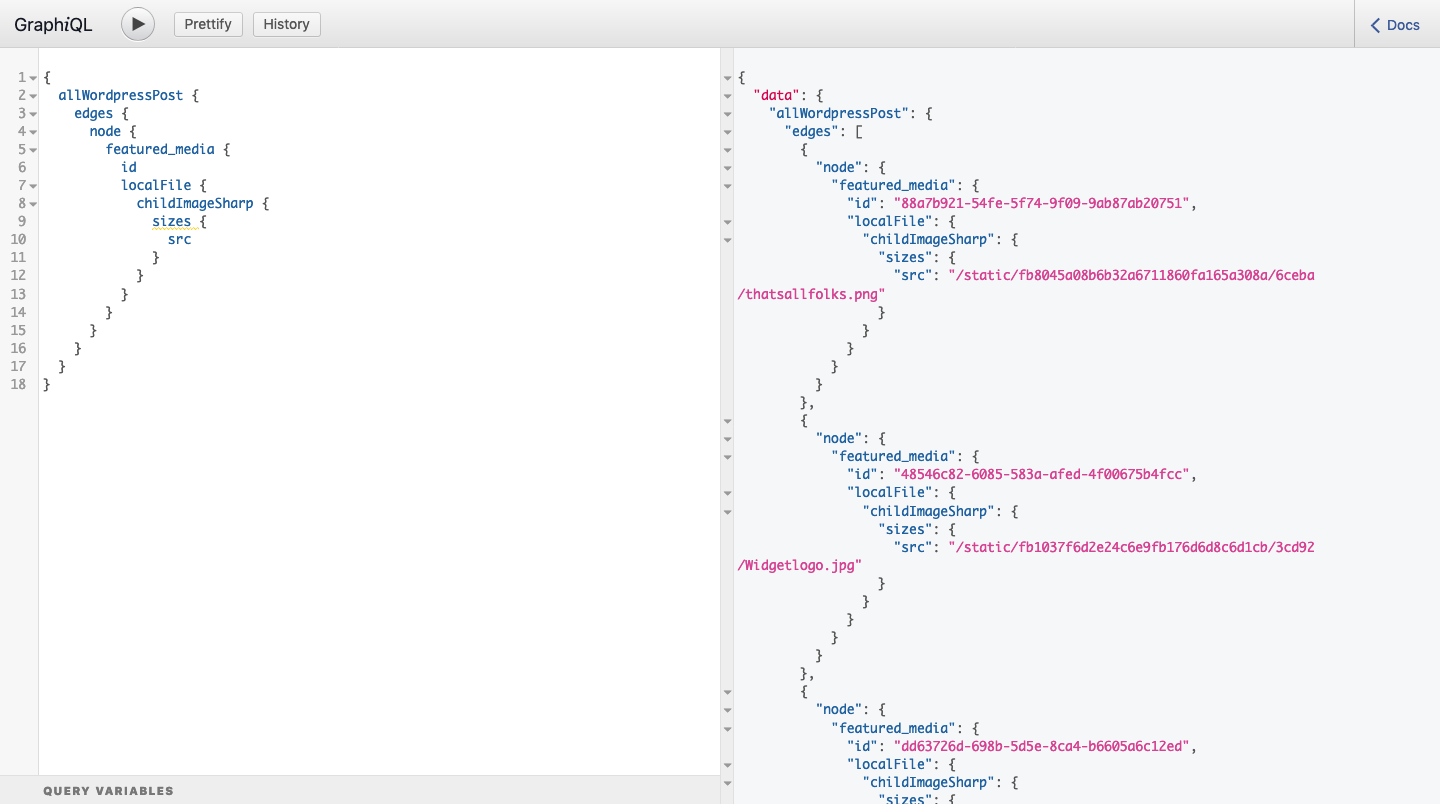
The setup above was using one of my wordpress sites as the host. I then tried switching to yours and started to see the errors you are seeing which leads me to believe that it's something with your wordpress site rather than the gatsby project.
I'm wondering if there's a conflict with your theme or plugins not allowing the featured image to be downloaded for some reason. The only thing I'm changing in my gatsby project is the url and protocol, so the config is all the same. Thoughts?
iamtimsmith
on 3 Apr 2019
@iamtimsmith interesting - I will use the repo you have from the blogpost with my wp endpoint and try and figure out which plugin messes up with this. At least now I know the issues is not on the Gatsby side.
bogdancss
on 3 Apr 2019
It was to do with the Soil plugin - disabling this allows the media files to be downloaded - so this all all good now.
The issue that I now have is that there are about 3500 thumbnail to get generated which takes about 5-10 mins locally, but much longer on Netlify (>24mins) which fails because it takes too long #8056
bogdancss
on 4 Apr 2019
Its to do with Wordpress itself or the server where it hosted. I am 100% sure. I come cross this nasty issue while developing client projects. Initially no issue, everything goes well, it started when i uploaded more than 100+ large images in wordpress and use image optimization plugin tinyjpeg it then started. Each time i run gatsby develop at last stage it crashes. And i notice after it fails, i can't even access Wordpress site for few minutes, it becomes inaccessible, nonresponsive. It comes back after few minutes. I think server doesn't handle that many queries, either it has memory or bandwidth issues. For time being i am using source_url but its bad and make the site slow to load.
Update
Try this:
GATSBY_CONCURRENT_DOWNLOAD=8 gatsby develop
or
GATSBY_CONCURRENT_DOWNLOAD=8 gatsby build
 zakirsajib
on 21 Feb 2020
zakirsajib
on 21 Feb 2020
Try this:
GATSBY_CONCURRENT_DOWNLOAD=8 gatsby develop
or
GATSBY_CONCURRENT_DOWNLOAD=8 gatsby build
In your package.json file, find the scripts section, and update the code as following:
"build": "npm run clean && GATSBY_CONCURRENT_DOWNLOAD=8 gatsby build",
"develop": "npm run clean && GATSBY_CONCURRENT_DOWNLOAD=8 gatsby develop",
zakirsajib
on 3 Mar 2020
Related issues
 andykais
·
3Comments
andykais
·
3Comments
 dustinhorton
·
3Comments
dustinhorton
·
3Comments
 signalwerk
·
3Comments
signalwerk
·
3Comments
 hobochild
·
3Comments
hobochild
·
3Comments
 magicly
·
3Comments
magicly
·
3Comments