gatsby-image randomly fails on bitbucket pipelines
Description
I have a project that downloads content from Google Drive to a content folder. This folder contains images, among other things. To be able to use gatsby-image with these images dynamically, i have made an Image component as seen below. When i build the project on my local machine, or my coworkers' machines, it succeeds. However, when the Bitbucket Pipeline for the project runs, gatsby-image fails, as seen in the following build log:
+ yarn build
yarn run v1.15.2
$ gatsby build
success open and validate gatsby-configs — 0.074 s
success load plugins — 0.291 s
success onPreInit — 0.592 s
success delete html and css files from previous builds — 0.006 s
success initialize cache — 0.007 s
success copy gatsby files — 0.019 s
🚗  Started downloading content
🚗  Creating folder /about
🚗  Creating folder /about/images
🚗  Creating folder /jobs
🚗  Saved file Test.html
🚗  Saved file content.md
🚗  Creating folder /cases
🚗  Creating folder /cases/Mobile Apps
🚗  Creating folder /services
🚗  Saved file team.jpg
🚗  Creating folder /cases/Mobile Apps/Connexii
🚗  Creating folder /cases/Applikationsudvikling
🚗  Creating folder /cases/Applikationsudvikling/Sampension
🚗  Creating folder /cases/Digitale Kundeportaler
🚗  Creating folder /cases/Digitale Kundeportaler/Frederikssund Kommune
🚗  Saved file description.html
🚗  Saved file settings.json
🚗  Saved file mood.jpg
🚗  Saved file background.png
🚗  Saved file settings.json
🚗  Saved file header.html
🚗  Saved file settings.json
🚗  Saved file header.html
🚗  Saved file background.png
🚗  Saved file header.html
🚗  Saved file result.html
🚗  Saved file quote.html
🚗  Saved file background.png
Downloading content: 2656.584ms
success onPreBootstrap — 3.012 s
success source and transform nodes — 0.121 s
success building schema — 0.237 s
success createPages — 0.015 s
success createPagesStatefully — 0.034 s
success onPreExtractQueries — 0.002 s
success update schema — 0.118 s
success extract queries from components — 0.127 s
error Failed to process image /opt/atlassian/pipelines/agent/build/content/cases/Applikationsudvikling/Sampension/background.png
  Error: Input file contains unsupported image format
error Command failed with exit code 1.
info Visit https://yarnpkg.com/en/docs/cli/run for documentation about this command.
I know that there is not a lot to go in, but any help would really be appreciated, as this is currently preventing deployment to our staging environment!
Steps to reproduce
So this is gonna be a bit hard, as there are so many components involved, and it only fails when running on the CI pipeline. My immediate guess would however be:
- Setup a project with gatsby-image, below Image component and a content folder with images.
- Build locally, should succeed
- Build on Bitbucket Pipelines - fail
Expected result
The project builds successfully.
Actual result
The project build fails.
Environment
Local environment:
  System:
    OS: Linux 4.15 Ubuntu 16.04.6 LTS (Xenial Xerus)
    CPU: (8) x64 Intel(R) Core(TM) i7-8550U CPU @ 1.80GHz
    Shell: 5.1.1 - /bin/zsh
  Binaries:
    Node: 11.12.0 - ~/.nvm/versions/node/v11.10.0/bin/node
    Yarn: 1.15.2 - /usr/bin/yarn
    npm: 6.7.0 - ~/.nvm/versions/node/v11.10.0/bin/npm
  Languages:
    Python: 2.7.12 - /usr/bin/python
  Browsers:
    Chrome: 73.0.3683.75
    Firefox: 65.0.1
  npmPackages:
    gatsby: 2.1.38 => 2.1.38
    gatsby-image: 2.0.34 => 2.0.34
    gatsby-plugin-emotion: 4.0.6 => 4.0.6
    gatsby-plugin-google-tagmanager: 2.0.10 => 2.0.10
    gatsby-plugin-manifest: 2.0.24 => 2.0.24
    gatsby-plugin-offline: 2.0.25 => 2.0.25
    gatsby-plugin-react-helmet: 3.0.10 => 3.0.10
    gatsby-plugin-remove-trailing-slashes: 2.0.10 => 2.0.10
    gatsby-plugin-sharp: 2.0.29 => 2.0.29
    gatsby-plugin-sitemap: 2.0.10 => 2.0.10
    gatsby-plugin-svg-sprite: 2.0.1 => 2.0.1
    gatsby-plugin-web-font-loader: 1.0.4 => 1.0.4
    gatsby-transformer-sharp: 2.1.17 => 2.1.17
  npmGlobalPackages:
    gatsby-cli: 2.4.16
Pipeline environment:
  System:
    OS: Linux 4.19 Debian GNU/Linux 9 (stretch) 9 (stretch)
    CPU: (8) x64 Intel(R) Xeon(R) Platinum 8175M CPU @ 2.50GHz
    Shell: 4.4.12 - /bin/bash
  Binaries:
    Node: 11.12.0 - /usr/local/bin/node
    Yarn: 1.15.2 - /usr/local/bin/yarn
    npm: 6.7.0 - /usr/local/bin/npm
  Languages:
    Python: 2.7.13 - /usr/bin/python
  npmGlobalPackages:
    gatsby-cli: 2.4.16
gatsby-config.js
const sanitizeHtml = require('./src/util/sanitizeDocExport')

module.exports = {
    siteMetadata: {
        title: 'Acto ApS',
        description: 'Tomorrows solution - today',
        author: 'Acto ApS',
        siteUrl: 'https://www.acto.dk'
    },
    plugins: [
        {
            resolve: '@acto/gatsby-plugin-drive',
            options: {
                folderId: '1BvReIbQomAUtNKDmFNPr3iI2MMUVFW8Y',
                keyFile: `${__dirname}/www-acto-dk-682e886da24f.json`,
                destination: `${__dirname}/content`,
                exportGDocs: true,
                exportMimeType: 'text/html',
                exportMiddleware: sanitizeHtml
            }
        },
        'gatsby-plugin-react-helmet',
        {
            resolve: 'gatsby-plugin-web-font-loader',
            options: {
                google: {
                    families: ['Barlow:300,400,600']
                },
                custom: {
                    families: ['LL Simple Regular Web'],
                    urls: ['/fonts/simple-font.css']
                }
            }
        },
        'gatsby-plugin-emotion',
        {
            resolve: '@acto/gatsby-source-filesystem',
            options: {
                name: 'images',
                path: `${__dirname}/src/images`
            }
        },
        {
            resolve: '@acto/gatsby-source-filesystem',
            options: {
                name: 'content',
                path: `${__dirname}/content`
            }
        },
        'gatsby-transformer-sharp',
        {
            resolve: 'gatsby-plugin-sharp',
            options: {
                withWebP: true
            }
        },
        {
            resolve: 'gatsby-plugin-manifest',
            options: {
                name: 'Acto ApS',
                short_name: 'Acto ApS',
                start_url: '/',
                background_color: '#2E2A43',
                theme_color: '#2E2A43',
                // Enables "Add to Homescreen" prompt and disables browser UI (including back button)
                // see https://developers.google.com/web/fundamentals/web-app-manifest/#display
                display: 'standalone',
                icon: 'src/images/favicon.png' // This path is relative to the root of the site.
            }
        },
        {
            resolve: 'gatsby-plugin-google-tagmanager',
            options: {
                id: 'GTM-MSCQMB9',
                includeInDevelopment: false
            }
        },
        'gatsby-plugin-svg-sprite',
        'gatsby-plugin-offline',
        'gatsby-plugin-remove-trailing-slashes',
        'gatsby-plugin-sitemap'
    ]
}
Image component:
import Img from 'gatsby-image'
import { StaticQuery, graphql } from 'gatsby'
import React from 'react'
import PropTypes from 'prop-types'

// Credit: https://gist.github.com/mgrubinger/4b5770c5aec1b1670f839ab9acb14649
// Very hacky solution for creating a reusable Image component, but it will have to do, until this issue is resolved:
// https://github.com/gatsbyjs/gatsby/issues/10482
const Image = props => (
    <StaticQuery
        query={graphql`
            {
                images: allFile(filter: { extension: { regex: "/(jpg|jpeg|png)/" } }) {
                    edges {
                        node {
                            relativePath
                            name
                            childImageSharp {
                                fluid(maxWidth: 600) {
                                    ...GatsbyImageSharpFluid_withWebp
                                }
                            }
                        }
                    }
                }
            }
        `}
        render={data => {
            const { path, alt, ...otherProps } = props

            const image = data.images.edges.find(n => {
                return n.node.relativePath === path
            })

            return image ? (
                <Img
                    fluid={image.node.childImageSharp.fluid}
                    alt={alt}
                    { ...otherProps }
                />
            ) : null
        }}
    />
)

Image.propTypes = {
  alt: PropTypes.string.isRequired,
  path: PropTypes.string.isRequired,
}

export default Image
Bitbucket pipeline config:
pipelines:
  default:
    - step:
        name: Build
        image: node:11.12.0
        caches:
          - node
        script:
          - export S3_BUCKET_NAME="staging.acto.dk"
          - echo $GOOGLE_KEYFILE > www-acto-dk-682e886da24f.json
          - npm i -g gatsby-cli
          - gatsby info
          - yarn
          - yarn build
        artifacts:
          - public/**
 EliasJorgensen
All 15 comments
Hey @EliasJorgensen
error Failed to process image /opt/atlassian/pipelines/agent/build/content/cases/Applikationsudvikling/Sampension/background.png
Error: Input file contains unsupported image format
This looks like sharp isn't able to process this particular image for some reason (and only on pipelines since you mentioned that it works fine locally)
Is there anything special about the image? Does the build succeed if you remove this particular image? If yes, could you create a minimal reproduction on BitBucket (with the pipeline) and link to it here?
 sidharthachatterjee
on 20 Mar 2019
sidharthachatterjee
on 20 Mar 2019
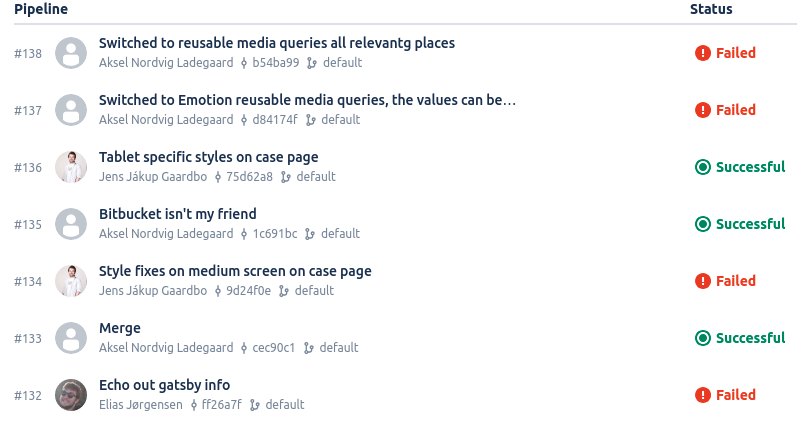
Hey @sidharthachatterjee, the problem has persisted since i made the issue, but it has now gotten weirder. As you see in the below screenshot, the pipeline apparently only fails sometimes? The image(s) have not been changed since pipeline #132 ran. This makes no sense to me at all. The only thing "special" about that image, is that a large portion of it is transparent.
EliasJorgensen
on 22 Mar 2019
@EliasJorgensen Seems like an issue with sharp not being able to process it (sometimes) 🤔
Could you create a small reproduction with the same image and a pipeline? We've seen issues with sharp before but haven't managed to reproduce a lot of these.
sidharthachatterjee
on 22 Mar 2019
Try disabling the webp part. Assuming you no longer run into issues, it may be due to webp conversion.
If that is the case, you want to find out if you're using webp provided by sharp. Have your yarn command also use the verbose log output option, should be able to scan through that looking for webp. It'll either install and pass the binary test fine or if that fails attempt to build from source.
If it's building from source, it may depend on the environment the CI is running in. Depending on the install, pulling binaries for image processing(libvips/sharp, and the png/webp/mozjpeg image ones) can fail under certain network connections. Yarn by default iirc does not indicate the failure like npm does in logs, unless you toggle verbose logging.
 polarathene
on 22 Mar 2019
polarathene
on 22 Mar 2019
@polarathene Where do you suggest that i add verbose logging?
I cannot find anything about log levels, in the gatsby documentation.
EliasJorgensen
on 22 Mar 2019
@sidharthachatterjee I actually just got the error on my local machine, also.
yarn build --verbose
yarn run v1.15.2
$ gatsby build --verbose
verbose 0.232822407 set gatsby_log_level: "verbose"
verbose 0.234570147 set gatsby_executing_command: "build"
verbose 0.2349452 loading local command from: /home/elias/Projects/Code/Acto/acto-website/node_modules/gatsby/dist/commands/build.js
verbose 1.021905577 running command: build
success open and validate gatsby-configs — 0.028 s
success load plugins — 0.167 s
success onPreInit — 0.254 s
success delete html and css files from previous builds — 0.006 s
success initialize cache — 0.007 s
success copy gatsby files — 0.012 s
⠁

🚗  Started downloading content
⡀ onPreBootstrap
🚗  Using cached Test.html
🚗  Creating folder /about
⠄ onPreBootstrap
🚗  Using cached content.md
🚗  Creating folder /about/images
🚗  Creating folder /jobs
⠂ onPreBootstrap
🚗  Creating folder /cases
🚗  Using cached team.jpg
⠐ onPreBootstrap
🚗  Creating folder /cases/Mobile Apps
🚗  Creating folder /services
⠐ onPreBootstrap
🚗  Creating folder /cases/Mobile Apps/Connexii
🚗  Creating folder /cases/Applikationsudvikling
⠠ onPreBootstrap
🚗  Creating folder /cases/Applikationsudvikling/Sampension
🚗  Creating folder /cases/Digitale Kundeportaler
🚗  Using cached mood.jpg
🚗  Using cached settings.json
🚗  Using cached header.html
🚗  Using cached background.png
⢀ onPreBootstrap
🚗  Creating folder /cases/Digitale Kundeportaler/Frederikssund Kommune
🚗  Using cached settings.json
🚗  Using cached result.html
🚗  Using cached description.html
🚗  Using cached header.html
🚗  Using cached quote.html
🚗  Using cached background.png
🚗  Using cached mood.jpg
⠂ onPreBootstrap
🚗  Using cached mood.jpg
🚗  Using cached settings.json
🚗  Using cached background.png
🚗  Using cached header.html
Downloading content: 2759.395ms
success onPreBootstrap — 3.471 s
success source and transform nodes — 0.130 s
success building schema — 0.169 s
success createPages — 0.011 s
success createPagesStatefully — 0.037 s
success onPreExtractQueries — 0.003 s
success update schema — 0.096 s
success extract queries from components — 0.119 s
error Failed to process image /home/elias/Projects/Code/Acto/acto-website/content/cases/Applikationsudvikling/Sampension/background.png


  Error: Input file contains unsupported image format

error Command failed with exit code 1.
info Visit https://yarnpkg.com/en/docs/cli/run for documentation about this command.
If there is anything i can do, to improve the detail level of the log, please let me know!
Update: I have also just gotten the error, with a JPEG image. I have turned off WebP generation.
EliasJorgensen
on 22 Mar 2019
I have possibly found the issue, i will investigate further and get back to you.
If i on my local machine get a problem, convert the problematic image to a text file and open it, i get an error message from the google drive API i'm using, about rate limiting.
I will find a way to fix that rate limiting issue, and see if it resolves the problem - both locally and in the pipeline.
EliasJorgensen
on 22 Mar 2019
I was actually thinking of yarn verbose option flag(yarn --verbose) and meant to compare it to npm, sorry for the confusion.
Ok, so the png image wasn't really a png image? Seems similar to this issue . Having a more helpful error that can confirm if the image type is what the extension suggests it is would probably be useful.
polarathene
on 22 Mar 2019
Yeah, the png image was actually a json file, with a .png extension.
This has nothing to do with Sharp however, but the gatsby-plugin-drive plugin, which fetches the files from Google Drive. But agreed, it would probably be beneficial to probe the file for a media type, and not just trusting the extension completely.
EliasJorgensen
on 22 Mar 2019
This has nothing to do with Sharp however
Oh I know it's not causing it, but it is where the error is being raised from right? (I tried to locate where the logged error was defined but failed miserably) If it is, it'd still be useful to provide the additional context if the image is what it claims to be :)
polarathene
on 22 Mar 2019
Yes, the error message in the log comes from gatsby-image, and thus by proxy, sharp :)
EliasJorgensen
on 22 Mar 2019
Glad you found the issue @EliasJorgensen
We should log the error here as well so that errors have more context in the future. Would you like to add this?
sidharthachatterjee
on 22 Mar 2019
We should log the error here as well so that errors have more context in the future. Would you like to add this?
So this part is coming from the sharp package?
Error: Input file contains unsupported image format
Sharp should be the one adding context that clarifies that the data matches the image type the extension suggests? There's a similar issue with the mozjpeg silently failing(extension changes, but no conversion or change to file) with non jpg inputs.
Were you suggesting updating the error to add some context of where it's coming from?
polarathene
on 23 Mar 2019
We have now gotten Google to increase our API quota, which fixed the problem. :smile:
EliasJorgensen
on 26 Mar 2019
Unless you want to discuss the error further, feel free to close the issue.
EliasJorgensen
on 26 Mar 2019
Related issues
 totsteps
·
3Comments
totsteps
·
3Comments
 magicly
·
3Comments
magicly
·
3Comments
 mikestopcontinues
·
3Comments
mikestopcontinues
·
3Comments
 theduke
·
3Comments
theduke
·
3Comments
 hobochild
·
3Comments
hobochild
·
3Comments
Most helpful comment
Yeah, the png image was actually a json file, with a .png extension.
This has nothing to do with Sharp however, but the gatsby-plugin-drive plugin, which fetches the files from Google Drive. But agreed, it would probably be beneficial to probe the file for a media type, and not just trusting the extension completely.