Gatsby: [gatsby-source-wordpress] Can't fetch the featured_media field
Description
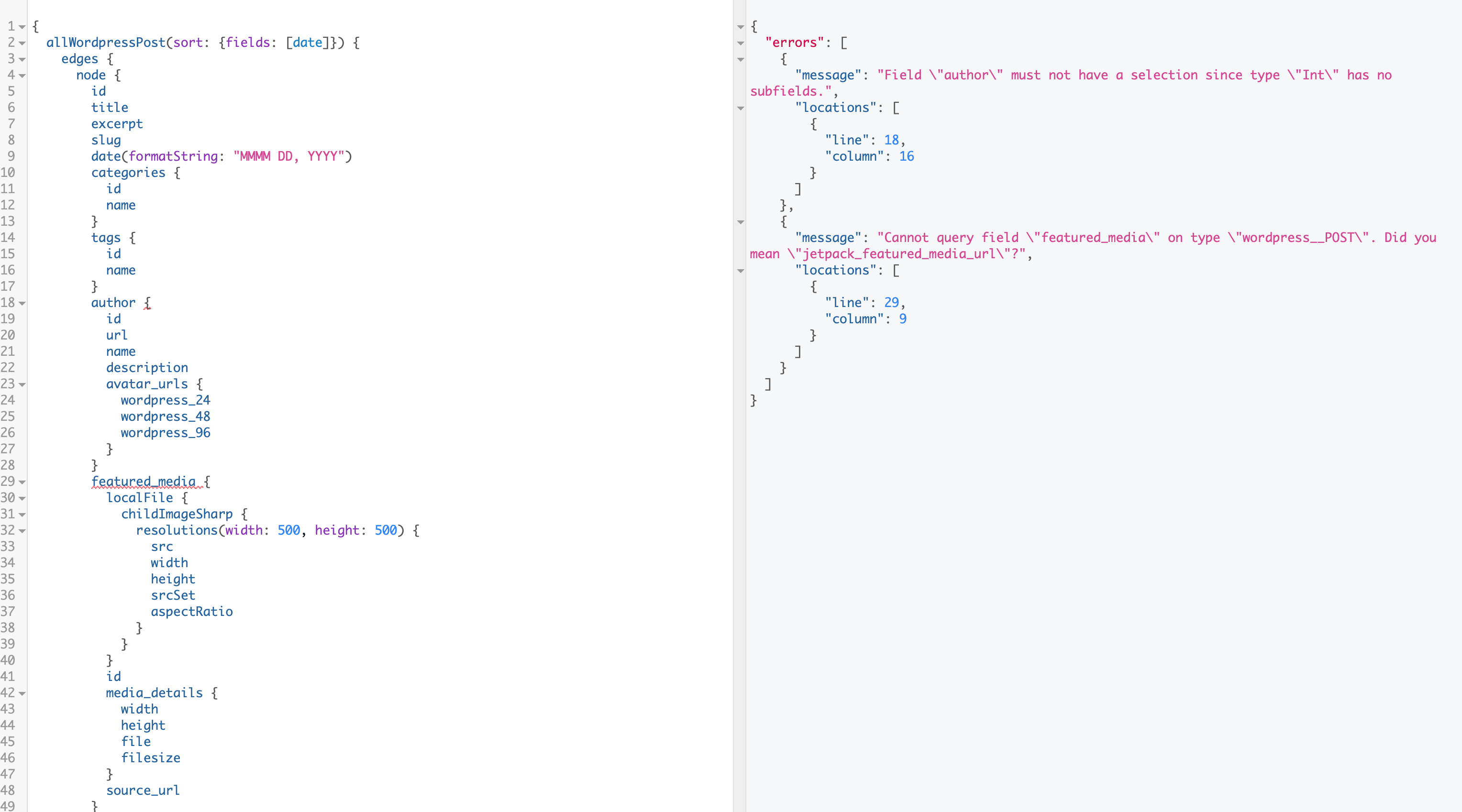
After upgrade to the latest GatsbyJS, I can't fetch some wordpress.com REST API fields.
author featured_media is not working.
"gatsby-source-wordpress": "^3.0.2"
I rechecked 3.0.2. It has no problem.
The problem has only happened in the latest version.
export const blogQuery = graphql`
  query {
    allWordpressPost(sort: { fields: [date] }) {
      edges {
        node {
          id
          title
          excerpt
          slug
          date(formatString: "MMMM DD, YYYY")
          categories {
            id
            name
          }
          tags {
            id
            name
          }
          author {
            id
            url
            name
            description
            avatar_urls {
              wordpress_24
              wordpress_48
              wordpress_96
            }
          }
          featured_media {
            localFile {
              childImageSharp {
                # edit the maxWidth value to generate resized images
                resolutions(width: 500, height: 500) {
                  src
                  width
                  height
                  srcSet
                  aspectRatio
                }
              }
            }
            id
            media_details {
              width
              height
              file
              filesize
            }
            source_url
          }
          jetpack_related_posts {
            wordpress_id
            url
            title
            date
            format
            excerpt
            rel
            context
          }
          ...PostIcons
        }
      }
    }
  }
`
Steps to reproduce
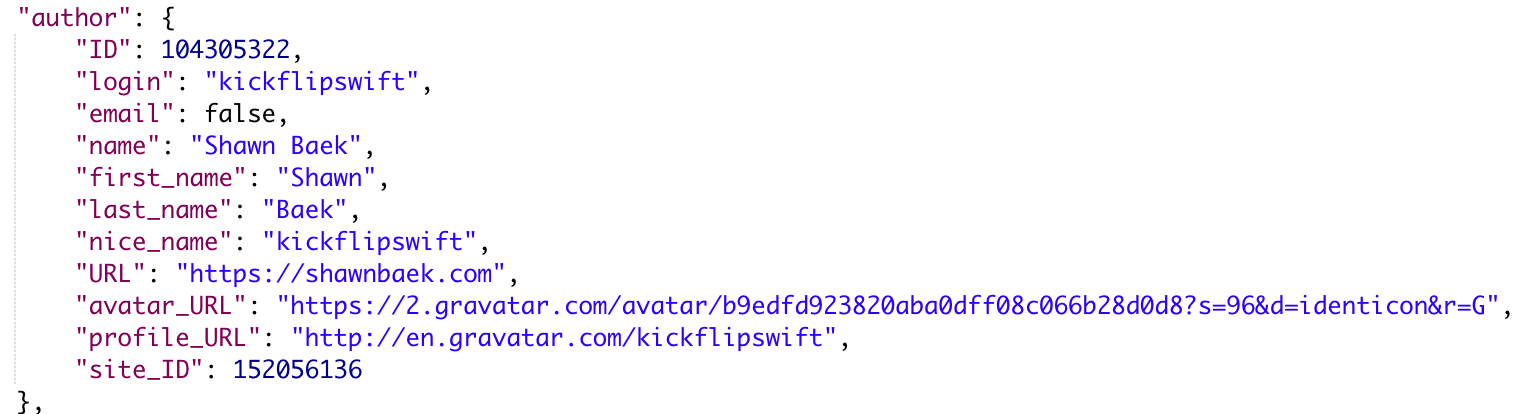
I checked Wordpress.com REST API using Postman.
The featured_media field and author object are fetched.

Expected result
All wordpress datas should be fetched.
Actual result

 ShawnBaek
All 16 comments
Did your credentials change? Did the way you sourced variables (e.g. username/pw) change?
You can see a number of 401 errors in your console, so the issue is that there aren't any nodes being created because the plugin is failing to fetch _any_ content with the aforementioned 401 error.
If you're able, I'd strongly encourage you to create a reproduction, so that we can most effectively debug this.
Thanks for your time, and sorry for the issue you're running into!
 DSchau
on 4 Mar 2019
DSchau
on 4 Mar 2019
@DSchau
No, I didn't change my account information.
I tested [email protected] It works perfectly.
This problem only happened in the latest version.
ShawnBaek
on 11 Mar 2019
Looking at logs, seems like there is regression causing wordpress plugin to make unauthenticated requests to media endpoint (wp.com hosting requires those to be authenticated). We need response from that to download images and link featured_media field to actual files.
 pieh
on 11 Mar 2019
pieh
on 11 Mar 2019
Having the same regression here. Using normal WP 5.1 (self-hosted). Can confirm that the media asset exists via REST API, but doesn't show on graphql side (FYI, all media has been unattached). Seems to only affect featured_media for me, but unsure as that is where it got stuck first. I've also tagged at 3.0.2 to prevent issues for now. Thanks @ShawnBaek !
 ryuheiyokokawa
on 22 Mar 2019
ryuheiyokokawa
on 22 Mar 2019
Hiya!
This issue has gone quiet. Spooky quiet. 👻
We get a lot of issues, so we currently close issues after 30 days of inactivity. It’s been at least 20 days since the last update here.
If we missed this issue or if you want to keep it open, please reply here. You can also add the label "not stale" to keep this issue open!
Thanks for being a part of the Gatsby community! 💪💜
![gatsbot[bot] picture](https://avatars2.githubusercontent.com/in/12849?v=4&s=40) gatsbot[bot]
on 12 Apr 2019
gatsbot[bot]
on 12 Apr 2019
Is it solved?
ShawnBaek
on 14 Apr 2019
Hey again!
It’s been 30 days since anything happened on this issue, so our friendly neighborhood robot (that’s me!) is going to close it.
Please keep in mind that I’m only a robot, so if I’ve closed this issue in error, I’m HUMAN_EMOTION_SORRY. Please feel free to reopen this issue or create a new one if you need anything else.
As a friendly reminder: the best way to see this issue, or any other, fixed is to open a Pull Request. Check out gatsby.dev/contribute for more information about opening PRs, triaging issues, and contributing!
Thanks again for being part of the Gatsby community!
gatsbot[bot]
on 2 May 2019
I'm having the same issue, @ShawnBaek did you ever figure out what the problem was?
 avinoamsn
on 6 Aug 2019
avinoamsn
on 6 Aug 2019
No the problem still exists. Using "gatsby-source-wordpress": "^3.1.13"!!
 vkallore
on 6 Aug 2019
vkallore
on 6 Aug 2019
Is it possible to create a reproduction for us? Or tell us how to repro this? If not, there is no real point of re-opening the issue.
 wardpeet
on 6 Aug 2019
wardpeet
on 6 Aug 2019
Well, I've replicated the code. Please let us know how to get the featured_media from here. Please let me know if the implementation is wrong.
vkallore
on 6 Aug 2019
Thanks @vkallore. Running the same setup with version 3.0.2 doesn't seem to remedy the problem, as it did for @ShawnBaek.
Edit: I cloned this starter, and ran it first with its default WordPress site and then with the one I'm working on. The problem only occurred with my site, which makes me think that the issue is with the specific WordPress installation.
Edit: This is going to sound _incredibly_ stupid, but it turns out my problem was the fact that no post for the website I am working with had a featured image. I had assumed (incorrectly) that the field would still be available as _null_, regardless of content (hitting the REST endpoint always returns the field). I'll chalk this one up to ignorance on my part. I'm not sure if this is the same problem @vkallore is having, although on brief inspection it appears as if the featured images of each post on the wp-api demo site are broken—maybe an unlucky coincidence.
avinoamsn
on 6 Aug 2019
@avinoamsn The blog which I am working on my local has featured image. _WP_SITE/wp-json/wp/v2/posts_ responses with "featured_media": INT_MEDIA_ID.
Even the WP API demo website API responds with featured_media, though they don't have one for their post (its 0).
vkallore
on 7 Aug 2019
I had the same issue. Running the WP-Optimize plugin with default setting and gatsby cleanafterwards solved it for me
 niklas-may
on 9 Sep 2019
niklas-may
on 9 Sep 2019
I tried downgrading to gatsby-source-wordpress 3.0.2 as mentioned above but didn't work.
I then unpublished a page which had no featured image and this solved the issue.
 alex789
on 10 Nov 2019
alex789
on 10 Nov 2019
For others hitting the missing featured_media field: I tried to get the featured media directly via the REST API of my WordPress installation (/wp-json/wp/v2/media/13) and got a 403. Using another image then solved it for me.
I got some input from an old Wordpress API issue, https://github.com/WP-API/WP-API/issues/2596. There seem to be some weird bugs regarding the media endpoint. From what I can tell i stumbled upon the following:
This issue also occurs if you attach the featured image at draft stage (the post has never been published). The post parent of the attachment retains the post parent id of a revision, which means the same permissions problem occurs.
(https://core.trac.wordpress.org/ticket/41445#comment:24)
Maybe when https://core.trac.wordpress.org/ticket/41445 lands in WordPress 5.4 those kind of errors will be gone.
 riddla
on 5 Jan 2020
riddla
on 5 Jan 2020
Related issues
 benstr
·
3Comments
benstr
·
3Comments
 3CordGuy
·
3Comments
3CordGuy
·
3Comments
 totsteps
·
3Comments
totsteps
·
3Comments
 ghost
·
3Comments
ghost
·
3Comments
 hobochild
·
3Comments
hobochild
·
3Comments