Gatsby: SSR React helmet plugin not working in combination with Redux
Description
I have a multi language website build with Gatsby, redux, redux-persist and Storyblok (CMS). When sharing our website in Slack I've noticed that no preview is available. I did some research and it looks that all the meta tags set via Helmet are present but they are not server rendered. You see the tags appearing when you inspect the website via the browser. As a result, when sharing the website, no preview text or picture is available (og meta tags, title & description) and I guess this also has a negative impact on general SEO as well.
The official Gatsby website is working fine though. After investigating the Gatsby repo I saw they are not using redux and custom html.js file. I'm wondering if the combination of redux and a custom html.js file can break the gatsby-plugin-react-helmet plugin?
I saw a lot of other people struggling with Helmet-related issues. Since SEO is an absolute key-stone of every website these days I think we have to improve both the plugin as well as documentation on how this plugin works and the current limitations. We've spent a lot of time creating this website and it's basically useless because of this problem, which is very hard to debug and information of how this plugin works in combination with Gatsby just doesn't exist.
Steps to reproduce
- Create a new Gatsby (v2) and integrate redux and redux-persist
- Create a custom html.js file (Already tried without this file, problem remains)
- Install gatsby-plugin-react-helmet plugin
Expected result
Tags are set during build time via React Helmet.
Actual result
Tags are inserted when the website is rendering in the browser. When inspecting the code in a browser you can see them appear.
Environment
System:
OS: macOS 10.14.3
CPU: (8) x64 Intel(R) Core(TM) i7-7820HQ CPU @ 2.90GHz
Shell: 3.2.57 - /bin/bash
Binaries:
Node: 8.12.0 - ~/.nvm/versions/node/v8.12.0/bin/node
Yarn: 1.3.2 - /usr/local/bin/yarn
npm: 6.4.1 - ~/.nvm/versions/node/v8.12.0/bin/npm
Languages:
Python: 2.7.10 - /usr/bin/python
Browsers:
Chrome: 71.0.3578.98
Firefox: 65.0
Safari: 12.0.3
npmPackages:
gatsby: ^2.0.91 => 2.0.91
gatsby-image: ^2.0.26 => 2.0.26
gatsby-plugin-eslint: ^2.0.3 => 2.0.3
gatsby-plugin-offline: ^2.0.21 => 2.0.21
gatsby-plugin-react-helmet: ^3.0.5 => 3.0.5
gatsby-plugin-react-svg: ^2.0.0 => 2.0.0
gatsby-plugin-sharp: ^2.0.17 => 2.0.17
gatsby-plugin-sitemap: ^2.0.4 => 2.0.4
gatsby-plugin-styled-components: ^3.0.4 => 3.0.4
gatsby-plugin-webpack-size: ^0.0.3 => 0.0.3
gatsby-source-filesystem: ^2.0.16 => 2.0.16
gatsby-source-storyblok: ^0.1.2 => 0.1.3
gatsby-transformer-json: ^2.1.7 => 2.1.7
gatsby-transformer-remark: ^2.2.0 => 2.2.0
gatsby-transformer-sharp: ^2.1.10 => 2.1.10
 Jornve
All 19 comments
I've tried to reproduce using our using-redux example as a base - https://github.com/pieh/redux-helmet
And react-helmet definitely can consume data from redux store for static html render.
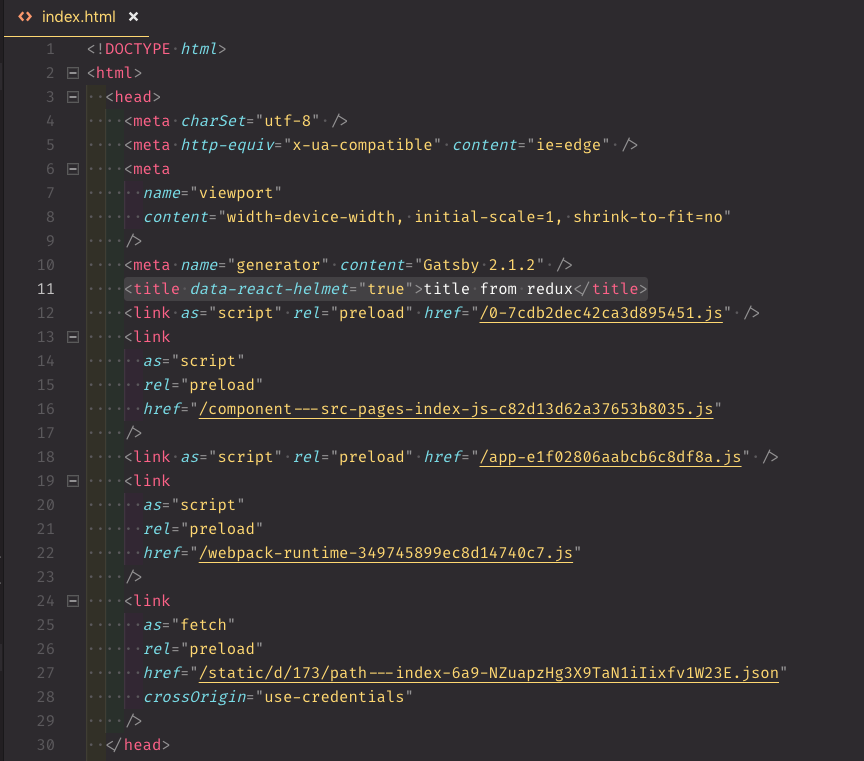
So I would assume there is something in your setup that cause SEO meta tags to not render into static html. But it's really hard to pinpoint what exactly without access to your project.
 pieh
on 14 Feb 2019
pieh
on 14 Feb 2019
@pieh Thanks for your response. I've added you to the project on Gitlab so you can have a look. Meanwhile I've tried many things including removing html.js file, added the code of the plugin directly into gatsby-ssr.js but nothings works.
FYI: The tags are being set via Helmet only but on rendering (I guess) and not via SSR.
Update
I'm using Netlify as host and saw some people that have the same issue when hosting on Netlify. I'm uploading the project to an S3 bucket as we speak to make sure the hosting is not causing this.
I hope you can find some time to take a look and investigate this.
Jornve
on 14 Feb 2019
Got invite, but I don't seem to have access to actual code (have access to wiki / issues / members etc)
pieh
on 14 Feb 2019
@pieh Now you should have access, my bad!
Thank for taking time for me :)
Jornve
on 14 Feb 2019
Ok, now I see it ;)
pieh
on 14 Feb 2019
Hi @pieh, did you found some time to take a look at our code? I have no clue what could be wrong and am hoping you could point us in the right direction to solve this issue :)
Jornve
on 15 Feb 2019
Yesterday I did pull the code, and definitely could reproduce it. I couldn't find apparent reason yet. And I just made few notes for myself to when I have more time to investigate this more in depth:
There are 2
tags being added and not sure why - it appears only one instance of Helmet component is in the react component tree for pages.</p> </blockquote> </div> <div class="card-footer"> <div class="row"> <div class="col"> <img src="https://avatars1.githubusercontent.com/u/419821?v=4&s=40" style="width:20px; height:20px;" class="mr-2 rounded float-left" alt="pieh picture"> <strong>pieh</strong> <span class="text-muted ml-1">on 15 Feb 2019</span> </div> <div class="col text-right"> </div> </div> </div> </div> <div class="card card-custom mb-4"> <div class="card-body pt-3 pb-3 markdown"> <p>Ok thanks @pieh. Luckily you are able to reproduce it. Regarding the title I've noticed that as well. Not sure how to continue on finding and resolving this issue. </p> <p>Hopefully you find some time to help us out, thanks already for your time :) </p> </div> <div class="card-footer"> <div class="row"> <div class="col"> <img src="https://avatars2.githubusercontent.com/u/13311412?v=4&s=40" style="width:20px; height:20px;" class="mr-2 rounded float-left" alt="Jornve picture"> <strong>Jornve</strong> <span class="text-muted ml-1">on 18 Feb 2019</span> </div> <div class="col text-right"> </div> </div> </div> </div> <div class="card card-custom mb-4"> <div class="card-body pt-3 pb-3 markdown"> <p><strong>@Jornve</strong> mind adding me too, I might take over from <strong>@pieh</strong> if he can't find the time.</p> </div> <div class="card-footer"> <div class="row"> <div class="col"> <img src="https://avatars3.githubusercontent.com/u/1120926?v=4&s=40" style="width:20px; height:20px;" class="mr-2 rounded float-left" alt="wardpeet picture"> <strong>wardpeet</strong> <span class="text-muted ml-1">on 18 Feb 2019</span> </div> <div class="col text-right"> 🚀<span class="ml-2 mr-3">1</span> </div> </div> </div> </div> <div class="card card-custom mb-4"> <div class="card-body pt-3 pb-3 markdown"> <p>Done <strong>@wardpeet</strong> :) </p> </div> <div class="card-footer"> <div class="row"> <div class="col"> <img src="https://avatars2.githubusercontent.com/u/13311412?v=4&s=40" style="width:20px; height:20px;" class="mr-2 rounded float-left" alt="Jornve picture"> <strong>Jornve</strong> <span class="text-muted ml-1">on 18 Feb 2019</span> </div> <div class="col text-right"> </div> </div> </div> </div> <div class="mb-4"> <ins class="adsbygoogle" style="display:block" data-ad-client="ca-pub-3835332123789605" data-ad-slot="3731713875" data-ad-format="auto" data-full-width-responsive="true"></ins> <script> (adsbygoogle = window.adsbygoogle || []).push({}); </script> </div> <div class="card card-custom mb-4"> <div class="card-body pt-3 pb-3 markdown"> <p>I don't know if it's related, but I just stumbled upon an issue with Helmet failing to render during SSR.<br /> The symptom would be no helmet at all in <code>build</code> output, except for the <code><title></code> tag that would be empty.<br /> (it's deceptive because when loading the page, client-side code kicks in and fills in the missing helmet data)</p> <p>After a lot of fiddling around, I was able to make it work by adding this to my <code>gatsby-node.js</code></p> <pre><code class="prettyprint">exports.onCreateWebpackConfig = ({ actions }) => { actions.setWebpackConfig({ externals: ['react-helmet'] }); }; </code></pre> <p>I guess you can try and see whether it has any effect for you. If it does, we might be onto something.</p> <p>[edit: however, that breaks <code>develop</code> mode]</p> </div> <div class="card-footer"> <div class="row"> <div class="col"> <img src="https://avatars1.githubusercontent.com/u/5879675?v=4&s=40" style="width:20px; height:20px;" class="mr-2 rounded float-left" alt="spectras picture"> <strong>spectras</strong> <span class="text-muted ml-1">on 19 Feb 2019</span> </div> <div class="col text-right"> </div> </div> </div> </div> <div class="card card-custom mb-4"> <div class="card-body pt-3 pb-3 markdown"> <p><strong>@spectras</strong> Can you share your environment please? I've tried your solution in our project but it was no solution for our setup. Besides the dev mode not working, the build passes but you end up with errors in the bundles.</p> <p><strong>@wardpeet</strong> <strong>@pieh</strong> Did you find some time to investigate this further? After hours of searching and testing for a solution we saw some people having the same issues and they switched to Next.js in order to resolve the SEO problem with Helmet. </p> <p>I prefer Gatsby over Next.js but if we cannot find a solution for this bug I'm afraid we have switch in order to solve our SEO problems. </p> </div> <div class="card-footer"> <div class="row"> <div class="col"> <img src="https://avatars2.githubusercontent.com/u/13311412?v=4&s=40" style="width:20px; height:20px;" class="mr-2 rounded float-left" alt="Jornve picture"> <strong>Jornve</strong> <span class="text-muted ml-1">on 20 Feb 2019</span> </div> <div class="col text-right"> </div> </div> </div> </div> <div class="card card-custom mb-4"> <div class="card-body pt-3 pb-3 markdown"> <p>It looks the problem is redux-persist <a rel="nofollow noopener" target="_blank" href="https://github.com/rt2zz/redux-persist/issues/457">https://github.com/rt2zz/redux-persist/issues/457</a></p> <p>Perhaps you don't add that during SSR? You're not persisting anything in that environment so perhaps removing it will fix the problems it's causing.</p> </div> <div class="card-footer"> <div class="row"> <div class="col"> <img src="https://avatars3.githubusercontent.com/u/71047?v=4&s=40" style="width:20px; height:20px;" class="mr-2 rounded float-left" alt="KyleAMathews picture"> <strong>KyleAMathews</strong> <span class="text-muted ml-1">on 20 Feb 2019</span> </div> <div class="col text-right"> </div> </div> </div> </div> <div class="card card-custom mb-4"> <div class="card-body pt-3 pb-3 markdown"> <p><strong>@KyleAMathews</strong> Thanks for pointing this out. I'm building a version without redux-persist now. I'll keep you guys posted!</p> </div> <div class="card-footer"> <div class="row"> <div class="col"> <img src="https://avatars2.githubusercontent.com/u/13311412?v=4&s=40" style="width:20px; height:20px;" class="mr-2 rounded float-left" alt="Jornve picture"> <strong>Jornve</strong> <span class="text-muted ml-1">on 20 Feb 2019</span> </div> <div class="col text-right"> </div> </div> </div> </div> <div class="card card-custom mb-4"> <div class="card-body pt-3 pb-3 markdown"> <p>I can now confirm that redux-persist is causing this issue, it blocks SSR from working properly. After doing more research, one solution is to integrate the store after using react-helmet.</p> <p>More info: <a rel="nofollow noopener" target="_blank" href="https://github.com/gatsbyjs/gatsby/issues/10414">https://github.com/gatsbyjs/gatsby/issues/10414</a></p> <p>I suggest we add this limitation to the plugin documentations so people know this when they start using this plugin and don't have to restructure their repo later on! </p> </div> <div class="card-footer"> <div class="row"> <div class="col"> <img src="https://avatars2.githubusercontent.com/u/13311412?v=4&s=40" style="width:20px; height:20px;" class="mr-2 rounded float-left" alt="Jornve picture"> <strong>Jornve</strong> <span class="text-muted ml-1">on 20 Feb 2019</span> </div> <div class="col text-right"> </div> </div> </div> </div> <div class="card card-custom mb-4"> <div class="card-body pt-3 pb-3 markdown"> <p>Jornve> Doing the same thing in a second project yields the same result as yours: errors in bundles. But with helmet meta filled in, still. I don't understand why it works in the other project and I am no redux nor webpack expert.</p> <p>I don't think my environment would be any helpful, over the months I have deviated a lot from defaults (custom plugins and build steps). I just figured I would share something that had an impact, in case it could help someone pinpoint the actual issue. Definitely nothing as solid as your investigation.</p> </div> <div class="card-footer"> <div class="row"> <div class="col"> <img src="https://avatars1.githubusercontent.com/u/5879675?v=4&s=40" style="width:20px; height:20px;" class="mr-2 rounded float-left" alt="spectras picture"> <strong>spectras</strong> <span class="text-muted ml-1">on 20 Feb 2019</span> </div> <div class="col text-right"> </div> </div> </div> </div> <div class="card card-custom mb-4"> <div class="card-body pt-3 pb-3 markdown"> <p>Hiya!</p> <p>This issue has gone quiet. Spooky quiet. 👻</p> <p>We get a lot of issues, so we currently close issues after 30 days of inactivity. It’s been at least 20 days since the last update here.</p> <p>If we missed this issue or if you want to keep it open, please reply here. You can also add the label "not stale" to keep this issue open!</p> <p>Thanks for being a part of the Gatsby community! 💪💜</p> </div> <div class="card-footer"> <div class="row"> <div class="col"> <img src="https://avatars2.githubusercontent.com/in/12849?v=4&s=40" style="width:20px; height:20px;" class="mr-2 rounded float-left" alt="gatsbot[bot] picture"> <strong>gatsbot[bot]</strong> <span class="text-muted ml-1">on 15 Mar 2019</span> </div> <div class="col text-right"> </div> </div> </div> </div> <div class="card card-custom mb-4"> <div class="card-body pt-3 pb-3 markdown"> <p>Hey again!</p> <p>It’s been 30 days since anything happened on this issue, so our friendly neighborhood robot (that’s me!) is going to close it.</p> <p>Please keep in mind that I’m only a robot, so if I’ve closed this issue in error, I’m <code>HUMAN_EMOTION_SORRY</code>. Please feel free to reopen this issue or create a new one if you need anything else.</p> <p>Thanks again for being part of the Gatsby community!</p> </div> <div class="card-footer"> <div class="row"> <div class="col"> <img src="https://avatars2.githubusercontent.com/in/12849?v=4&s=40" style="width:20px; height:20px;" class="mr-2 rounded float-left" alt="gatsbot[bot] picture"> <strong>gatsbot[bot]</strong> <span class="text-muted ml-1">on 26 Mar 2019</span> </div> <div class="col text-right"> </div> </div> </div> </div> <div class="card card-custom mb-4"> <div class="card-body pt-3 pb-3 markdown"> <p>I just had this problem. Solved it this way:</p> <p><a rel="nofollow noopener" target="_blank" href="https://stackoverflow.com/a/62501513/7292383">https://stackoverflow.com/a/62501513/7292383</a></p> </div> <div class="card-footer"> <div class="row"> <div class="col"> <img src="https://avatars2.githubusercontent.com/u/19536324?v=4&s=40" style="width:20px; height:20px;" class="mr-2 rounded float-left" alt="MiKatre picture"> <strong>MiKatre</strong> <span class="text-muted ml-1">on 21 Jun 2020</span> </div> <div class="col text-right"> ❤<span class="ml-2 mr-3">1</span> 👍<span class="ml-2 mr-3">1</span> </div> </div> </div> </div> </div> <div class="col-12"> <div class="card card-custom mb-4"> <div class="card-body pt-3 pb-3 markdown text-center helpful"> <div class="title">Was this page helpful?</div> <div class="mt-1" onMouseLeave="rating(410258857, 0);"> <i class="fas fa-star inactive" id="star-1" onMouseOver="rating(410258857, 1);" onclick="rate(410258857, 1);"></i> <i class="fas fa-star inactive" id="star-2" onMouseOver="rating(410258857, 2);" onclick="rate(410258857, 2);"></i> <i class="fas fa-star inactive" id="star-3" onMouseOver="rating(410258857, 3);" onclick="rate(410258857, 3);"></i> <i class="fas fa-star inactive" id="star-4" onMouseOver="rating(410258857, 4);" onclick="rate(410258857, 4);"></i> <i class="fas fa-star inactive" id="star-5" onMouseOver="rating(410258857, 5);" onclick="rate(410258857, 5);"></i> </div> <div class="description text-small"><span id="rating-val">0</span> / 5 - <span id="rating-count">0</span> ratings</div> </div> </div> <div class="mb-4"> <ins class="adsbygoogle" style="display:block" data-ad-client="ca-pub-3835332123789605" data-ad-slot="3452512275" data-ad-format="auto" data-full-width-responsive="true"></ins> <script> (adsbygoogle = window.adsbygoogle || []).push({}); </script> </div> </div> </div> </div> <div class="col-12 col-lg-4"> <div id="ph-above-related"></div> <div class="card card-custom issue-box"> <div class="card-body pt-3 pb-5"> <h2 class="mb-4">Related issues</h2> <div> <strong> <a href="/gatsby/153514626/new-html-functionality-not-clear">new /html functionality not clear</a> </strong> </div> <div class="text-muted text-small mt-2"> <img src="https://avatars0.githubusercontent.com/u/2379901?v=4&s=40" style="width:20px; height:20px;" class="mr-2 rounded float-left" alt="rossPatton picture"> <strong class="pr-1" dir="ltr">rossPatton</strong> · <span class="px-1" dir="ltr">3</span><span>Comments</span> </div> <hr /> <div> <strong> <a href="/gatsby/261978754/don-t-trigger-onrouteupdate-on-hash-updates">Don't trigger onRouteUpdate on hash updates</a> </strong> </div> <div class="text-muted text-small mt-2"> <img src="https://avatars2.githubusercontent.com/u/14139991?v=4&s=40" style="width:20px; height:20px;" class="mr-2 rounded float-left" alt="brandonmp picture"> <strong class="pr-1" dir="ltr">brandonmp</strong> · <span class="px-1" dir="ltr">3</span><span>Comments</span> </div> <hr /> <div> <strong> <a href="/gatsby/243285833/can-t-dynamic-require-img">Can't dynamic require img?</a> </strong> </div> <div class="text-muted text-small mt-2"> <img src="https://avatars1.githubusercontent.com/u/1471805?v=4&s=40" style="width:20px; height:20px;" class="mr-2 rounded float-left" alt="magicly picture"> <strong class="pr-1" dir="ltr">magicly</strong> · <span class="px-1" dir="ltr">3</span><span>Comments</span> </div> <hr /> <div> <strong> <a href="/gatsby/256484016/graphql-error-unknown-argument-slug">GraphQL Error Unknown argument `slug`</a> </strong> </div> <div class="text-muted text-small mt-2"> <img src="https://avatars2.githubusercontent.com/u/30707961?v=4&s=40" style="width:20px; height:20px;" class="mr-2 rounded float-left" alt="3CordGuy picture"> <strong class="pr-1" dir="ltr">3CordGuy</strong> · <span class="px-1" dir="ltr">3</span><span>Comments</span> </div> <hr /> <div> <strong> <a href="/gatsby/254808070/graphql-fix-better-error-message-when-duplicate-query-name">Graphql: Fix better error message when duplicate query name</a> </strong> </div> <div class="text-muted text-small mt-2"> <img src="https://avatars0.githubusercontent.com/u/1715834?v=4&s=40" style="width:20px; height:20px;" class="mr-2 rounded float-left" alt="timbrandin picture"> <strong class="pr-1" dir="ltr">timbrandin</strong> · <span class="px-1" dir="ltr">3</span><span>Comments</span> </div> </div> </div> <div class="sticky-top pt-4"> <ins class="adsbygoogle" style="display:block" data-ad-client="ca-pub-3835332123789605" data-ad-slot="3919948963" data-ad-format="auto" data-full-width-responsive="true"></ins> <script> (adsbygoogle = window.adsbygoogle || []).push({}); </script> <div id="ph-below-related-2" class="mt-4"> <ins class="adsbygoogle" style="display:block" data-ad-client="ca-pub-3835332123789605" data-ad-slot="3919948963" data-ad-format="auto" data-full-width-responsive="true"></ins> <script> (adsbygoogle = window.adsbygoogle || []).push({}); </script> </div> </div> </div> <div class="col-12 col-lg-4"> </div> </div> <div class="skyscraper-container"> <ins class="adsbygoogle" style="display:block" data-ad-client="ca-pub-3835332123789605" data-ad-slot="7879185320" data-ad-format="vertical" data-full-width-responsive="true"></ins> <script> (adsbygoogle = window.adsbygoogle || []).push({}); </script> </div> </div> <div class="mt-5 spacer"></div> <footer class="mt-5 pb-2 py-4 text-center mt-auto"> <div class="container"> <a class="navbar-brand logo mr-5" href="/"> <img src="/assets/img/logo.svg" width="40" height="40" alt="bleepingcoder logo"> bleeping<strong>coder</strong> </a> <div class="mt-4"> bleepingcoder.com uses publicly licensed GitHub information to provide developers around the world with solutions to their problems. We are not affiliated with GitHub, Inc. or with any developers who use GitHub for their projects. We do not host any of the videos or images on our servers. All rights belong to their respective owners. </div> <div> Source for this page: <a href="https://www.github.com/gatsbyjs/gatsby/issues/11761" rel="nofollow noreferrer" target="_blank">Source</a> </div> </div> <hr class="mb-5 mt-5"> <div class="container"> <div class="row"> <div class="col-sm-4 col-lg mb-sm-0 mb-5"> <strong>Popular programming languages</strong> <ul class="list-unstyled mb-0 mt-2"> <li class="mb-2"> <a href="/python" dir="ltr">Python</a> </li> <li class="mb-2"> <a href="/javascript" dir="ltr">JavaScript</a> </li> <li class="mb-2"> <a href="/typescript" dir="ltr">TypeScript</a> </li> <li class="mb-2"> <a href="/cpp" dir="ltr">C++</a> </li> <li class="mb-2"> <a href="/csharp" dir="ltr">C#</a> </li> </ul> </div> <div class="col-sm-4 col-lg mb-sm-0 mb-5"> <strong>Popular GitHub projects</strong> <ul class="list-unstyled mb-0 mt-2"> <li class="mb-2"> <a href="/microsoft/vscode" dir="ltr">vscode</a> </li> <li class="mb-2"> <a href="/numpy/numpy" dir="ltr">numpy</a> </li> <li class="mb-2"> <a href="/ant-design/ant-design" dir="ltr">ant-design</a> </li> <li class="mb-2"> <a href="/mui-org/material-ui" dir="ltr">material-ui</a> </li> <li class="mb-2"> <a href="/vercel/next-js" dir="ltr">next.js</a> </li> </ul> </div> <div class="col-sm-4 col-lg mb-0"> <strong>More GitHub projects</strong> <ul class="list-unstyled mb-0 mt-2"> <li class="mb-2"> <a href="/rust-lang/rust" dir="ltr">rust</a> </li> <li class="mb-2"> <a href="/moment/moment" dir="ltr">moment</a> </li> <li class="mb-2"> <a href="/yarnpkg/yarn" dir="ltr">yarn</a> </li> <li class="mb-2"> <a href="/mozilla/pdf-js" dir="ltr">pdf.js</a> </li> <li class="mb-2"> <a href="/JuliaLang/julia" dir="ltr">julia</a> </li> </ul> </div> </div> </div> <hr class="mb-5 mt-5"> <div class="container text-muted"> © 2026 bleepingcoder.com - <a href="/bleeps" rel="nofollow">Contact</a><br /> By using our site, you acknowledge that you have read and understand our <a href="/cookies" rel="nofollow">Cookie Policy</a> and <a href="/privacy" rel="nofollow">Privacy Policy</a>. </div> </footer> <script src="https://code.jquery.com/jquery-3.5.1.slim.min.js" integrity="sha256-4+XzXVhsDmqanXGHaHvgh1gMQKX40OUvDEBTu8JcmNs=" crossorigin="anonymous"></script> <script async src="https://cdn.jsdelivr.net/npm/popper.js@1.16.0/dist/umd/popper.min.js" integrity="sha384-Q6E9RHvbIyZFJoft+2mJbHaEWldlvI9IOYy5n3zV9zzTtmI3UksdQRVvoxMfooAo" crossorigin="anonymous"></script> <script src="https://stackpath.bootstrapcdn.com/bootstrap/4.4.1/js/bootstrap.min.js" integrity="sha384-wfSDF2E50Y2D1uUdj0O3uMBJnjuUD4Ih7YwaYd1iqfktj0Uod8GCExl3Og8ifwB6" crossorigin="anonymous"></script> <!--<script defer type="text/javascript" src="//s7.addthis.com/js/300/addthis_widget.js#pubid=ra-5fb2db66acbd74b2"></script>--> <script type="text/javascript" src="/assets/js/main.js"></script> <script src="https://cdn.jsdelivr.net/gh/google/code-prettify@master/loader/run_prettify.js"></script></body> </html>
Most helpful comment
I just had this problem. Solved it this way:
https://stackoverflow.com/a/62501513/7292383