Gatsby: [gatsby-source-graphql] InputFields (using a scalar type) are invalidated by relay-compiler
Description
It seems that scalar types are not supported? I've tried to build the schema via an introspection file as well and it still throws the same error.
Steps to reproduce
- Open this simple graphql server and make sure it's running. See JSON scalar type in edit view. Running queries via
graphiqlgives you the correct response.
try:
{
  Search {
    asc: by(filter: { sort: "DESC" }) {
      result
    }
    desc: by(filter: { sort: "ASC" }) {
      result
    }
  }
}
Open this gatsby project, which points to the graphql server (step 1) and go to
Server Control Paneltab and hit theRestart Sandboxbutton.See error in
Terminaltab:
error GraphQLIRPrinter: Need an InputObject type to print objects.
Tip
If you change page/index.js with this query (leave out the input args):
export const query = graphql`
  {
    searchapi {
      Search {
        by {
          result
        }
      }
    }
  }
`
the build succeeds.. it seems like relay-compiler doesn't like the custom scalar type. I've tried it with an older version of Gatsby and the error was something like:
GraphQL Error Expected a value matching type 'Search_JSON' but got an object value
Expected result
The build should succeed.
Actual result
Error:
error GraphQLIRPrinter: Need an InputObject type to print objects.
Environment
See codesandbox
Using Gatsby's GraphiQL
Query it with the builtin Gatsby GraphiQL at http://localhost:8000/___graphql works as expected
Thanks so much for creating this awesome project! Keep up the good work.
 inlet
inlet
All 19 comments
It's a bug upstream. I'll make a fix and send it to relay-compiler.
 freiksenet
on 12 Feb 2019
freiksenet
on 12 Feb 2019
Right, this is actually already fixed by me in https://github.com/facebook/relay/pull/2638. I'll push additional regression test for it there just to make sure.
freiksenet
on 12 Feb 2019
Right, this is actually already fixed by me in facebook/relay#2638.
Perhaps Gatsby using an older relay?
I'll push additional regression test for it there just to make sure.
Awesome! Would love to see this working
inlet
on 12 Feb 2019
Perhaps Gatsby using an older relay?
It's not merged yet, that's why it still occurs.
freiksenet
on 12 Feb 2019
That makes sense! Hopefully they'll merge it soon. Thanks man
inlet
on 12 Feb 2019
Should be fixed in 2.1.1
freiksenet
on 14 Feb 2019
Now it throws a different error:
The GraphQL query from /sandbox/src/pages/index.js failed.

Errors:
  Syntax Error: Expected Name, found String "sort"
See terminal tab: https://codesandbox.io/s/431j121929
(hit Restart Sandbox to run gatsby develop)

inlet
on 14 Feb 2019
Any pointers why this happens?
inlet
on 15 Feb 2019
try removing the double quotes
 simoneb
on 18 Feb 2019
simoneb
on 18 Feb 2019
See gatsby project, I'm not adding double quotes at all.
inlet
on 18 Feb 2019
"DESC" -> DESC
simoneb
on 18 Feb 2019
As you can see if I remove the double quotes it gets reconstructed with double quotes internally.

Can you make the codesandbox example to work?
inlet
on 18 Feb 2019
I couldn't, but when I opened it the quotes were still there. In any case, this issue doesn't seem to be fixed and it's affecting me too, with or without quotes.
simoneb
on 18 Feb 2019
@freiksenet Do you have any idea what's causing the issue? Thanks!
inlet
on 18 Feb 2019
To add more details to this, the same query in my case works perfectly fine in the GraphiQL tool running along with the gatsby development server. It suggests it's an issue with the way the query is parsed before being submitted to the server, or a wrong formatting when it is sent to the server.
simoneb
on 19 Feb 2019
To add more details to this, the same query in my case works perfectly fine in the GraphiQL tool running along with the gatsby development server.
Exactly, I pointed this out in the issue description as well.
It suggests it's an issue with the way the query is parsed before being submitted to the server, or a wrong formatting when it is sent to the server.
👍
It looks like the graphql validator (relay-compiler?) validates a serialized query.
inlet
on 19 Feb 2019
@freiksenet any updates on this issue?
inlet
on 22 Feb 2019
Folks I am still facing this issue with my Hasura GraphQL engine server.
Here are my package.json and yarn.lock screenshots.

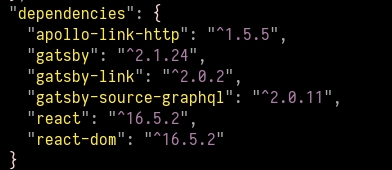
Here is the error

Am I doing anything wrong here?
Any help is greatly appreciated :)
 karthikvt26
on 8 Mar 2019
karthikvt26
on 8 Mar 2019
Error with your hasura coming from using single query values where arrays are expected.
Probably you copied your query from their playground, but the playground set single objects per default also where array is expected. It doesn't cause errors on playground itself.
 Overdozed
on 8 Jul 2020
Overdozed
on 8 Jul 2020
Related issues
 signalwerk
·
3Comments
signalwerk
·
3Comments
 jimfilippou
·
3Comments
jimfilippou
·
3Comments
 rossPatton
·
3Comments
rossPatton
·
3Comments
 totsteps
·
3Comments
totsteps
·
3Comments
 ferMartz
·
3Comments
ferMartz
·
3Comments
Most helpful comment
@freiksenet any updates on this issue?