Gatsby: Page height not shrinking with content if browser is narrowed
Description
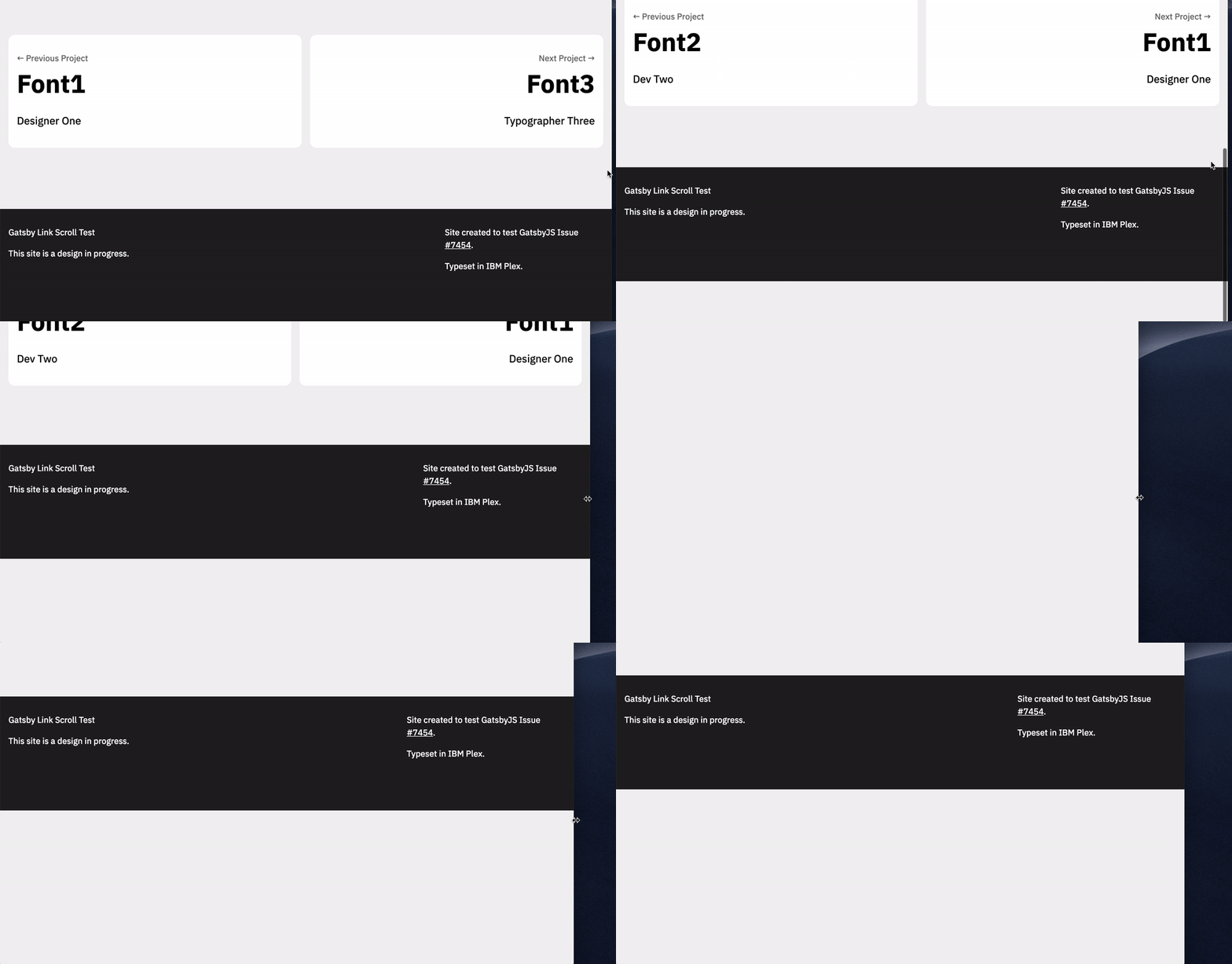
If the browser width is reduced on a page containing images, the total page height / length doesn't change accordingly. That is, if a given page is 4000px tall from several large images showing in a wide browser, then it _stays_ 4000px tall if the browser is made more narrow, even though the content gets shorter as images scale down. This results in pages with massive empty parts at the bottom. Luckily, page heights are accurate on first load, but this is a site I'm making for an audience of designers / developers, so it's not so unlikely for them to resize their browser while they visit.
I haven't found prior documentation of the second issue, but possibly I'm not searching in the right way. If this is already documented, or if someone has already found an easy fix, terrific! If I've made a simple mistake, even better! Any insight would be great, here.
Steps to reproduce
Test Repo: https://github.com/thundernixon/gatsby-link-scroll-test
Deployed at: https://zen-brown-8c4cd6.netlify.com/
To reproduce (must be on desktop):
- Scroll to the bottom of a project page
- Resize your browser to make it more narrow. Notice how the page height remains large, even while content height shrinks.
I'm finding that this is actually slightly less frequent on the Netlify-deployed site than on Localhost. However, it will still happen for me if I paginate to the next project, then change browser width.
Expected result
The page height should be reduced when its viewport width is narrowed, because the content height is reduced as images scale down.
Actual result
The page height stays the same, resulting in a massive extra space at the bottom.
Environment
  System:
    OS: macOS 10.14.2
    CPU: (8) x64 Intel(R) Core(TM) i7-4960HQ CPU @ 2.60GHz
    Shell: 5.3 - /bin/zsh
  Binaries:
    Node: 11.4.0 - ~/.nvm/versions/node/v11.4.0/bin/node
    Yarn: 1.13.0 - /usr/local/bin/yarn
    npm: 6.4.1 - ~/.nvm/versions/node/v11.4.0/bin/npm
  Languages:
    Python: 2.7.15 - /usr/local/bin/python
  Browsers:
    Chrome: 72.0.3626.96
    Safari: 12.0.2
  npmPackages:
    gatsby: ^2.0.118 => 2.0.118
    gatsby-image: ^2.0.20 => 2.0.29
    gatsby-mdx: ^0.3.5 => 0.3.6
    gatsby-plugin-layout: ^1.0.11 => 1.0.12
    gatsby-plugin-manifest: ^2.0.9 => 2.0.17
    gatsby-plugin-offline: ^2.0.16 => 2.0.23
    gatsby-plugin-react-helmet: ^3.0.2 => 3.0.6
    gatsby-plugin-sass: ^2.0.10 => 2.0.10
    gatsby-plugin-sharp: ^2.0.14 => 2.0.20
    gatsby-plugin-styled-components: ^3.0.4 => 3.0.5
    gatsby-plugin-transition-link: ^1.4.4 => 1.4.7
    gatsby-remark-images: ^3.0.1 => 3.0.3
    gatsby-source-filesystem: ^2.0.16 => 2.0.20
    gatsby-transformer-remark: ^2.2.0 => 2.2.4
    gatsby-transformer-sharp: ^2.1.8 => 2.1.13
 thundernixon
All 9 comments
It looks like there is min-height rule getting added, but gatsby itself doesn't do that - from quick check it seems like gatsby-plugin-transtion-link is doing that (https://github.com/TylerBarnes/gatsby-plugin-transition-link/blob/master/src/wrap-page.js#L24). This plugin is not maintained in this repo, but we can discuss the issue here. @TylerBarnes do you have any thoughts how to solve this?
 pieh
on 11 Feb 2019
pieh
on 11 Feb 2019
Ahh nice find, @pieh! Thanks for the quick response.
I'll have a another look to see whether there might be something I can fix on my end. I bet that the min-height is solving a problem for page transitions, but hopefully there's an approach that could accomplish transitions without setting a min-height.
thundernixon
on 11 Feb 2019
Okay, yeah I do see that div with a min-height set. If I comment out that declaration or set height to 100% or auto, the div gets a height of 0, which I bet would break transitions.
I'll make a branch* without the transition link code, just to verify how that's affecting things.
(Not right away; but hopefully this evening).
thundernixon
on 11 Feb 2019
Hey guys! The reason for the min height wrapper was to support adding a persistent footer via a layout as the entering and exiting pages are both set to position: absolute so that they can overlap each other during transitions.
I've been working on a V2 of the plugin and I actually removed this min height wrapper as I found a better CSS-only solution. I'll move that code over and do a minor V1 release as soon as I can and I'll let you know when it's out. Thanks!
 TylerBarnes
on 11 Feb 2019
TylerBarnes
on 11 Feb 2019
Amazing, thanks for the info and for being able to make a minor release to solve this! I appreciate your hard work on the plug-in. 🤘
thundernixon
on 11 Feb 2019
Awesome, thanks for the appreciation! The release should be out some time this week
TylerBarnes
on 11 Feb 2019
@thundernixon install [email protected] for a fix!
I've changed out the way the pages are overlapping each other so please let me know if you run into any odd side effects. From my testing everything seemed great but there may be edge cases.
TylerBarnes
on 15 Feb 2019
@TylerBarnes Awesome, thanks! I'll keep you posted if I run into anything odd.
thundernixon
on 15 Feb 2019
Just confirmed that with 1.5.1, it's working just as expected. 🎉
thundernixon
on 16 Feb 2019
Related issues
 rossPatton
·
3Comments
rossPatton
·
3Comments
 mikestopcontinues
·
3Comments
mikestopcontinues
·
3Comments
 Oppenheimer1
·
3Comments
Oppenheimer1
·
3Comments
 KyleAMathews
·
3Comments
KyleAMathews
·
3Comments
 kalinchernev
·
3Comments
kalinchernev
·
3Comments
Most helpful comment
@thundernixon install
[email protected]for a fix!I've changed out the way the pages are overlapping each other so please let me know if you run into any odd side effects. From my testing everything seemed great but there may be edge cases.