Gatsby: Babel errors shouldn't let the site run
I'm in a hurry, feel free to close if I'm not following the template.
I have some Babel errors:
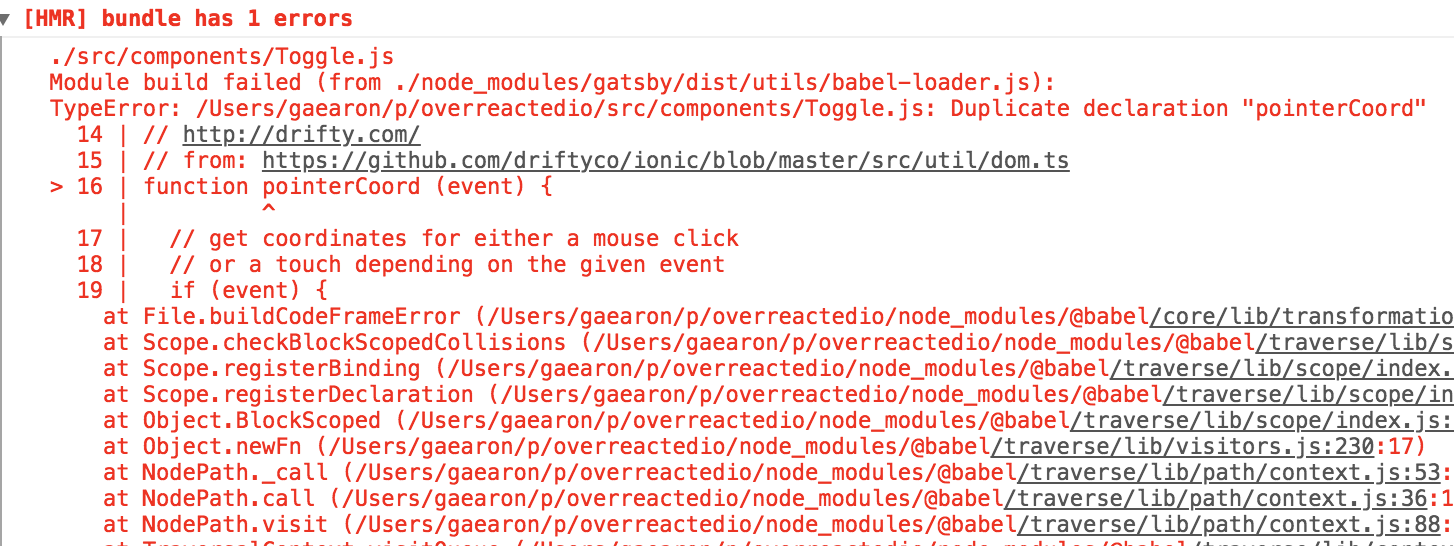
But the site still loads in DEV. I guess it just serves the previous version.
This is very wrong and can lead to nightmare-ish debugging sessions. If there is a Babel error, refresh should show that error immediately. Not serve the previous version.
 gaearon
All 11 comments
Thank you for reporting this @gaearon
Posting reproduction steps here for future reference
- Clone https://github.com/sidharthachatterjee/gatsby-babel-test
- gatsby develop
- Uncomment line 33 in src/components/image.js
- Develop logs Babel error and error component is rendered in browser
- Hit refresh
Error component is not rendered and previous build is served instead
 sidharthachatterjee
on 21 Jan 2019
sidharthachatterjee
on 21 Jan 2019
@sidharthachatterjee can i look into this?
 gagandeepp
on 29 Jan 2019
gagandeepp
on 29 Jan 2019
@gagandeepp Sure! Please comment if you need any help 🙂
sidharthachatterjee
on 29 Jan 2019
Hiya!
This issue has gone quiet. Spooky quiet. 👻
We get a lot of issues, so we currently close issues after 30 days of inactivity. It’s been at least 20 days since the last update here.
If we missed this issue or if you want to keep it open, please reply here. You can also add the label "not stale" to keep this issue open!
Thanks for being a part of the Gatsby community! 💪💜
![gatsbot[bot] picture](https://avatars2.githubusercontent.com/in/12849?v=4&s=40) gatsbot[bot]
on 19 Feb 2019
gatsbot[bot]
on 19 Feb 2019
@sidharthachatterjee @LekoArts
So far, I found that we are not enforcing webpack rules on js/jsx file.
We can do that in packages/gatsby-plugin-preact/src/gatsby-node.js file by adding below rule under module.rules
{
  test: /\.jsx?$/,
  enforce: "pre",
  loader: "babel-loader"
}
Or is there any other generic place to add such enforcing rules? Please let me know your thoughts.
I would like to work on this. Can you please assign it me?
 theajr
on 17 Oct 2019
theajr
on 17 Oct 2019
@theajr are you still working on this, otherwise I would like to give it a try to make a fix. I am having this issue and it is quite annoying.
 krvajal
on 10 Apr 2020
krvajal
on 10 Apr 2020
adding below rule under
module.rules{ test: /\.jsx?$/, enforce: "pre", loader: "babel-loader" }
@theajr what about react? I tried the above in my project's gatsby-node.js and it doesn't make any difference, the previous version continues to load.
 bilogic
on 4 Jun 2020
bilogic
on 4 Jun 2020
Hiya!
This issue has gone quiet. Spooky quiet. 👻
We get a lot of issues, so we currently close issues after 30 days of inactivity. It’s been at least 20 days since the last update here.
If we missed this issue or if you want to keep it open, please reply here. You can also add the label "not stale" to keep this issue open!
As a friendly reminder: the best way to see this issue, or any other, fixed is to open a Pull Request. Check out gatsby.dev/contribute for more information about opening PRs, triaging issues, and contributing!
Thanks for being a part of the Gatsby community! 💪💜
![github-actions[bot] picture](https://avatars2.githubusercontent.com/in/15368?v=4&s=40) github-actions[bot]
on 24 Jun 2020
github-actions[bot]
on 24 Jun 2020
This is still up for grabs if someone wants to contribute to Gatsby.
 LekoArts
on 24 Jun 2020
LekoArts
on 24 Jun 2020
Hiya!
This issue has gone quiet. Spooky quiet. 👻
We get a lot of issues, so we currently close issues after 30 days of inactivity. It’s been at least 20 days since the last update here.
If we missed this issue or if you want to keep it open, please reply here. You can also add the label "not stale" to keep this issue open!
As a friendly reminder: the best way to see this issue, or any other, fixed is to open a Pull Request. Check out gatsby.dev/contribute for more information about opening PRs, triaging issues, and contributing!
Thanks for being a part of the Gatsby community! 💪💜
github-actions[bot]
on 15 Jul 2020
I just tested this. If a babel syntax error happens, we show the error on the screen immediately. We are not rendering the previous version of the page. I'm going to close this because I believe the original issue is fixed.
 blainekasten
on 16 Jul 2020
blainekasten
on 16 Jul 2020
Related issues
 cusspvz
·
128Comments
cusspvz
·
128Comments
 TuckerWhitehouse
·
69Comments
TuckerWhitehouse
·
69Comments
 freiksenet
·
131Comments
freiksenet
·
131Comments
 kripod
·
74Comments
kripod
·
74Comments
 Jivings
·
112Comments
Jivings
·
112Comments
Most helpful comment
Thank you for reporting this @gaearon
Posting reproduction steps here for future reference
Error component is not rendered and previous build is served instead