Gatsby: Is it possible to use Formik and GatsbyJS ?
Someone did have an experience with forms and GatsbyJS?
I would like to create 2 pages, one with a form (page n°1), and another to retrieve all the entries (page n°2)
How can we handle dynamic content (in my case this page n°2)with Gatsby as it serves static pages?
Thanks
 Steffi3rd
All 8 comments
Where would you be hosting? Netlify has a great API for form handling. It allows you to do whatever you want with the data so as long as your post somewhere you can then fetch the data from you should be able to achieve what you're after
 isaac-martin
on 10 Dec 2018
isaac-martin
on 10 Dec 2018
For this project, it will be AWS Elastic Beanstalk.
For my previous project using Gatsby, I used Netlify. I can't use Netlify for this project
Steffi3rd
on 10 Dec 2018
@Steffi3rd in response to your issue and based on the title, i was able to create a simple form using formik.
This is the most basic example stated here, and the code i used was this.
index.js
import React from 'react'
import { Link } from 'gatsby'

import Layout from '../components/layout'
import Image from '../components/image'
import UserForm from '../components/UserForm';

const IndexPage = () => (
  <Layout>
    <h1>Hi people</h1>
    <p>Welcome to your new Gatsby site.</p>
    <p>Now go build something great.</p>
    <div style={{ maxWidth: '300px', marginBottom: '1.45rem' }}>
      <Image />
    </div>
    <div>
      <UserForm user={imaginaryUser} />
    </div>
    <Link to="/page-2/">Go to page 2</Link>
  </Layout>
)

export default IndexPage
The form itself located in components folder, under the name UserForm.js, with the following code:
import React from 'react';
import { Formik, Form, Field, ErrorMessage } from 'formik';

const UserForm = () => (
  <div>
    <h1>Any place in your app!</h1>
    <Formik
      initialValues={{ email: '', password: '' }}
      validate={values => {
        let errors = {};
        if (!values.email) {
          errors.email = 'Required';
        } else if (
          !/^[A-Z0-9._%+-]+@[A-Z0-9.-]+\.[A-Z]{2,}$/i.test(values.email)
        ) {
          errors.email = 'Invalid email address';
        }
        return errors;
      }}
      onSubmit={(values, { setSubmitting }) => {
        setTimeout(() => {
          alert(JSON.stringify(values, null, 2));
          setSubmitting(false);
        }, 400);
      }}
    >
      {({ isSubmitting }) => (
        <Form>
          <Field type="email" name="email" />
          <ErrorMessage name="email" component="div" />
          <Field type="password" name="password" />
          <ErrorMessage name="password" component="div" />
          <button type="submit" disabled={isSubmitting}>
            Submit
          </button>
        </Form>
      )}
    </Formik>
  </div>
);

export default UserForm;
After issuing either gatsby develop and gatsby build && gatsby serve the outcome is exactly the same, it's rendered without any issues.
As you can see here
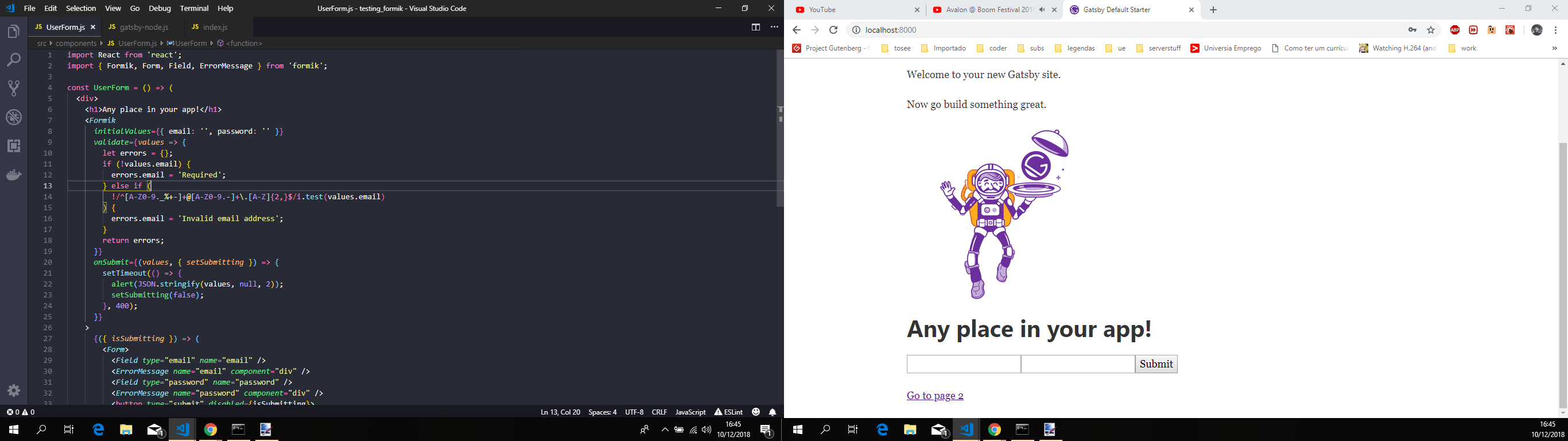
Beforehand be advised that expanding on the example i have shown here, that is based on the official docs i mentioned above, some extra work might be needed to make gatsby and formik to "play nice" together and some extra steps might be needed.
 jonniebigodes
on 10 Dec 2018
jonniebigodes
on 10 Dec 2018
Based on @jonniebigodes example you should be able to use formik.
With respect to your question about dynamic content:
- Gatsby statically renders your pages into HTML but rehydrates React once JavaScript is loaded. Hence you can consume any dynamic content in a React component.
- The simplest way to do this in React is by fetching data in
componentDidMountand then setting state to render with.
I'm closing this for now but please feel free to reopen if there is anything else.
 sidharthachatterjee
on 12 Dec 2018
sidharthachatterjee
on 12 Dec 2018
Gatsby and Formik
From the Gatsby website here:
This form isn’t doing anything besides showing the user information that they just entered. At this point, you may want to move this form to a component, send the form state to a backend server, or add robust validation. You can also use fantastic React form libraries like Formik or Final Form to speed up your development process.
Multistep Form
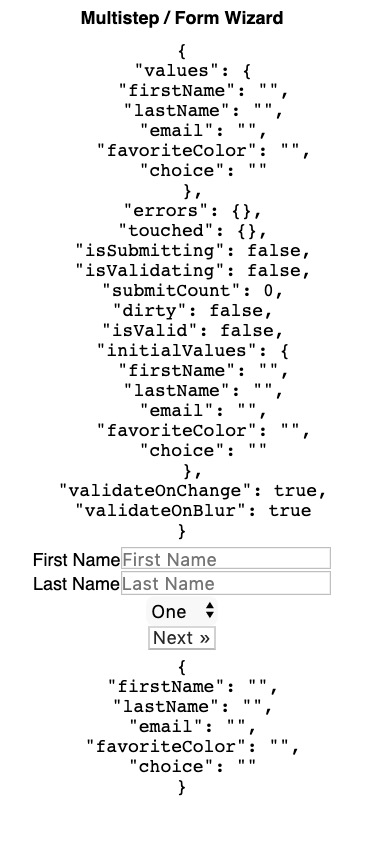
Would it be possible to build a multi-step form like this one WITHIN gatsby that onSubmit performs an ajax post?
https://codesandbox.io/s/62nk7x0p73
Some Questions/Thoughts
- Will a multistep wizard work within gatsby using formik?
- Can I build the form using formik with externally sourced data in gatsby?
- I want to host on netlify. I want the onSubmit function to do an ajax post to an external/remote webapp. Are there any foreseen obstacles with this (super vague question i know )?
Image References
 jajourda
on 27 Dec 2019
jajourda
on 27 Dec 2019
@jajourda going to try and answer your questions:
1- Yes it will
2- Yes you can
3- That will depend on the webapp itself, without more information it's a bit tricky to give a definitive answer to that.
I've setup a repo here, that contains a dummy express server that will send the data to the Gatsby site and also recieve the data entered in the form.
A few key items:
- The Gatsby site is currently working locally, with a proxy, that is setup on
gatsby-config.js - There's no validation implemented.
- I've grabbed the example from the formik repo and tried to simplify it.
- Left in some comments.
jonniebigodes
on 29 Dec 2019
@jajourda going to try and answer your questions:
1- Yes it will
2- Yes you can
3- That will depend on the webapp itself, without more information it's a bit tricky to give a definitive answer to that.I've setup a repo here, that contains a dummy express server that will send the data to the Gatsby site and also recieve the data entered in the form.
A few key items:
- The Gatsby site is currently working locally, with a proxy, that is setup on
gatsby-config.js- There's no validation implemented.
- I've grabbed the example from the formik repo and tried to simplify it.
- Left in some comments.
You are awesome. I can't wait to try this. Such a quick response. This relieves the biggest concern I had yet to have answered: is the community thriving enough to move ahead with my project! Thank you @jonniebigodes
jajourda
on 29 Dec 2019
@jajourda no need to thank, glad that i was able to help you with your issue. And the Gatsby community is thriving. And you should continue with your project and one thing can't wait to see it added to the showcase!
jonniebigodes
on 29 Dec 2019
Related issues
 rossPatton
·
3Comments
rossPatton
·
3Comments
 andykais
·
3Comments
andykais
·
3Comments
 magicly
·
3Comments
magicly
·
3Comments
 3CordGuy
·
3Comments
3CordGuy
·
3Comments
 brandonmp
·
3Comments
brandonmp
·
3Comments
Most helpful comment
Based on @jonniebigodes example you should be able to use formik.
With respect to your question about dynamic content:
componentDidMountand then setting state to render with.I'm closing this for now but please feel free to reopen if there is anything else.