Gatsby: Google Mobile-Friendly Test Failing for Gatsby with no CSS via styled-components
I am using Gatsby + styled-components for my new VSCode course site. Everything looks fine on Desktop/Mobile but Google Mobile-Friendly test is failing miserably. Which is costing me SEO and more.
I am out of options, searched about it and didn't find anything. I think I added the webfontloader plugin since then I started having this issue. But not sure. I've since removed it. Any help would be appreciated.
This is what I see on Google's Mobile-friendly test.
Steps to reproduce
Here's the HTML in case you need it to test. I opened this HTML up and yes, there is actually no CSS to be found. Click this raw file, it's huge so not adding it here.
Expected result
CSS should be loaded by Google Mobile-Friendly test it is not at the moment. I am out of options so creating this issue to get some pointers on what to do. This is what the site should look like.
Actual result
CSS is not loaded :(
Even if I try loading this HTML that I got from Google Mobile-friendly test, this is exactly what I see. No CSS.
Environment
 System:
    OS: macOS High Sierra 10.13.5
    CPU: x64 Intel(R) Core(TM) i7-4850HQ CPU @ 2.30GHz
    Shell: 5.3 - /bin/zsh
  Binaries:
    Node: 10.11.0 - ~/.asdf/shims/node
    Yarn: 1.10.1 - /usr/local/bin/yarn
    npm: 6.4.1 - ~/.asdf/shims/npm
  Browsers:
    Chrome: 70.0.3538.110
    Firefox: 57.0.1
    Safari: 11.1.1
  npmPackages:
    gatsby: ^2.0.44 => 2.0.44
    gatsby-cli: ^2.4.6 => 2.4.6
    gatsby-image: ^2.0.20 => 2.0.20
    gatsby-plugin-google-analytics: ^2.0.7 => 2.0.7
    gatsby-plugin-manifest: ^2.0.8 => 2.0.8
    gatsby-plugin-offline: ^2.0.13 => 2.0.13
    gatsby-plugin-react-helmet: ^3.0.1 => 3.0.1
    gatsby-plugin-sharp: ^2.0.12 => 2.0.12
    gatsby-plugin-sitemap: ^2.0.3 => 2.0.3
    gatsby-plugin-styled-components: ^3.0.1 => 3.0.1
    gatsby-source-filesystem: ^2.0.8 => 2.0.8
    gatsby-transformer-sharp: ^2.1.8 => 2.1.8
  npmGlobalPackages:
    gatsby-cli: 2.4.3
Looking forward, peace! ✌️
 ahmadawais
All 24 comments
Here's the Google Mobile-Friendly test I did. You can try it as well.
https://search.google.com/test/mobile-friendly?id=bYfcuuOi_wXmVp2GFrYjSA
Thoughts?
ahmadawais
on 4 Dec 2018
Further investigation down the road with minified HTML source led to the fact that styles are not outputting in the page. It's empty.
<style data-styled="" data-styled-version="4.1.2"></style>
What could be causing this issue?
ahmadawais
on 4 Dec 2018
Just to try a shot in the dark here: Maybe the Service Worker is the issue here? Maybe the Google test has problems with that? Your page probably works just fine on phones and Google Lighthouse test is also good?
 LekoArts
on 4 Dec 2018
LekoArts
on 4 Dec 2018
@LekoArts nice to see you here, again.
Umm I am not so sure how to fix that. Service worker stuff is all built-in. This is what my config looks like.
const config = require('./src/config/SiteConfig');

module.exports = {
    siteMetadata: {
        title: config.title,
        siteUrl: config.urlNoTrailingSlash,
    },
    plugins: [
        'gatsby-plugin-react-helmet',
        {
            resolve: `gatsby-source-filesystem`,
            options: {
                name: `images`,
                path: `${__dirname}/src/images`,
            },
        },
        'gatsby-transformer-sharp',
        'gatsby-plugin-sharp',
        {
            resolve: `gatsby-plugin-manifest`, // https://developer.mozilla.org/en-US/docs/Web/Manifest
            options: {
                name: config.short_name,
                short_name: config.short_name,
                description: config.title,
                start_url: '/',
                background_color: config.color,
                theme_color: config.color,
                display: 'minimal-ui',
                lang: 'en-US',
                icon: config.icon, // This path is relative to the root of the site.
            },
        },
        'gatsby-plugin-offline',
        `gatsby-plugin-styled-components`,
        {
            resolve: `gatsby-plugin-google-analytics`,
            options: {
                trackingId: 'UA-XXXX-1',
            },
        },
        {
            resolve: `gatsby-plugin-sitemap`,
            options: {
                output: `sitemap.xml`,
                // Exclude specific pages or groups of pages using glob parameters
                // See: https://github.com/isaacs/minimatch
                // The example below will exclude the single `path/to/page` and all routes beginning with `category`
                exclude: ['/category/*'],
                query: `{
                        site {
                            siteMetadata {
                            siteUrl
                            }
                        }

                        allSitePage {
                            edges {
                            node {
                                path
                            }
                            }
                        }
                    }`,
            },
        },
    ],
};
Thoughts?
ahmadawais
on 4 Dec 2018
One more thing. I am using Netlify and asset optimization is enabled for everything. But the thing is I don't see any styles inside the style tag, not on localhost with gatsby serve and not on the live site.
<style data-styled="" data-styled-version="4.1.2"></style>
Yeah, it just was a thought spoken out load...
Regarding your config:
Sometimes it actually matters how you order your plugins. The service worker only includes things that come before its entry, hence the note on the readme:
If you're using this plugin with gatsby-plugin-manifest (recommended) this plugin should be listed after that plugin so the manifest file can be included in the service worker.
So try putting the gatsby-plugin-offline entry to the end of the array. Btw, you could also use gatsby-plugin-netlify if you want (that would go after the offline entry then)
LekoArts
on 4 Dec 2018
@LekoArts after you asked that's what I started investigating and have already sent a deploy with the gatsby-plugin-offline at the end.
May I ask what would be the benefit of gatsby-plugin-netlify (looking into it now myself as well). Appreciate all the help. Testing the changes.
ahmadawais
on 4 Dec 2018
I use it for the HTTP/2 functionality and the default security and caching headers
LekoArts
on 4 Dec 2018
@LekoArts I just tried the latest build. No luck :( styles generated are empty.
The production site has no styles being outputted in the following tag
<style data-styled="" data-styled-version="4.1.2"></style>
My config looks like this now.
const config = require('./src/config/SiteConfig');

module.exports = {
    siteMetadata: {
        title: config.title,
        siteUrl: config.urlNoTrailingSlash,
    },
    plugins: [
        'gatsby-plugin-react-helmet',
        {
            resolve: `gatsby-source-filesystem`,
            options: {
                name: `images`,
                path: `${__dirname}/src/images`,
            },
        },
        'gatsby-transformer-sharp',
        'gatsby-plugin-sharp',
        {
            resolve: `gatsby-plugin-manifest`, // https://developer.mozilla.org/en-US/docs/Web/Manifest
            options: {
                name: config.short_name,
                short_name: config.short_name,
                description: config.title,
                start_url: '/',
                background_color: config.color,
                theme_color: config.color,
                display: 'minimal-ui',
                lang: 'en-US',
                icon: config.icon, // This path is relative to the root of the site.
            },
        },
        `gatsby-plugin-styled-components`,
        {
            resolve: `gatsby-plugin-google-analytics`,
            options: {
                trackingId: 'UA-xxxx-1',
            },
        },
        {
            resolve: `gatsby-plugin-sitemap`,
            options: {
                output: `sitemap.xml`,
                // Exclude specific pages or groups of pages using glob parameters
                // See: https://github.com/isaacs/minimatch
                // The example below will exclude the single `path/to/page` and all routes beginning with `category`
                exclude: ['/category/*'],
                query: `{
                        site {
                            siteMetadata {
                            siteUrl
                            }
                        }

                        allSitePage {
                            edges {
                            node {
                                path
                            }
                            }
                        }
                    }`,
            },
        },
        `gatsby-plugin-offline`,
    ],
};
P.S. As a separate note — do you have an example config I can look at for gatsby-plugin-netlify as a reference for me to look at.
Peace! ✌️
ahmadawais
on 4 Dec 2018
You can't have a look at the "real" source code via Site source. You're seeing the content served from the Service worker (Ref: https://github.com/gatsbyjs/gatsby/issues/10017#issuecomment-439946657).
Do a curl https://www.vscode.pro and you'll see the styling tags filled.
Just add the netlify plugin, no options needed
LekoArts
on 4 Dec 2018
@LekoArts That makes sense. The curl output does have the styles being included in it.
Sadly, it's the same with Google Mobile-Friendly Test. Service worker is being served there and there are no styles being served to Google.
On curl'd request I do have styles.
<style data-styled="inwsUJ gAexoZ iwFWYm qvQBF bIIOEk jTXiBx dKmpLX dYidhB iXidjg eKESjm epwiIB htBqnc hqaCAQ ihHlsT hNRGBe bReJa bRmXpm gopGmT fZTjOg iNVscE hCdxnF hzDgvN emWJqL eONboK iJfYmr dfejAE hgvooP gWCadn lgQDZB dEcOJK kNVtIm eMLOun jrxhMy jygtF gXWNGn hSmSep fEQAEO fOADLC jyBzaR cJyvkH lgbYfy gabLVZ kpolOW kDUoMT bzWzZv ktPZNp kWmFyR hFcRmG dspUsc srKNF fMywxP bxvWKO RFGja eepNxg hzLokd kGoZVc fLvjfk iRXbat ubKGm dvEqQD fHgYui eiEdjC bKCaJc kxGHsE iTxPZZ gNUgXD ihvlnM kEUuji hbPKgu cGILMx cWWZys iqBjii bhLCNn iqiumM fnmQfO" data-styled-version="4.1.2">
/* sc-component-id: sc-global-1458806570 */
html{line-height:1.15;-webkit-text-size-adjust:100%;} body{margin:0;} h1{font-size:2em;margin:0.67em 0;} hr{box-sizing:content-box;height:0;overflow:visible;} pre{font-family:monospace,monospace;font-size:1em;} a{background-color:transparent;} abbr[title]{border-bottom:none;-webkit-text-decoration:underline;text-decoration:underline;-webkit-text-decoration:underline dotted;text-decoration:underline dotted;} b,strong{font-weight:bolder;} code,kbd,samp{font-family:monospace,monospace;font-size:1em;} small{font-size:80%;} sub,sup{font-size:75%;line-height:0;position:relative;vertical-align:baseline;} sub{bottom:-0.25em;} sup{top:-0.5em;} img{border-style:none;} button,input,optgroup,select,textarea{font-family:inherit;font-size:100%;line-height:1.15;margin:0;} button,input{overflow:visible;} button,select{text-transform:none;} button,[type="button"],[type="reset"],[type="submit"]{-webkit-appearance:button;} button::-moz-focus-inner,[type="button"]::-moz-focus-inner,[type="reset"]::-moz-focus-inner,[type="submit"]::-moz-focus-inner{border-style:none;padding:0;} button:-moz-focusring,[type="button"]:-moz-focusring,[type="reset"]:-moz-focusring,[type="submit"]:-moz-focusring{outline:1px dotted ButtonText;} fieldset{padding:0.35em 0.75em 0.625em;} legend{box-sizing:border-box;color:inherit;display:table;max-width:100%;padding:0;white-space:normal;} progress{vertical-align:baseline;} textarea{overflow:auto;} [type="checkbox"],[type="radio"]{box-sizing:border-box;padding:0;} [type="number"]::-webkit-inner-spin-button,[type="number"]::-webkit-outer-spin-button{height:auto;} [type="search"]{-webkit-appearance:textfield;outline-offset:-2px;} [type="search"]::-webkit-search-decoration{-webkit-appearance:none;} ::-webkit-file-upload-button{-webkit-appearance:button;font:inherit;} details{display:block;} summary{display:list-item;} template{display:none;} [hidden]{display:none;}
/* sc-component-id: Container__Wrap-sc-1hmin2q-0 */
.qvQBF{display:table;width:100%;position:relative;}
/* sc-component-id: Container__Inner-sc-1hmin2q-1 */
.bIIOEk{max-width:75rem;margin:0 auto;}
/* sc-component-id: Desc-iyuu9f-0 */
/* sc-component-id: Testimonials__Text-sc-1djwdp2-2 */
.cWWZys{margin:0;font-size:1.6rem;} .cWWZys a{color:inherit;-webkit-text-decoration:none;text-decoration:none;-webkit-transition:0.4s all ease-out;transition:0.4s all ease-out;border-bottom:1px dotted rgba(23,22,58,0.33);} .cWWZys a:hover{border-bottom:1px dotted #4e44d6;}
/* sc-component-id: Testimonials__Cite-sc-1djwdp2-3 */
.iqBjii{display:table;width:100%;margin-top:auto;padding-top:1.8rem;color:rgba(23,22,58,0.83);} .iqBjii img{float:left;border-radius:50%;margin-right:1.8rem;width:5.4rem;height:5.4rem;background:#fff;}
/* sc-component-id: Testimonials__Name-sc-1djwdp2-4 */
.bhLCNn{font-family:'Lato',sans-serif;font-size:1.8rem;-webkit-text-decoration:none;text-decoration:none;color:inherit;font-style:normal;} .bhLCNn small{display:block;font-weight:400;opacity:0.9;} @media (max-width:425px){.bhLCNn small{font-size:1.1rem;}}</style>
but on Google Mobile-Friendly Test this is what I get in the HTML which is the cause of this issue.
<style data-styled="" data-styled-version="4.1.2"></style>
Sometimes I don't understand Google. They want you to have a PWA (for which you need a Service Worker) but then their weird Mobile-Friendly test doesn't understand that...
So, the initial question is answered I guess? Nothing wrong on Gatsby's end.
LekoArts
on 4 Dec 2018
@LekoArts there is something wrong here. I assure you it's probably not Google.
E.g. I have just tested https://www.lekoarts.de/ your site. It's loading fine. It doesn't have any styles on the desktop but when tested with Google Mobile-friendly test it does have styles.
On desktop:
From Google Mobile test
I am not sure what I am doing wrong. It was working fine before. Traveling back in time with Git has not helped at all. Next up I can think of is to deploy feature branches and test them after disabling plugins and things to find the culprit.
Any pointers you can think of would greatly help. Coz right now my site has received a penalty from Google for not being mobile friendly.
:(
ahmadawais
on 4 Dec 2018
Another small update. I have removed the the gatsby offline plugin and the issue is still there.
Here's a test link with the netlify branch preview. Something else is going on there. Would update with more info next time.
https://search.google.com/test/mobile-friendly?id=KqCY-3YpkMvB2zK-ZqmPTA
ahmadawais
on 4 Dec 2018
No, what you're marking there in the HTML is the css of typefaces-* packages I use. Nothing related to styled-components. The tag is still empty:

And the site gives me an "OK"
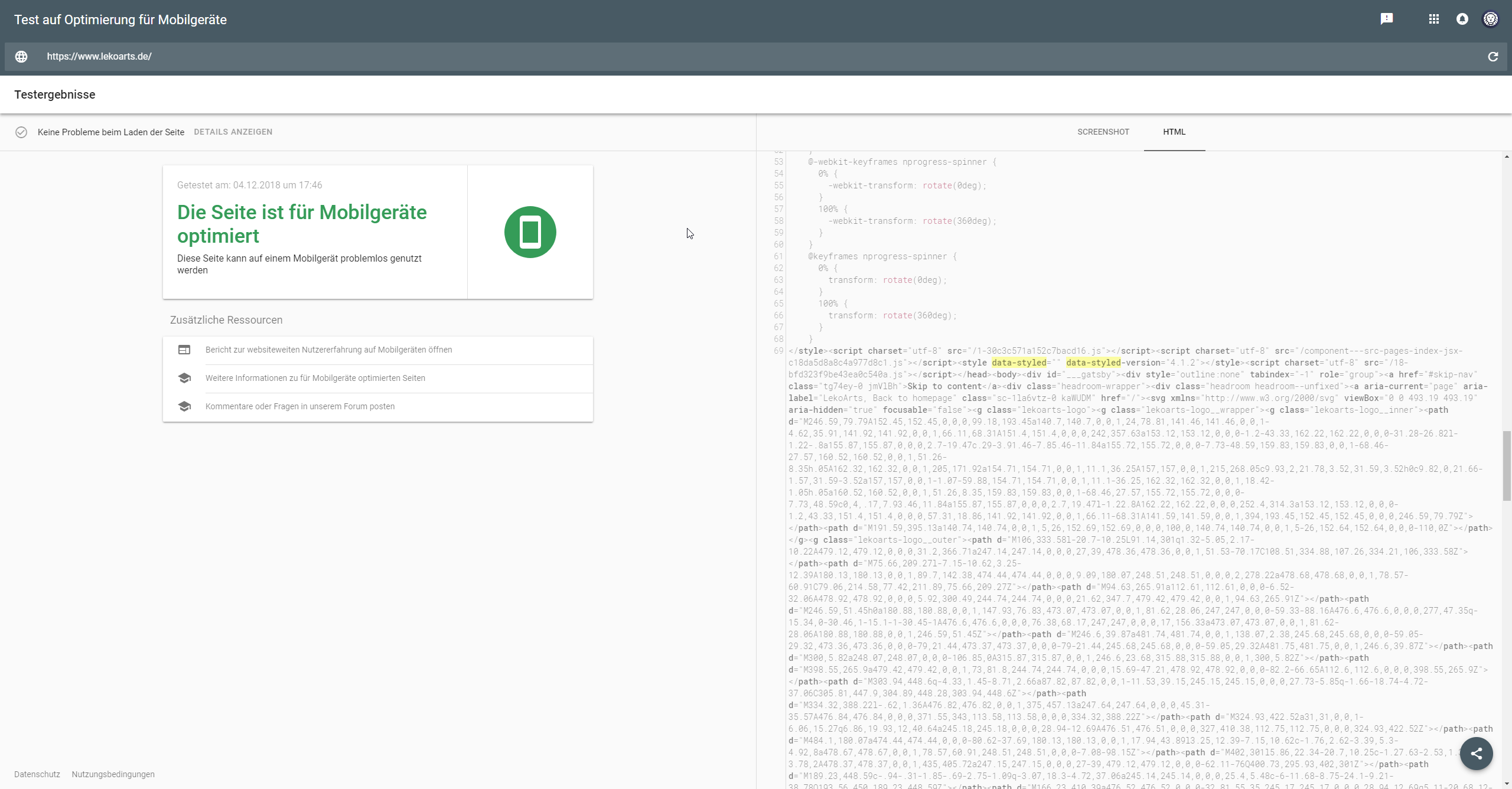
An hour ago it told me something is wrong with my site.
LekoArts
on 4 Dec 2018
Hahaha, didn't see that. I just missed that. Google is crazy :(
ahmadawais
on 4 Dec 2018
Folks, this is most definitely an issue with Gatsby or Gatsby's styled-components plugin. I have been trying to debug it for hours.
I deployed a custom branch where I manually added all the CSS that I scrapped via curl from local gatsby serve to the head of my site and now the site test is all passed. It's as simple as that, the CSS is not getting applied on the Google Mobile Test. It could be coz of the Service Worker. Not sure. But I removed the offline plugin and it still wouldn't work.
Here're the results if I manually duplicate the CSS at the top.
https://search.google.com/test/mobile-friendly?id=wn6RGnv1YC3DIK0Vld53Rw
ahmadawais
on 4 Dec 2018
@ahmadawais are you able to share a reproduction repo?
 DSchau
on 4 Dec 2018
DSchau
on 4 Dec 2018
@DSchau I can probably strip out the stuff that needn't be public and share it with you privately on GitHub. Can I have your email ID?
Here's what I have ended up with:
- Sadly, I have to add 20KB of extra styles manually at the top since Google is not picking up the CSS no matter what I do. Here's the failed test and here's a test with the passed test with manually added CSS at the top.
- For some reason, Google still doesn't pass the site and that's beyond me. Some sort of caching. So, the default URL https://VSCode.pro is still failing and if I add
?nocache=1then the test is passing.
I have no idea where to go from here. But I'll keep working on this thing and there must be a solution here somewhere.
When I get home, I'll send you a reproducible repo.
ahmadawais
on 5 Dec 2018
@ahmadawais dustin at gatsbyjs dot com
DSchau
on 5 Dec 2018
Hiya!
This issue has gone quiet. Spooky quiet. 👻
We get a lot of issues, so we currently close issues after 30 days of inactivity. It’s been at least 20 days since the last update here.
If we missed this issue or if you want to keep it open, please reply here. You can also add the label "not stale" to keep this issue open!
Thanks for being a part of the Gatsby community! 💪💜
![gatsbot[bot] picture](https://avatars2.githubusercontent.com/in/12849?v=4&s=40) gatsbot[bot]
on 5 Feb 2019
gatsbot[bot]
on 5 Feb 2019
Hey again!
It’s been 30 days since anything happened on this issue, so our friendly neighborhood robot (that’s me!) is going to close it.
Please keep in mind that I’m only a robot, so if I’ve closed this issue in error, I’m HUMAN_EMOTION_SORRY. Please feel free to reopen this issue or create a new one if you need anything else.
Thanks again for being part of the Gatsby community!
gatsbot[bot]
on 16 Feb 2019
Hey there, I'm looking at the issue now as well.
A few notes:
- Googlebot (and thus, mobile-friendly test and other testing tools) aren't using service workers. PWAs are great but users coming through search results might be first-time users, so Googlebot ignores service workers, but they won't break your site or CSS as they are ignored.
- The testing tools haven't been updated to the latest Chrome renderer yet, so they still run Chrome 41. We are working on fixing this, but maybe this causes trouble here?
- The mobile-friendly test tool is unfortunately a little flaky sometimes, we also work on resolving that as quickly as possible.
 AVGP
on 26 May 2019
AVGP
on 26 May 2019
Most of the Google testing tools are now updated to use Googlebot evergreen rendering so try running your site through the testing tool again @ahmadawais.
Thanks Martin (@AVGP) for the comment above. Any other latest Googlebot updates you can provide?
 tcope25
on 2 Jan 2020
tcope25
on 2 Jan 2020
Related issues
 jimfilippou
·
3Comments
jimfilippou
·
3Comments
 ferMartz
·
3Comments
ferMartz
·
3Comments
 brandonmp
·
3Comments
brandonmp
·
3Comments
 hobochild
·
3Comments
hobochild
·
3Comments
 timbrandin
·
3Comments
timbrandin
·
3Comments
Most helpful comment
Most of the Google testing tools are now updated to use Googlebot evergreen rendering so try running your site through the testing tool again @ahmadawais.
Thanks Martin (@AVGP) for the comment above. Any other latest Googlebot updates you can provide?