gatsby-image: Cannot read property 'file' of undefined
Started off with hello-world-starter template....
gatsby-config.js
    module.exports = {
     siteMetadata: {
        title:  'The Super Page',
        description: 'just blog another page'
    },
    plugins: [
        'gatsby-plugin-react-helmet',
        'gatsby-plugin-styled-components',
        {
            resolve: `gatsby-source-filesystem`,
            options: {
            name: `img`,
            path: `${__dirname}/src/img`
            }
        },
        'gatsby-transformer-sharp',
        'gatsby-plugin-sharp',
        {
           resolve: `gatsby-plugin-manifest`,
           options: {
                name: 'Super Page',
                short_name: 'SP',
                start_url: '/',
                background_color:  #fff',
                theme_color:  '#1a2632'
                display: 'minimal-ui',
                icon: 'src/img/icon.png',
                legacy: true
            }
        }
    ]
   };
The setup with almost exact duplication from https://www.gatsbyjs.org/packages/gatsby-image/#gatsby-image . Except for in relative path which I made change.
pages/index.js
import React from 'react';
import Img from 'gatsby-image';

export default ({ data }) => (
    <div>
        <h1>Hello gatsby-image</h1>
        <Img fixed={data.file.childImageSharp.fixed} />
    </div>
);

export const query = graphql`
    query {
        file(relativePath: { eq: "01.png" }) {
            childImageSharp {
                # Specify the image processing specifications right in the query.
                # Makes it trivial to update as your page's design changes.
                fixed(width: 125, height: 125) {
                    ...GatsbyImageSharpFixed
                }
            }
        }
    }
`;
I end up getting error: TypeError: Cannot read property 'file' of undefined.
Went on visting http://localhost:8000/___graphql and include following the string...
query {
  file: file(relativePath: {eq: "01.png"}) {
    childImageSharp {
      fluid(maxWidth: 1000) {
        src
      }
    }
  }
}
And the result...
{
  "data": {
    "file": {
      "childImageSharp": {
        "fluid": {
          "src": "/static/046b644ff401bbcaaa159ee99068b8f1/b3372/01.png"
        }
      }
    }
  }
}
I also follow this... https://codebushi.com/using-gatsby-image/ and end up with same error. I could not fathom what the issues are, what am I doing wrong?
Strange part is, this work without error when I used this method...
import React from 'react';
import { StaticQuery, graphql } from 'gatsby';
import Img from 'gatsby-image';

import Layout from '../templates/Layout';

const IndexPage = () => (
    <StaticQuery
        query={graphql`
            query {
                placeholderImage: file(relativePath: { eq: "01.png" }) {
                    childImageSharp {
                        fluid(maxWidth: 300) {
                            ...GatsbyImageSharpFluid
                        }
                    }
                }
            }
        `}
        render={data => (
            <Layout>
                <Img fluid={data.placeholderImage.childImageSharp.fluid} />
            </Layout>
        )}
    />
);
export default IndexPage;
But I wanted to avoid using <StaticQuery>, any suggestion? Is there any better explanation on how to use <Img> (gatsby-image) that detect image path without needing query but use styled-component instead?
 aprather51
All 11 comments
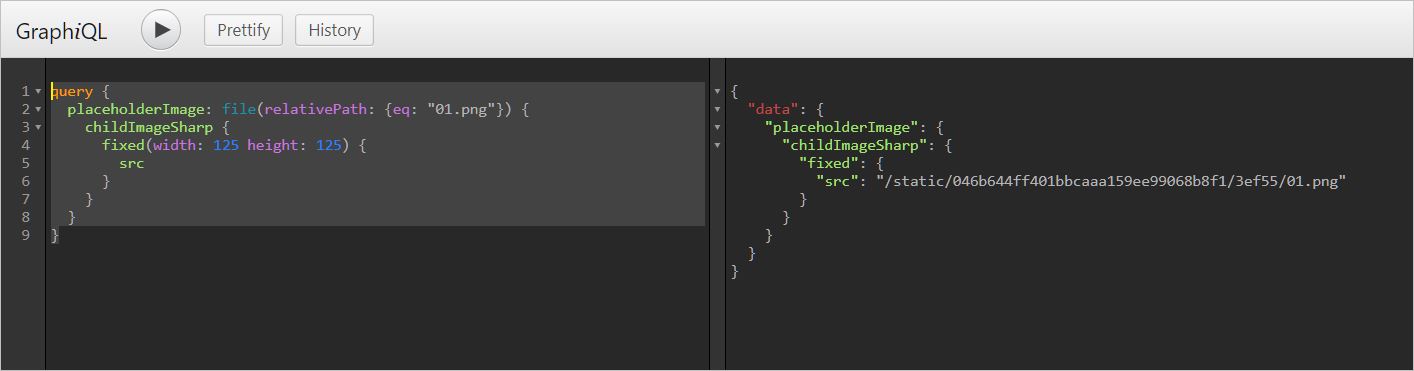
I've noticed that the success you've had has been with the fluid configuration. Would you try running the query in graphiql with the fixed designiator and share what it yields?
 wlockiv
on 25 Nov 2018
wlockiv
on 25 Nov 2018
Ran graphiql and designates it in fixed... nothing yields after I hit play button.
 .
.
aprather51
on 25 Nov 2018
After going though lot of research, I found exporting query to get Image Sharp methods works mostly on v1. Look like this become obsolete for v2. Unless if someone can prove me that I am wrong.
This step gatsby-image how to use probably need to be updated, otherwise it would mislead to new users.
aprather51
on 25 Nov 2018
After going though lot of research, I found exporting query to get Image Sharp methods works mostly on v1. Look like this become obsolete for v2. Unless if someone can prove me that I am wrong.
This step gatsby-image how to use probably need to be updated, otherwise it would mislead to new users.
I was actually able to successfully run the query on my setup (copied your code from the original post). There are several issues with your gatsby-config.js. On line 24, you're missing a single quote before the color, and you're missing a comma following the theme_color property on the next line. Also note how the successful example you provided imports { graphql }.
If you're still interested in trying to get this to work, would you fix the issues mentioned above, delete your .cache folder, and try again? If it still doesn't work, would you share a repo?
wlockiv
on 25 Nov 2018
Actually, there are no error with "missing" commas or etc with gatsby-config.js. Its typo error after I pasted and edit syntaxes inside github md. I am going to reopen this issues, and share my repo here...
https://github.com/aprather51/gatsby-image-test.git
FYI: I created new from bare, implement the part that I am having issues with. So it may not be same thing from what i have posted above.
aprather51
on 26 Nov 2018
Forgive me for pointing out the errors in the code you posted, they were the only thing causing the code on my machine to fail.
For the repo you posted:
Graphql queries can only be performed on page components without using <StaticQuery />. Layout components do not count as page components.
In order to get this to work without using <StaticQuery /> you'll need to query the image on the index page component. Your index.js would look like this:
import React from "react";
import { graphql } from "gatsby";

import Layout from "../components/Layout";

const IndexPage = ({ data }) => (
  <Layout backgroundImage={data.bgImg.childImageSharp.fluid}>
    <h3>{data.site.siteMetadata.title}</h3>
  </Layout>
);

export default IndexPage;

export const pageQuery = graphql`
  query IndexQuery {
    site {
      siteMetadata {
        title
      }
    }
    bgImg: file(relativePath: { eq: "01.jpg" }) {
      childImageSharp {
        fluid(maxWidth: 1240) {
          ...GatsbyImageSharpFluid
        }
      }
    }
  }
`;
and your Layout component would look something like this:
import React, { Fragment } from "react";
import PropTypes from "prop-types";
import Header from "./Header";
import Img from "gatsby-image";

const Layout = ({ children, backgroundImage }) => {
  return (
    <Fragment>
      <Header />
      <Img fluid={backgroundImage} />
      {children}
    </Fragment>
  );
};

Layout.propTypes = {
  children: PropTypes.node.isRequired
};

export default Layout;
If this image is dependent on the page component calling the <Layout /> component, this is the way to go; however, if this image will always be the same wherever this layout component is used, <StaticQuery /> may not be a bad idea after all.
Everything else in the repo looks fine; though it is a different situation than the original post, which had a failing page query on a page component.
wlockiv
on 26 Nov 2018
Closing due to the reasons @wlockiv identified. Please re-open if we can assist further!
 DSchau
on 26 Nov 2018
DSchau
on 26 Nov 2018
_Forgive me for pointing out the errors in the code you posted, they were the only thing causing the code on my machine to fail._
@wlockiv — Actually it was my fault, I mislead you. I am one that should apologize you. 😭
_Graphql queries can only be performed on page components_
Now that explains everything! Finally got this to work. Thank you @wlockiv. Now I understand why <StaticQuery> may not be bad idea after all.
_Everything else in the repo looks fine; though it is a different situation than the original post, which had a failing page query on a page component._
Actually, its same situation with different syntax... I had to write new from scratch to scope on issues I am having this is to minimize, simplify and keep clear up for us since other project code (problem one) very messy. But everything solve for me as well. Once again, thank you for your time and help 👌
aprather51
on 26 Nov 2018
Delighted to help!
If the "messiness" of the staticquery is what makes you weary from using it, you can also declare the graphql object in a variable, then pass that object tio the 'query' prop.
This is the general idea:
// Layout.js

import React, { Fragment } from "react";
import PropTypes from "prop-types";
import Header from "./Header";
import Img from "gatsby-image";
import { StaticQuery, graphql } from "gatsby";

const Layout = ({ children }) => {
  return (
    <StaticQuery
      query={query}
      render={data => (
        <Fragment>
          <Header />
          <Img fluid={data.bgImg.childImageSharp.fluid} />
          {children}
        </Fragment>
      )}
    />
  );
};

Layout.propTypes = {
  children: PropTypes.node.isRequired
};

const query = graphql`
  query {
    bgImg: file(relativePath: { eq: "01.jpg" }) {
      childImageSharp {
        fluid(maxWidth: 1240) {
          ...GatsbyImageSharpFluid
        }
      }
    }
  }
`;

export default Layout;
Just be sure to delete the background image prop in index.js!
wlockiv
on 26 Nov 2018
Excellent! 👍 I am going with this syntax. This look much more cleaner, very clear and concise. Easy to pick up for future debugging or among developers in teams. Now I can sleep better tonight, once again Thank you.
aprather51
on 27 Nov 2018
I haven't been able to solve this because i'm also passing props
 PaulinaVPG
on 13 Dec 2019
PaulinaVPG
on 13 Dec 2019
Related issues
 Oppenheimer1
·
3Comments
Oppenheimer1
·
3Comments
 jimfilippou
·
3Comments
jimfilippou
·
3Comments
 mikestopcontinues
·
3Comments
mikestopcontinues
·
3Comments
 3CordGuy
·
3Comments
3CordGuy
·
3Comments
 ferMartz
·
3Comments
ferMartz
·
3Comments
Most helpful comment
Forgive me for pointing out the errors in the code you posted, they were the only thing causing the code on my machine to fail.
For the repo you posted:
Graphql queries can only be performed on page components without using
<StaticQuery />. Layout components do not count as page components.In order to get this to work without using
<StaticQuery />you'll need to query the image on the index page component. Your index.js would look like this:and your Layout component would look something like this:
If this image is dependent on the page component calling the
<Layout />component, this is the way to go; however, if this image will always be the same wherever this layout component is used,<StaticQuery />may not be a bad idea after all.Everything else in the repo looks fine; though it is a different situation than the original post, which had a failing page query on a page component.