Gatsby: Dynamic Routes via gatsby-plugin-create-client-paths receive NGINX 404
Description
When deployed and served our gatsby app produces NGINX 404 errors when trying to access a dynamic route created by gatsby-plugin-create-client-paths. All this works locally when in development but breaks when deployed to Heroku and served via CloudFlare.
Steps to reproduce
in gatsby-config.js:
    {
      resolve: `gatsby-plugin-create-client-paths`,
      options: { prefixes: [`'/quote/*'] }
    },
in our src/pages folder we have a quote.js file that reads the * after /quote and displays content accordingly.
Expected result
The quote.js page should be displayed, no 404 error.
Actual result
NGINX 404 ERROR

 luskin
All 22 comments
Hey, you need to adjust nginx config to serve /quotes/index.html when accessing /quotes/* routes. This is not something that gatsby can control as mentioned in https://www.gatsbyjs.org/docs/building-apps-with-gatsby/#client-only-routes--user-authentication
These routes will exist on the client only and will not correspond to index.html files in an app’s built assets. If you’d like site users to be able to visit client routes directly, you’ll need to set up your server to handle those routes appropriately.
We should expand docs there to add example configuration for popular servers (including ngingx)
 pieh
on 21 Nov 2018
pieh
on 21 Nov 2018
Also this might be helpful to set this up - https://stackoverflow.com/questions/52051090/gatsbyjs-client-only-paths-goes-to-404-page-when-the-url-is-directly-accessed-in
pieh
on 21 Nov 2018
As @pieh pointed, something like this works for me:
location /quotes/ {
  try_files $uri $uri/ /quotes/index.html;
}
 elrumordelaluz
on 8 Jan 2019
elrumordelaluz
on 8 Jan 2019
@pieh
The fix mentionned in https://stackoverflow.com/questions/52051090/gatsbyjs-client-only-paths-goes-to-404-page-when-the-url-is-directly-accessed-in for Heroku doesn't work.
I tried to deploy the client-only-paths example (extracted repo is here : https://github.com/gendronb/test-gatsby-client-only-paths) to Heroku, using https://www.gatsbyjs.org/docs/deploying-to-heroku/ as guidelines, and adding a static.json as mentionned in https://github.com/heroku/heroku-buildpack-static :
{
    "root": "public/",
    "routes": {
        "/static/*": "/static/",
        "/**": "index.html"
    }
  }
but loading any client-only route will still fail with 404 status (try https://salty-waters-64986.herokuapp.com/page/3)...
If someone manages to make this work, I will pleased to help writing some documentation regarding this aspect (client-side routing setup for Heroku).
I have to mention the above example works perfectly on Netlify, with the following _redirects file added to the /static directory (see https://agitated-mahavira-6d8509.netlify.com/pages/3) :
/* /index.html 200
 gendronb
on 15 Jan 2019
gendronb
on 15 Jan 2019
follow
I'm trying to do this with the static site build and am finding it unlikely to work, even with a workaround to route all requests through the "application" page.
I like the idea of gatsby, but particularly for static deployment, it's lacking in a number of areas in providing known solutions and best practices :(
 jufemaiz
on 17 Jan 2019
jufemaiz
on 17 Jan 2019
I am deploying to GitHub pages. I could not find any documentation on how to redirect there. Does anyone know if this is possible?
 barbalex
on 26 Jan 2019
barbalex
on 26 Jan 2019
I think you’ll need to “hack” the 404 page as the main page and error check on it in your react app. Basically emulate a rewrite (or similar) on the path.
jufemaiz
on 26 Jan 2019
@jufemaiz yeah, that works:
I am now simply returning the correct component from the 404 page, depending on the pathname.
Thanks a lot!
barbalex
on 27 Jan 2019
No worries. It’s a little hacky but it meets the requirements.
Still working out what to do for a noscript option though.
jufemaiz
on 27 Jan 2019
Hiya!
This issue has gone quiet. Spooky quiet. 👻
We get a lot of issues, so we currently close issues after 30 days of inactivity. It’s been at least 20 days since the last update here.
If we missed this issue or if you want to keep it open, please reply here. You can also add the label "not stale" to keep this issue open!
Thanks for being a part of the Gatsby community! 💪💜
![gatsbot[bot] picture](https://avatars2.githubusercontent.com/in/12849?v=4&s=40) gatsbot[bot]
on 18 Feb 2019
gatsbot[bot]
on 18 Feb 2019
Hey again!
It’s been 30 days since anything happened on this issue, so our friendly neighborhood robot (that’s me!) is going to close it.
Please keep in mind that I’m only a robot, so if I’ve closed this issue in error, I’m HUMAN_EMOTION_SORRY. Please feel free to reopen this issue or create a new one if you need anything else.
Thanks again for being part of the Gatsby community!
gatsbot[bot]
on 1 Mar 2019
@jufemaiz this means the server responds with a 404 status code which messes up logs and analytics. I'm trying to get this working on Azure Verizon CDN which is awful. No answer here sorry.
 eknowles
on 29 May 2019
eknowles
on 29 May 2019
FYI, For Apache => https://www.gatsbyjs.org/packages/gatsby-plugin-htaccess/
Like the doc says:
npm install gatsby-plugin-htaccess
# or
yarn add gatsby-plugin-htaccess
Add to plugins in your gatsby-config.js:
module.exports = {
  plugins: ['gatsby-plugin-htaccess'],
}
I think I have lost 4+ hours on a bad custom .htaccess, and I just found this plugin..
And it works like a charm!
 FredericMartinez
on 19 Jul 2019
FredericMartinez
on 19 Jul 2019
For any users with Azure Verizon CDN, my solution was to add a URL rewrite rule.
My rule

documentation around this syntax is at https://docs.microsoft.com/en-us/azure/cdn/cdn-verizon-premium-rules-engine-reference-features#url-rewrite
eknowles
on 28 Jul 2019
@elrumordelaluz
I'm trying to serve my gatsby in /blog route with Nginx that's why I built gatsby with _blog_ prefix. I have a dynamic route called /admin which can access it in /blog/admin. and my Nginx config is this:
http {
  server {
    listen 80;
    server_name localhost;
    client_max_body_size 10M;

    location /blog {
      root /usr/share/nginx/html;
      location /blog/admin {
        try_files $uri $uri/blog /blog/admin/index.html;
      }
    }

    location / {
      proxy_pass http://web1:8080;
    }
  }
}
as you can see in / location I used proxy_pass and in /blog location I served gatsby static files but when I visit /blog/admin/myClientRoute I can not see myClientRoute component and in console, I see this error:
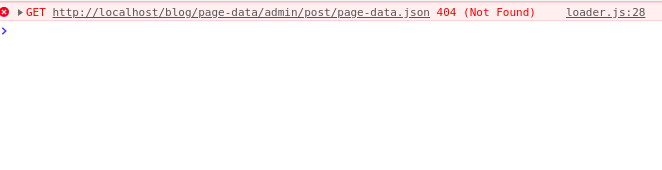
Actually Requests for page-data.json return 404 in client-side routes.
Do you have any solutions?
Thanks in advance
 derakhshanfar
on 26 Aug 2019
derakhshanfar
on 26 Aug 2019
Hi @derakhshanfar, I had the same problem: I solved adding the pathPrefix in the router client path:
<Router>
   <Loader
     path={`${pathPrefix}/preview/:guid`}
   />
</Router>
I think that it should be fixed in the gatsby-plugin-create-client-paths plugin directly
 valse
on 27 Aug 2019
valse
on 27 Aug 2019
Hi @valse. Thanks a ton man! It worked! you saved my life :-D
derakhshanfar
on 27 Aug 2019
I found a more elegant solution importing the helper function withPrefix from gatsby
```
import { withPrefix } from 'gatsby'
/>
valse
on 27 Aug 2019
@valse Great man. Thanks very much!
derakhshanfar
on 27 Aug 2019
What about in S3 and CloudFront? How to fix this issue?
 endigo
on 28 Aug 2019
endigo
on 28 Aug 2019
Hey again!
It’s been 30 days since anything happened on this issue, so our friendly neighborhood robot (that’s me!) is going to close it.
Please keep in mind that I’m only a robot, so if I’ve closed this issue in error, I’m HUMAN_EMOTION_SORRY. Please feel free to reopen this issue or create a new one if you need anything else.
As a friendly reminder: the best way to see this issue, or any other, fixed is to open a Pull Request. Check out gatsby.dev/contribute for more information about opening PRs, triaging issues, and contributing!
Thanks again for being part of the Gatsby community!
gatsbot[bot]
on 8 Sep 2019
@endigo I am facing similar issue in s3 and cloudfront. When I refresh the browser, the page first shows 404 page and then immediately shows the actual page. Please let me know if you've any idea about it.
 vamshi9
on 18 Dec 2020
vamshi9
on 18 Dec 2020
Related issues
 Oppenheimer1
·
3Comments
Oppenheimer1
·
3Comments
 timbrandin
·
3Comments
timbrandin
·
3Comments
 hobochild
·
3Comments
hobochild
·
3Comments
 3CordGuy
·
3Comments
3CordGuy
·
3Comments
 theduke
·
3Comments
theduke
·
3Comments
Most helpful comment
As @pieh pointed, something like this works for me: