Gatsby: MetaData not appearing in page source
Description
I am using gatsby-plugin-react-helmet and not seeing my metadata in the page source using Chrome. I see the meta data in the
tag when I inspect the page, but it's completely missing in the page source. This presents an SEO problem for my team because my understanding is that google page crawlers search the actual page source.**I have found a way to see the metadata in the page source. If I run build the app and serve it to localhost:9000 using gatsby serve, I can see the metadata if I go to localhost:9000/?no-cache=1. I tried to empty my browser history to see if that was the issue, but still no luck.
**I'm also getting the following errors in my console:
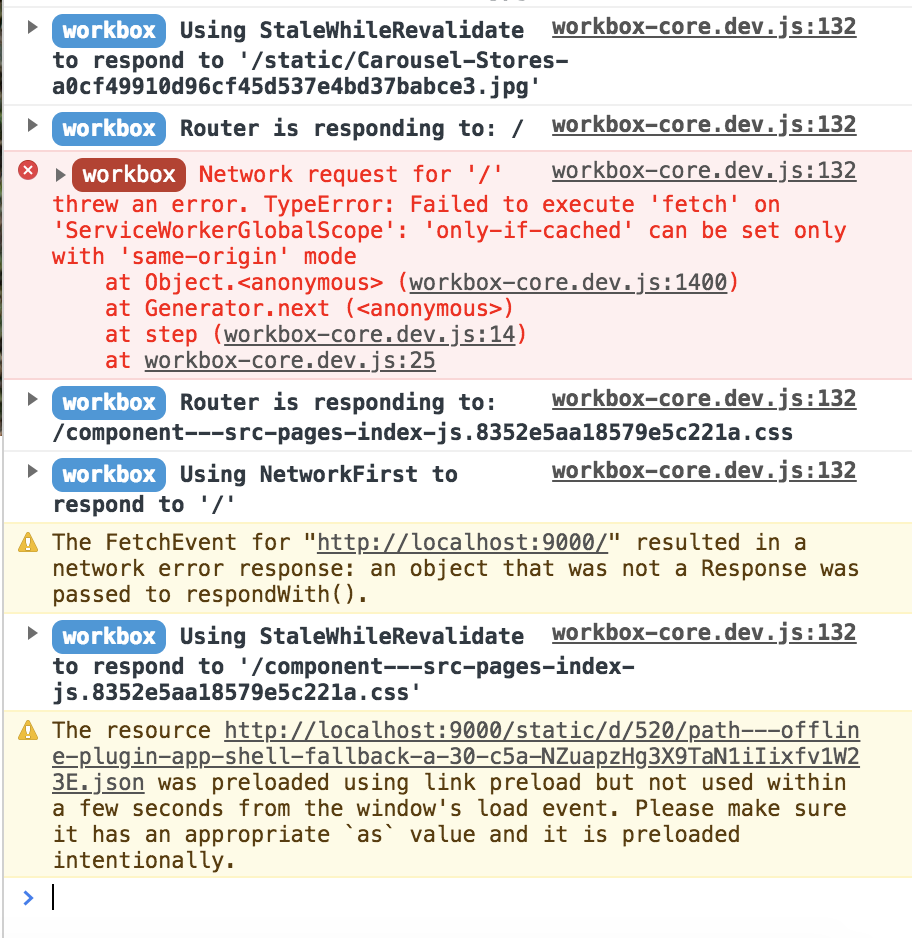
Steps to reproduce
I am currently creating a demo link and will paste here once completed. I believe it has something to do with the _no-cache=1_ described above ^^.
Expected result
I should see the metadata in the page source
Actual result
I only see <!DOCTYPE html><html><head><meta charSet="utf-8"/><meta http-equiv="x-ua-compatible" content="ie=edge"/><meta name="viewport" content="width=device-width, initial-scale=1, shrink-to-fit=no"/><title data-react-helmet="true"></title><link rel="shortcut icon" href="/icons/icon-48x48.png"/><link rel="manifest" href="/manifest.webmanifest"/><meta name="theme-color"/><script src="/socket.io/socket.io.js"></script></head><body><div id="___gatsby"></div><script src="/commons.js"></script></body></html>
Environment
System:
OS: macOS High Sierra 10.13.6
CPU: (12) x64 Intel(R) Core(TM) i7-8850H CPU @ 2.60GHz
Shell: 3.2.57 - /bin/bash
Binaries:
Node: 8.12.0 - /usr/local/bin/node
Yarn: 1.10.1 - /usr/local/bin/yarn
npm: 6.4.1 - /usr/local/bin/npm
Browsers:
Chrome: 70.0.3538.102
Firefox: 62.0.2
Safari: 12.0
npmPackages:
gatsby: ^2.0.0 => 2.0.40
gatsby-plugin-heap: ^1.1.0 => 1.1.0
gatsby-plugin-manifest: ^2.0.2 => 2.0.7
gatsby-plugin-offline: ^2.0.5 => 2.0.12
gatsby-plugin-react-helmet: ^3.0.0 => 3.0.1
gatsby-plugin-sass: ^2.0.1 => 2.0.3
gatsby-source-instagram: ^0.2.0 => 0.2.0
npmGlobalPackages:
gatsby-cli: 2.4.5
 alyssaaaa
All 3 comments
I removed the gatsby-plugin-offline - metaData seems to be working and there are no errors in the console. _However_, if anyone knows how to get this withhh offline support and without the errors, please share. :)
alyssaaaa
on 19 Nov 2018
I think @Vagr9K explained it quite well here: https://github.com/Vagr9K/gatsby-advanced-starter/issues/48#issuecomment-439530920
gatsby-plugin-offline gives you the service worker => Content gets served by the service worker. If you look at the source in public/index.html you'll see the content (or do a curl)
 LekoArts
on 19 Nov 2018
LekoArts
on 19 Nov 2018
@alyssaaaa You can manually delete all site data (including service workers) in DevTools > Application > Clear storage (sidebar) > Clear site data
 jgierer12
on 19 Nov 2018
jgierer12
on 19 Nov 2018
Related issues
 cusspvz
·
128Comments
cusspvz
·
128Comments
 kripod
·
74Comments
kripod
·
74Comments
 Jivings
·
112Comments
Jivings
·
112Comments
 jp887
·
98Comments
jp887
·
98Comments
 jsanchez034
·
92Comments
jsanchez034
·
92Comments
Most helpful comment
I think @Vagr9K explained it quite well here: https://github.com/Vagr9K/gatsby-advanced-starter/issues/48#issuecomment-439530920
gatsby-plugin-offlinegives you the service worker => Content gets served by the service worker. If you look at the source inpublic/index.htmlyou'll see the content (or do acurl)