gatsby new site from template don't work on ie 10
Description
A fresh new site crashes on ie 10 because 'Set' (used in react-dom) is not polyfilled.
Steps to reproduce
open https://gatsby-freshinstall.netlify.com with ie10
(source: https://github.com/abumalick/gatsby-freshinstall )
or:
- create a new site with gatsby-cli
- deploy to netlify
- test deploy link with ie10
Expected result
javascript should load without error
(a polyfill should be included automatically by babel-env ?)
Actual result
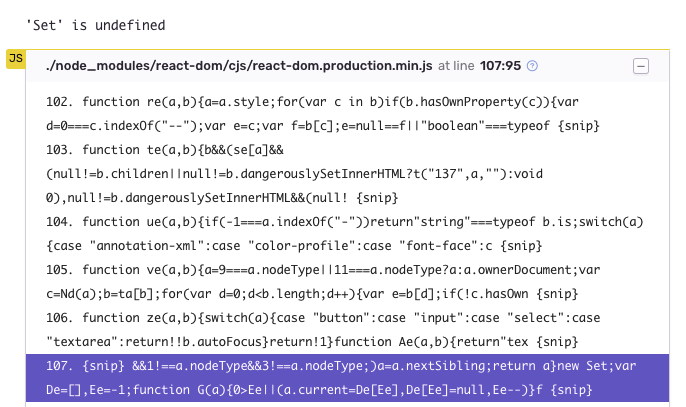
'Set is undefined':

this is a screenshot of sentry from another project, tested with ie10 windows 7 on browserstack:
Other notes
I had a similar problem with redux-form including a polyfill for string.prototype.startsWith fixed the problem. ref: https://github.com/erikras/redux-form/issues/4126
I will add a polyfill for Set to my projects until this is fixed in gatsby.
Environment
(I am testing with browserstack)
gatsby info --clipboard

  System:
    OS: macOS High Sierra 10.13.6
    CPU: x64 Intel(R) Core(TM) i7-4770HQ CPU @ 2.20GHz
    Shell: 5.3 - /bin/zsh
  Binaries:
    Node: 8.12.0 - ~/.nvm/versions/node/v8.12.0/bin/node
    Yarn: 1.10.1 - /usr/local/bin/yarn
    npm: 6.4.1 - ~/.nvm/versions/node/v8.12.0/bin/npm
  Browsers:
    Chrome: 70.0.3538.67
    Firefox: 62.0.3
    Safari: 12.0
  npmPackages:
    gatsby: ^2.0.19 => 2.0.29
    gatsby-image: ^2.0.15 => 2.0.16
    gatsby-plugin-manifest: ^2.0.5 => 2.0.5
    gatsby-plugin-offline: ^2.0.5 => 2.0.8
    gatsby-plugin-react-helmet: ^3.0.0 => 3.0.0
    gatsby-plugin-sharp: ^2.0.7 => 2.0.7
    gatsby-source-filesystem: ^2.0.4 => 2.0.5
    gatsby-transformer-sharp: ^2.1.4 => 2.1.4
 abumalick
All 18 comments
ie 9 and ie 10 are in the supported browser by default right ? https://github.com/gatsbyjs/gatsby/blob/master/.babel-preset.js#L13
abumalick
on 24 Oct 2018
Hi,
I don't know if gatsby and/or the babel preset provides polyfills by default. But this is surely a polyfill issue. Maybe you can try with https://polyfill.io/v2/docs/
 swashata
on 24 Oct 2018
swashata
on 24 Oct 2018
Do we need to set corejs option for babel-transform-runtime? Babel7 does not include those by default.
https://github.com/gatsbyjs/gatsby/blob/4d5c5e0d26c231b9ea1396a8c58432dc100411c0/packages/babel-preset-gatsby/src/index.js#L64-L68
 stefanprobst
on 24 Oct 2018
stefanprobst
on 24 Oct 2018
@DSchau Could you take a look at this? By default we target ["last 4 versions", "safari >= 7", "ie >= 9"] but don't include the corejs polyfills with the babel runtime.
stefanprobst
on 1 Nov 2018
@stefanprobst sure; I'll take a look here in a bit. We've heard similar issues tangentially about the browserslist not being picked up, so want to investigate that!
 DSchau
on 1 Nov 2018
DSchau
on 1 Nov 2018
@DSchau, any updates on this issue so far? If you provide more info and share any new ideas on how we can fix this, I would probably provide you with the PR. Because IE10 issues are very critical for our company. Thanks in advance!
 yuriMalakhov
on 21 Dec 2018
yuriMalakhov
on 21 Dec 2018
I think adding this line at the beginning of gatsby-browser.js fixes this error.
import 'core-js/modules/es6.set';
abumalick
on 21 Dec 2018
@abumalick @DSchau Manually adding import 'core-js/modules/es6.set'; polyfills to gatsby-browser.js is a workaround, but not real solution. As stated in gatsby docs on browser support it should have IE9+ available with browserslist.
Gatsby supports the same browsers as the current stable version of React.js which is currently IE9+ as well as the most recent versions of other popular browsers.
I think it should be fixed the way that core-js/modules/es6.set and other polyfills added automatically with respect to browserslist as it was designed.
yuriMalakhov
on 10 Jan 2019
Hiya!
This issue has gone quiet. Spooky quiet. 👻
We get a lot of issues, so we currently close issues after 30 days of inactivity. It’s been at least 20 days since the last update here.
If we missed this issue or if you want to keep it open, please reply here. You can also add the label "not stale" to keep this issue open!
Thanks for being a part of the Gatsby community! 💪💜
![gatsbot[bot] picture](https://avatars2.githubusercontent.com/in/12849?v=4&s=40) gatsbot[bot]
on 13 Feb 2019
gatsbot[bot]
on 13 Feb 2019
Hey again!
It’s been 30 days since anything happened on this issue, so our friendly neighborhood robot (that’s me!) is going to close it.
Please keep in mind that I’m only a robot, so if I’ve closed this issue in error, I’m HUMAN_EMOTION_SORRY. Please feel free to reopen this issue or create a new one if you need anything else.
Thanks again for being part of the Gatsby community!
gatsbot[bot]
on 24 Feb 2019
This issue still exists with current versions
 thebarty
on 28 Feb 2019
thebarty
on 28 Feb 2019
Could someone explain to me how this can be solved with the mentioned workaround?
I added import 'core-js/modules/es6.set'; to gatbsy-browser.js but I'm still having issues.
 cbetta
on 7 Mar 2019
cbetta
on 7 Mar 2019
what is the first error message ?
abumalick
on 7 Mar 2019
Still getting the same issue. The 'Set' one.
cbetta
on 7 Mar 2019
Strange, for us it is working
Make sure the polyfills imports are in first position in gatsby-browser
We use these polyfills in our app:
import 'core-js/modules/es6.set'; // react-dom
import 'core-js/modules/es6.map'; // react-dom
import 'core-js/modules/es6.string.starts-with'; // redux-form
import 'raf/polyfill';
Having the same issue, has there been any other developments in regards to fixing this issue?
 MariuszDabrowski
on 15 Mar 2019
MariuszDabrowski
on 15 Mar 2019
Still running into issues with this. It seems like nothing from gatsby-browser-js is actually getting loaded into the browser. Not sure what might be causing this.
cbetta
on 25 Mar 2019
Hey again!
It’s been 30 days since anything happened on this issue, so our friendly neighborhood robot (that’s me!) is going to close it.
Please keep in mind that I’m only a robot, so if I’ve closed this issue in error, I’m HUMAN_EMOTION_SORRY. Please feel free to reopen this issue or create a new one if you need anything else.
Thanks again for being part of the Gatsby community!
gatsbot[bot]
on 5 Apr 2019
Related issues
 signalwerk
·
3Comments
signalwerk
·
3Comments
 totsteps
·
3Comments
totsteps
·
3Comments
 Oppenheimer1
·
3Comments
Oppenheimer1
·
3Comments
 brandonmp
·
3Comments
brandonmp
·
3Comments
 mikestopcontinues
·
3Comments
mikestopcontinues
·
3Comments
Most helpful comment
This issue still exists with current versions