Gatsby: PrismJs doesn't seem to work with Bulma
Description
I'm using PrismJs to highlight code that I have in some of my posts, but it doesn't seem to work well with Bulma because didn't highlight anything :/
Someone knows a workaround for this issue, or if there's any issue with my code at all that is causing this?
Steps to reproduce
Demo, so you can see it working.
Source Code
Expected result
Highlight the code that is written inside markdown pages with Bulma css.
 SamuelPinho
All 3 comments
@SamuelPinho you had some issues with your gatsby-config.js, specifically with nesting options in the wrong place, or in the wrong plugin.
You'll want something like this:
module.exports = {
  siteMetadata: {
    title: 'Samuel Monteiro',
    links: {
      github: 'https://github.com/SamuelPinho',
      linkedin: 'https://www.linkedin.com/in/samuelmpinho/',
      medium: 'https://medium.com/@samuelmonteiro',
    },
  },
  pathPrefix: "/blog",
  plugins: [
    'gatsby-plugin-sass',
    'gatsby-plugin-react-helmet',
    {
    resolve: `gatsby-transformer-remark`,
      options: {
        plugins: [
          {
            resolve: 'gatsby-remark-prismjs',
            options: {
              classPrefix: "language-",
              showLineNumbers: true,
            }
          }
        ],
      },
    },
    {
      resolve: `gatsby-plugin-manifest`,
      options: {
        name: 'gatsby-starter-default',
        short_name: 'starter',
        start_url: '/',
        background_color: '#663399',
        theme_color: '#663399',
        display: 'minimal-ui',
        icon: 'src/images/gatsby-icon.png', // This path is relative to the root of the site.
      }
    },
    {
      resolve: 'gatsby-source-filesystem',
      options: {
        name: 'src',
        path: `${__dirname}/src/blog/`,
      }
    },
    'gatsby-plugin-offline',
  ],
}
 DSchau
on 10 Oct 2018
DSchau
on 10 Oct 2018
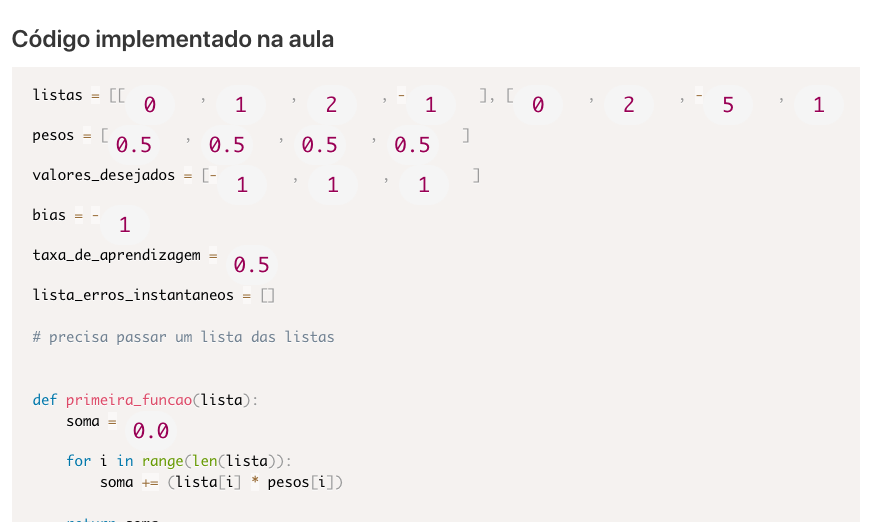
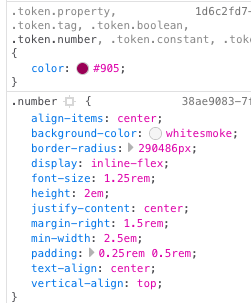
Note: there are still some issues with bulma (i.e. numbers are far too large) but that's because bulma is targeting the number selector, which is causing the issues. You'll probably need to override in src/templates/blog-post.js to apply some custom CSS to reset that global style!
DSchau
on 10 Oct 2018
Thanks @DSchau, this change even made other things works as expected too. :+1:
SamuelPinho
on 10 Oct 2018
Related issues
 KyleAMathews
·
3Comments
KyleAMathews
·
3Comments
 magicly
·
3Comments
magicly
·
3Comments
 3CordGuy
·
3Comments
3CordGuy
·
3Comments
 signalwerk
·
3Comments
signalwerk
·
3Comments
 totsteps
·
3Comments
totsteps
·
3Comments