Gatsby: [Question] Is there a guide for working with Gatsby's built in routing?
I would like to implement some custom routing functionality by adding search params to url..
If I go down this route I will potentially be clashing with Gatsby's amazing built in routing.
I don't want to start messing around with history API etc if there's a better way of manipulating routing with Gatsby.
I was hoping their might be some documentation regarding routing on the docs section of the Gatsby site.
Any pointers massively appreciated 👍
Many thanks
 h0rhay
All 12 comments
@h0rhay There are 2 ways of handling params:
- using query strings (ie.
/search?q=search_phrase) - using client routing (ie
/search/search_phrase)
Both can be implemented in gatsby - which one would you like to use?
 pieh
on 3 Oct 2018
pieh
on 3 Oct 2018
Hi thanks for the response.. initially looking at query strings for now :)
h0rhay
on 3 Oct 2018
Page components have location prop. You can access query string by this.props.location.search - this will be actual string, so you will need something to parse it - for example https://www.npmjs.com/package/qs
pieh
on 3 Oct 2018
Thanks thats really helpful 👍
h0rhay
on 3 Oct 2018
I'll close this for now - feel free to re-open or open new issue if you will have follow up questions
pieh
on 3 Oct 2018
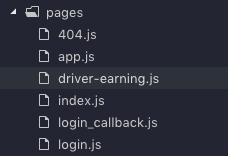
Hi @pieh , I want to implement /driver-earning/:driver-id, but I get many troubles and cannot figure out the right way to do it since I already had another client route /app/*. It can run on localhost but when deploying using Docker, nginx server treats the route as a new page, and return 404.
My pages folder
gatsby-config.js
{
resolve: 'gatsby-plugin-create-client-paths',
options: { prefixes: ['/app/*', '/driver-earning/*'] },
}
driver-earning.js
function DriverEarning (props) {
return (
<Layout {...props}>
<Router basepath='/driver-earning'>
<NotFound path='/' />
<Earning path=':driver-id' />
</Router>
</Layout>
)
}
 ng-hai
on 2 Nov 2018
ng-hai
on 2 Nov 2018
@ng-hai Please check https://www.gatsbyjs.org/docs/building-apps-with-gatsby/#client-only-routes--user-authentication
Specifically:
These routes will exist on the client only and will not correspond to index.html files in an app’s built assets. If you’d like site users to be able to visit client routes directly, you’ll need to set up your server to handle those routes appropriately.
You will need to have additional configuration for nginx to serve app or driver-earning shell pages for /app/dynamic-path/driver-earning/some-driver-id. I never configured nginx, but just googling around I think something like this is needed:
server {
  listen [::]:80 default_server;
  listen 80;
  server_name localhost mydomain 127.0.0.1;

  location /app {
    try_files $uri $uri/ /app/index.html;
  }

  location /driver-earning {
    try_files $uri $uri/ /driver-earning/index.html;
  }
}
Let me know if this works (or if you can make it to work with some modifications) - updating our docs with working configuration snippets for nginx would be great!
pieh
on 2 Nov 2018
It works like a charm, @pieh! Thank you for saving my time a lot ❤️
ng-hai
on 6 Nov 2018
After deployed, it did not work as expected 😞
I don't know why the router always renders two routes, but the weirdness is, the second route is nested inside the first route. These are all my attempts to fix without success:
function DriverStatement (props) {
  return (
    <Layout {...props}>
      <Router basepath='/driver-statement'>
        <Underconstruction path='/' />
        <Statement path=':encryptedCode' />
      </Router>
    </Layout>
  )
}
function DriverStatement (props) {
  return (
    <Layout {...props}>
      <Match path='/driver-statement/:encryptedCode'>
        {({ match }) =>
          match ? (
            <Statement encryptedCode={match.encryptedCode} />
          ) : (
            <Underconstruction />
          )
        }
      </Match>
    </Layout>
  )
}
function DriverStatement (props) {
  return (
    <Layout {...props}>
      <Router basepath='/driver-statement'>
        <Underconstruction default />
        <Statement path=':encryptedCode' />
      </Router>
    </Layout>
  )
}
function DriverStatement (props) {
  return (
    <Layout {...props}>
      <Router>
        <Underconstruction path='/'>
          <Statement path=':encryptedCode' />
        </Underconstruction>
      </Router>
    </Layout>
  )
}
All of them only work in development mode, the nginx server is so messy. Even reach/router repo doesn't have any issues related to nginx.
Here is my nginx config
server {
    listen      80;

    server_name localhost
                127.0.0.1
                my.server;

    root /app/public;

    location /app {
      try_files $uri $uri/ /app/index.html;
    }

    location /driver-earning {
      try_files $uri $uri/ /driver-earning/index.html;
    }

    location /driver-statement {
      try_files $uri $uri/ /driver-statement/index.html;
    }

    location /health {
        return 200 'OK';
        add_header Content-Type text/plain;
    }
}
I have tested @reach/router using CRA 2.0 with the same server configuration and it works 🤔
ng-hai
on 10 Nov 2018
@ng-hai are you able to share either your repo or minimal reproduction repo?
pieh
on 10 Nov 2018
I think I have found the point. The problem caused by SSR, if I return null when windows is undefined, the error will not appear.
ng-hai
on 14 Nov 2018
Related issues
 cutemachine
·
112Comments
cutemachine
·
112Comments
 freiksenet
·
131Comments
freiksenet
·
131Comments
 jonathan-chin
·
69Comments
jonathan-chin
·
69Comments
 antoinerousseau
·
139Comments
antoinerousseau
·
139Comments
 omrllm
·
83Comments
omrllm
·
83Comments
Most helpful comment
@ng-hai Please check https://www.gatsbyjs.org/docs/building-apps-with-gatsby/#client-only-routes--user-authentication
Specifically:
You will need to have additional configuration for
nginxto serveappordriver-earningshell pages for/app/dynamic-path/driver-earning/some-driver-id. I never configured nginx, but just googling around I think something like this is needed:Let me know if this works (or if you can make it to work with some modifications) - updating our docs with working configuration snippets for
nginxwould be great!