Gatsby: Different results for develop and serve when using random ordering
Description
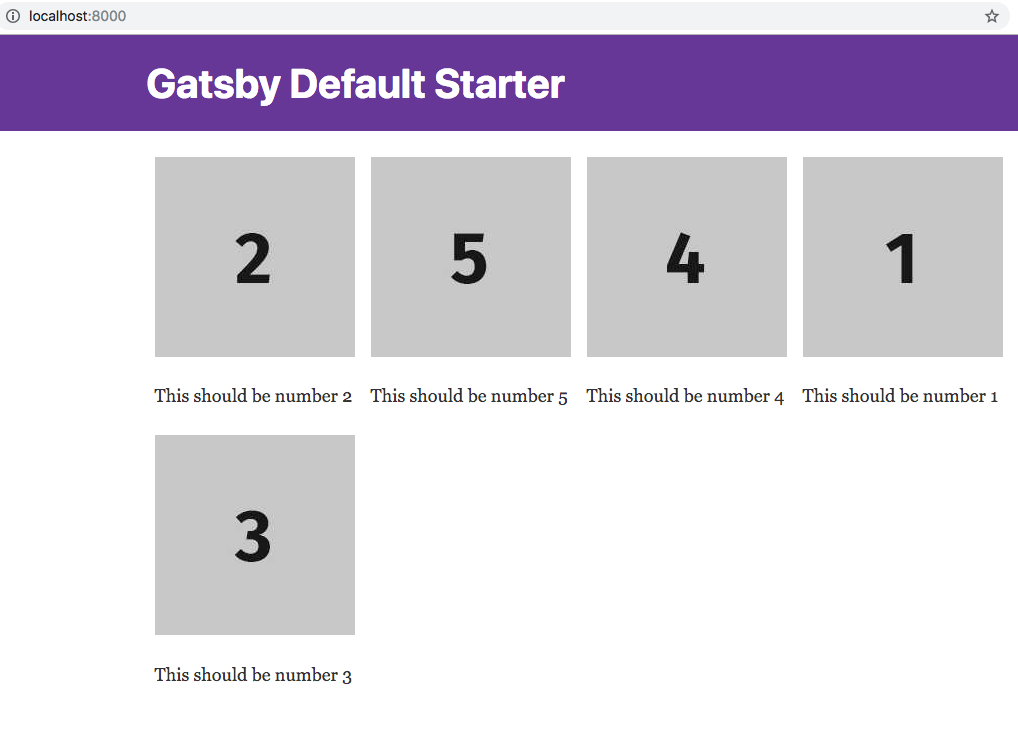
I use StaticQuery to get some images, shuffle their order, add some text underneath, and then render it all. In development it all works as expected.
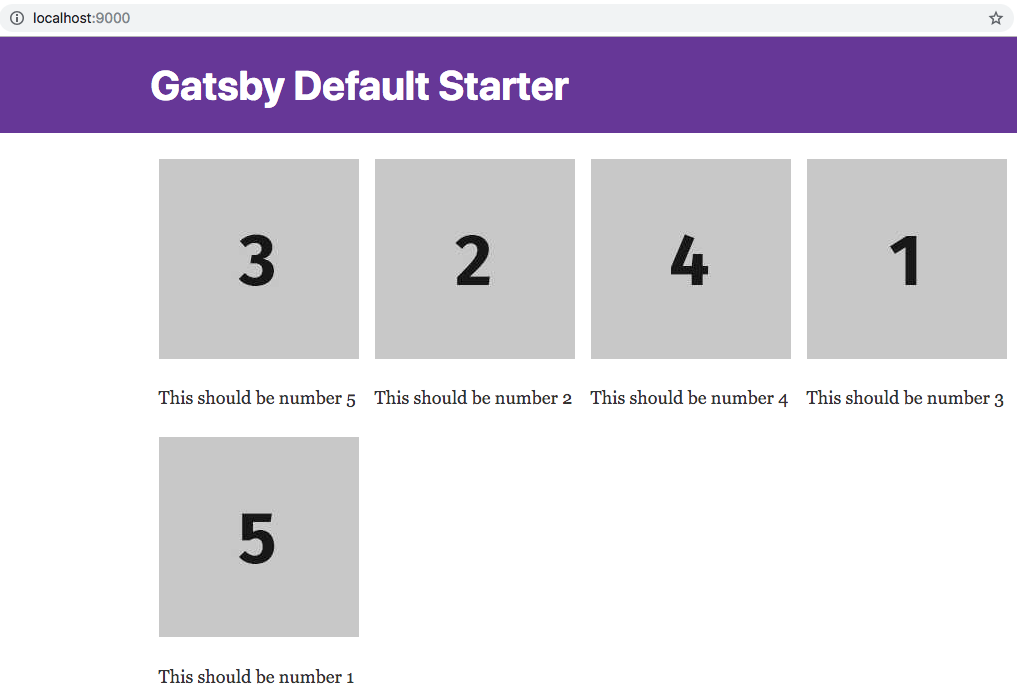
But in production it turns out that the order of the images is always the same, while the order of the text that accompanies the images is different on every reload.
Steps to reproduce
Clone this repo and check out the differences between gatsby develop and gatsby build.
All the important code can be found here.
Expected result
Actual result
Environment
  System:
    OS: macOS High Sierra 10.13.6
    CPU: x64 Intel(R) Core(TM) i7-4770HQ CPU @ 2.20GHz
    Shell: 5.3 - /bin/zsh
  Binaries:
    Node: 8.12.0 - /usr/local/bin/node
    Yarn: 1.10.1 - /usr/local/bin/yarn
    npm: 6.4.1 - ~/.npm-global/bin/npm
  Browsers:
    Chrome: 69.0.3497.100
    Firefox: 62.0.2
    Safari: 12.0
  npmPackages:
    gatsby: ^2.0.0 => 2.0.14
    gatsby-plugin-manifest: ^2.0.2 => 2.0.4
    gatsby-plugin-offline: ^2.0.5 => 2.0.5
    gatsby-plugin-react-helmet: ^3.0.0 => 3.0.0
    gatsby-plugin-sharp: ^2.0.5 => 2.0.5
    gatsby-source-filesystem: ^2.0.1 => 2.0.1
    gatsby-transformer-sharp: ^2.1.3 => 2.1.3
 nikoladev
All 18 comments
Old issues will be closed after 30 days of inactivity. This issue has been quiet for 20 days and is being marked as stale. Reply here or add the label "not stale" to keep this issue open!
![gatsbot[bot] picture](https://avatars2.githubusercontent.com/in/12849?v=4&s=40) gatsbot[bot]
on 19 Jan 2019
gatsbot[bot]
on 19 Jan 2019
I just encoutered the exact same problem as described here : no problem at all on gatsby develop but the pictures are not the expected ones on gatsby serve after building the project.
The code can be found here https://github.com/adriantombu/the-greaaat-gatsby/blob/master/src/pages/freelances.js
 adriantombu
on 19 Jan 2019
adriantombu
on 19 Jan 2019
@gatsbybot Please don't mark this as stale
nikoladev
on 19 Jan 2019
@nikoladev i've picked on your issue and the solution is disabling the gatsby-plugin-offline, after doing that it worked, it was randomizing the order. The problem is that with the plugin activated the page is cached and when you visit it once and then revisit the content is cached and you're presented with the cached version, as there's no change in that page. I tested it it by changing your index.js file in order to incorporate a console.log like so:
const IndexPage = () => (
  <StaticQuery
    query={graphql`
     .......
    `}
    render={(data) => {
      const image1 = data.image1.childImageSharp.fluid
      const image2 = data.image2.childImageSharp.fluid
      const image3 = data.image3.childImageSharp.fluid
      const image4 = data.image4.childImageSharp.fluid
      const image5 = data.image5.childImageSharp.fluid
      const randomized = getRandomOrder(ordered)
      console.log('====================================');
      console.log(`randomized:${JSON.stringify(randomized,null,2)}`);
      console.log('====================================');
These are the results of running it a couple of times after issuing a build command:
randomized:[
  {
    "text": "This should be number 5",
    "img": "image5"
  },
  {
    "text": "This should be number 3",
    "img": "image3"
  },
  {
    "text": "This should be number 2",
    "img": "image2"
  },
  {
    "text": "This should be number 1",
    "img": "image1"
  },
  {
    "text": "This should be number 4",
    "img": "image4"
  }
]

randomized:[
  {
    "text": "This should be number 4",
    "img": "image4"
  },
  {
    "text": "This should be number 2",
    "img": "image2"
  },
  {
    "text": "This should be number 3",
    "img": "image3"
  },
  {
    "text": "This should be number 1",
    "img": "image1"
  },
  {
    "text": "This should be number 5",
    "img": "image5"
  }
]

randomized:[
  {
    "text": "This should be number 1",
    "img": "image1"
  },
  {
    "text": "This should be number 4",
    "img": "image4"
  },
  {
    "text": "This should be number 2",
    "img": "image2"
  },
  {
    "text": "This should be number 3",
    "img": "image3"
  },
  {
    "text": "This should be number 5",
    "img": "image5"
  }
]
As you can see the order is randomized, also don't forget to clear the cache after commenting out the plugin as it might lead to error. As the content you're being served is the cached version not the actual one.
@adriantombu i've cloned your repo, added the dependencies and ran it with gatsby develop and gatsby build && gatsby serve and opening various browsers and including incognito mode the results are the same. Care to elaborate more on the issue. Because it's a bit short on the description of what should be happening and the expected result-
Also as a side note when issuing gatsby develop / gatsby build you get a warning, mentioning that grapql is missing in a component. I've checked and in your src\components\Page you have the following:
...
import { StaticQuery } from 'gatsby'
and it should be:
import { StaticQuery,graphql} from 'gatsby'
 jonniebigodes
on 24 Jan 2019
jonniebigodes
on 24 Jan 2019
Hey @jonniebigodes, thanks for taking the time to look into it ! Since my comment, I disabled the shuffle (the commented line 10) because I had to put the website on production, that's why you don't see any change 😊
The problem here is that I wanted to shuffle the people on the page so that they are not always displayed in the same order. And with the shuffle I'm having the same problem than @nikoladev, hence the picture staying the same, but not the text below, giving wrong faces to wrong people 😀
I guess it's something to do with the cache too, but I'm not using any plugin for that yet.
PS: well done for the graphql part, I totaly missed the warning in the logs !
adriantombu
on 24 Jan 2019
@adriantombu on your code you have this:
export default ({ data: { allMarkdownRemark: { edges: freelances }}}) => {
  // const freelances = shuffle(edges)
right? By uncommenting this and issuing gatsby develop i get the following error:
 11:9   warning  'freelances' is already defined  no-redeclare

✖ 2 problems (1 error, 1 warning)


 @ ./.cache/sync-requires.js 21:59-188
 @ ./.cache/app.js
 @ multi (webpack)-hot-middleware/client.js?path=/__webpack_hmr&reload=true&overlay=false /the-greaaat-gatsby//.cache//app

 error  in ./src/pages/freelances.js

Module build failed (from ./node_modules/gatsby/dist/utils/babel-loader.js):
TypeError: \the-greaaat-gatsby\src\pages\freelances.js: Duplicate declaration "freelances"
   9 | export default ({ data: { allMarkdownRemark: { edges: freelances }}}) => {
  10 | const freelances = shuffle(edges)
The reason behind this is because your shuffling the wrong thing.
I've corrected it by doing so:
export default ({ data: { allMarkdownRemark: { edges: freelances }}}) => {

  const shuffled= shuffle(freelances) // don't use the same name for variables/consts (could lead to error)
  return (
    <Page bodyClass="freelances" title="Les freelances">

      <NavFreelance />

      <div className="wrapper">
        <div className="pod-head">
          <h1 className="pod-head__title">Les freelances</h1>
        </div>
      </div>

      <div className="freelance-box">
        <div className="wrapper">

        { shuffled.map(({ node: { frontmatter }}) => (
            <FreelancePreview data={frontmatter} key={frontmatter.slug} />
          ))}
        </div>
      </div>
    </Page>
  )
}
doing that change allowed the for a randomization of the items shown with the use of your library for randomizing the array. Feel free to provide feedback on the issue, to see if it was resolved so that this issue can be closed as soon as @nikoladev answers, sounds good?
jonniebigodes
on 24 Jan 2019
This is the commit where I removed the shuffle, as you can see I was using edges in the shuffle 😊
https://github.com/adriantombu/the-greaaat-gatsby/commit/d627cda17638df44f016df33f9f0f0be951cbb67
The shuffle was working properly on gatsby develop, it's only when using gatsby serve that I encounter the problem ^^ It looks like some cache problem, but I don't know how to counter it. It's my first project with Gatsby, so maybe I did some stuff wrong 👀
adriantombu
on 24 Jan 2019
I rebooted the computer and the problem resurfaced. I've re-tested it and the problem still exists for you @nikoladev and for your aswell @adriantombu. I'm thinking that the problem is not cache at all but something else. I'm going to do some more testing and see if can come up with a answer or a workaround.
jonniebigodes
on 24 Jan 2019
I'm grateful for the time you're putting in this, I hope I'll be able to buy you a beer someday 🍻😊
adriantombu
on 25 Jan 2019
@jonniebigodes Thanks for investigating! I'll try to find some time in the weekend to try out what you proposed and see if I can get anywhere with it. Thanks again for taking the time to look into it :)
nikoladev
on 25 Jan 2019
@adriantombu thank so very much on the offer. And i don't mind helping out as much as i can. And i think i have already a solution for you both. Late today (as it's almost 3 am where i'm at) i'm going to do some final testing and i believe i have a solution for you both. I need to check @adriantombu repo with my approach and if that fixes it, you can implement that feature in it. Sounds good for both of you?
jonniebigodes
on 26 Jan 2019
Ok, looks like we have a solution. Going in by order.
@nikoladev and @adriantombu i'm going to break the answer into smaller parts for each of you.
Starting by @nikoladev
- Grabbed the code from the repo, installed and updated the dependencies up to par.
- Created
staticfolder, inside, created a new one calledimages_v2as you can see bellow.

- Copied the images into that folder, also one of the gatsby icons, to act as a placeholder and to test out my hypothesis.
- Created a new component called
ImageRandomwith the following code:
import React, { Component } from 'react'

class ImageRandom extends Component {
  componentDidMount() {
    const { imageData } = this.props
    console.log(`props random=>${imageData.url}`)
    setTimeout(() => {
      this.RandomImage.src = imageData.url
    }, 1000)
  }
  onloadImage = e => {
    const { imageData } = this.props
    console.log('====================================')
    console.log(`image=>${imageData.alt} was loaded`)
    console.log('====================================')
  }
  render() {
    const { imageData } = this.props
    return (
      <img
        ref={el => {
          this.RandomImage = el
        }}
        src={'/images_v2/placeholder.png'}
        id={`image_id_${imageData.alt}`}
        key={`image_key_${imageData.alt}`}
        onload={this.onloadImage}
        alt={imageData.alt}
      />
    )
  }
}
export default ImageRandom
Changed the code on page-2 with the following code:
import React from 'react'
import Layout from '../components/layout'
import ImageRandom from '../components/ImageRandom'
const ordered = [
  {
    text: 'This should be number 1',
    img: 'v1',
  },
  {
    text: 'This should be number 2',
    img: 'v2',
  },
  {
    text: 'This should be number 3',
    img: 'v3',
  },
  {
    text: 'This should be number 4',
    img: 'v4',
  },
  {
    text: 'This should be number 5',
    img: 'v5',
  },
]
const Numbers = props => {
  const { data } = props
  const flexRow = {
    display: 'flex',
    flexDirection: 'row',
    flexWrap: 'wrap',
  }
  const numberStyle = {
    display: 'flex',
    flexDirection: 'column',
    margin: '0 8px',
  }
  const imgStyle = {
    width: 200,
    height: 200,
  }
  return (
    <div style={flexRow}>
      {data.map(({ text, img }, ix) => {
        return (
          <div key={ix} style={numberStyle}>
            <ImageRandom
              imageData={{
                url: `/images_v2/${img}.jpg`,
                alt: `v2_image_${img}`,
              }}
              key={`random_image_${img}`}
            />
            <p>{text}</p>
          </div>
        )
      })}
    </div>
  )
}
const getRandomOrder = arr => {
  const clone = arr.slice()
  const ret = []
  while (clone.length > 0) {
    const obj = clone.splice(Math.floor(Math.random() * clone.length), 1)[0]
    ret.push(Object.assign({}, obj))
  }
  return ret
}

const SecondPage = () => {
  const randomized = getRandomOrder(ordered)
  console.log(`ARR v2=>${JSON.stringify(randomized, null, 2)}`)
  return (
    <Layout>
      <Numbers data={randomized} />
    </Layout>
  )
}

export default SecondPage
Issuing gatsby build && gatsby serve and opening a new chrome window in incognito mode resulted in the following:

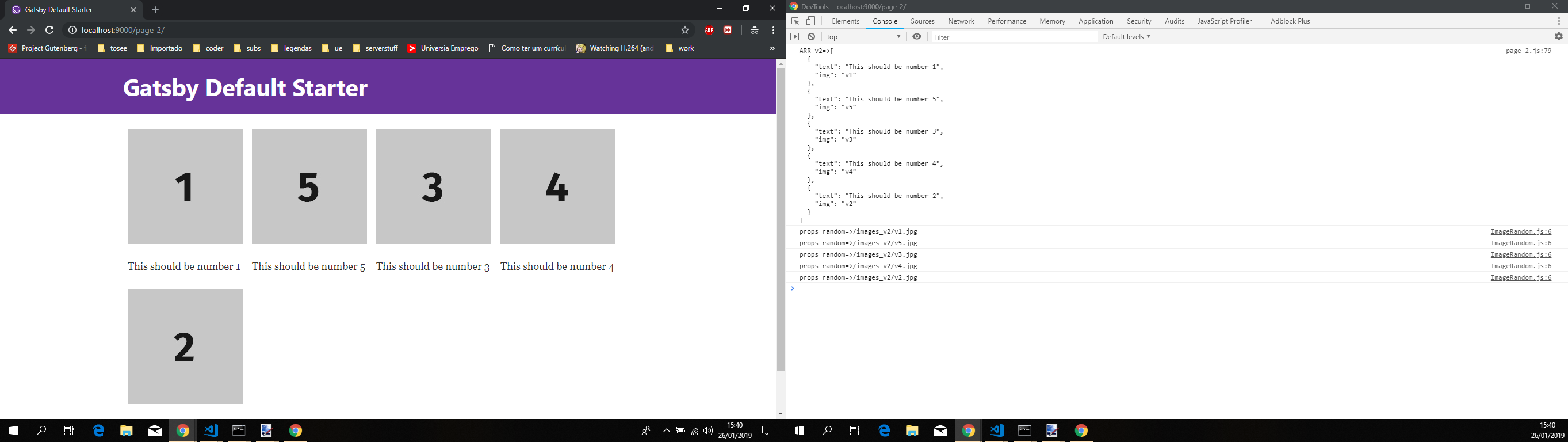
After hitting the refresh button some times the images are updated.
Side Note: Don't know the reason why you're using graphql in this particular case, but techically my approach should work with your index.js file/page with graphql.
Now onto @adriantombu
- As i had already cloned the repo, did the same, updated the gatsby version and it's dependencies up to par.
- Followed the same strategy as above, created a new component with the exact same code as said above.
- Copied the same placeholder image as above.
- Changed only the
FreelancePreviewcomponent to the following:
import React from "react";
import { Link } from "gatsby";
import ImageRandom from './ImageRandom'

export default ({ data }) => {
  const { picture, position, title, slug } = data;
  return (
    <article className="freelance" key={slug}>
      <Link
        to={`/freelances/${slug}`}
        title={data.title}
        activeClassName="freelance__link media"
      >
        <div className="freelance__thumb-box">
          <ImageRandom imageData={{
                url: `/freelances/${picture}`,
                alt: `v2_image_${title}`,
              }}
              key={`random_image_${slug}`} />
        </div>
        <div className="freelance__text">
          <h2 className="h3-like freelance__title">{title}</h2>
          <h3 className="freelance__prestation">{position}</h3>
          <p className="freelance__city mbn">
            <svg
              className="icon-location"
              xmlns="http://www.w3.org/2000/svg"
              viewBox="0 0 12 16"
              enableBackground="new 0 0 12 16"
            >
              <g
                stroke="#705C76"
                strokeLinecap="round"
                strokeLinejoin="round"
                strokeMiterlimit="10"
                fill="none"
              >
                <circle cx="6" cy="5.7" r="1.4" />
                <path d="M10.9 5.8c0-2.8-2.2-5-4.9-5s-4.9 2.2-4.9 5c0 3.6 4.9 9.4 4.9 9.4s4.9-5.8 4.9-9.4z" />
              </g>
            </svg>

            {data.city}
          </p>
        </div>
      </Link>
    </article>
  );
};
Issued
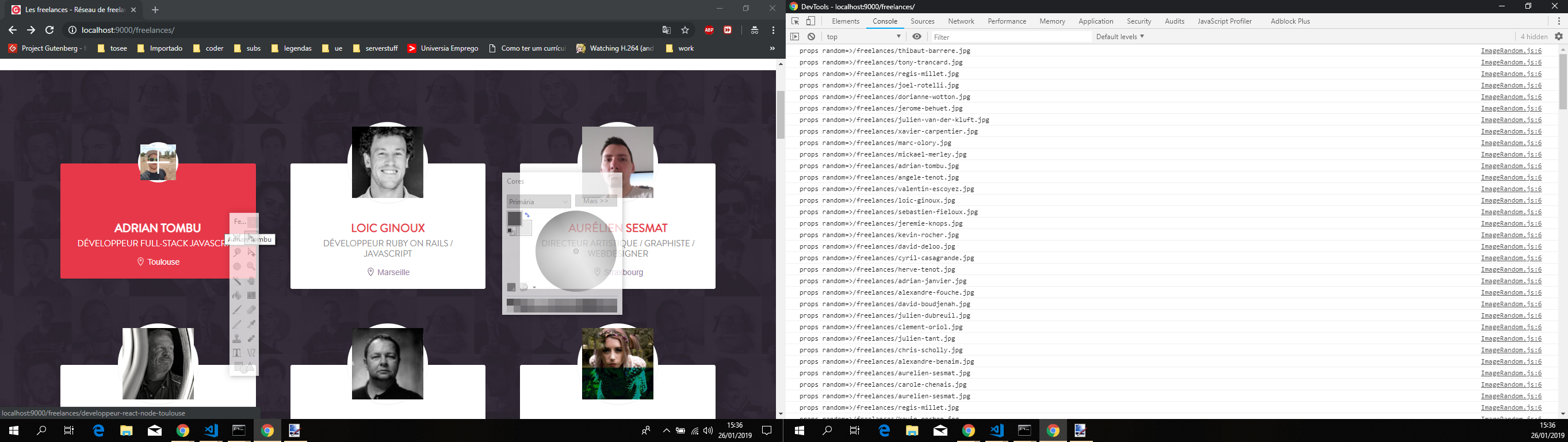
gatsby build && gatsby serve, opened a new chrome window in incognito mode and the results are as follows:- The first load of the page
- Opening a item
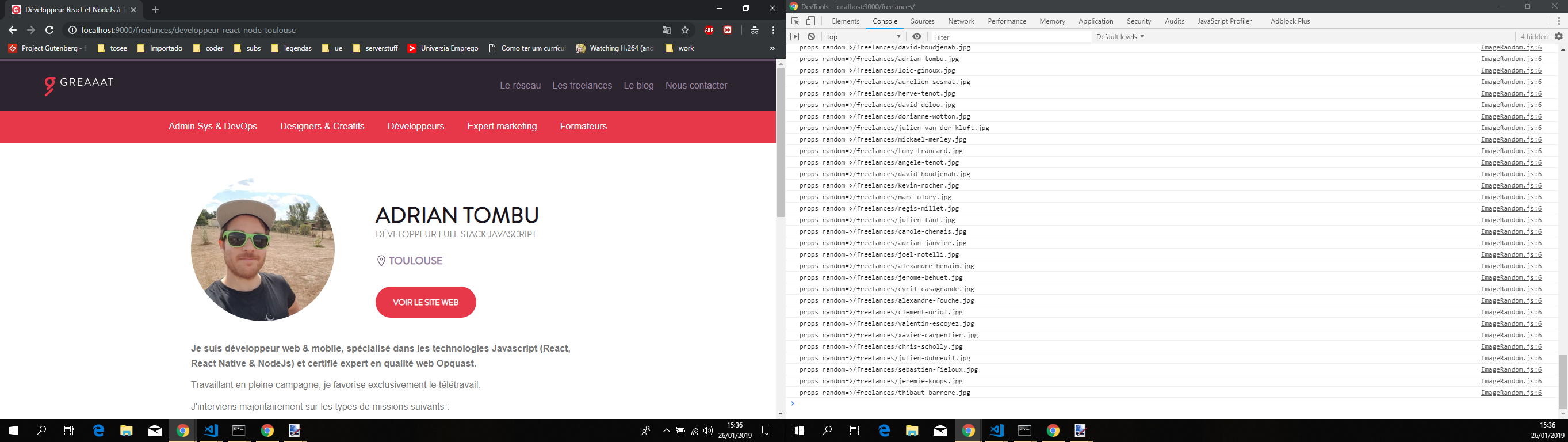
- Going back to the page

- The first load of the page
Side Note: Sorry for plastering the faces your company workmates in here. But it was done for explanation purposes, if need be i'll remove the images and update the comment.
Now onto my findings,
As this issue was bugging me a bit, last night after a couple of glasses of wine and looking at network tab, more particularly the headers recieved. it hit me. It seems the content does not change, namely the images, there's no need to reload/fetch them again. So i thought. Ok, let's try something else, opened postman issued a get request with the header must-revalidate to a date in the past and i got the contents correctly. Also tried with the no-cache header same result. Got the correct contents. Is this a gatsby issue? In my meager opinion, no, it's not, it's a development strategy to make the website be faster and avoid extra work.
On a final note, i used a ref so that i could have "absolute" control on the element, so that i could set the src attribute as i saw fit. Performance wise, this set of items on both cases are negligible, so it shouldn't be a issue, from personal experience i only suffered a decrease with performance once using this approach and that was with d3 and a force graph with 400 nodes. So you should be safe.
Sorry for the long comment. Hope i shed some insight and helped out in resolving your issue. Feel free to provide some feedback.
jonniebigodes
on 26 Jan 2019
Hey there! Sorry for the late answer, I had no time until now to check your solution 😊
I made some adaptation that can be found in this PR: https://github.com/adriantombu/the-greaaat-gatsby/pull/9
The image problem is now resolved thanks to you, but I still have some glitches with the text that changes after a few miliseconds. I can make some placeholder too for the text, I'll see when I have some time 😀
Thanks again for all the time you took for debugging and submitting a solution, I hope I'll be able to do the same for you and/or the Gatsby project someday!
Note: I first tried the gatsby-plugin-netlify to force the no-cache on this specific page, but it didn't seem to work. Anyways, I'm not sure it would be really worth it.
adriantombu
on 29 Jan 2019
Hiya!
This issue has gone quiet. Spooky quiet. 👻
We get a lot of issues, so we currently close issues after 30 days of inactivity. It’s been at least 20 days since the last update here.
If we missed this issue or if you want to keep it open, please reply here. You can also add the label "not stale" to keep this issue open!
Thanks for being a part of the Gatsby community! 💪💜
gatsbot[bot]
on 19 Feb 2019
Side Note: Don't know the reason why you're using graphql in this particular case, but techically my approach should work with your
index.jsfile/page with graphql.
The reason I'm using GraphQL is that in my project I'm using gatsby-image to optimize all my images. I've removed the dependency from the example repo so that it doesn't increase the surface area for bugs.
Your solution hardcodes the URLs of the images into the code. While if you use GraphQL it allows gatsby-image to optimize the images for different resolutions and breakpoints.
@jonniebigodes Even though my exact issue hasn't been solved thanks for putting so much effort into this!
P.S. You removed the label status: inkteam to review, but I feel that it should still be checked out. How can I add it back?
nikoladev
on 25 Feb 2019
@nikoladev i've seen your comment and based on it i've added gatsby-image and made some changes to your code, replaced the img element with Gatsby's image, resulting in the following:
import React from 'react'
import {
  StaticQuery,
  graphql
} from 'gatsby'
import Img from "gatsby-image"
import Layout from '../components/layout'

const ordered = [
  {
    text: 'This should be number 1',
    img: 'image1',
  },
  {
    text: 'This should be number 2',
    img: 'image2',
  },
  {
    text: 'This should be number 3',
    img: 'image3',
  },
  {
    text: 'This should be number 4',
    img: 'image4',
  },
  {
    text: 'This should be number 5',
    img: 'image5',
  },
]

const getRandomOrder = (arr) => {
  const clone = arr.slice()
  const ret = []
  while (clone.length > 0) {
    const obj = clone.splice(Math.floor(Math.random() * clone.length), 1)[0]
    ret.push(Object.assign({}, obj))
  }
  return ret
}

const Numbers = (props) => {
  const { numbers } = props
  const flexRow = {
    display: 'flex',
    flexDirection: 'row',
    flexWrap: 'wrap'
  }
  const numberStyle = {
    display: 'flex',
    flexDirection: 'column',
    margin: '0 8px'
  }
  const imgStyle = {
    width: 200,
    height: 200
  }
  return (
    <div
      style={flexRow}
    >
      {numbers.map(({ text, img }, ix) => {
        const image = props[img]
        return (
          <div
            key={ix}
            style={numberStyle}
          >
            <Img fluid={image} style={imgStyle}/>
            {/* <img
              src={image.src}
              style={imgStyle}
            /> */}
            <p>
              {text}
            </p>
          </div>
        )
      })}
    </div>
  )
}

const IndexPage = () => (
  <StaticQuery
    query={graphql`
      query {
        image1: file (
          relativePath: {eq: "1.jpg"}
        ) {
          childImageSharp {
            fluid {
              src
              srcSet
            }
          }
        }
        image2: file (
          relativePath: {eq: "2.jpg"}
        ) {
          childImageSharp {
            fluid {
              src
              srcSet
            }
          }
        }
        image3: file (
          relativePath: {eq: "3.jpg"}
        ) {
          childImageSharp {
            fluid {
              src
              srcSet
            }
          }
        }
        image4: file (
          relativePath: {eq: "4.jpg"}
        ) {
          childImageSharp {
            fluid {
              src
              srcSet
            }
          }
        }
        image5: file (
          relativePath: {eq: "5.jpg"}
        ) {
          childImageSharp {
            fluid {
              src
              srcSet
            }
          }
        }
      }
    `}
    render={(data) => {
      const image1 = data.image1.childImageSharp.fluid
      const image2 = data.image2.childImageSharp.fluid
      const image3 = data.image3.childImageSharp.fluid
      const image4 = data.image4.childImageSharp.fluid
      const image5 = data.image5.childImageSharp.fluid
      const randomized = getRandomOrder(ordered)
      console.log('====================================')
      console.log(`randomized:${JSON.stringify(randomized, null, 2)}`)
      console.log('====================================')
      return (
        <Layout>
          <Numbers
            numbers={randomized}
            image1={image1}
            image2={image2}
            image3={image3}
            image4={image4}
            image5={image5}
          />
        </Layout>
      )
    }}
  />
)

export default IndexPage
Running a production build with gatsby build && gatsby serve yelds the following:
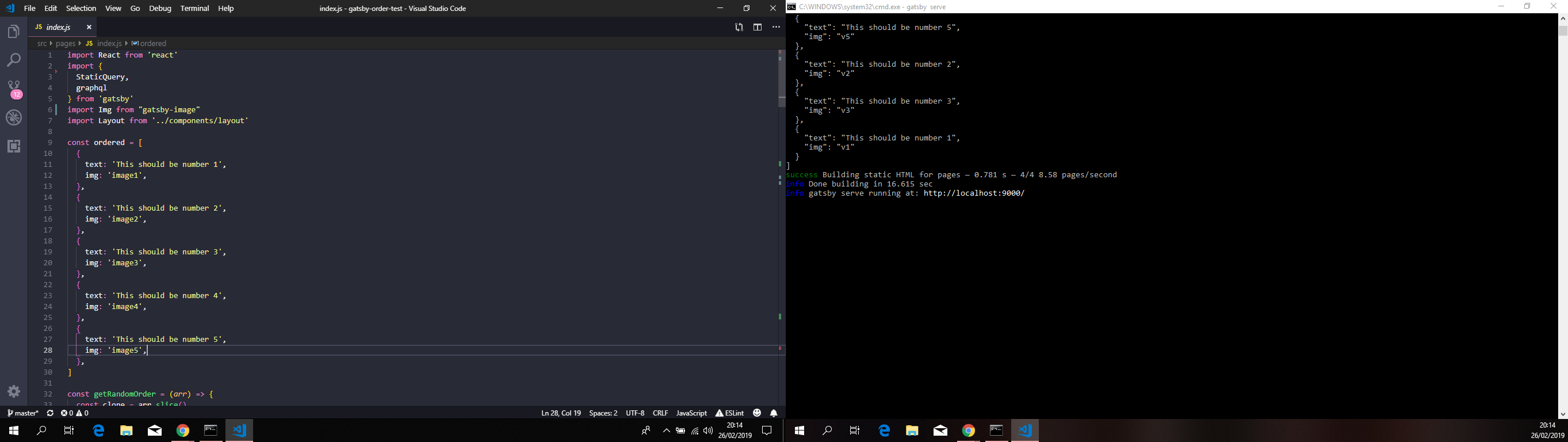
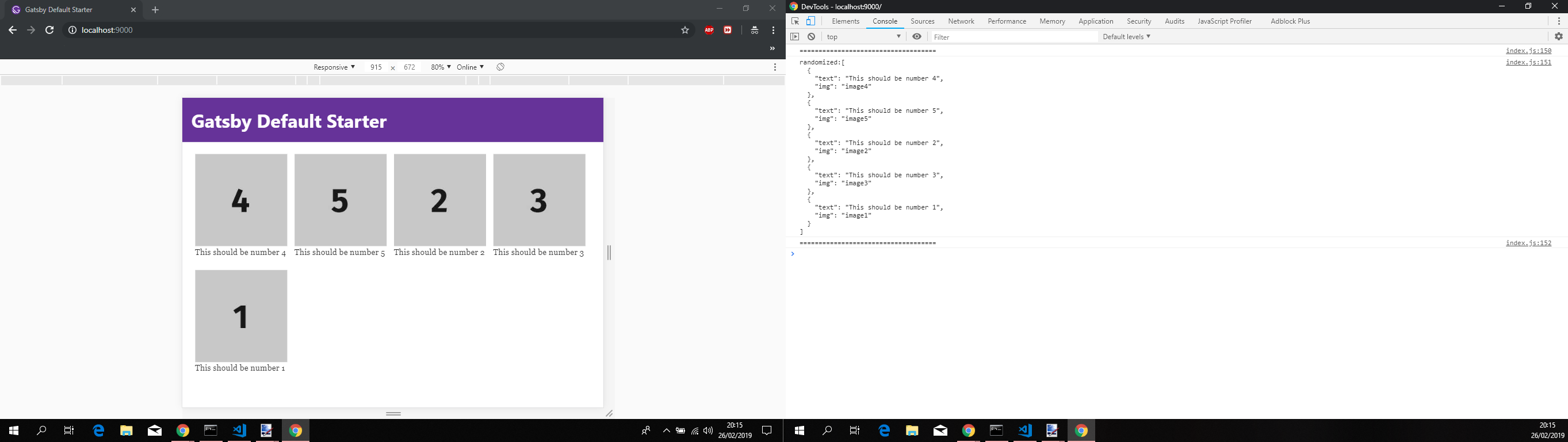
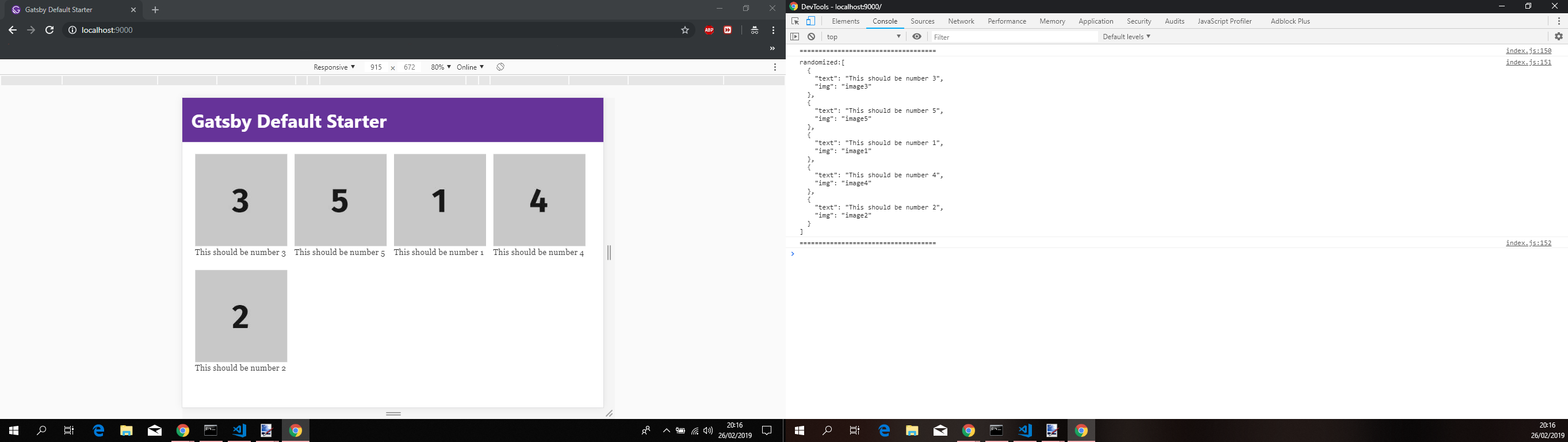
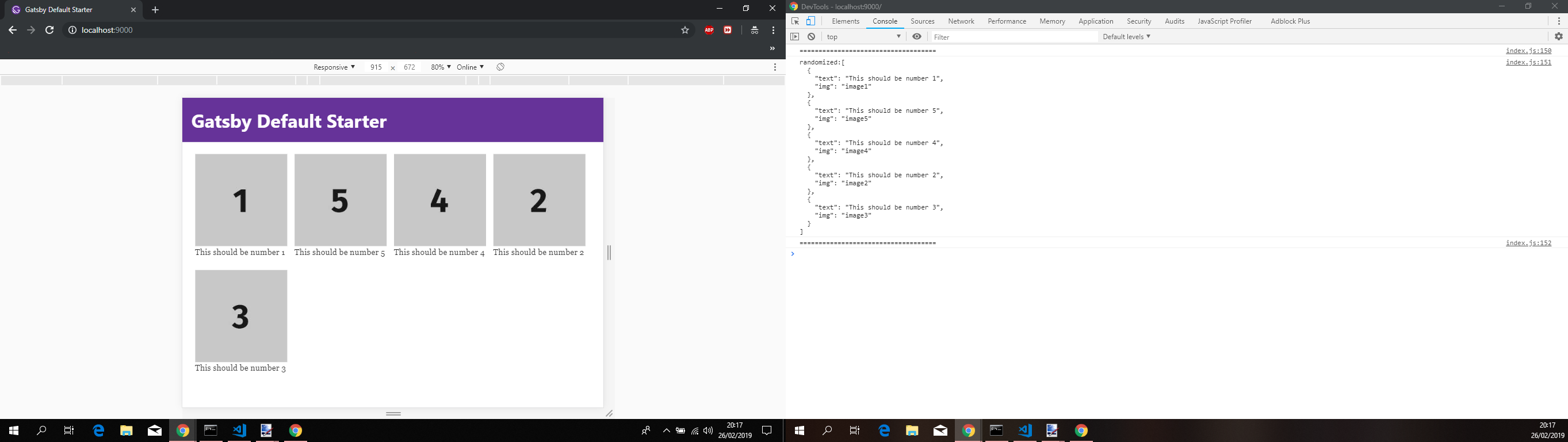
All page refreshes were done using chrome in incognito mode.
Based on the code you supplied in your example repository and with either using the standard img or Gatsby's image component it works.
The solution i've provided worked for either cases, it was designed to be used as a starting point. It worked for adriantombu, since then he's made some subsequent changes and got it to work.
Also in my initial comment to this issue i mentioned that removing gatsby-plugin-offline would solve your issue.
If you absolutely need it that specific plugin, then probably some extra configuration is needed to avoid this behaviour, more on that here.
Regarding the removal of the label, it was not intentional, i've removed by accident when i've removed the stale one.
jonniebigodes
on 26 Feb 2019
Hiya!
This issue has gone quiet. Spooky quiet. 👻
We get a lot of issues, so we currently close issues after 30 days of inactivity. It’s been at least 20 days since the last update here.
If we missed this issue or if you want to keep it open, please reply here. You can also add the label "not stale" to keep this issue open!
Thanks for being a part of the Gatsby community! 💪💜
gatsbot[bot]
on 19 Mar 2019
@jonniebigodes Thanks for all the work put in!
I think you're right in that the easiest solution would be to remove gatsby-plugin-offline if it's not explicitly necessary. Otherwise, fiddling with the configuration of gatsby-plugin-offline is also an option, but not one I have time for right now.
Thanks a lot :)
nikoladev
on 25 Mar 2019
Related issues
 andykais
·
3Comments
andykais
·
3Comments
 dustinhorton
·
3Comments
dustinhorton
·
3Comments
 benstr
·
3Comments
benstr
·
3Comments
 KyleAMathews
·
3Comments
KyleAMathews
·
3Comments
 timbrandin
·
3Comments
timbrandin
·
3Comments
Most helpful comment
I rebooted the computer and the problem resurfaced. I've re-tested it and the problem still exists for you @nikoladev and for your aswell @adriantombu. I'm thinking that the problem is not cache at all but something else. I'm going to do some more testing and see if can come up with a answer or a workaround.