Gatsby: [v2] How to pass data from a Layout component to children?
In v1, I used to pass props to children using something like this:
children({ ...this.props, foo: bar })
But in v2, children is not a function:
Uncaught TypeError: children is not a function
I saw children is an array of objects so I tried to add a prop to every object in the children array using map (also tried forEach):
const childrenWithProps = children.map(child => child.foo = bar)
But I get
Uncaught TypeError: Cannot add property foo, object is not extensible
What's the v2 way of doing this?
 piducancore
All 14 comments
This way works.
const childrenWithProps = React.Children.map(children, (child, i) =>
React.cloneElement(child, { foo: `bar=${i}` })
);
return <div>{childrenWithProps}</div>;
 azdanov
on 21 Aug 2018
azdanov
on 21 Aug 2018
hi @azdanov
i tried that, but i'm getting:
Uncaught Error: React.cloneElement(...): The argument must be a React element, but you passed null.
I don't know why. children isn't null.
const childrenWithProps = React.Children.map(children, child => {
React.cloneElement(child, {
foo: bar,
})
console.log(child)
})
When I do that I get all child objects printed to the console. They look like this:
{$$typeof: Symbol(react.element), type: ƒ, key: null, ref: null, props: {…}, …}
I'm assuming those are react elements.
What am I missing?
piducancore
on 21 Aug 2018
Maybe do an if statement, and skip child === null?
It's hard to tell. Can you share a repo with the project?
azdanov
on 21 Aug 2018
When I do this I don't get all those errors, but children won't appear either.
const childrenWithProps = React.Children.map(children, child => {
if (child !== null) {
React.cloneElement(child, {
foo: bar,
})
}
})
I just created a repo, my layout component is here
piducancore
on 21 Aug 2018
I think that’s because nothing was returned from that function, try adding return just before React.cloneElement.
(Pure speculation here) Having done this, I think the props will be available not to the pages component, but to the children of Layout.
So instead of:
src/pages/index.js
const HomePage = ({ foo }) => (
<Layout>
... rest of code
</Layout>
)
It will be:
src/pages/index.js
const HomePage = () => (
<Layout>
{
({ foo }) => (
... rest of code
)
}
</Layout>
)
 ryanditjia
on 21 Aug 2018
ryanditjia
on 21 Aug 2018
@ryanditjia You are right.
@primaveraentalca Since it's a map function, it needs a return value to work.
Implicit return:
const childrenWithProps = React.Children.map(children, (child, i) =>
React.cloneElement(child, { foo: `bar=${i}` })
);
return <div>{childrenWithProps}</div>;
Explicit return:
const childrenWithProps = React.Children.map(children, (child, i) => {
return React.cloneElement(child, { foo: `bar=${i}` })
})
return <div>{childrenWithProps}</div>;
@azdanov yes, adding return did the trick.
but as @ryanditjia said, props aren't passed to pages components.
is there a way to pass props from a Layout component to pages components?
piducancore
on 21 Aug 2018
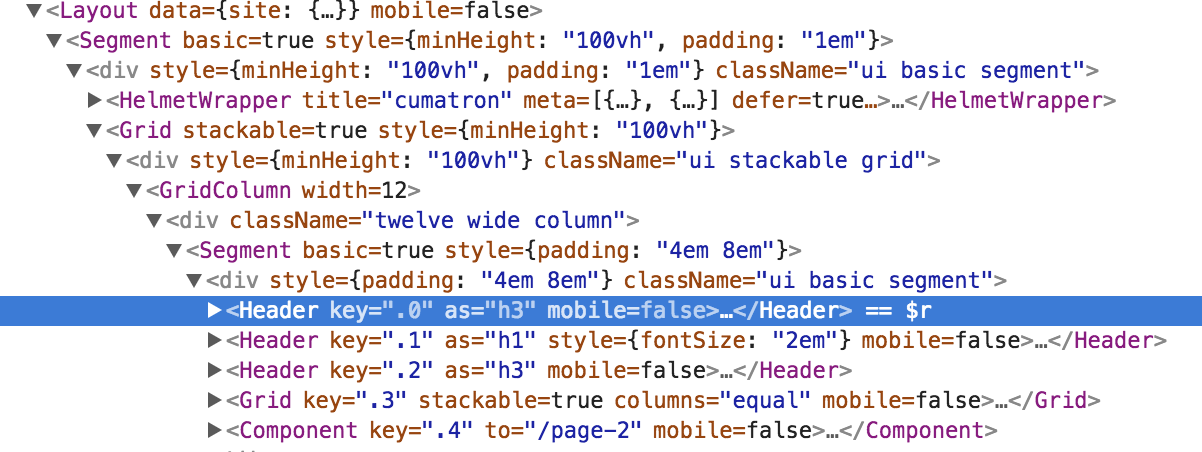
Works for me.
azdanov
on 21 Aug 2018
Try looking into gatsby-plugin-layout, which I believe should be a drop-in replacement for v1’s layout.
ryanditjia
on 21 Aug 2018
@azdanov, I can see the new "mobile" prop in devtools too, but when I try to access it from a page component like @ryanditjia said, I get these warnings and no data is passed to the page component.

What I was trying to do is to wrap the page component with the layout component and pass data from the layout to the pages, but that's not the way V2 works.
Seems like gatsby-plugin-layout is what I'm looking for.
I'll try it and let you know.
piducancore
on 22 Aug 2018
Hi folks,
In case this is useful for someone else, what did work for me was to use both gatsby-plugin-layout and React.cloneElement as @azdanov said.
In v1 the layout component was wrapped around the outside of the pages, and children was a function you could pass props as arguments. In v2 the layout component is not special anymore so I used gatsby-plugin-layout for the layout to be wrapped around the pages, and since children is not a function anymore, I used React.cloneElement in the layout component like this:
In the layout component:
...
const childrenWithProps = React.Children.map(children, (child) =>
  React.cloneElement(child, { mobile: true })
);

return (
  <>
    <MobileContainer>{childrenWithProps}</MobileContainer>
    <DesktopContainer>{children}</DesktopContainer>
  </>
)
...
And in the pages I can do stuff like this:
const IndexPage = ({mobile}) => (
  <>
    <h1
      style={{
        fontSize: `${ mobile ? '2em' : '4em' }`
      }}
    >
      Hi people
    </h1>
    {
      mobile ? <p>YES</p> : <p>NO</p>
    }
  </>
)
Also in gatsby-plugin-layout documentation's troubleshooting section says you can use React.Context to pass data both ways, but that seemed way too complicated for my use case, since I only needed to pass a prop true or false from the layout to the pages.
piducancore
on 5 Nov 2018
Old issues will be closed after 30 days of inactivity. This issue has been quiet for 20 days and is being marked as stale. Reply here or add the label "not stale" to keep this issue open!
![gatsbot[bot] picture](https://avatars2.githubusercontent.com/in/12849?v=4&s=40) gatsbot[bot]
on 28 Jan 2019
gatsbot[bot]
on 28 Jan 2019
Hey again!
It’s been 30 days since anything happened on this issue, so our friendly neighborhood robot (that’s me!) is going to close it.
Please keep in mind that I’m only a robot, so if I’ve closed this issue in error, I’m HUMAN_EMOTION_SORRY. Please feel free to reopen this issue or create a new one if you need anything else.
Thanks again for being part of the Gatsby community!
gatsbot[bot]
on 8 Feb 2019
Hey folks - I'm looking to accomplish this behavior (pass data as a prop to my Layout component's child components, each page component) - is there a new best practice on how to accomplish this? Or is gatsby-plugin-layout still the best approach?
In the Gatsby docs on Layouts, they mention:
It also makes it easy to pass data between layout and page components.
... but there's no explanation on how to actually accomplish this.
Edit for context:
I'm already using the wrapPageElement browser API to avoid re-mounting the Layout:
export const wrapPageElement = ({ element, props }) => {
  return <Layout {...props}>{element}</Layout>
}
 samajammin
on 9 Jul 2020
samajammin
on 9 Jul 2020
Related issues
 3CordGuy
·
3Comments
3CordGuy
·
3Comments
 rossPatton
·
3Comments
rossPatton
·
3Comments
 totsteps
·
3Comments
totsteps
·
3Comments
 brandonmp
·
3Comments
brandonmp
·
3Comments
 benstr
·
3Comments
benstr
·
3Comments
Most helpful comment
Hi folks,
In case this is useful for someone else, what did work for me was to use both
gatsby-plugin-layoutand React.cloneElement as @azdanov said.In v1 the layout component was wrapped around the outside of the pages, and children was a function you could pass props as arguments. In v2 the layout component is not special anymore so I used
gatsby-plugin-layoutfor the layout to be wrapped around the pages, and since children is not a function anymore, I used React.cloneElement in the layout component like this:In the layout component:
And in the pages I can do stuff like this:
Also in
gatsby-plugin-layoutdocumentation's troubleshooting section says you can use React.Context to pass data both ways, but that seemed way too complicated for my use case, since I only needed to pass a prop true or false from the layout to the pages.