Hi Guys,
Loving Gatsby :) I am trying the 2.0 beta and I cant get debugging working. Before I could use the browser tools to put a breakpoint in a page when running under 'gatsby develop'. Now none of that is working. I cant see the pages in the debugger. Is there updated documentation for how to debug? Many thanks.
 jandrews377
All 15 comments
Hey @jandrews377 I don't think anything should have changed on that side of things. Could you give a bit more info on the exact steps you were taking with a v1 project, and which part doesn't show up in v2? Maybe a screen recording would be useful? Also any additional info like browser version, operating system, which plugins and their versions that you're using.
 m-allanson
on 1 Aug 2018
m-allanson
on 1 Aug 2018
@jandrews377
You can check out this v2 demo: https://portfolio-cara.netlify.com/, where debugging is working fine.
Maybe poke around in configuration files: https://github.com/LeKoArts/gatsby-starter-portfolio-cara, see what's different in your project.
And here's the debugging documentation: https://next.gatsbyjs.org/docs/debugging/.
 azdanov
on 1 Aug 2018
azdanov
on 1 Aug 2018
Hi azdanov, Thanks for taking the time to answer. If I clone 'cara' and 'gatsby develop', browse to the website (http://localhost:8000) using FF, hit 'F12', go to the 'Debugger' tab, I cant see the page sources in order to set a break point. In v1, i could. Am I missing something very obvious that will make me look like an idiot?
jandrews377
on 6 Aug 2018
Actually, I see I have [email protected] installed. Cara has a dependency on beta-19 :\
PS C:\Projects\Playground\ReactExperiments\cara> npm install [email protected]
npm WARN [email protected] requires a peer of webpack@2 || 3 but none is installed. You must install peer dependencies yourself.
npm WARN [email protected] No repository field.
npm WARN optional SKIPPING OPTIONAL DEPENDENCY: [email protected] (node_modules\fsevents):
npm WARN notsup SKIPPING OPTIONAL DEPENDENCY: Unsupported platform for [email protected]: wanted {"os":"darwin","arch":"any"} (current: {"os":"win32","arch":"x64"})
- [email protected]
updated 1 package and audited 26585 packages in 15.821s
found 3 moderate severity vulnerabilities
runnpm audit fixto fix them, ornpm auditfor details
PS C:\Projects\Playground\ReactExperiments\cara> npm install
npm WARN [email protected] requires a peer of webpack@2 || 3 but none is installed. You must install peer dependencies yourself.
npm WARN [email protected] No repository field.
npm WARN optional SKIPPING OPTIONAL DEPENDENCY: [email protected] (node_modules\fsevents):
npm WARN notsup SKIPPING OPTIONAL DEPENDENCY: Unsupported platform for [email protected]: wanted {"os":"darwin","arch":"any"} (current: {"os":"win32","arch":"x64"})
audited 26585 packages in 12.093s
found 3 moderate severity vulnerabilities
run npm audit fix to fix them, or npm audit for details
Which version of webpack do you have installed?
jandrews377
on 6 Aug 2018
@jandrews377 I've played around https://github.com/LeKoArts/gatsby-starter-portfolio-cara repo and noticed several things.
In _develop_ mode you can only debug gatsby-node.js or similar files that are not transpiled or need source-maps.
But to debug components you need to _build_ the project. It seems source maps are messed up in development mode. Or I am missing something too.
Which version of webpack do you have installed?
This shouldn't matter since it's under the hood.
azdanov
on 6 Aug 2018
azdanov, in "gatsby develop" mode, I see this:

jandrews377
on 6 Aug 2018
"gatsby build" followed by "gatsby serve", I see this:

jandrews377
on 6 Aug 2018
In develop I managed to debug with VSCode and only gatsby-node.js: https://next.gatsbyjs.org/docs/debugging-the-build-process/#vs-code-debugger.
In build you need to go to webpack folder, and find src folder there. I had to resume several times to get there, since it was breakin much earlier.
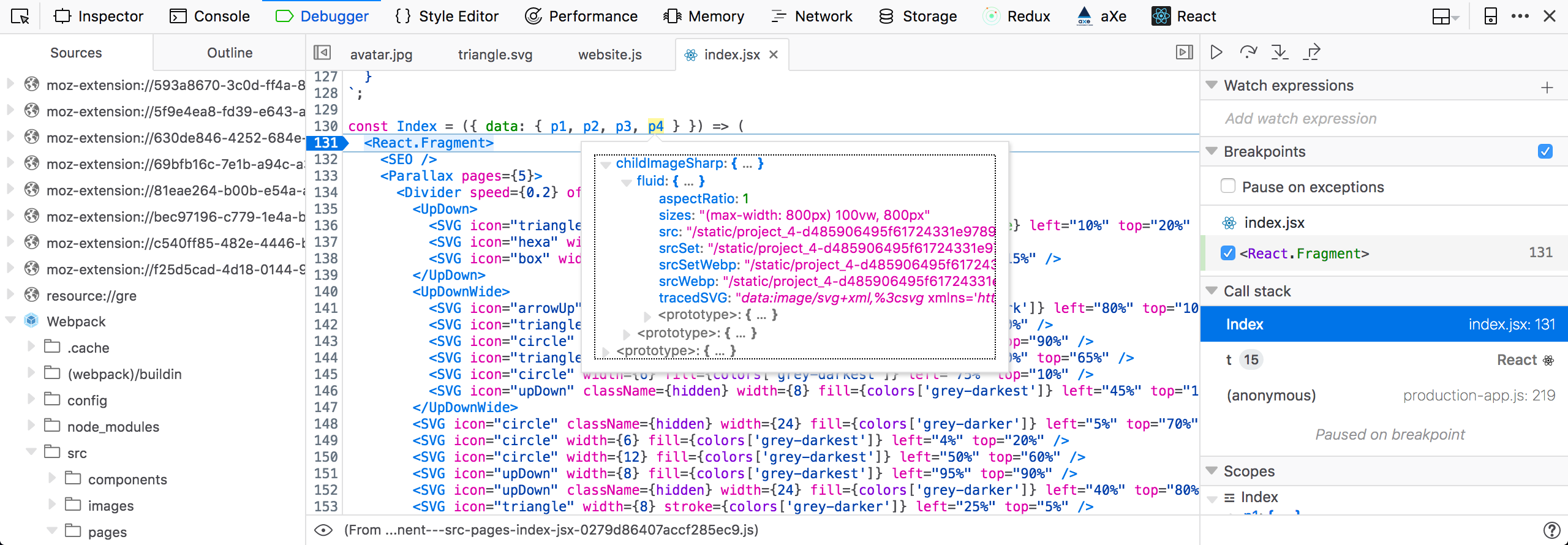
azdanov
on 6 Aug 2018
azdanov, thanks for your efforts, much appreciated.
It was trivial in v1 to see the props and state etc and debug the js. This just seems way too hard.
In your opinion, do you think we are dealing with a bug here? Is there some weirdness going on with webpack?
jandrews377
on 6 Aug 2018
It does seems like a bug, but I can't say for sure with my lack of v1 experience.
Source maps are not showing up in develop for src files. Maybe this leads to the problem.
azdanov
on 6 Aug 2018
I've managed to make it work in develop.
Add this to gatsby-node.js. And it should work the same way as in build.
exports.onCreateWebpackConfig = ({ actions }) => {
  actions.setWebpackConfig({
    devtool: "eval-source-map"
  });
};
azdanov, Legend! 👍
I can see a lot more now than I could before. Thanks very much for your help.
jandrews377
on 6 Aug 2018
Awesome!
Forgot to mention, for production you will need to remove this. Or add a conditional statement that checks for process.NODE_ENV === 'development'.
azdanov
on 6 Aug 2018
Yeah in v1 we set sourcemaps to cheap-module-source-map and in v2 it's just eval
- v1 — https://github.com/gatsbyjs/gatsby/blob/b7d8d244cc7631fc325b4a139be5e3cbe6c3c9fe/packages/gatsby/src/utils/webpack.config.js#L390
- v2 — https://github.com/gatsbyjs/gatsby/blob/95607856c0ed4dfaeb967a30b743ba87cb076681/packages/gatsby/src/utils/webpack.config.js#L260
@jquense did you make this change? Do you remember why?
 KyleAMathews
on 6 Aug 2018
KyleAMathews
on 6 Aug 2018
Due to the high volume of issues, we're closing out older ones without recent activity. Please open a new issue if you need help!
KyleAMathews
on 8 Sep 2018
Related issues
 kalinchernev
·
3Comments
kalinchernev
·
3Comments
 Oppenheimer1
·
3Comments
Oppenheimer1
·
3Comments
 magicly
·
3Comments
magicly
·
3Comments
 3CordGuy
·
3Comments
3CordGuy
·
3Comments
 totsteps
·
3Comments
totsteps
·
3Comments
Most helpful comment
I've managed to make it work in
develop.Add this to
gatsby-node.js. And it should work the same way as inbuild.