Gatsby: [v2] hot reload not working for React components
Description
For some reason I can only get hot reloading effects with my style sheets and not react components. Not sure if this a problem with v2 or my computer.
Steps to reproduce
Clone a brand new project using Gatsby v2. Change any style block. Save file and wait to see changes in the browser.
Expected result
React components should hot reload and the changes should be visible in the browser withou having to interact with the page.
Actual result
When I change my styles in a .css file, the changes are hot reloaded and can be seen on screen immediately.
When I modify the styles of a React components using an inline style block or styled-components, the style change is only reflect in the browser when I interact with the page or performa full reload.
Environment
System:
OS: macOS Sierra 10.12.6
CPU: x64 Intel(R) Core(TM) i5-5287U CPU @ 2.90GHz
Shell: 5.2 - /bin/zsh
Binaries:
Node: 9.7.1 - ~/.nvm/versions/node/v9.7.1/bin/node
Yarn: 1.5.1 - /usr/local/bin/yarn
npm: 6.0.0 - ~/.nvm/versions/node/v9.7.1/bin/npm
Browsers:
Chrome: 67.0.3396.99
Firefox: 57.0.4
Safari: 11.0.1
npmPackages:
gatsby: 2.0.0-beta.29 => 2.0.0-beta.29
gatsby-cli: 2.0.0-beta.5 => 2.0.0-beta.5
gatsby-plugin-react-helmet: next => 3.0.0-beta.3
npmGlobalPackages:
gatsby-cli: 1.1.44
File contents (if changed)
gatsby-config.js: N/A
package.json: N/A
gatsby-node.js: N/A
gatsby-browser.js: N/A
gatsby-ssr.js: N/A
 nodox
nodox
All 14 comments
Also having a similar issue when running gatsby develop; updating state causes re-compile but the associated elements are not reloaded in the browser
 JonJamesDesign
on 15 Jul 2018
JonJamesDesign
on 15 Jul 2018
I can confirm this is a problem with Gatsby v2. When you clone a gatsby-stater-default using v1 this problem is not present. Changing the styles on a react components (within a style block) automatically hot reloads the component onto the page and does not require interaction from the user.
package.json
{
  "name": "gatsby-starter-default",
  "description": "Gatsby default starter",
  "version": "1.0.0",
  "author": "Kyle Mathews <[email protected]>",
  "dependencies": {
    "gatsby": "^1.9.247",
    "gatsby-link": "^1.6.40",
    "gatsby-plugin-react-helmet": "^2.0.10",
    "react-helmet": "^5.2.0"
  },
  "keywords": [
    "gatsby"
  ],
  "license": "MIT",
  "scripts": {
    "build": "gatsby build",
    "develop": "gatsby develop",
    "format": "prettier --write 'src/**/*.js'",
    "test": "echo \"Error: no test specified\" && exit 1"
  },
  "devDependencies": {
    "prettier": "^1.12.0"
  },
  "repository": {
    "type" : "git",
    "url" : "https://github.com/gatsbyjs/gatsby-starter-default"
  }
}
I am going to keep poking at this until its fixed.
nodox
on 16 Jul 2018
I am having the same issue.
In order to make sure it isn't caused by a change I did, I cloned gatsby-stater-default and run without any changes. Still doesn't work and page fully reloads.
Here is the console log in case it helps:
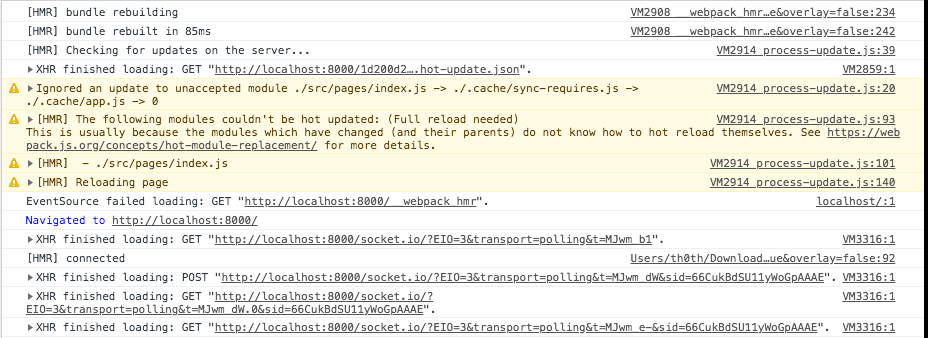
 th0th
on 2 Aug 2018
th0th
on 2 Aug 2018
I can confirm this. I think it was working in beta 59 but not in 65. Need to confirm this though.
Which version are you guys using?
 HriBB
on 3 Aug 2018
HriBB
on 3 Aug 2018
I have tested on [email protected].
Edit: I have just updated to [email protected] and it doesn't work on beta 67 either.
th0th
on 3 Aug 2018
What beta version did have this feature working?
nodox
on 3 Aug 2018
Hot reload works with [email protected] for me.
HriBB
on 5 Aug 2018
It broke after beta.64
 alpgumus
on 8 Aug 2018
alpgumus
on 8 Aug 2018
@KyleAMathews thanks for the PR!
nodox
on 9 Aug 2018
@KyleAMathews thanks! Hot-reloading works now but in order to maintain redux state, Provider should be above the hot module. I had to do a couple tricks to make it work.
alpgumus
on 9 Aug 2018
@alpgumus oh hmm yeah — could you file a new issue for this w/ a reproduction? This should be fixable.
 KyleAMathews
on 9 Aug 2018
KyleAMathews
on 9 Aug 2018
Just for the record, this can also happen on Mac OS if your import statement and actual folder name have a case mismatch.
Example:
import TopArea from '../layout/TopArea'
...When the actual folder is: ../layout/topArea
 jiv-e
on 24 Nov 2019
jiv-e
on 24 Nov 2019
@jiv-e Can confirm... I wasted half a day trying to figure this out.
 wutangpaul
on 5 Dec 2019
wutangpaul
on 5 Dec 2019
I couldn't find out where in my project there was a case mismatch... For now I'm just using 127.0.0.1 instead of localhost and that's doing the trick... 😓
 constmontague
on 2 Jan 2020
constmontague
on 2 Jan 2020
Related issues
 rossPatton
·
3Comments
rossPatton
·
3Comments
 signalwerk
·
3Comments
signalwerk
·
3Comments
 3CordGuy
·
3Comments
3CordGuy
·
3Comments
 ghost
·
3Comments
ghost
·
3Comments
 magicly
·
3Comments
magicly
·
3Comments
Most helpful comment
I am having the same issue.
In order to make sure it isn't caused by a change I did, I cloned
gatsby-stater-defaultand run without any changes. Still doesn't work and page fully reloads.Here is the console log in case it helps: