Gatsby: v2 docs search modal cut off on smaller screens
Description
When viewing the v2 docs site at https://next.gatsbyjs.org/docs, while using the the search field, the pop-up window appears to be cutoff on smaller screens (A 13" Macbook Pro for example), or in smaller browser windows, when there is a large amount of search result content.
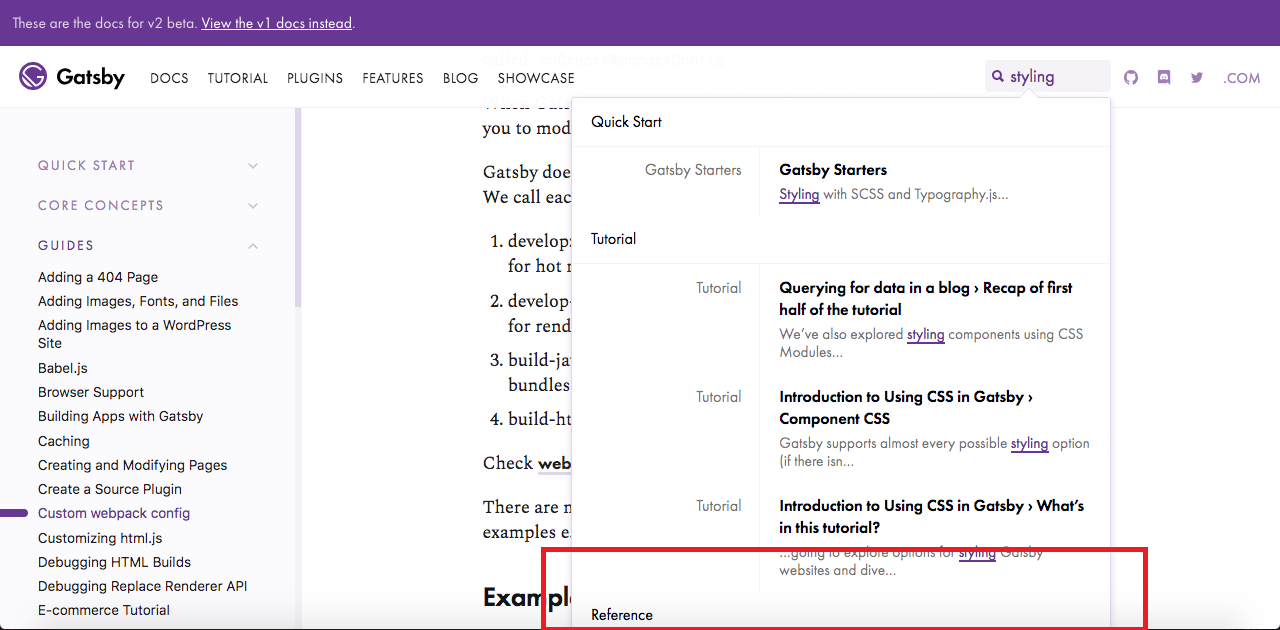
Steps to reproduce
- Visit https://next.gatsbyjs.org/docs on a device with a small screen (ex: 13" Macbook Pro), or resize the browser window viewport to a small height (Below 760px in this case)
- Enter a query/term into the search field (ex:
styling) that might result in a large amount of returned results - View that the bottom of the modal appears to be cutoff
Expected result
I would expect the search modal to have a vertical scrollbar or some other way to reduce the overall height of the modal at smaller screen/browser window sizes.
Actual result
Content underneath the Reference heading appears to be cutoff, and I was unable to see what that additional content/search results might be.
Environment
13" Macbook Pro
macOS Sierra v10.12.6
1280x800 resolution
Google Chrome v67.0.3396.99
 kellylawrence
All 5 comments
Thanks for the detailed report @kellylawrence. I can confirm what you're seeing. It looks like the search form should constrain itself to the height of the browser window, but that doesn't seem to be happening.
If you (or anyone else) would like to take a look at fixing this, you can get a local copy of the site running by following these contribution docs.
Then enable debug mode for the search form here. This stops the search results from auto-closing.
 m-allanson
on 29 Jun 2018
m-allanson
on 29 Jun 2018
Note that this happens on pages that have a fixed header - on other pages like the homepage and blog overview page you can still scroll the page to see the rest of the results.
m-allanson
on 29 Jun 2018
While I'm thinking about this - it _might_ be easier to modify these styles by restyling the search results dropdown from scratch. That would mean removing the default DocSearch CSS and then rewriting the CSS that overrides the DocSearch CSS.
m-allanson
on 29 Jun 2018
@m-allanson I'd be willing to pick this up!
 wuweiweiwu
on 4 Jul 2018
wuweiweiwu
on 4 Jul 2018
That would be great @wuweiweiwu!
m-allanson
on 4 Jul 2018
Related issues
 andykais
·
3Comments
andykais
·
3Comments
 signalwerk
·
3Comments
signalwerk
·
3Comments
 magicly
·
3Comments
magicly
·
3Comments
 totsteps
·
3Comments
totsteps
·
3Comments
 kalinchernev
·
3Comments
kalinchernev
·
3Comments
Most helpful comment
That would be great @wuweiweiwu!