Gatsby: [www/showcase] Screenshots are not rendering non-roman characters
Looks like screenshots in site showcase aren't rendering non-roman characters, like this one in Japanese: https://5b1ac9153672df15a1c3b201--gatsbyjs.netlify.com/showcase/www-yuuniworks-com/
 shannonbux
All 12 comments
@ThatOtherPerson looks like we need to install some extra packages https://github.com/GoogleChrome/puppeteer/blob/master/docs/troubleshooting.md#running-puppeteer-in-docker Not sure if those packages are available in Lambda.
 KyleAMathews
on 16 Jun 2018
KyleAMathews
on 16 Jun 2018
@KyleAMathews Lambda doesn't let you write to anything other than the /var/task and /tmp directories, so you can't install font packages in the normal locations. I'm hoping there's an environment variable or a Chrome setting where you can add to the font search path. If nothing else works we can probably make a change in the Chromium source code.
 cassiebeckley
on 16 Jun 2018
cassiebeckley
on 16 Jun 2018
Emojis are also not rendered in showcase screenshots:
https://next.gatsbyjs.org/showcase/www.michaeluloth.com
If there's a way I can manually submit a more accurate screenshot, please let me know!
 ooloth
on 23 Jul 2018
ooloth
on 23 Jul 2018
oh good catch @ooloth ~
The screenshots are rendered by the plugin gatsby-transformer-screenshot and not sure if it's possible to replace the automatic screenshot with a manually chosen one @ThatOtherPerson in the meantime, until someone has time to update the plugin?
shannonbux
on 23 Jul 2018
Hiya!
This issue has gone quiet. Spooky quiet. 👻
We get a lot of issues, so we currently close issues after 30 days of inactivity. It’s been at least 20 days since the last update here.
If we missed this issue or if you want to keep it open, please reply here. You can also add the label "not stale" to keep this issue open!
Thanks for being a part of the Gatsby community! 💪💜
![gatsbot[bot] picture](https://avatars2.githubusercontent.com/in/12849?v=4&s=40) gatsbot[bot]
on 6 Feb 2019
gatsbot[bot]
on 6 Feb 2019
Hey again!
It’s been 30 days since anything happened on this issue, so our friendly neighborhood robot (that’s me!) is going to close it.
Please keep in mind that I’m only a robot, so if I’ve closed this issue in error, I’m HUMAN_EMOTION_SORRY. Please feel free to reopen this issue or create a new one if you need anything else.
Thanks again for being part of the Gatsby community!
gatsbot[bot]
on 17 Feb 2019
This appears to still be an issue.
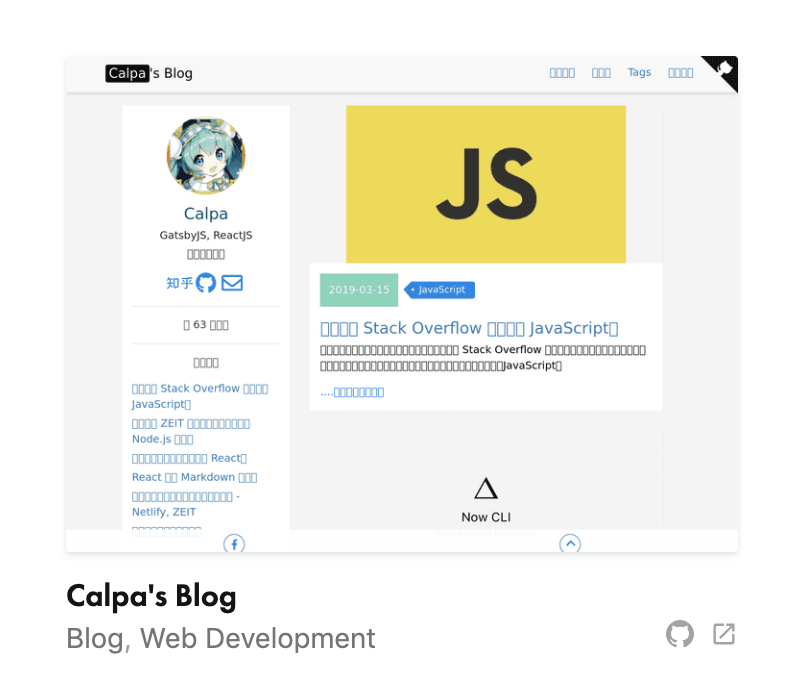
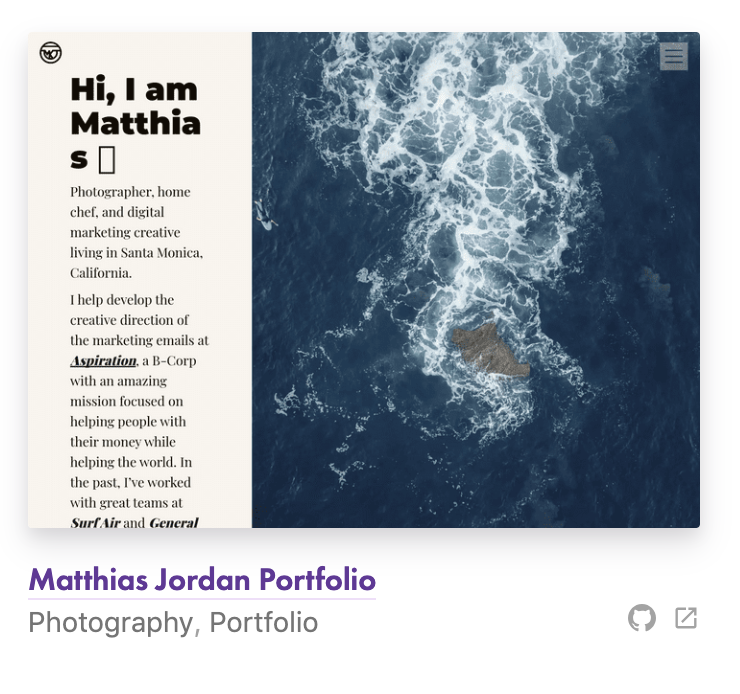
 missmatsuko
on 3 Apr 2019
missmatsuko
on 3 Apr 2019
I'll reopen this
 lannonbr
on 3 Apr 2019
lannonbr
on 3 Apr 2019
There's a Chromium binary for Lambda. It includes a function to download fonts. There's a link to it from the puppeteer troubleshooting docs and is kept up to date within 2 days.
Maybe this should be used in gatsby-transformer-screenshot instead of puppeteer.
I'm not sure which fonts should be downloaded, though. The puppeteer docs mention these fonts for Docker:
// fonts to support major charsets
// (Chinese, Japanese, Arabic, Hebrew, Thai and a few others)
fonts-ipafont-gothic fonts-wqy-zenhei fonts-thai-tlwg fonts-kacst ttf-freefont
Maybe we should use all the Google Noto (No Tofu) fonts? Would that be too much?
missmatsuko
on 3 Apr 2019
It might be possible to put the fonts in ~/.fonts, maybe even setting $HOME to something helpful if it is poorly defined in Lambda.
 sever1an
on 23 Oct 2019
sever1an
on 23 Oct 2019
The screenshots are now sourced from WordPress and not by creating screenshots anymore with gatsby-transformer-screenshot. We've taken the screenshots it created though so entries with problems will still have issues. We can manually change the screenshots now though so will need to ask what to do about it now.
 LekoArts
on 8 Sep 2020
LekoArts
on 8 Sep 2020
I just made an update to our screenshot on WordPress to fix the site for calpa.me, feel free to let me know if you encounter other sites with this issue. If it's a bigger problem across many sites we can investigate a better automated audit of these kinds of issues, but for now I'm going to close this issue since we no longer use the plugin to take screenshots through a Lambda function anyway 🙂
 gillkyle
on 25 Sep 2020
gillkyle
on 25 Sep 2020
Related issues
 signalwerk
·
3Comments
signalwerk
·
3Comments
 dustinhorton
·
3Comments
KyleAMathews
·
3Comments
dustinhorton
·
3Comments
KyleAMathews
·
3Comments
 jimfilippou
·
3Comments
jimfilippou
·
3Comments
 3CordGuy
·
3Comments
3CordGuy
·
3Comments
Most helpful comment
I'll reopen this