Gatsby: Question: Double script import in build?
Hi, New here! Really enjoying the hard work that has been put into the project thus far 😸
Description
I've been experiencing multiple script imports of the same file in the index.html outputted by gatsby build.
Steps to reproduce
gatsby new sitecd sitegatsby build(doesn't happen indevelop)- Open up
public/using a simple server and view in browser, see multiple resources being loaded twice.
Expected result
Resources should only be loaded once? Not sure if there is some reason why they are done twice
Actual result
They get loaded twice.
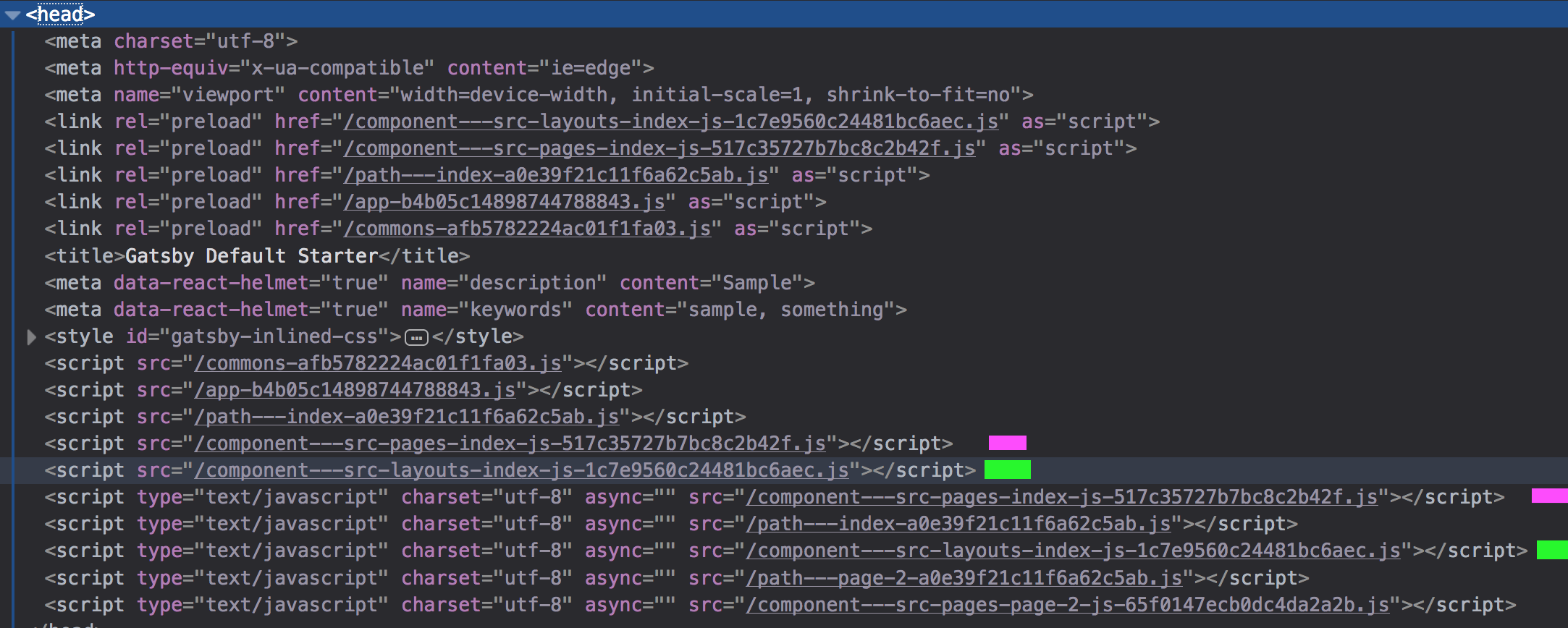
Environment
- Gatsby version (
npm list gatsby): [email protected] - gatsby-cli version (
gatsby --version): 1.1.51 - Node.js version: 9.11.1
- Operating System: OSX
File contents (if changed):
NA
 wemyss
All 6 comments
To my knowledge, double script imports doesn't cause double script loading. And we do have doubled scripts import because first ones are written to html files, so it start fetching them as fast as possible on browsers that don't supporting link preloads. Second "copies" of scripts are caused by webpack runtime that adds those dynamically to <head> (you can view html to see there are not there initially) when we want to load them (that's how we prefetch needed data and components for pages that user might go next).
 pieh
on 7 May 2018
pieh
on 7 May 2018
Agree with @pieh that this shouldn't be a problem as the browser dedupes requests. Could you check the network tab in your browser dev tools to verify that there isn't multiple downloads happening?
 KyleAMathews
on 7 May 2018
KyleAMathews
on 7 May 2018
@KyleAMathews yeah that's what confused me initially, as firefox displays it's loading both, while chrome does not 😕
Firefox:

Chrome:

EDIT:
Just noticed that firefox displays in the bottom status bar 2.32 MB / 1.15 MB transferred. So it seems like it just displays it in the network page but only loads it once
wemyss
on 8 May 2018
Oh interesting — that's not good.
KyleAMathews
on 8 May 2018
Sorry just updated my comment. So I don’t think it’s an issue, just Firefox being a bit weird. Haven’t tested if it affects performance/load times
wemyss
on 8 May 2018
Hi there 👋
Actually, if you have several script tags with the same source file, it will be loaded once but, it will be parsed and executed at each call... (more on that here).
What about putting only one script tag and add a to properly preload it as soon as possible?
cc @KyleAMathews @pieh @wemyss
 GuillaumeAmat
on 5 Jul 2018
GuillaumeAmat
on 5 Jul 2018
Related issues
 totsteps
·
3Comments
totsteps
·
3Comments
 signalwerk
·
3Comments
KyleAMathews
·
3Comments
signalwerk
·
3Comments
KyleAMathews
·
3Comments
 mikestopcontinues
·
3Comments
mikestopcontinues
·
3Comments
 brandonmp
·
3Comments
brandonmp
·
3Comments