Gatsby: Tutorial Part Six: No Date or Title in frontmatter in GraphiQL
Description
In the part of the tutorial where we first view the frontmatter node in GraphiQL, the title is blank and the date node is missing.
Steps to reproduce
The problem is caused by copying all text in a code block in the tutorial from Firefox and pasting into a text editor on a Windows machine.
- Using a Windows 10 machine, create a new empty text file called sweet-pandas-eating-sweets.md per the tutorial.
- In Firefox, on the tutorial part six page, use your mouse to select all text in the markdown code block for sweet-pandas-eating-sweets.md. Be sure to select all text, from the opening
---through the closing>on the iframe.

- Copy the text, e.g., CTRL+C.
- Paste the text in sweet-pandas-eating-sweets.md. Notice two extra lines (Line Feed character, Hex 0A) at the top and bottom of the file. It's the two extra lines at the top that break things. Save and close the file.
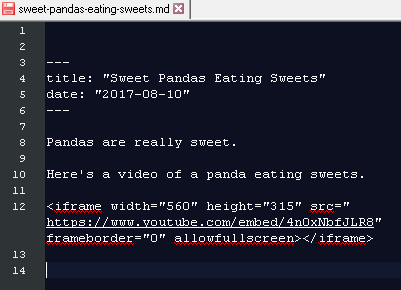
- Continue with the tutorial, installing gatsby-transformer-remark and configuring gatsby-config.js.
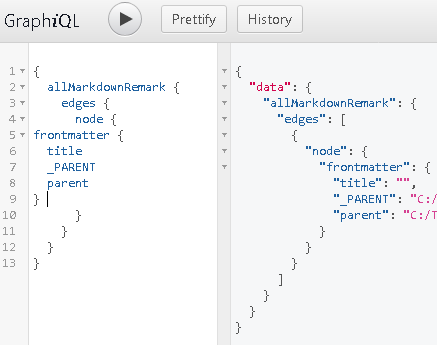
- Restart the server and open GraphiQL to browse to the frontmatter element. Notice title is empty, and date node is completely missing.
The key is selecting and copying all text in the code block in Firefox on Windows.
Here are things that DO NOT reproduce the problem:
- Selecting just part of the text, such as a single line.
- Copying the text from Chrome instead of Firefox.
- Copying the text from Chrome or Firefox on a Mac, as tested by @shannonbux.
Expected result
Title and date nodes should be present and populated with text from the markdown file.

Actual result
Title is empty, and date node is completely missing.
Environment
- Gatsby version: [email protected]
- gatsby-cli version: 1.1.50
- Node.js version: Node.js 8.10.0 (x64)
- Operating System: Windows 10 64-bit
- Browser: Firefox
- Code editor: Tested and reproduced in Notepad++, Visual Studio Code, and Notepad
File contents (if changed):
gatsby-config.js:
module.exports = {
  siteMetadata: {
    title: `Pandas Eating Lots`,
  },
  plugins: [
    {
      resolve: `gatsby-source-filesystem`,
      options: {
        name: `src`,
        path: `${__dirname}/src/`,
      },
    },
    `gatsby-transformer-remark`,
    `gatsby-plugin-glamor`,
    {
      resolve: `gatsby-plugin-typography`,
      options: {
        pathToConfigModule: `src/utils/typography`,
      },
    },
  ],
};
Comments
A copy button in the top right corner of each code window could help avoid this problem, as long as the extra lines weren't copied.
I also wonder if the gatsby-transformer-remark plugin is intended to fail to read the metadata if there are blank lines at the top of the markdown file. It looks like the tutorial examples follow the YAML metadata block convention, which states, "A YAML metadata block may occur anywhere in the document." Or does it only count as blog-post-level-metadata if it's at the top?
Another possible solution is to instruct the user to remove any blank lines at the top.
 twhiteaker
All 13 comments
Thanks for the detailed report @twhiteaker!
I also wonder if the gatsby-transformer-remark plugin is intended to fail to read the metadata if there are blank lines at the top of the markdown file
I think we should fix this behaviour if possible. The next steps might be:
- demonstrate the issue with a failing test in the
gatsby-transformer-remarkplugin - investigate if this behaviour exists in
gray-matter, which is the module that Gatsby uses for parsing frontmatter
I'm going to mark this as _help wanted_ for anyone to jump in and help out.
Also note that @shannonbux has created an issue for the copy / paste button: #5030 🎉
 m-allanson
on 18 Apr 2018
m-allanson
on 18 Apr 2018
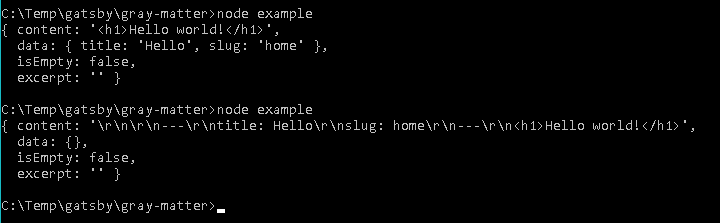
Looks like the behavior does exist in gray-matter. Here's the result from the gray-matter example with no blank lines at the top, and then after adding two blank lines and running node example again.
twhiteaker
on 18 Apr 2018
Thanks @twhiteaker! Want to file an issue over on the gray-matter repo?
m-allanson
on 18 Apr 2018
twhiteaker
on 18 Apr 2018
We could start trimming top whitespace in the meantime as well though it'd be great to have this fixed upstream.
 KyleAMathews
on 18 Apr 2018
KyleAMathews
on 18 Apr 2018
We could start trimming top whitespace in the meantime as well though it'd be great to have this fixed upstream.
I mention this in https://github.com/jonschlinkert/gray-matter/issues/71, but we would be breaking established front-matter conventions to trim whitespace. Typically, front-matter is expected to be the _very first thing_ in a file.
I'm open to discussing, but just wanted to be clear that this is a feature request, and we'd be breaking conventions to support it.
edit: I'm not opposed to an option for this if that sounds good to you.
 jonschlinkert
on 19 Apr 2018
jonschlinkert
on 19 Apr 2018
Oh really? Wasn't really sure what the convention was.
The other approach for fixing this is to add a copy button to code blocks — this problem is only cropping up it seems in Firefox.
KyleAMathews
on 19 Apr 2018
I'm open to feedback, let me know what you think we should do.
jonschlinkert
on 19 Apr 2018
@twhiteaker thanks for submitting such a thorough issue and contacting me
to figure out the problem!
On Wed, Apr 18, 2018 at 11:37 AM, Kyle Mathews notifications@github.com
wrote:
We could start trimming top whitespace in the meantime as well though it'd
be great to have this fixed upstream.—
You are receiving this because you were mentioned.
Reply to this email directly, view it on GitHub
https://github.com/gatsbyjs/gatsby/issues/5024#issuecomment-382468627,
or mute the thread
https://github.com/notifications/unsubscribe-auth/Ae9o2myPQgeowPl-YGQsUqfvjIfvRT9nks5tp3nRgaJpZM4TZCMo
.
 shannonbux
on 19 Apr 2018
shannonbux
on 19 Apr 2018
Per my comment in gray-matter, it looks like there is no formal specification, but placing it at the top is what several projects follow and so it has become the de facto convention. Thus, I think the best solution is to bring this to the user's attention in the tutorial. It's better to have users construct "valid" front-matter than to make gatsby too smart.
twhiteaker
on 19 Apr 2018
Oh, and that Copy button will be great, too!
twhiteaker
on 19 Apr 2018
Title is about in and we're working on a copy button
KyleAMathews
on 8 Sep 2018
I've just bumped into this issue as well by following along with the tutorial.
The other option is to remove date from the GraphQL query string.
 baerrach
on 8 Mar 2019
baerrach
on 8 Mar 2019
Related issues
 Oppenheimer1
·
3Comments
Oppenheimer1
·
3Comments
 benstr
·
3Comments
benstr
·
3Comments
 timbrandin
·
3Comments
timbrandin
·
3Comments
 ghost
·
3Comments
ghost
·
3Comments
 rossPatton
·
3Comments
rossPatton
·
3Comments
Most helpful comment
Per my comment in gray-matter, it looks like there is no formal specification, but placing it at the top is what several projects follow and so it has become the de facto convention. Thus, I think the best solution is to bring this to the user's attention in the tutorial. It's better to have users construct "valid" front-matter than to make gatsby too smart.