Gatsby: Editing & Adding new content to an existing page via Contentful?
Hi, new to Gatsby and JAMStack setup and still trying to get to grips with everything, so apologies if this is something apparent I've not understood via the docs.
I've managed to get posts created via Contentful, however, I'd like to add the ability to edit content on existing pages and if possible add new sections/content to those existing pages rather than create separate pages for those sections.
So, for example, say you have a one-page website and that has sections such as 'About us', 'What we do', 'Contact us' etc. What would be the best approach to making those sections individually editable via Contentful?
 squaredindex
All 7 comments
Editable in the Contentful UI?
 KyleAMathews
on 3 Apr 2018
KyleAMathews
on 3 Apr 2018
@KyleAMathews Yeah, that's right. I wouldn't mind a solution that uses NetlifyCMS either, really just need something easy for clients to use.
squaredindex
on 3 Apr 2018
@squaredindex I'm using Gatsby + Contentful + Netlify and loving it in terms of how flexible the entire setup is. An enjoyable developer experience and the clients love the simplicity of editing content via Contentful compared to other solutions I had wired up for Jekyll but really never felt truly stoked on.
I'd recommend a couple things to get into the groove quicker.
- Run through the entire Gatsby tutorial, there is a ton of gold in there I didn't see at first glance.
- Take in everything you can regarding GraphQL if your new to it like I am. How to GraphQL Coming back to Gatsby tutorial and docs made a lot more sense to me after this.
- Check out this video series that Khaled Garbaya from Contentful put together. He focuses mostly on a simple blog setup but watching him wire it up on the fly and correct little things was worthwhile.
- Finally scope out some repos like gatsby-contentful-starter this will give you some ideas about how you can leverage the GraphQL data layer and template a layout anyway you can think of. Try taking a peak at the components folder especially. That really made Contentful's content models and entries make more sense for stuff like wiring up unique sections/components that are client editable.
I'm very new to it myself but hopefully this helps.
Oh and be sure to join us all on the Spectrum community for Gatsby! Its pretty fun for open ended discussions on the fly.
 grantmoran
on 3 Apr 2018
grantmoran
on 3 Apr 2018
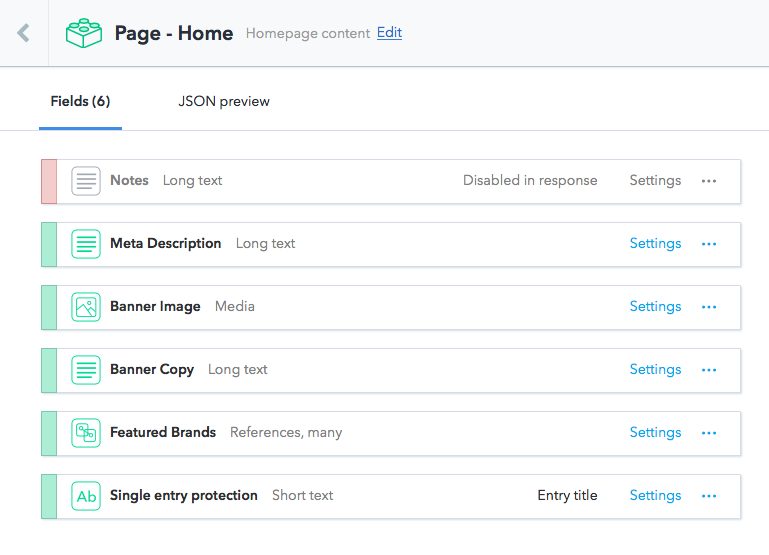
I might be able to help here. I create a custom Content Model for each page that I want for the user to be able to edit.
Content model examples
Homepage
About page
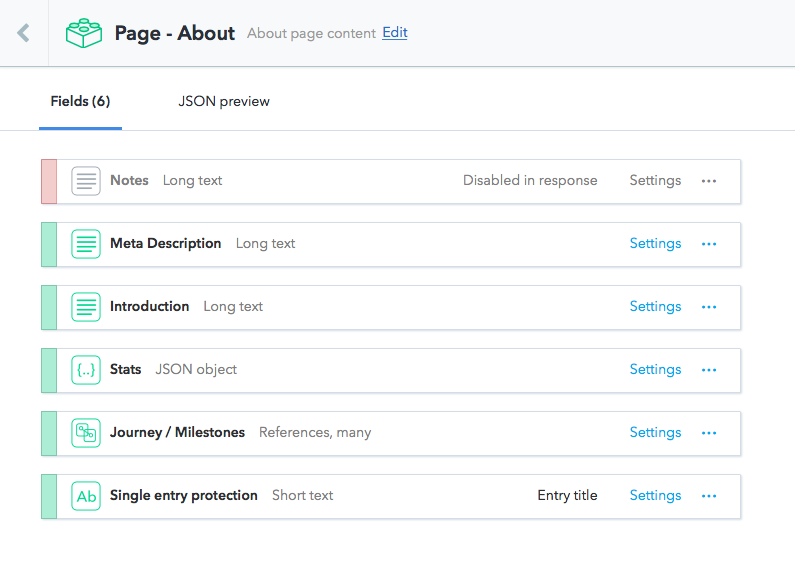
Single entry protection
You have to make sure that there is only 1 entry for each page’s Content Model. This is a little bit of a workaround, but it gets the job done. Notice the _Single entry protection_ field? Here are the settings for that field:
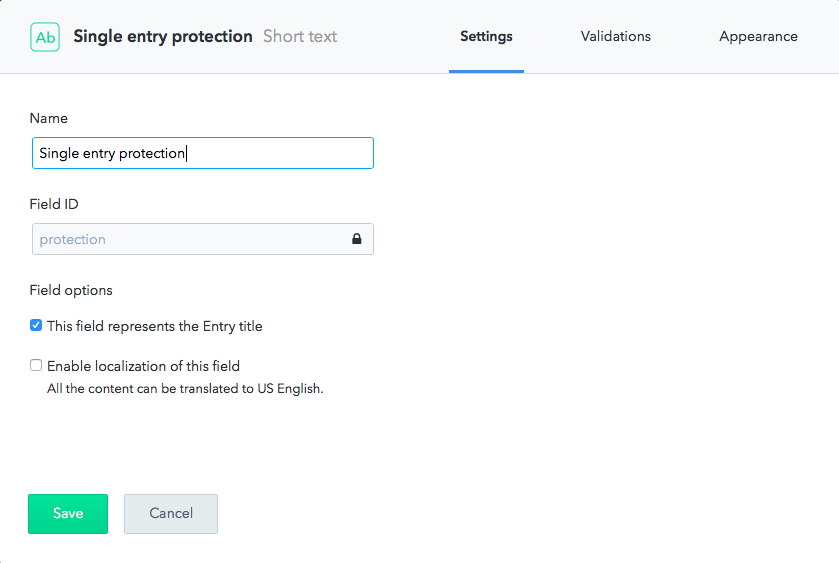
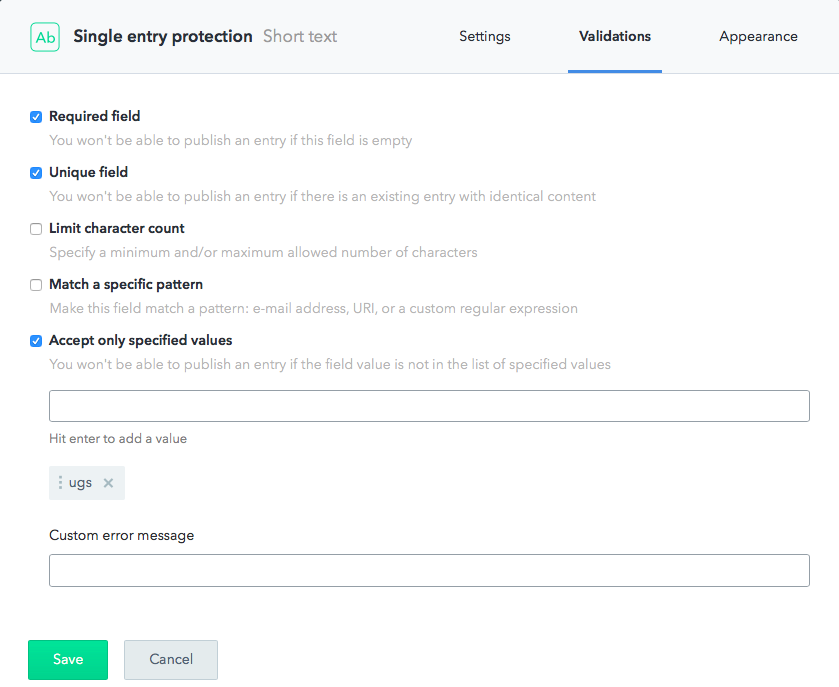
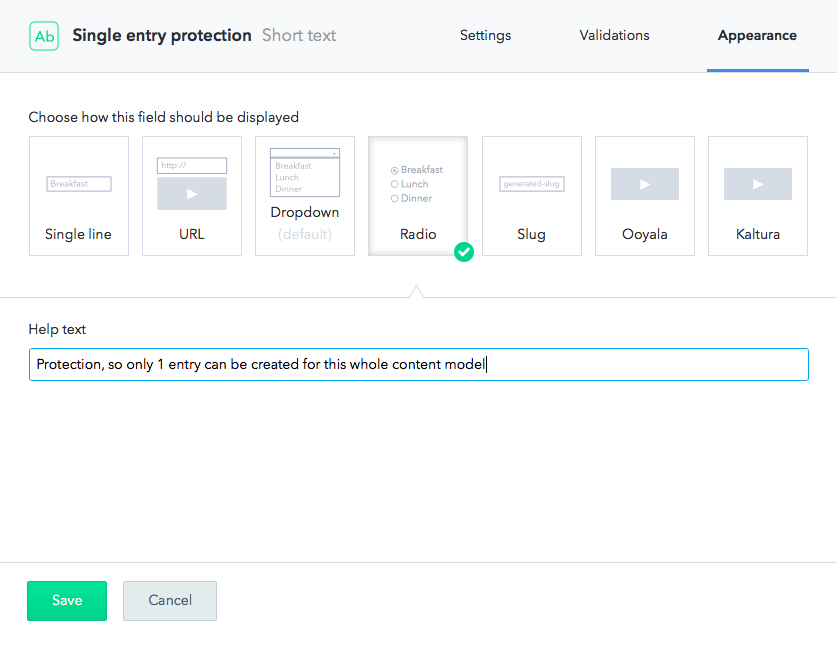
Key here being Required field, Unique field, and Accept only specified value — which I have set to ugs (you can change ugs to whatever, I choose it because it’s my client’s initial).
Creating the entry
I then create an entry, the only valid entry for the entire Content Model. When user tries to create another entry, he/she won’t be able to publish it, because I have reserved the only valid protection keyword.

Querying with Gatsby
Now, querying with Gatsby is easy, you don’t even have to know the ID of the entry.
pages/index.js
export const query = graphql`
  query HomeQuery {
    contentfulPageHome(protection: { eq: "ugs" }) {
      metaDescription {
        metaDescription
      }

      bannerImage {
        description
        resize(width: 1344) {
          src
          width
          height
        }
      }

      bannerCopy {
        childMarkdownRemark {
          html
        }
      }

      ...FeaturedBrandFragment
    }
  }
`
pages/about.js
export const query = graphql`
  query AboutQuery {
    contentfulPageAbout(protection: { eq: "ugs" }) {
      metaDescription {
        metaDescription
      }
      introduction {
        introduction
      }
      stats {
        internal {
          content
        }
      }
    }
  }
`
 ryanditjia
on 3 Apr 2018
ryanditjia
on 3 Apr 2018
@ryanditjia Thank you so much for giving such a complete & clear explanation, that was incredibly helpful! 😁
This sort of setup will work perfectly for my client.
squaredindex
on 3 Apr 2018
@grantly7 Thanks for sharing those resources, looking forward to really diving in and learning as much as possible.
squaredindex
on 3 Apr 2018
No worries. It’s a workaround and can be bypassed by a naughty user deleting the entry and creating a new one from scratch. Just have to tell them not to do that 😃. Consider closing the issue if it’s solved your problem.
ryanditjia
on 3 Apr 2018
Related issues
 dustinhorton
·
3Comments
dustinhorton
·
3Comments
 3CordGuy
·
3Comments
KyleAMathews
·
3Comments
3CordGuy
·
3Comments
KyleAMathews
·
3Comments
 magicly
·
3Comments
magicly
·
3Comments
 totsteps
·
3Comments
totsteps
·
3Comments