Gatsby: Tutorial part six sort not working
I'm probably doing something wrong but I don't know JS/React/Gatsby to know what I'm missing. In GraphiQL, I have:
{
  allMarkdownRemark(
    sort: { fields: [frontmatter___date], order: ASC}
  ) {
    edges {
      node {
        frontmatter {
          title
          date(formatString: "DD MMMM, YYYY")
        }
        excerpt
        timeToRead
        html
      }
    }
  }
}
and changing the ASC to DESC changes the order of the returned result as one would expect. However, when I place this query in src/pages/index.js, the order on the index page is always the same, regardless of whether I choose ASC or DESC. Restarting the development server made no difference. Adding new blog entries works, but something about the sorting is not working.
 hazelnusse
All 11 comments
Changing the date in the markdown file changes the order in the generated page, indicating that the entries are being sorted. However, changing the Graphql query in src/pages/index.js doesn't change the order as expected. Here is my src/pages/index.js:
import React from "react";
import g from "glamorous";

import { rhythm } from "../utils/typography";

export default ({ data }) => {
  console.log(data);
  return (
    <div>
      <g.H1 display={"inline-block"} borderBottom={"1px solid"}>
        Amazing Pandas Eating Things
      </g.H1>
      <h4>{data.allMarkdownRemark.totalCount} Posts</h4>
      {data.allMarkdownRemark.edges.map(({ node }) => (
        <div key={node.id}>
          <g.H3 marginBottom={rhythm(1 / 4)}>
            {node.frontmatter.title}{" "}
            <g.Span color="#BBB">— {node.frontmatter.date}</g.Span>
          </g.H3>
          <p>{node.excerpt}</p>
        </div>
      ))}
    </div>
  );
};

export const query = graphql`
  query IndexQuery {
    allMarkdownRemark(
      sort: { fields: [frontmatter___date], order: ASC}
    ) {
      totalCount
      edges {
        node {
          id
          frontmatter {
            title
            date(formatString: "MMMM, YYYY")
          }
          excerpt
        }
      }
    }
  }
`;
And here is what the index page looks like:

Note that the date format doesn't match, and also note that changing the sorting has not effect. This smells like there are stale files around that aren't getting updated, but re-running gatsby develop doesn't resolve the issue, nor does nuking the public dir -- is there something else I should be doing?
hazelnusse
on 18 Mar 2018
I tried to record the steps in commits as I went through the tutorial, maybe it can help. So far I can't see any issues with your query..
Here is my changeset for that part of the tutorial https://github.com/vprasanth/gatsby-practice-graphql/commit/d767e3f3bb58dd3d1d3dd5e3364505cf54532ce1
 vprasanth
on 18 Mar 2018
vprasanth
on 18 Mar 2018
I'm trying to root cause this and am noticing if I complete the steps incrementally as they are described in tutorial part 4, I get errors such as TypeError: children is not a function on index.js, but if don't run the gatsby develop step until I've made all the edits to get the various .js files in their final state, the page is built and works fine.
Does tutorial 4 work for you if you complete the steps verbatim as they are on the website?
hazelnusse
on 18 Mar 2018
Maybe a separate issue, but sort doesn't work for me because there is no date on the frontmatter object. I'm using:
-- [email protected]
gatsby cli 1.1.50
node v8.10.0
Windows 10 64-bit
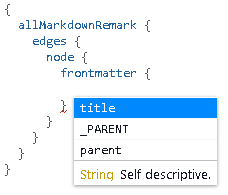
 twhiteaker
on 10 Apr 2018
twhiteaker
on 10 Apr 2018
Hi Tim!
Just to double check; did you include dates in your .md files?
Like this:
--- title: "Sweet Pandas Eating Sweets" date: "2017-08-10" ---
If so, did you restart the dev server after installing the
gatsby-transformer-remark plugin? That is necessary in order for GraphiQL
to reflect all the information in the markdown files.
One other thing that could have happened is that parts 4 and 5 might
include some instructions that are necessary to complete before part 6.
If you have carefully followed all instructions from part 4 through part 6
and are still running into this error, let me know and I'm curious to know
more. We could screen share so I can possibly see what's going wrong!
Shannon
On Tue, Apr 10, 2018 at 2:52 PM, Tim Whiteaker notifications@github.com
wrote:
Maybe a separate issue, but sort doesn't work for me because there is no
date on the frontmatter object. I'm using:
-- [email protected]
gatsby cli 1.1.50
node v8.10.0
Windows 10 64-bit[image: frontmatter]
https://user-images.githubusercontent.com/699496/38585306-00dd8438-3cdf-11e8-856a-88be521d93c0.PNG—
You are receiving this because you were assigned.
Reply to this email directly, view it on GitHub
https://github.com/gatsbyjs/gatsby/issues/4585#issuecomment-380259308,
or mute the thread
https://github.com/notifications/unsubscribe-auth/Ae9o2gr06po57KtOyplcEnzQFEOKrSdKks5tnSmAgaJpZM4SvAyE
.
 shannonbux
on 11 Apr 2018
shannonbux
on 11 Apr 2018
I did include dates in my md files, I restarted the dev server after installing the plug-in, and I started with part four from scratch in a fresh directory just to be sure, to the same effect. I also noticed that while my frontmatter has a title attribute, its value is empty.
I am using the Node.js command prompt on Windows 10 64-bit as administrator (regular node is blocked). I'm using Node.js 8.10.0 (x64).
Screen sharing sounds great! April 12 is pretty open for me.
twhiteaker
on 11 Apr 2018
Hi Tim!
I was in workshops for a couple days. Will you put a time on my calendar
and we'll screenshare? calendly.com/shannon-soper
:) I'm very curious to see what is happening!
On Wed, Apr 11, 2018 at 10:52 AM, Tim Whiteaker notifications@github.com
wrote:
I did include dates in my md files, I restarted the dev server after
installing the plug-in, and I started with part four from scratch in a
fresh directory just to be sure, to the same effect. I also noticed that
while my frontmatter has a title attribute, its value is empty.I am using the Node.js command prompt on Windows 10 64-bit as
administrator (regular node is blocked). I'm using Node.js 8.10.0 (x64).Screen sharing sounds great! April 12 is pretty open for me.
—
You are receiving this because you were assigned.
Reply to this email directly, view it on GitHub
https://github.com/gatsbyjs/gatsby/issues/4585#issuecomment-380539916,
or mute the thread
https://github.com/notifications/unsubscribe-auth/Ae9o2u8_UxhobGTFpb1i0KKGFzvhKtPZks5tnkLvgaJpZM4SvAyE
.
shannonbux
on 16 Apr 2018
My issue is different from the OP. I created a new one at #5024.
twhiteaker
on 17 Apr 2018
I'm having the same issue. It's in someway related to caching. If I blow away the .cache directory and rerun gatsby develop the change applies. It also happens for any change to the sorting/filtering logic. If I change the sort to a limit: 1 no effect till I blow away .cache and restart.
npm 6.1.0
node v10.1.0
gatsby 1.9.250
arch linux
 7h3kk1d
on 30 May 2018
7h3kk1d
on 30 May 2018
Also of note that the results from the iGraphQL interface seem to be correct when pasting the query from the code. So I'm not sure why those aren't being cached.
7h3kk1d
on 31 May 2018
Due to the high volume of issues, we're closing out older ones without recent activity. Please open a new issue if you need help!
 KyleAMathews
on 8 Sep 2018
KyleAMathews
on 8 Sep 2018
Related issues
 dustinhorton
·
3Comments
dustinhorton
·
3Comments
 brandonmp
·
3Comments
brandonmp
·
3Comments
 ferMartz
·
3Comments
ferMartz
·
3Comments
 mikestopcontinues
·
3Comments
mikestopcontinues
·
3Comments
 totsteps
·
3Comments
totsteps
·
3Comments
Most helpful comment
I'm having the same issue. It's in someway related to caching. If I blow away the .cache directory and rerun
gatsby developthe change applies. It also happens for any change to the sorting/filtering logic. If I change the sort to alimit: 1no effect till I blow away .cache and restart.npm 6.1.0
node v10.1.0
gatsby 1.9.250
arch linux