Hi everyone,
Is it possible to access the configuration parameters of YOAST SEO, like title or description, using gatsby-source-wordpress plugin?
Thanks in advance.
 imarem
All 9 comments
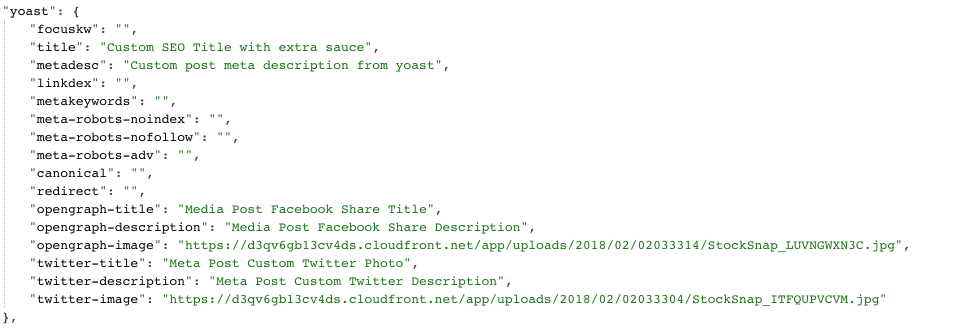
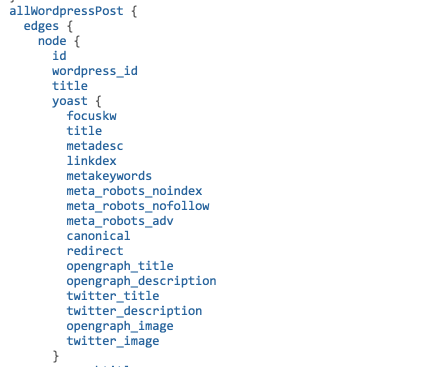
@imarem I've been able to get the yoast params to load in pretty nicely by adding in the WP API Yoast SEO Plugin (It's pretty old I know) to my WP Install. This plugin will add a yoast: object to the WP Rest API, and then the gatsby source plugin will automatically make it available with GraphQL. It's pretty easy to then add those values into your templates with React Helmet.
Yoast in Rest API
Yoast in GraphiQL Query
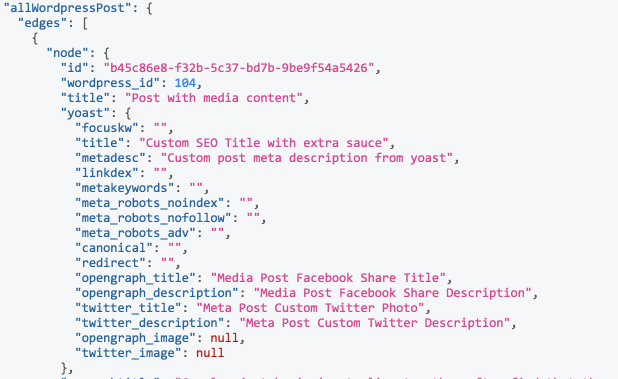
Yoast in GraphiQL Query Response
Note: The WP Rest API only returns values in yoast: if you've set them on the post, so it doesn't default to the "post title" for instance, the way it might in a Wordpress template.
One issue I am having (which maybe @KyleAMathews has some insights into) is that when I set a custom social image for either opengraph-image or twitter-image, the image urls are being returned in the WP Rest Api, but are null when returned in GraphQL, (see screenshots above). I'm wondering if there's some processing going on of image urls in Gatsby.
 all9lives
on 13 Mar 2018
all9lives
on 13 Mar 2018
@all9lives wordpress plugin currently converts strings that look like image urls to wordpress media object - if you don't have file with same url in media library it will return null ( https://github.com/gatsbyjs/gatsby/blob/master/packages/gatsby-source-wordpress/src/normalize.js#L313-L320 ). Do you have those images in your media library under same url?
 pieh
on 13 Mar 2018
pieh
on 13 Mar 2018
@pieh TLDR; Yes those images are in the media library under the source_url property.
Details: So that images inside post content can be served by a CDN, I'm using the WP Offload S3 Plugin, this pushes uploads to S3, then rewrites WP image urls to cloudfront > S3.
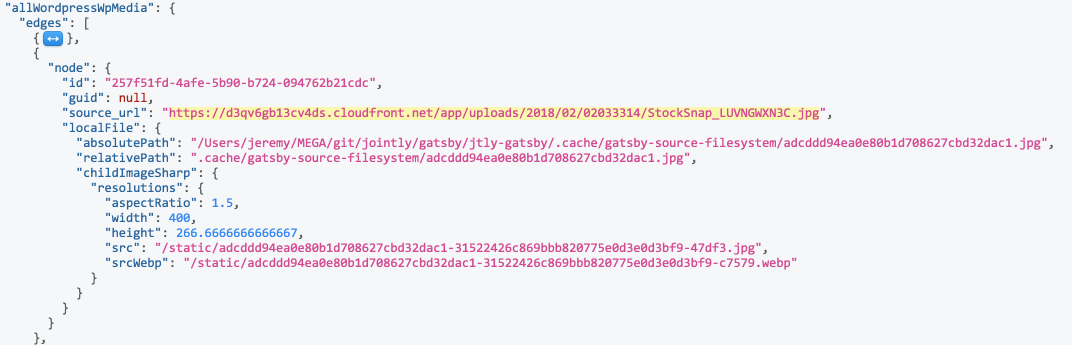
The images in question are available in the wordpress media library via rest api and in GraphQL under the allWordpressWpMedia query, with all the localFile properties found in featured_media. Perhaps there's an issue linking yoast.opengraph_image to the allWordpressWpMedia node. Is there a verbose log where I could see it parsing the image urls and looking for a corresponding allWordpressWpMedia object?
all9lives
on 14 Mar 2018
@all9lives This might be actually bug in gatsby related to normalized field names (changing - to _ in this case) names and resolving linked nodes. Can you try to change code in wordpress plugin from
-'twitter-image' => get_post_meta($post['id'], '_yoast_wpseo_twitter-image', true)`
+'twitter_image' => get_post_meta($post['id'], '_yoast_wpseo_twitter-image', true)`
and see if this will make it work?
pieh
on 14 Mar 2018
@pieh I tried changing the keys in the API response as you suggested, checked that the adjusted keys are being returned but when gatsby builds, graphql is still returning null.
"opengraph_image": null,
"twitter_image": null

_WP API Response_
all9lives
on 14 Mar 2018
@all9lives I tried to reproduce this locally, but it works for me. Can you share your gatsby-source-wordpress config so I could try to reproduce it using your data? If you don't want to share this publicly, you can join gatsby discord channel ( https://discord.gg/0ZcbPKXt5bVoxkfV ) and message me privately (my handle on discord is grajen3)
pieh
on 14 Mar 2018
@all9lives Finally found time to investigate this, sorry for delay.
Issue here is that yoast rest api will return empty string if image is not set and will cause ambiguity for gatsby as part of entries will link to media nodes and part of them will be empty strings. To handle this You will have to edit plugin to return null instead of empty string - for example:
add helper function
function nullify_empty($val) {
  return empty($val) ? null : $val;
}
-'twitter-image' => get_post_meta($post['id'], '_yoast_wpseo_twitter-image', true)
+'twitter-image' => nullify_empty(get_post_meta($post['id'], '_yoast_wpseo_twitter-image', true))
just note that it will change type of field to media and so you will have to adjust your queries to use something like this:
allWordpressPost {
  edges {
    node {
      yoast {
        twitter_image {
          localFile {
            publicURL
          }
        }
      }
    }
  }
}
(or childImageSharp if you want to process that image)
pieh
on 19 Mar 2018
@pieh Thanks for your help working out the issue here, I was able to implement it and I'm getting back either null or detailed media properties (localFile, childImageSharp, source_url etc). Works well now, cheers.
all9lives
on 23 Mar 2018
We derailed original issue a little, but overall it might be helpful for other folks that want to use seo data. Will close issue is problem seems resolved.
pieh
on 23 Mar 2018
Related issues
 timbrandin
·
3Comments
timbrandin
·
3Comments
 mikestopcontinues
·
3Comments
mikestopcontinues
·
3Comments
 benstr
·
3Comments
benstr
·
3Comments
 dustinhorton
·
3Comments
dustinhorton
·
3Comments
 rossPatton
·
3Comments
rossPatton
·
3Comments
Most helpful comment
@all9lives Finally found time to investigate this, sorry for delay.
Issue here is that yoast rest api will return empty string if image is not set and will cause ambiguity for gatsby as part of entries will link to media nodes and part of them will be empty strings. To handle this You will have to edit plugin to return
nullinstead of empty string - for example:add helper function
just note that it will change type of field to media and so you will have to adjust your queries to use something like this:
(or
childImageSharpif you want to process that image)