Gatsby: Gatsby does not reload my page on Windows 10
Description
I set up a new gatsby project and ran it via gatsby develop command. Everything seems to be OK, network monitor in my Google Chrome DevTools doesn't show any errors (i.e. __webpack_hmr loads properly). I already checked similar topics and people there had problems with loading __webpack_hmr, but in my case it loads properly. I tried both these two commands:
1) gatsby develop
2) gatsby develop --host localhost --port 8000
Environment
Gatsby version: 1.1.41
Node.js version: 9.3.0
NPM version: 5.5.1
Operating System: Microsoft Windows [Version 10.0.15063]
Expected behavior
I would like to have my project refreshed when I make changes in my code.
Steps to reproduce
1. Install gatsby, set up a new project
2. Run it via gatsby develop command
 TheOpti
All 8 comments
Hi @TheOpti ,
can you update gatsby in your app? I am using gatsby v1.9.204 in Windows 10 / Chrome and hot-reloading works fine with it.
EDIT: you probably meant gatsby-cli v1.1.41, sorry :D But still it works here for files inside the pages directory. There was a problem with markdown files earlier issue 4093
 mpolinowski
on 22 Feb 2018
mpolinowski
on 22 Feb 2018
Hey @mpolinowski
Unfortunately it doesn't work with any files in my case. No matter which file I edit, page is not being refreshed.
TheOpti
on 26 Feb 2018
@TheOpti are you able to publish a repo with your project?
 m-allanson
on 27 Feb 2018
m-allanson
on 27 Feb 2018
I have the same issue on Windows 10 using Chrome.
HMR was working just fine, and stopped working for unknown reason (didn't change any package or something).
The strange thing about it is that when I kill gatsby develop (ctrl + c), I have the [HMR] connected message in the console.
When I check on the Network tab of the dev console, I can see that __webpack_hmr status is (pending):
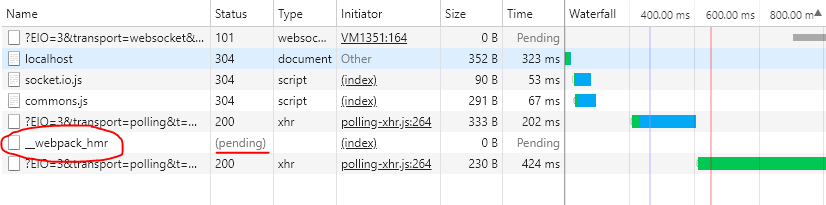
I also tried with Firefox but HMR is not working here too.
 SebastienBelmon
on 22 Mar 2018
SebastienBelmon
on 22 Mar 2018
Hello @m-allanson I'm having the same issue above. Am able to run my project in every browser, but i notice in FF the fonts are not rendering and the only thing i'm seeing that could be the cause is _webapck_hmr being interrupted. I'm on macOS v10.13.4 (high sierra) and the FF version is v59.0.2.


Will have to remake this static site in something like Nuxt, unfortunately, if I don't find a way to resolve this in FF because the fonts not loading is a no-go for my client work :(
 tetreault
on 27 Apr 2018
tetreault
on 27 Apr 2018
Seems to be the same as https://github.com/gatsbyjs/gatsby/issues/3043
The solution of the last comment works for me
!/bin/bash
export CHOKIDAR_USEPOLLING=1
gatsby develop --host localhost
But CPU-usage goes up to 100% with this option on my machine, so this is not the optimum solution.
 PutziSan
on 30 Apr 2018
PutziSan
on 30 Apr 2018
Reload isn't working for me either (Windows 10, gatsby v1.9.273) when using Edge or Firefox, but it does work under Chrome.
In my case, it is not a problem of file changed not being detected - I see gatsby compiling on every edit just fine. But somehow, Firefox and Edge just sit there and not show the change (unless I reload), while Chrome does pick up the changes live.
In Edge's console it says:
webpack-hot-middleware's client requires EventSource to work. You should include a polyfill if you want to support this browser: https://developer.mozilla.org/en-US/docs/Web/API/Server-sent_events#Tools
Firefox doesn't seem to load any HMR related stuff at all:
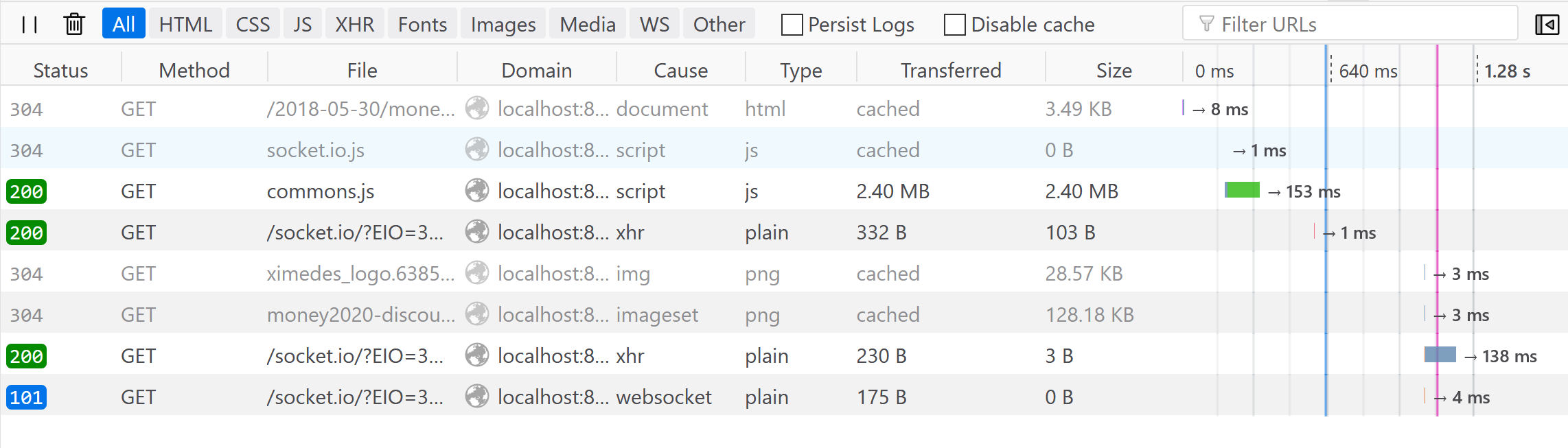
What's really odd is that I am positive everything worked fine on my previous laptop, on Firefox. I recently upgraded and reinstalled everything (including Node etc) so maybe that broke something?
 jorispz
on 27 Jun 2018
jorispz
on 27 Jun 2018
Due to the high volume of issues, we're closing out older ones without recent activity. Please open a new issue if you need help!
 KyleAMathews
on 8 Sep 2018
KyleAMathews
on 8 Sep 2018
Related issues
 signalwerk
·
3Comments
signalwerk
·
3Comments
 totsteps
·
3Comments
totsteps
·
3Comments
 mikestopcontinues
·
3Comments
mikestopcontinues
·
3Comments
 benstr
·
3Comments
benstr
·
3Comments
 andykais
·
3Comments
andykais
·
3Comments
Most helpful comment
Reload isn't working for me either (Windows 10, gatsby v1.9.273) when using Edge or Firefox, but it does work under Chrome.
In my case, it is not a problem of file changed not being detected - I see gatsby compiling on every edit just fine. But somehow, Firefox and Edge just sit there and not show the change (unless I reload), while Chrome does pick up the changes live.
In Edge's console it says:
Firefox doesn't seem to load any HMR related stuff at all:
What's really odd is that I am positive everything worked fine on my previous laptop, on Firefox. I recently upgraded and reinstalled everything (including Node etc) so maybe that broke something?