Gatsby: Example site running clarification
Description
I tried to run run some sites from the gatsby example section (gatsbygram and using-page-transitions). Basically I cloned the gatsby repo, npm installed inside it, entered the example site's directory and npm installed there too. "gatsby develop" errored out with this message.
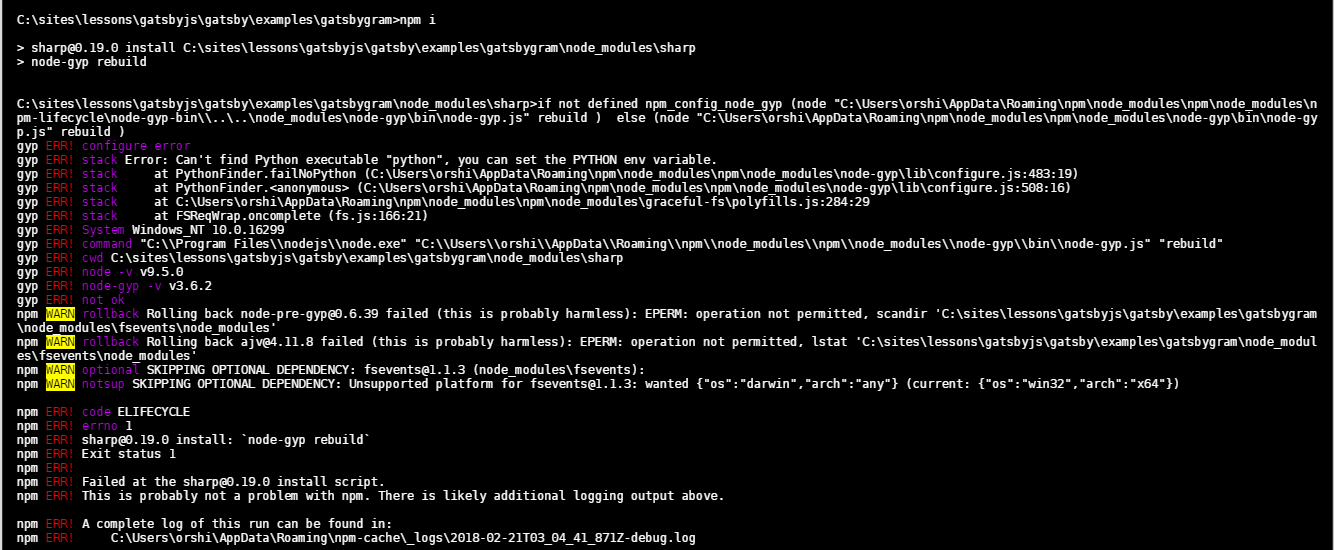
Anybody have any idea why I got this? Did I just miss something about how to run the example sites?
Thanks.
Environment
Gatsby version: 1.1.41
Node.js version: 9.5.0
Operating System: Windows 10
Actual result
Error that is listed above. Site does not go into 'develop' mode.
Expected behavior
I should be able to see the site!
Steps to reproduce
1. git clone the gatsby repo, then npm -i inside of it
2. enter the example site directory, then npm -i inside of it
3. When installation is done, run 'gatsby develop'
...
 orshick
All 3 comments
Hey @orshick! Looks like you're missing Python. Please take a look at https://www.gatsbyjs.org/docs/gatsby-on-windows/ and let us know if that helped.
 fk
on 21 Feb 2018
fk
on 21 Feb 2018
Closing this, thanks @fk
 calcsam
on 21 Feb 2018
calcsam
on 21 Feb 2018
Thanks a lot @fk !
orshick
on 22 Feb 2018
Related issues
 mikestopcontinues
·
3Comments
mikestopcontinues
·
3Comments
 ghost
·
3Comments
ghost
·
3Comments
 brandonmp
·
3Comments
brandonmp
·
3Comments
 theduke
·
3Comments
theduke
·
3Comments
 hobochild
·
3Comments
hobochild
·
3Comments