Gatsby: [gatsby-plugin-sharp] High DPI images are rendered tiny
Because of the way the presentationWidth is calculated, my images being displayed through gatsby-remark-images are way smaller than they should be.
For example, I have an image with width=750 and density=600
const pixelRatio = typeof density === `number` && density > 0 ? density / 72 : 1
const presentationWidth = Math.min(
    options.maxWidth,
    Math.round(width / pixelRatio)
);
Under this code the presentationWidth is calculated to be 90.
If my image density was 75, the presentationWidth would be 719.
Am I approaching this completely incorrectly, or is the logic here wrong?
 gausie
All 19 comments
@bripkens you might have some thoughts on this
gausie
on 1 Oct 2017
That's as expected. We respect the intended viewing size of your images. If you want images to be larger then you need to change the internal pixel density to something else. If you read the original issue, the reason this change was made was to respect the original size of screenshots made on high density screens.
 KyleAMathews
on 2 Oct 2017
KyleAMathews
on 2 Oct 2017
🤔 @KyleAMathews Would you consider adding an option to opt out of the default behavior? _Edit:_ Opting out would simply not consider the image resolution/restore the behavior pre https://github.com/gatsbyjs/gatsby/pull/2040
 fk
on 2 Oct 2017
fk
on 2 Oct 2017
@fk's suggestion seems reasonable - how am I meant to embed high density images otherwise?
gausie
on 2 Oct 2017
Where do you get high-density images from?
KyleAMathews
on 2 Oct 2017
I.e. how common is it that images have densities over 100?
KyleAMathews
on 2 Oct 2017
Perhaps presentationWidth should be opt-in. The only use case for respecting it is screenshots. Everything else we'd want the image to be full-width.
KyleAMathews
on 2 Oct 2017
how am I meant to embed high density images otherwise
In the meantime, any image editing program will let you modify the DPI.
KyleAMathews
on 2 Oct 2017
Where do you get high-density images from?
Maybe @gausie can tell his story?
Without going into too much detail (and brushing up my rusty print design workflow knowledge to properly explain things), setting the DPI for images used in print was a pretty common thing (at least for some time) – FWIW I can recall setting 300dpi for JPGs that I placed in Adobe Illustrator or InDesign, but that was years ago. While I don't know if this still is "a thing" today, I can see those images being used in a CMS like WordPress and finding their way to a Gatsby site somehow.
fk
on 2 Oct 2017
I am making a portfolio website, so I have a lot of photography and design
pieces in 300 and 600 dpi.
My current solution is indeed to reduce the DPI. Perhaps a good solution
would be for sharp to produce a set lower density images when provided high
DPI images?
On Oct 2, 2017 22:44, "Kyle Mathews" notifications@github.com wrote:
how am I meant to embed high density images otherwise
In the meantime, any image editing program will let you modify the DPI.
—
You are receiving this because you authored the thread.
Reply to this email directly, view it on GitHub
https://github.com/gatsbyjs/gatsby/issues/2292#issuecomment-333674256,
or mute
the thread
https://github.com/notifications/unsubscribe-auth/AAK-LnMX3-nE9ZKccVUgCAuy9ob096kVks5soVlVgaJpZM4PpuPb
.
gausie
on 3 Oct 2017
I am not yet convinced whether disabling the default is good or better behavior. Sure, it would resolve the immediate issue of easier support for photography / design artifacts, but one would loose any ability to embed high DPI images that are smaller than the content width.
@gausie: Do you have a suggestion how Gatsby could automatically differentiate between regular and high DPI images?
 bripkens
on 5 Oct 2017
bripkens
on 5 Oct 2017
I'm not sure, it's definitely a tough one. Is there a way to add metadata
to images through remark? Or could we do something through frontmatter?
On Oct 5, 2017 19:12, "Ben Ripkens" notifications@github.com wrote:
I am not yet convinced whether disabling the default is good or better
behavior. Sure, it would resolve the immediate issue of easier support for
photography / design artifacts, but one would loose any ability to embed
high DPI images that are smaller than the content width.@gausie https://github.com/gausie: Do you have a suggestion how Gatsby
could automatically differentiate between regular and high DPI images?—
You are receiving this because you were mentioned.
Reply to this email directly, view it on GitHub
https://github.com/gatsbyjs/gatsby/issues/2292#issuecomment-334547644,
or mute the thread
https://github.com/notifications/unsubscribe-auth/AAK-LnDXJWjXtSQqXduHbEczTEtmsUUuks5spRwZgaJpZM4PpuPb
.
gausie
on 5 Oct 2017
One can add meta data to images using exif data. This is what we are leveraging in Gatsby right now. We read the image resolution (DPI) in order to make decisions about image width.
The problem I am seeing here is that we have images for which one does want this behavior (screenshots, icons, charts and other explanatory graphics) and then we have a completely different source of images (cameras, media designed for print etc.). I am wondering whether we could automatically differentiate between those. For instance, we could only apply this logic when resolution % 72 === 0.
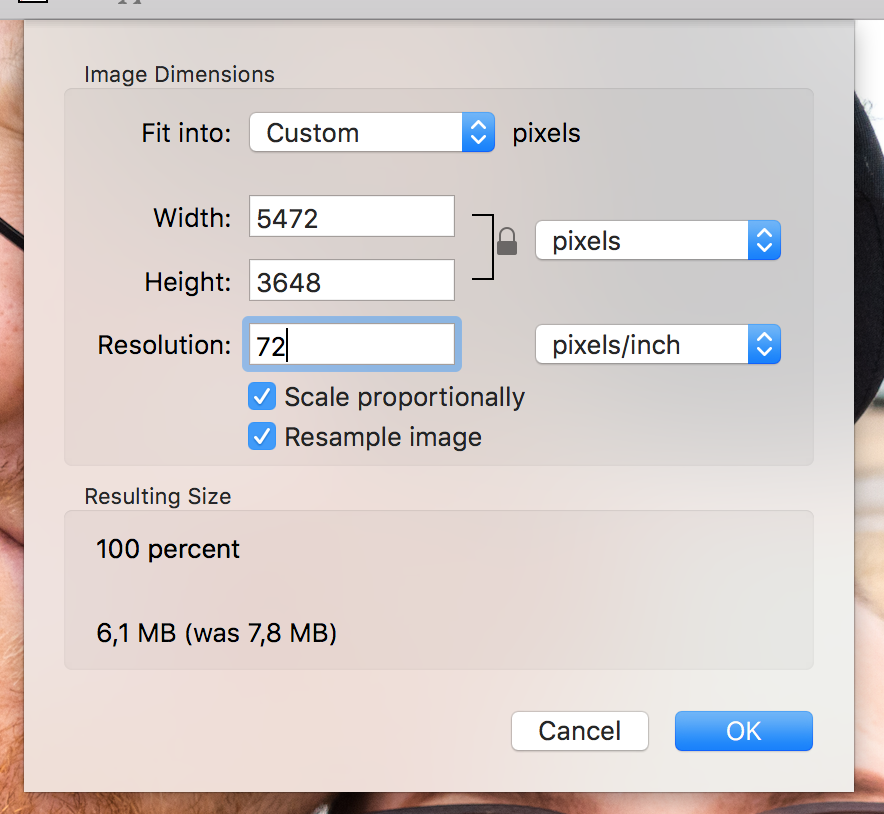
For the time being, you can change the resolution manually. Gatsby respects this setting:
bripkens
on 6 Oct 2017
@gausie From experience (Other people also use this workflow) I'd say that you won't upload such 300/600 dpi images to the internet anyway. I normally use Lightroom to export my images for the internet because I'll always do:
- Resize it to suitable image dimensions (Big enough for Social Media and Website but not to big. People like to rip of your images)
- Adapt the resolution (72 dpi)
- Add a small watermark in the corner
Generally speaking I like the idea to use sharp to create low resolution images? One might not want to use Lightroom/any other tool to prepare their images.
 LekoArts
on 12 Oct 2017
LekoArts
on 12 Oct 2017
you won't upload such 300/600 dpi images to the internet anyway
@LeKoArts I think this is not true. When developing websites people use images from different sources.
For example, I used an image exported from pdf file. Because pdf's are designed to be printed, they have much higher resolution than 72dpi. I've lost an hour debugging why the size of an image is so small. Gatsby should either cope with high-resolution images correctly or at the very least state in documentation clearly that every image should have 72dpi, how to check it, and how to convert your image to such resolution.
For everybody facing that issue and using a mac: Open an image with Preview app, go to Tools, Adjust size, set the resolution to 72 and save file.
 maciejmyslinski
on 22 Oct 2017
maciejmyslinski
on 22 Oct 2017
Yeah… I'm thinking this change is causing more trouble than it's worth. I think most people expect their images to fill the entire width. Let's make resizing to the "presentation width" an opt-in option. reactjs.org also got bit by this change https://github.com/reactjs/reactjs.org/issues/174
KyleAMathews
on 23 Oct 2017
Anyone want to take on making the change?
KyleAMathews
on 23 Oct 2017
I'm having the same issue with this as @LeKoArts described in #2391:
Using [gatsby-image] for a full-width image, the client's 1230px, 400dpi image ends up in the browser with sizes="(max-width: 222px) 100vw, 222px" and looks pixellated. Manually removing the "222px" values in dev tools fixes the issue (the image looks sharp), but obviously isn't a permanent solution.
This appears to make [gatsby-image] unusable for images provided by clients that aren't 72dpi. Is there a workaround I can apply at this point? I tried @maciejmyslinski's Preview app suggestion, but in this case, it results in an unusable 222px version of the image.
 ooloth
on 31 Oct 2017
ooloth
on 31 Oct 2017
The presentation width default change was reverted by @bripkens in #2713
When you upgrade, you can set sizeByPixelDensity to true in your gatsby-remark-images config to keep that behavior.
KyleAMathews
on 1 Nov 2017
Related issues
 kalinchernev
·
3Comments
kalinchernev
·
3Comments
 ferMartz
·
3Comments
ferMartz
·
3Comments
 andykais
·
3Comments
KyleAMathews
·
3Comments
andykais
·
3Comments
KyleAMathews
·
3Comments
 dustinhorton
·
3Comments
dustinhorton
·
3Comments
Most helpful comment
Yeah… I'm thinking this change is causing more trouble than it's worth. I think most people expect their images to fill the entire width. Let's make resizing to the "presentation width" an opt-in option. reactjs.org also got bit by this change https://github.com/reactjs/reactjs.org/issues/174