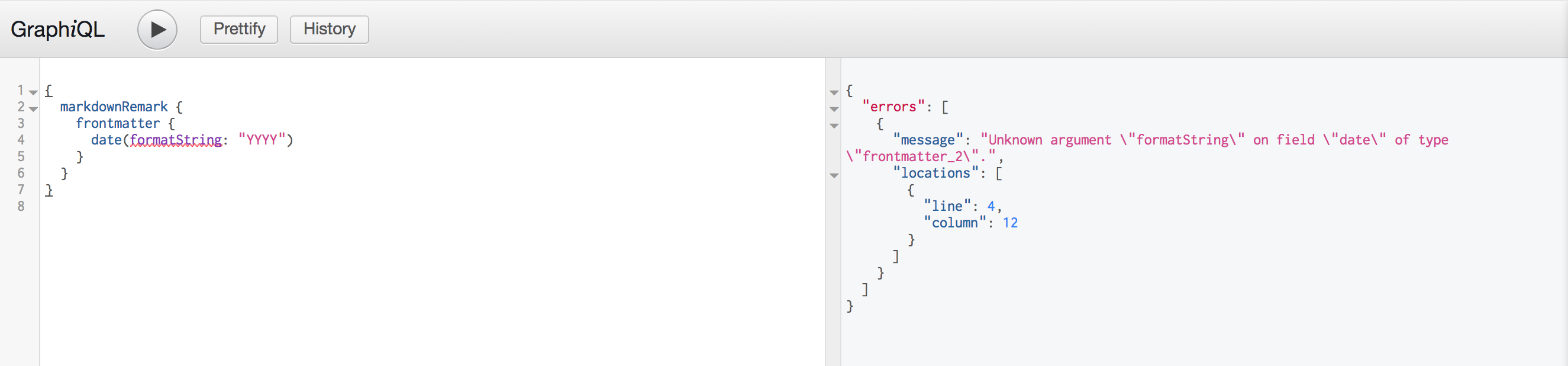
Gatsby: Unknown argument `formatString`

All 8 comments
You might try formatting the date field to something a bit more standard and see if that helps. I've had intermittent issues with date fields before, and tweaking the formatting usually helps.
 secretfader
on 19 Jul 2017
secretfader
on 19 Jul 2017
Yeah, a string has to be a standard date format for the various date formatting options to be added.
 KyleAMathews
on 19 Jul 2017
KyleAMathews
on 19 Jul 2017
cool, thanks @nicholaswyoung & @KyleAMathews
 ahmedelgabri
on 19 Jul 2017
ahmedelgabri
on 19 Jul 2017
@KyleAMathews If I am using this with the Wordpress REST API, how do I ensure its being returned as a string, looking at the example in the Gatsby repo it seems that it kinda just works?
EDIT: To clarify I receive a date without using the formatString function, however I get the error mentioned here when attempting to format it (including using GraphIQL console)
 daviddeejjames
on 30 Sep 2017
daviddeejjames
on 30 Sep 2017
Try using gatsby-source-wordpress which handles this for you.
KyleAMathews
on 30 Sep 2017
@KyleAMathews sorry I should have clarified I am using gatsby-source-wordpress and have created a blog page that uses the GraphQL query below. It works as intended! But would like to format the date without having to use something like MomentJS to format after the fact. However by adding the date(formatString: "MMMM DD, YY") that you have used in your Wordpress example, I am thrown the Unknown argument "formatString"
Any assistance with this issue would be greatly appreciated 👍
// Working Query
export const postQuery = graphql`
  query getPostQuery {
    allWordpressPost(sort: { fields: [date] }) {
      edges {
        node {
          id
          title
          excerpt
          slug
          date
        }
      }
    }
  }`
This just means that for some reason the data in your "date" field doesn't look dates to Gatsby. You'll need to do some debugging to see what your data looks like. Also might want to add some console.logs here https://github.com/gatsbyjs/gatsby/blob/8e271dac240c9374c654d1576fefafe4319cb314/packages/gatsby-source-wordpress/src/normalize.js#L108 Perhaps the WordPress API doesn't always include *_gmt fields.
KyleAMathews
on 1 Oct 2017
date must be: 2000-01-01
NOT: 2000-1-1
that was my problem
 andrejarboe
on 20 Mar 2019
andrejarboe
on 20 Mar 2019
Related issues
 totsteps
·
3Comments
totsteps
·
3Comments
 signalwerk
·
3Comments
signalwerk
·
3Comments
 andykais
·
3Comments
andykais
·
3Comments
 brandonmp
·
3Comments
KyleAMathews
·
3Comments
brandonmp
·
3Comments
KyleAMathews
·
3Comments
Most helpful comment
date must be: 2000-01-01
NOT: 2000-1-1
that was my problem