Gatsby: [source-wordpress] Transformer Sharp
Hi, is there any chance the source-wordpress example could be updated to fetch wordpress uploaded images and then run them through responsive image generator and saved to /public/static similar to the gatsbygram example? Many thanks!
 samburgers
All 23 comments
@sebastienfi is working on this exact thing actually :-)
 KyleAMathews
on 14 Jul 2017
KyleAMathews
on 14 Jul 2017
Yes ! This is still a WIP, I plan to be done on this by 24th July. This would also work with ACF.
 sebastienfi
on 14 Jul 2017
sebastienfi
on 14 Jul 2017
Incredible, looking forward to it!
samburgers
on 15 Jul 2017
thank you @sebastienfi :)
 giacomoalonzi
on 15 Jul 2017
giacomoalonzi
on 15 Jul 2017
Please submit your use case so I can extend the functionality to your needs.
My use case is :
- Identify each image node field being an URL for an image (ex.
post: {featured_media: http://your-site.com/image.jpg}). This will cover responsivenes of images for many use cases, including images components build in templates or components, or images displayed usingbackground-imageforstyled-componentsfor example (see note 1). - Identify each image in HTML node field (ex.
post: {content: "<p><img src='http://your-site.com/image.jpg />}). This will cover images inserted using the regular WYSIWYG editor of WP. - Identify each image in stringyfied JSON node field (ex.
post: {json: "<p><img src='http:\/\/your-site.com\/image.jpg \/>"}). This will cover images under ACF Field (like these inserted using an ACF Image component). - images file ended by
jpg,png,gif. - for an image node field, transform the node to an object with properties
{original_url, static_url, sizes { blob, size_1, size_2,...}} - for an image in HTML or json, replace the img tag url with the static one or blob if smaller than 8kb, and insert the
srcsetattribute.
[EDITED 23/07/17]
Note 1 : https://aclaes.com/responsive-background-images-with-srcset-and-sizes/
sebastienfi
on 15 Jul 2017
Hi @sebastienfi
Thanks again for this!
Yes, that all sounds right to me... the images from the wordpress side would be a combination of Featured Image, ACF Image/Gallery uploads, and possibly inline post media attachments too, as you say.
On the Gatsby side, these would be used as such:
- og:image meta tags (usually featured image)
- Various resized thumbnail images with
srcsetattributes.
Cheers :)
samburgers
on 18 Jul 2017
Hi guys !
Just an update, need more time, expect this around 29th.
Will focus first at image node field's example above. Then I'll digg into images contained in JSON stringyfied DOM or "simple" DOM. Building the regex that will extract these contents from the DOM won't be an easy task, any help appreciated.
I also updated my post above.
sebastienfi
on 23 Jul 2017
Use cheerio! Check out the recent changes to gatsby-remark-images adding support for parsing inline html.
KyleAMathews
on 23 Jul 2017
I'll give a go at Cheerio.
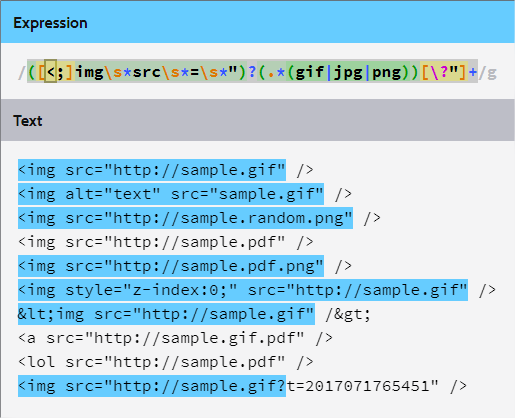
I've ended with this regex but it may not be bulletproof : ([<;]img\s*src\s*=\s*")?(.*(gif|jpg|png))[\?"]+
sebastienfi
on 23 Jul 2017
This is worth a read :-P https://stackoverflow.com/a/1732454
KyleAMathews
on 23 Jul 2017
I will also probably dedicate to Worpdress the image sizes management, using the thumbnail-width definitons https://codex.wordpress.org/Post_Thumbnails
sebastienfi
on 23 Jul 2017
LOL @KyleAMathews
The force of regex and HTML together in the same conceptual space will destroy your mind like so much watery putty.
I think the flaw here is that HTML is a Chomsky Type 2 grammar (context free grammar) and RegEx is a Chomsky Type 3 grammar (regular grammar). Since a Type 2 grammar is fundamentally more complex than a Type 3 grammar (see the Chomsky hierarchy), you can't possibly make this work. But many will try, some will claim success and others will find the fault and totally mess you up.
sebastienfi
on 23 Jul 2017
@sebastienfi would it be cleaner to just replicate/sync the wordpress asset library in its entirety? I imagine this might negate the need to regex the post content for image markup, and could just simply swap out the base path or something. As long as the build task is aware of which assets have already been processed it shouldn't really take up too many resources for each build (I am pretty sure the gatsbygram example behaves this way)
In a perfect world, image_sizes should really be defined on the Gatsby side. For example you could have multiple Gatsby sites reading from a single WordPress content API etc.
Just my 2c :)
samburgers
on 24 Jul 2017
would it be cleaner to just replicate/sync the wordpress asset library in its entirety?
Yes! Definitely cleaner. The problem is that on Wordpress.com one cannot query this library entirely without auth. We have 2 models : the localy hosted Wordpress instance (at your hosting provider or wordpress.org for example) and the wordpress instance hosted on wordpress.com. I'm trying to remain generic. Also, scraping the HTML content would also take care of the images which src are not hosted on the Wordpress instance.
You are right about the image size management. Gatsby should hold on this as templating and design is done at this level too.
sebastienfi
on 24 Jul 2017
For an update : being late on this sorry guys. I had to de-prioritize this in favor of some more urgent matters. I've made great progress thought. Still bugged by some call back hell. I hope to have time to solve this on the coming weeks.
WIP is at https://github.com/sebastienfi/gatsby/tree/topics/wordpress-responsive-images
PRs welcomed !
sebastienfi
on 11 Aug 2017
This is working — see the example site https://using-wordpress.gatsbyjs.org/sample-post-1
KyleAMathews
on 19 Dec 2017
So content images (uploaded by WYSIWYG) are not supported?
 jarekpelczynski
on 8 Mar 2018
jarekpelczynski
on 8 Mar 2018
They aren't for now. If someone would like to add support for that then PRs are welcome. It would need to parse html content from WYSIWYG fields (at least for main content field) and replace inline images (somethink like gatsby-remark-images does for markdown).
 pieh
on 8 Mar 2018
pieh
on 8 Mar 2018
I was just doing a little thinking about this and here's what I came up with to parse images from WYSIWYG fields:
function replaceInlineImages({ post }) => {
    const parser = new DOMParser()
    const contentTree = parser.parseFromString(post.content, "text/html")
    const inlineImages = contentTree.getElementsByTagName('img')
    for (const wordpressImage of inlineImages) {
      const gatsbyImage = getGatsbyImage(wordpressImage) // The hard part
      worpressImage.replaceWith(gatsbyImage)
    }
    return contentTree.body.innerHTML
}
@pieh Seem like a decent start for the parsing side?
 lightstrike
on 31 Mar 2018
lightstrike
on 31 Mar 2018
My thought it that past is that we should make a gatsby-transformer-rehype that works the same as gatsby-transformer-remark. Then we could create a gatsby-rehype-images that transforms images inside html sections.
KyleAMathews
on 31 Mar 2018
Along with plugins doing other HTML manipulation e.g. even syntax highlighting.
KyleAMathews
on 31 Mar 2018
That makes a lot of sense to me, I'll take a look into rehype :smile:
lightstrike
on 31 Mar 2018
There is also images in the CSS.
sebastienfi
on 31 Mar 2018
Related issues
 totsteps
·
3Comments
totsteps
·
3Comments
 signalwerk
·
3Comments
signalwerk
·
3Comments
 benstr
·
3Comments
benstr
·
3Comments
 Oppenheimer1
·
3Comments
Oppenheimer1
·
3Comments
 magicly
·
3Comments
magicly
·
3Comments
Most helpful comment
Yes ! This is still a WIP, I plan to be done on this by 24th July. This would also work with ACF.