Gatsby-theme-novela: Cannot read property 'getElementsByTagName' of null
Prerequisites
- [x] Have you searched the issue tracker for similar issues (either past or present)?
- [x] Can you reproduce the issue consistently?
- [x] Are you reporting to the correct repository?
- [ ] Is this something you can debug and fix? Send a pull request! Bug fixes and documentation fixes are welcome.
Description
Creating a new Post in mdx format (local) on posts/2017-05-22-my-title an write the text. After
generating the start page shows the new entry. If i try to read the whole post i get the following error:
Cannot read property 'getElementsByTagName' of null
 if (document.title) {
  171 |   pageName = document.title
  172 | }
> 173 | const pageHeadings = document
  174 |   .getElementById(`gatsby-focus-wrapper`)
  175 |   .getElementsByTagName(`h1`)
  176 | if (pageHeadings && pageHeadings.length) {
Version of Novela you are using
1.0.0
Number of posts you have and which data source
- [x] Local
- [ ] Contentful
Describe the bug
Creating a new Post in mdx format (local) on posts/2017-05-22-my-title an write the text. After
generating the start page shows the new entry. If i try to read the whole post i get the following error:
Cannot read property 'getElementsByTagName' of null
 if (document.title) {
  171 |   pageName = document.title
  172 | }
> 173 | const pageHeadings = document
  174 |   .getElementById(`gatsby-focus-wrapper`)
  175 |   .getElementsByTagName(`h1`)
  176 | if (pageHeadings && pageHeadings.length) {
To Reproduce
Steps to reproduce the behavior:
- Create a new folder (posts/2020-02-02-my-new-blogpost
- write the text and save
- gatsby build the page
- after clicking the link to read the new blog post the above descripted error will show
Expected behavior
Just see the whole blogpost
Screenshots
_If applicable, add screenshots to help explain your problem._
Browser
all borwser (latest Chrome, Edge, and Firefox 72.0.2)
 schmanat
All 13 comments
update your gatsby version to 2.19.12 or latest. it will resolve.
 zakirsajib
on 2 Feb 2020
zakirsajib
on 2 Feb 2020
Thanks for your reply. But it doesn't work.
I installed Gatsby globaly and the version is
Gatsby CLI version: 2.8.29
Gatsby version: 2.19.12
the errors stays. I try also to the same with npx without success.
schmanat
on 4 Feb 2020
I'm seeing this error as well.
 calascionec
on 7 Feb 2020
calascionec
on 7 Feb 2020
Gatsby CLI version: 2.8.29
Gatsby version: 2.19.12
After install with this theme starter, and enter the example post, same error happens
 ivanberry
on 9 Feb 2020
ivanberry
on 9 Feb 2020
I think we should fix the version issue soon. Now more than 20% of issue cards are version issues.
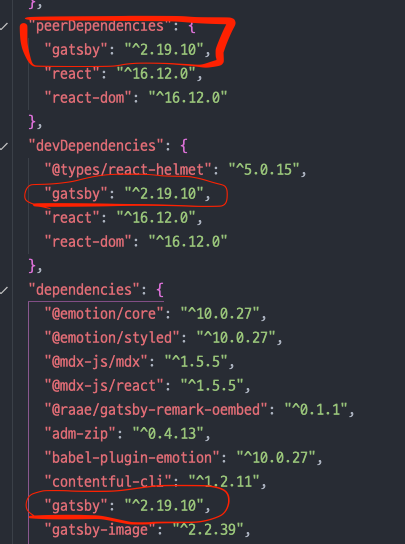
To the writer, Can you try to update your version of gatsby in the "@narative/gatsby-theme-novela/package.json" file.
Also, I've updated the "React, React-dom" package.
And it builds without a problem.
 eugenejeonme
on 10 Feb 2020
eugenejeonme
on 10 Feb 2020
I had the same issue and fixed by giving a valid author in the demo post. My mistake was that I edited the authors but forgot to change the post data to reflect that.
 Shackless
on 11 Feb 2020
Shackless
on 11 Feb 2020
Seeing this same issue on my repo but only on windows.
 matthewharwood
on 18 Feb 2020
matthewharwood
on 18 Feb 2020
@eugenejeonme thx for your hint but it doesn't work for me. Im using Windows 10 Enterprise if tis necessary. Which OS are you using?
schmanat
on 29 Feb 2020
@eugenejeonme thx for your hint but it doesn't work for me. Im using Windows 10 Enterprise if tis necessary. Which OS are you using?
Hm... I use Mac OS (with Catalina version). But, I don't know if it has anything to do with the OS version.
I think it would be better to upgrade all the other packages.
eugenejeonme
on 16 Mar 2020
Same error here. I use Windows 10. My packages versions are:
"gatsby": "^2.20.8",
"react": "^16.12.0",
"react-dom": "^16.12.0",
 xanderios
on 27 Mar 2020
xanderios
on 27 Mar 2020
Also experiencing the same issue on the latest version but only after implementing createPages.
 Simba14
on 12 Apr 2020
Simba14
on 12 Apr 2020
Also experiencing the same issue on the latest version but only after implementing
createPages.
I have the same issue
 techandsec
on 17 Apr 2020
techandsec
on 17 Apr 2020
Please check your author name. Is it exists in the authors' directory with author meta information? yes, then check the spelling.
 Nishchit14
on 7 May 2020
Nishchit14
on 7 May 2020
Related issues
 SabariVig
·
4Comments
eugenejeonme
·
3Comments
SabariVig
·
4Comments
eugenejeonme
·
3Comments
 zactony
·
3Comments
zactony
·
3Comments
 KrisBraun
·
4Comments
KrisBraun
·
4Comments
 MartinRosenberg
·
3Comments
MartinRosenberg
·
3Comments
Most helpful comment
update your gatsby version to 2.19.12 or latest. it will resolve.